
What you’ll learn
Find the CRIBWISE Terms of Service, Data Processing Agreement and user policies, and see who in your company accepts each one and when.
This page sums up the documents in plain language so you know where to look. It is not legal advice. If anything here differs from the documents, the documents apply.
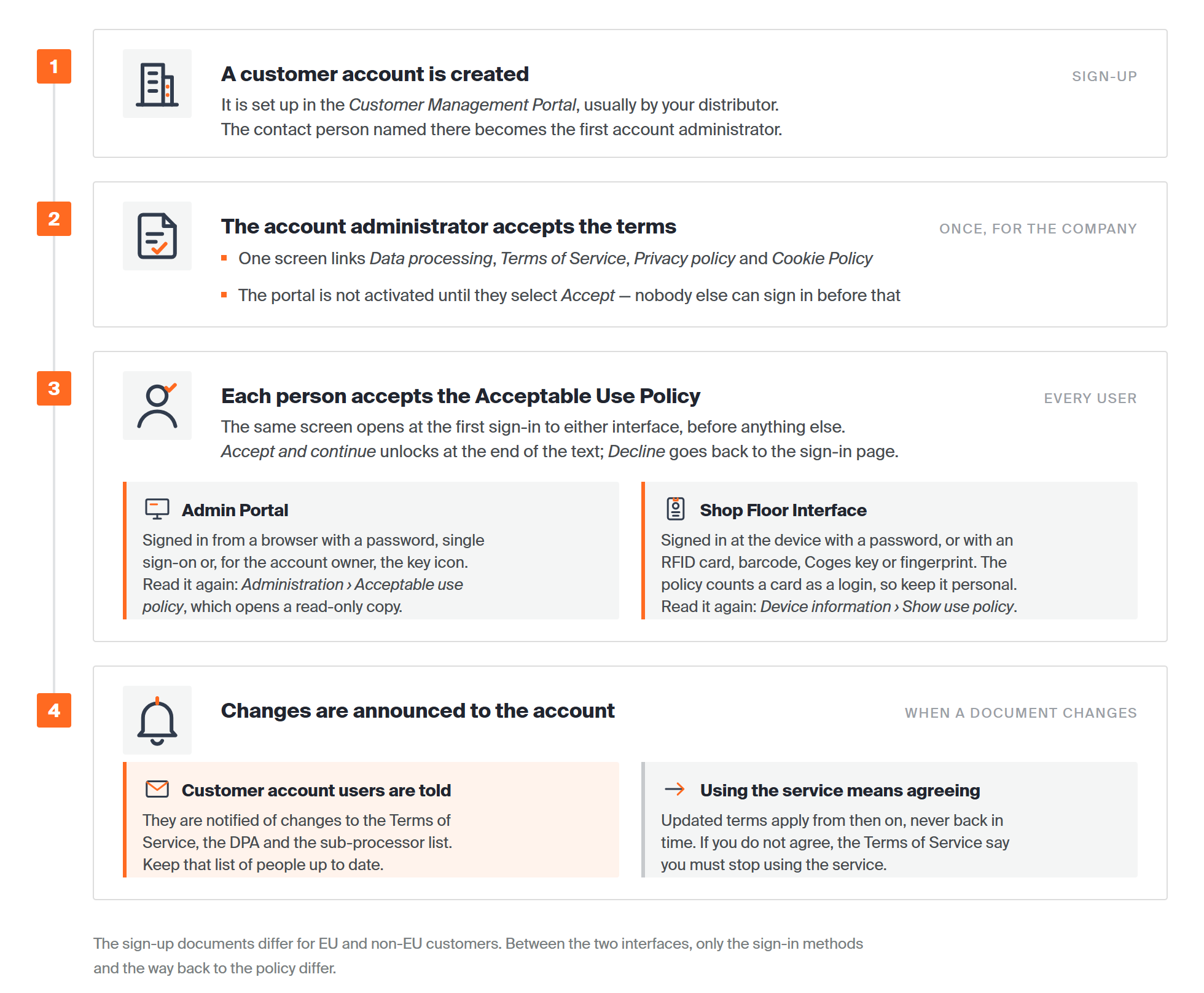
The company accepts the Terms of Service and the DPA once, through its account administrator. Every person who signs in accepts the Acceptable Use Policy for themselves.
The documents at a glance
| Document | What it covers | Who accepts it | Where to read it |
|---|---|---|---|
| Terms of Service | The contract for the CRIBWISE service: the subscription, what you may and may not do, who owns the data, support, renewal and termination. | The first account administrator, once, for your whole company. | Terms of Service |
| Data Processing Agreement (DPA) | How Sandvik processes personal data about your users on your behalf. It is a schedule to the Terms of Service. | Accepted together with the Terms of Service. | Data Processing Agreement |
| Sub-processor list | The companies that help Sandvik develop, support and install CRIBWISE, with where they work and what they do. It is Annex 3 of the DPA. | No separate acceptance – it is part of the DPA. | Sub-processors |
| Privacy policy and Cookie Policy | How Sandvik handles personal data and cookies in general. | Linked on the same sign-up screen as the Terms of Service. | The sign-up screen, or Data privacy – Sandvik Group |
| Acceptable Use Policy (AUP) | The rules for each person who uses CRIBWISE: keep your login to yourself, do not get around security, and use CRIBWISE only for your company’s work. | Every user, the first time they sign in. | Admin Portal: Administration > Acceptable use policy. Shop Floor Interface: Device information > Show use policy. |
Note: The documents shown at sign-up depend on your region – EU and non-EU customers get different versions. The links above open the versions published on app.cribwise.com. If your company signed a main agreement that refers to these terms, that signature counts as acceptance too.
How acceptance works
Once for the company, at sign-up
Your customer account is set up in the Customer Management Portal, usually by your distributor. The contact person named in that sign-up becomes your first account administrator.
That person gets a welcome e-mail and sets a password. Next, one screen links the Data processing, Terms of Service, Privacy policy and Cookie Policy documents.
Your portal is not activated until they select Accept, so nobody else can sign in before that. See How to activate a new portal and create your first user for the full sequence.
Important: The person who accepts must be allowed to sign contracts for your company. By accepting, they also agree to make sure every user follows the Acceptable Use Policy.
On-premise installations work differently: the installer asks you to select Agree to Terms and Conditions before it continues. See How to install on-premise.
Once for each user, at first sign-in
The first time someone signs in to the Admin Portal or the Shop Floor Interface, the Acceptable Use Policy opens before anything else. This happens with every login method, including single sign-on, and the policy is shown in the user’s language.
- Accept and continue stays greyed out until the user scrolls to the end of the policy.
- Decline returns the user to the sign-in page without signing them in.
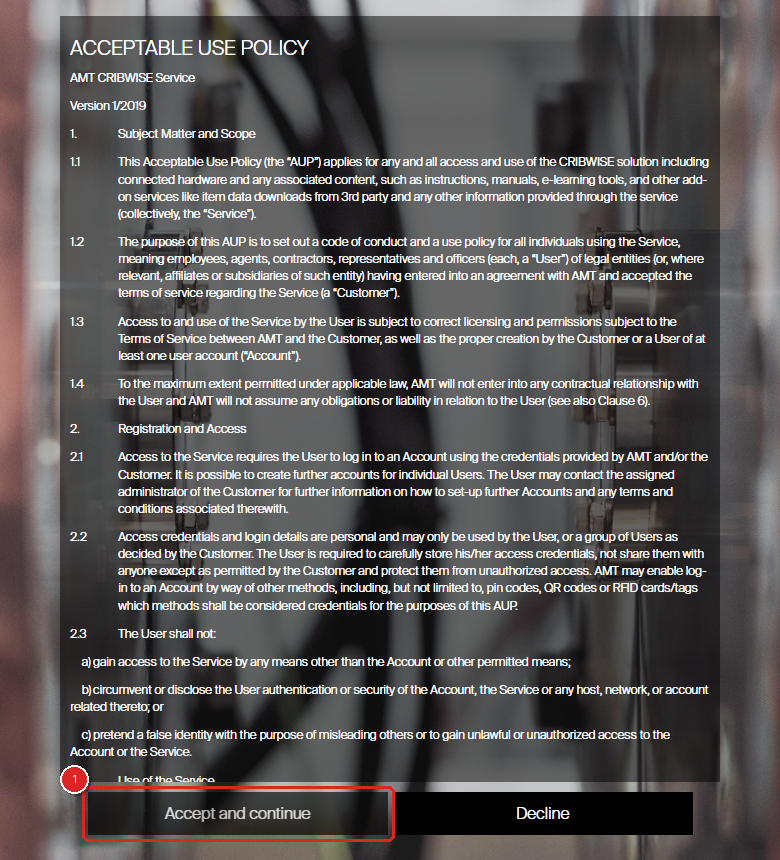
A new user’s first sign-in. Accept and continue (1) unlocks once the policy has been scrolled to the end.
Anyone can read the policy again later. In the Admin Portal, select Administration and then Acceptable use policy. On the Shop Floor Interface, select Device information in the header and then Show use policy.
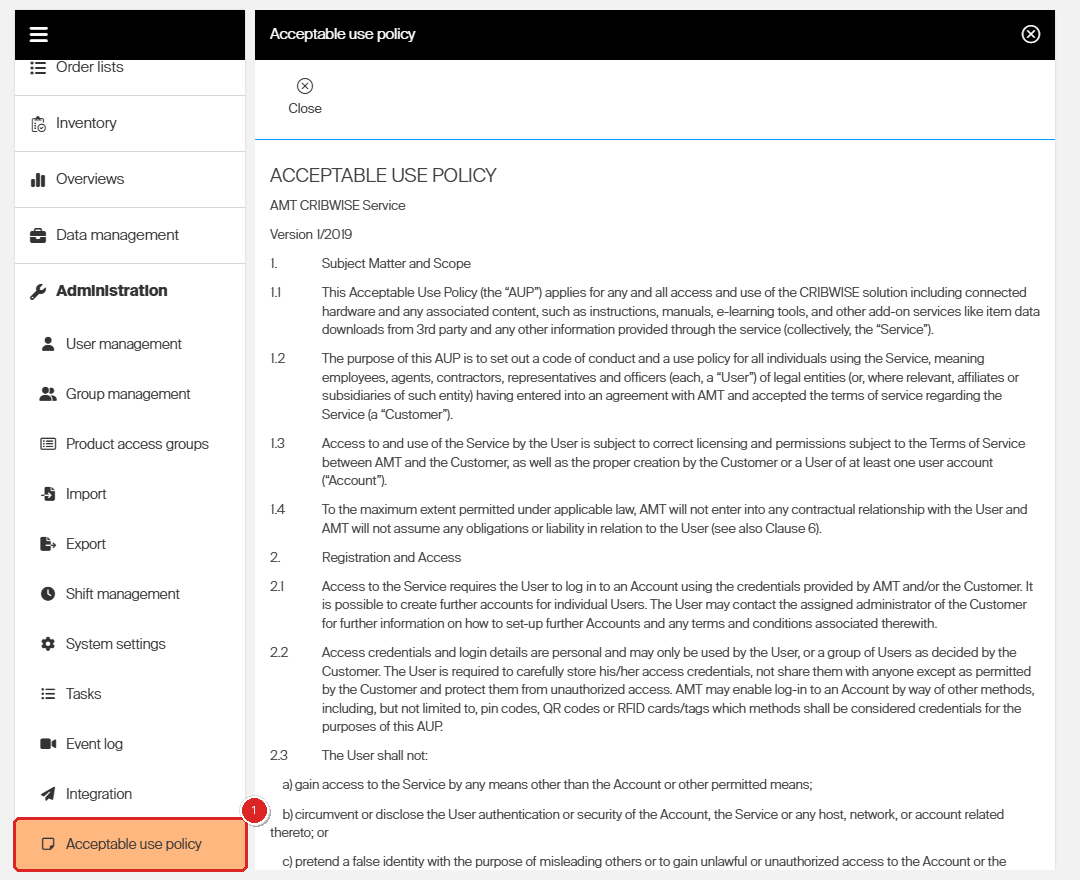
Administration > Acceptable use policy (1) opens a read-only copy of the policy.
When a document changes
Customer account users – the people on your customer account in the Customer Management Portal – are notified of any change to the Terms of Service, the DPA or the sub-processor list.
Updated terms apply from the moment they take effect, never back in time. If you keep using the service after being notified, the updated terms apply. If you do not agree, the Terms of Service say you must stop using the service.
Tip: Notifications go to the people on your customer account. Keep that list up to date, so the right people hear about changes.
Terms of Service: key points
| Topic | What the terms say | Section |
|---|---|---|
| Your data | You keep all rights to the data you put into CRIBWISE. Sandvik uses it only to provide the service, and you are responsible for keeping it correct. | 7.2 |
| Usage statistics | Sandvik may collect anonymous, combined data about how the service is used. It never identifies your company or your users and contains no personal data. | 7.3 |
| Backups | Sandvik protects your data to industry standards, but you are encouraged to keep your own backup to restore data changes faster – for example with regular exports. On-premise installations have no automatic backups by default. | 7.2.3 |
| Availability | Sandvik aims to keep the service available at all times but does not guarantee it. A separate service level agreement (SLA) can be agreed on request. | 10.1 |
| Updates | Sandvik may change or improve the service without notice. Updates and maintenance can cause short downtime. | 10.4 |
| Renewal | Your subscription renews automatically for another period unless either side gives notice. | 13.1 |
| When it ends | Access can stop right away. Your data is kept for 30 days, and you can download it free of charge during that time. | 13.3 |
| Bought through a distributor | You pay the distributor, and your licence is what the distributor ordered for you. The distributor cannot change these terms or make promises for Sandvik. | 15 |
| Law and disputes | Swedish law applies. Disputes are settled by arbitration at the Stockholm Chamber of Commerce. | 17 |
Data Processing Agreement: key points
Under the GDPR, your company is the data controller: you decide which personal data goes into CRIBWISE. Sandvik is the data processor: it handles that data for you, only to run and support the service.
| Topic | What the DPA says | Section |
|---|---|---|
| Whose data | Your employees and anyone else who uses CRIBWISE for your company. | Annex 1 |
| Which data | Given name, e-mail address and user ID, plus surname and phone number if you enter them. Every transaction and event also records who did it and when. | Annex 1 |
| Where it is stored | Microsoft Azure data centres in Western Europe (Germany), for the cloud service. | Annex 1 |
| Data breaches | Sandvik tells you by e-mail without undue delay. The message says what happened, roughly how many people and records are affected, and what is being done about it. | 4 |
| Sub-processors | Sandvik may use sub-processors and lists them online. You can object on data protection grounds. If Sandvik cannot meet the objection, you can end the affected service within one month and get a refund for the unused period. | 6 |
| Requests from individuals | If one of your users asks Sandvik to see or delete their data, Sandvik refers them to you. | 9 |
| When the agreement ends | Personal data is deleted or anonymised. If you ask in writing, it is returned to you instead. | 10 |
| Transfers outside the EU | Only to countries the EU Commission approves, or with safeguards such as the EU standard contractual clauses. | 11 |
| Audits | You can ask for documents that show compliance. An on-site inspection is carried out by a third-party auditor that both sides appoint. | 5 |
The security measures behind the DPA are described in CRIBWISE Technical and Organisational security Measures.
Personal data in your portal
Two parts of Administration > System settings > Access control put the DPA into practice.
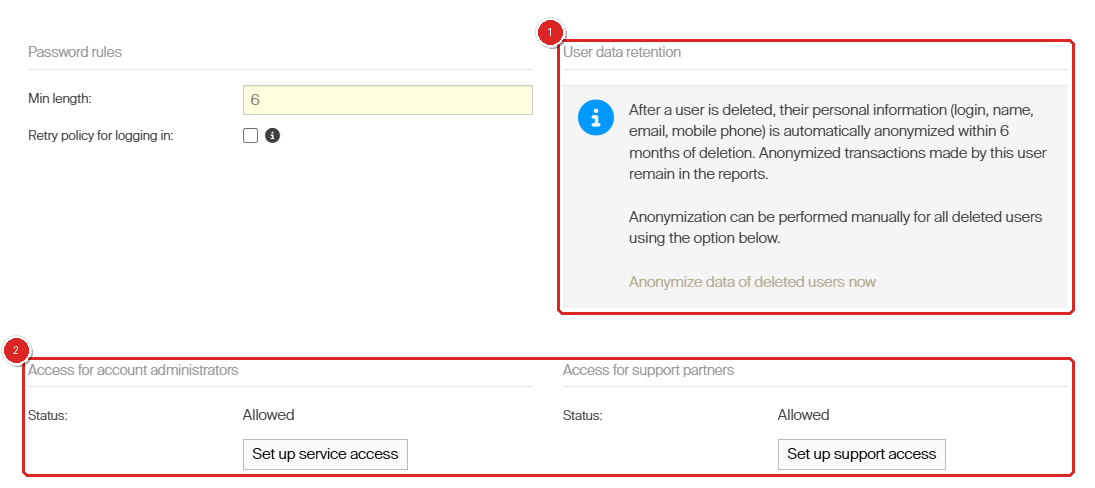
User data retention (1) and the two access settings for people outside your organisation (2).
- User data retention (1) – When you delete a user, their login, name, e-mail and mobile phone are anonymised within 6 months. Their transactions stay in your reports under an anonymous ID. Anonymize data of deleted users now does this at once for every deleted user.
- Access for account administrators and Access for support partners (2) – These control whether people from outside your Admin Portal can sign in to your portal: account administrators from the Customer Management Portal, and support partners you give access to. Both are allowed by default. See How to set up support partner access.
In the Customer Management Portal, a user who has no role left is deleted automatically after 30 days, to comply with the GDPR.
Common confusion
| People often think… | But actually… |
|---|---|
| Every user has to accept the Terms of Service. | The account administrator accepts the Terms of Service and the DPA once, for the whole company. Individual users accept only the Acceptable Use Policy. |
| Every user is e-mailed when the terms change. | Notifications go to your customer account users in the Customer Management Portal. Having an Admin Portal or Shop Floor Interface login does not put someone on that list. |
| A distributor’s own terms replace the CRIBWISE terms. | You pay the distributor, but the Terms of Service still apply. The distributor cannot change them. |
| Deleting a user erases their transactions. | Transactions stay in your reports. Only the personal data is anonymised, within 6 months or at once if you choose. |
| A user who selects Decline can still work. | Decline returns them to the sign-in page. They cannot use CRIBWISE until they accept the Acceptable Use Policy. |
Take action
Make sure the right people hear about changes to these documents by reviewing your customer account users – see How to manage customer account administrators (distributors). Setting up a new customer? Follow How to activate a new portal and create your first user.
Related articles
- CRIBWISE Technical and Organisational security Measures – the security and privacy controls behind these agreements.
- How to activate a new portal and create your first user – where the account administrator accepts the terms.
- How to manage customer account administrators (distributors) – who approves the terms and receives change notifications.
- How to manage users in the Customer Management Portal (CMP) – user roles in the CMP and the 30-day clean-up.
- How to create and manage users – the Admin Portal and Shop Floor Interface users, who each accept the Acceptable Use Policy.
- All system settings quick reference – every option on the Access control tab.
- How to log in to the Shop Floor Interface – the Device information dialog and Show use policy.