
What you’ll learn
An assembly in CRIBWISE is one durable tool built from several items, such as a drill holder with its drill. Learn what an assembly is, what you can do with one, and the stages it goes through from setup to tracking.
What an assembly is
An assembly is a tool that leaves the crib as one piece but is made of several items. A typical example is a holder with the insert or drill that goes in it. On our test system, the drilling tool assembly DEMO-ASM-03 is drill holder DEMO-HLD-02 with solid carbide drill DEMO-DRL-01.
In the Admin Portal, an assembly is an ordinary durable item with the Assembly box ticked and a list of the items it is built from, its bill of materials. Because it is durable, it comes back after use, and it can be serviced and tracked like any other durable item.
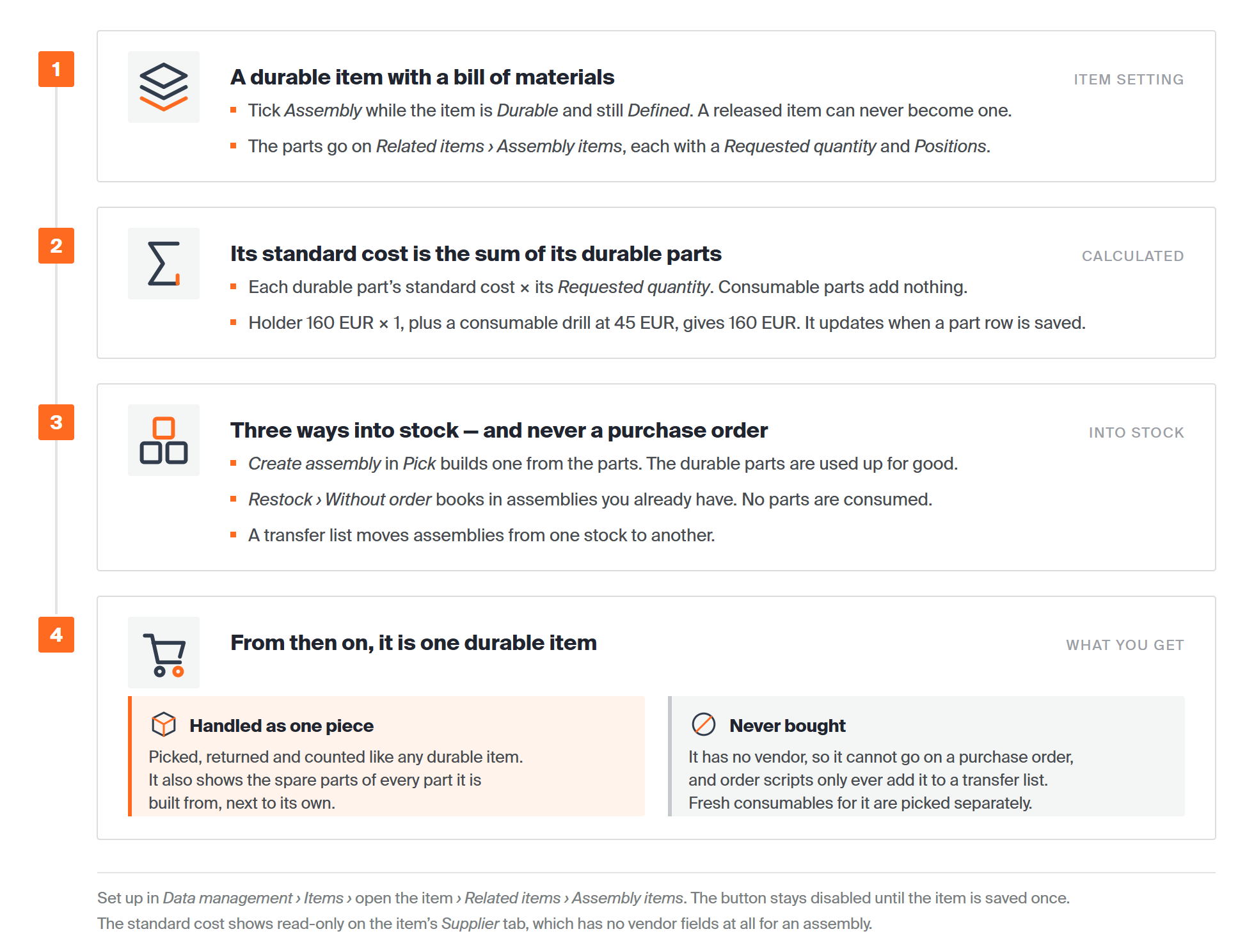
The four things that make an assembly different from an ordinary durable item.
Most of what you know about durable items still applies. The differences are these:
- It is built, not bought. An assembly has no vendor and never goes on a purchase order. You build it from its parts on the Shop Floor Interface (SFI), or book in ready-built ones.
- Its cost is calculated. You never type in a standard cost. CRIBWISE works it out from the durable parts in the bill of materials.
- Its parts stay inside it. Once built, the durable parts belong to the assembly and are not picked, returned or serviced on their own.
- It shares its parts’ spare parts. The spare parts of every part show on the assembly too, so you don’t enter them twice.
An assembly can also be serialized. Each one you build then gets its own serial number, so you can follow it through use, service and scrapping. See Serialized items: Understanding the concept.
Important: Decide before you release the item. You can only make an item an assembly while it is Durable and still in Defined status. A released item can never become one.
What you can do with an assembly
- Define it once in the Admin Portal, with the parts it is built from and how many of each.
- Build it on the shop floor from parts in the storage device, or book in assemblies you already have.
- Pick and return it as one tool, like any durable item, and pick a fresh insert or drill for it when one wears out.
- Send it for service as one piece when it has been used enough, and restock it afterwards.
- Move it between stocks on a transfer list, for example from a central crib to a satellite stock.
- Follow it in reports and overviews: how many you have, what they are worth, who has one out, and what happened to each serial number.
The life of an assembly
Every assembly goes through the same stages. Each stage has its own article in this series.
| Stage | Where | What happens | Read next |
|---|---|---|---|
| 1. Set up | Admin Portal | Create the assembly item and list the parts it is built from. | Assemblies: Setup |
| 2. Build and stock | SFI | Build an assembly from the parts in the device and put it into a location, or book in ready-built ones. | Assemblies: Building and stocking |
| 3. Pick and return | SFI | Take the assembly out as one tool and bring it back as new, used, for service or scrap. | Assemblies: Picking and returning |
| 4. Service | SFI and Admin Portal | A worn assembly goes for service as one piece and comes back ready to use again. | Assemblies: Service |
| 5. Track | Admin Portal | See where your assemblies are, what they are worth and how they have been used. | Assemblies: Tracking |
What a pick of an assembly costs, and how its standard cost is calculated, is explained in Assemblies: Usage cost and standard cost. What changes when an assembly has serial numbers, from the build to service rules that start on their own, is in Assemblies: Serial numbers.
Common confusion
| People often think… | But actually… |
|---|---|
| An assembly can be ordered from a vendor. | It has no vendor and never goes on a purchase order. You build it, book in ready-built ones, or move it on a transfer list. |
| Any durable item can be turned into an assembly later. | Only while it is still in Defined status. A released item can never become an assembly. |
| A durable part can be taken back out of an assembly and picked on its own. | It stays part of the assembly. The assembly is picked, returned and serviced as one piece. |
| An assembly costs the total of all its parts. | Only the durable parts count. See Assemblies: Usage cost and standard cost. |
Take action
Next, read Assemblies: Usage cost and standard cost to see what an assembly costs, then continue with Assemblies: Setup to create one.
Related articles
- Item relations: alternatives, substitutes, and assemblies – how assembly items sit next to alternatives, spare parts and matching items.
- Serialized items: Understanding the concept – serial numbers and statuses, including In assembly.
- Assemblies: Serial numbers – serial numbers on an assembly and its parts, and automatic service rules.
- Understanding transfer lists – how assemblies move between central and satellite stocks.
- How to set up tool life tracking and automatic service triggers – send a serialized assembly for service automatically.