
What you’ll learn
Item relations link an item to its alternative, its spare parts, its matching items and its assembly items. Learn what each relation does, where you set it in the Admin Portal, and what the operator sees on the Shop Floor Interface (SFI).
The four relations at a glance
All four relations live on the item’s Related items panel, one tab each.
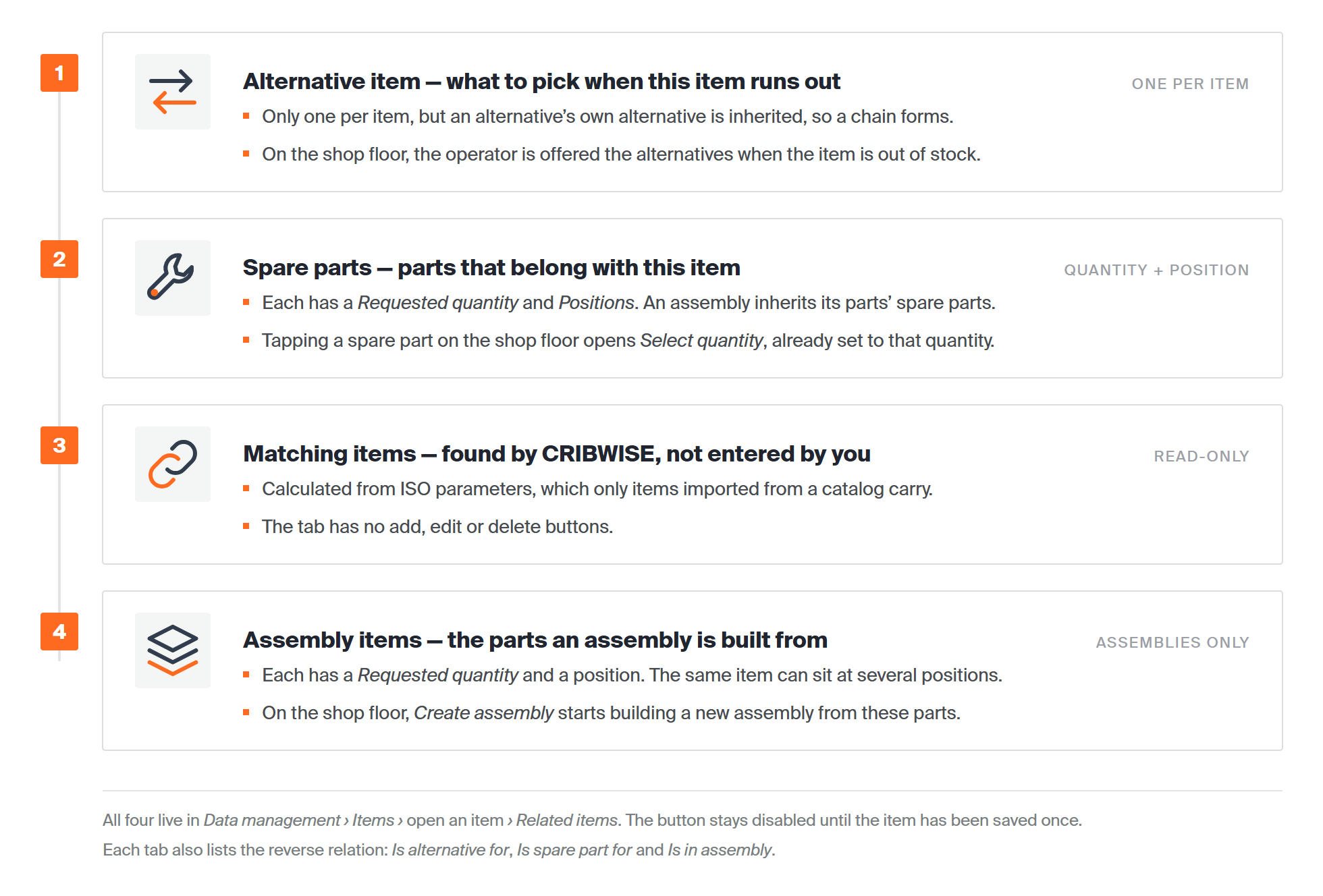
| Relation | How many | Who sets it | What the operator sees |
| Alternative item | One per item | You | The alternatives, offered when the item is out of stock |
| Spare parts | One or many, each with a quantity and positions | You | A Spare parts tab. Tapping one opens a pick at the requested quantity |
| Matching items | Calculated | CRIBWISE, from ISO parameters | – |
| Assembly items | One or many, each with a quantity and a position | You, on an assembly only | An Assembly items tab with Create assembly |
Where to find related items
Go to Data management > Items and open the item. Choose Related items under the description. The panel opens on the right, with one tab per relation.
Note: Related items is disabled on a new item until you have saved it once.
Every tab also works in reverse. Below the item’s own relations, you see which other items point at this one: Is alternative for, Is spare part for and Is in assembly. Use these lists to check what else is affected before you change or delete an item.
Alternative item
An alternative item is what the operator can take instead when this item runs out. Use it for an equivalent tool, such as the same insert in another grade.
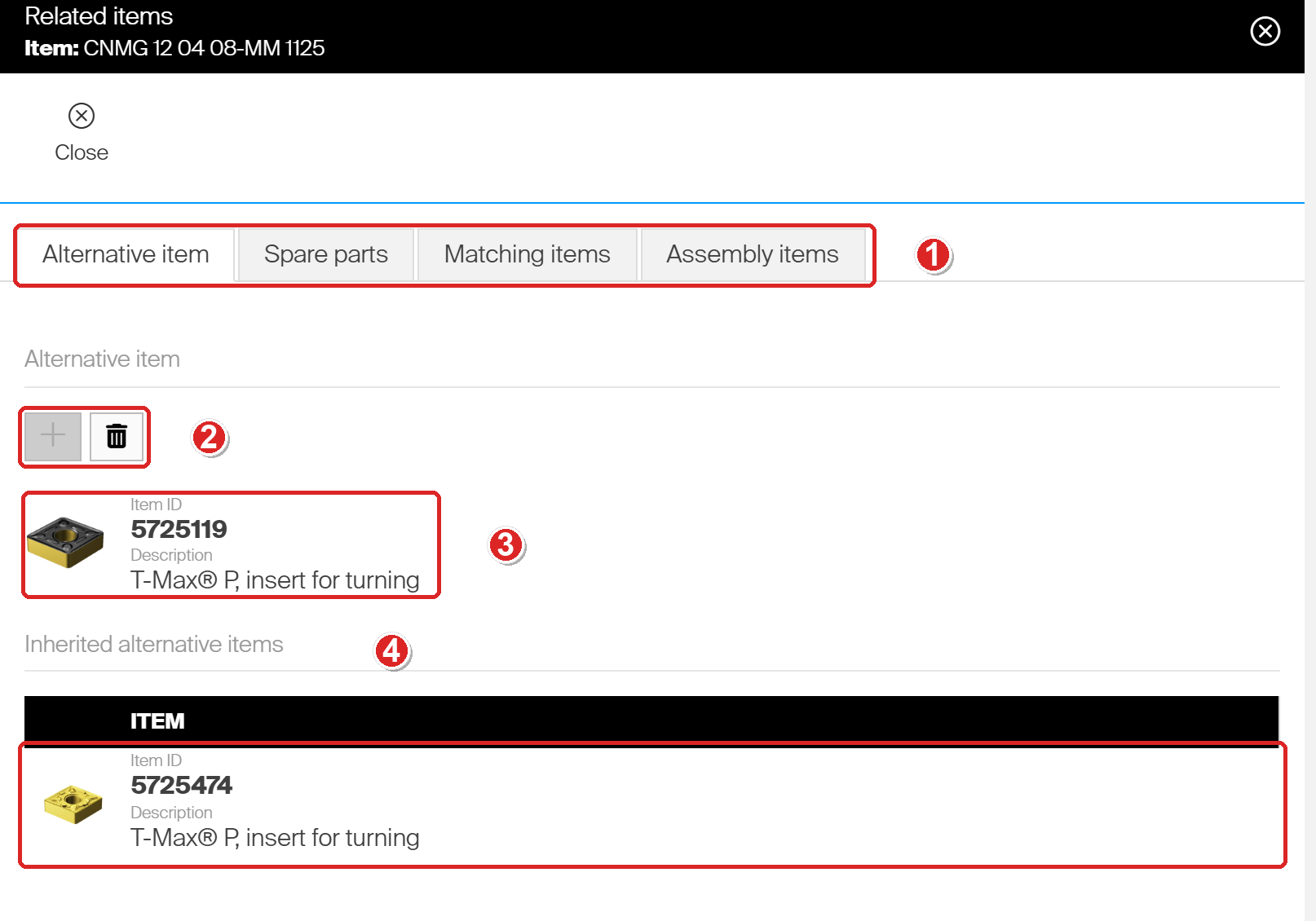
- The four tabs of the Related items panel. Alternative item opens first.
- Add alternative item (plus) and Delete alternative item (bin). The plus is greyed out once an alternative is set, because an item can have only one.
- The alternative item. Here, insert CNMG 12 04 08-MM 1125 (5724444) has 5725119 as its alternative.
- Inherited alternative items. 5725119 has its own alternative, 5725474, so 5724444 inherits it. This is how a chain of substitutes forms.
The alternative is saved when you choose OK in the Select alternative item list. You do not need to save the item as well.
On the SFI, the operator sees the alternatives under Related items on the quantity screen. When the item is out of stock, its row in the pick list offers the alternatives that have stock instead. Whether an alternative may be picked right away, or only once the original is used up, depends on its item status. See How to set up item substitutions and phase-in alternatives.
Spare parts
Spare parts are items that belong with this item and wear out or get lost, such as the inserts for a tool holder. Each spare part has two values:
- Requested quantity – how many the item needs. The SFI uses it as the default pick quantity.
- Positions – Is an information placeholder, the field can contain characters aswell as digits.
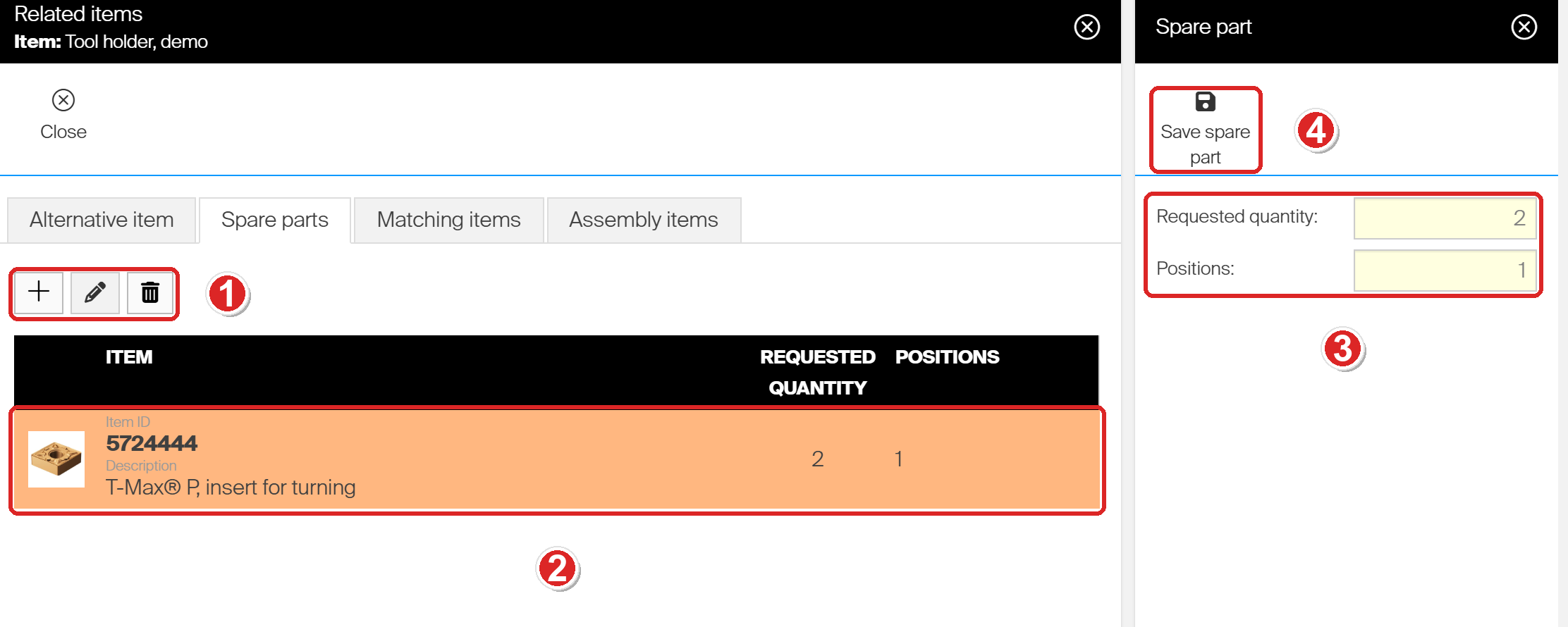
- Add spare part, Update spare part and Delete spare part. Update and Delete work on the selected row.
- The spare part. Here, tool holder DEMO-TH-01 needs 2 of insert 5724444 at position 1.
- The Spare part panel. Both fields are required.
- Save spare part stores the relation.
To add one, choose Add spare part, select the item in Select spare part and choose OK. Enter Requested quantity and Positions, then choose Save spare part.
Assemblies inherit spare parts
An assembly shows the spare parts of its assembly items under Inherited spare parts. You do not have to enter them twice.
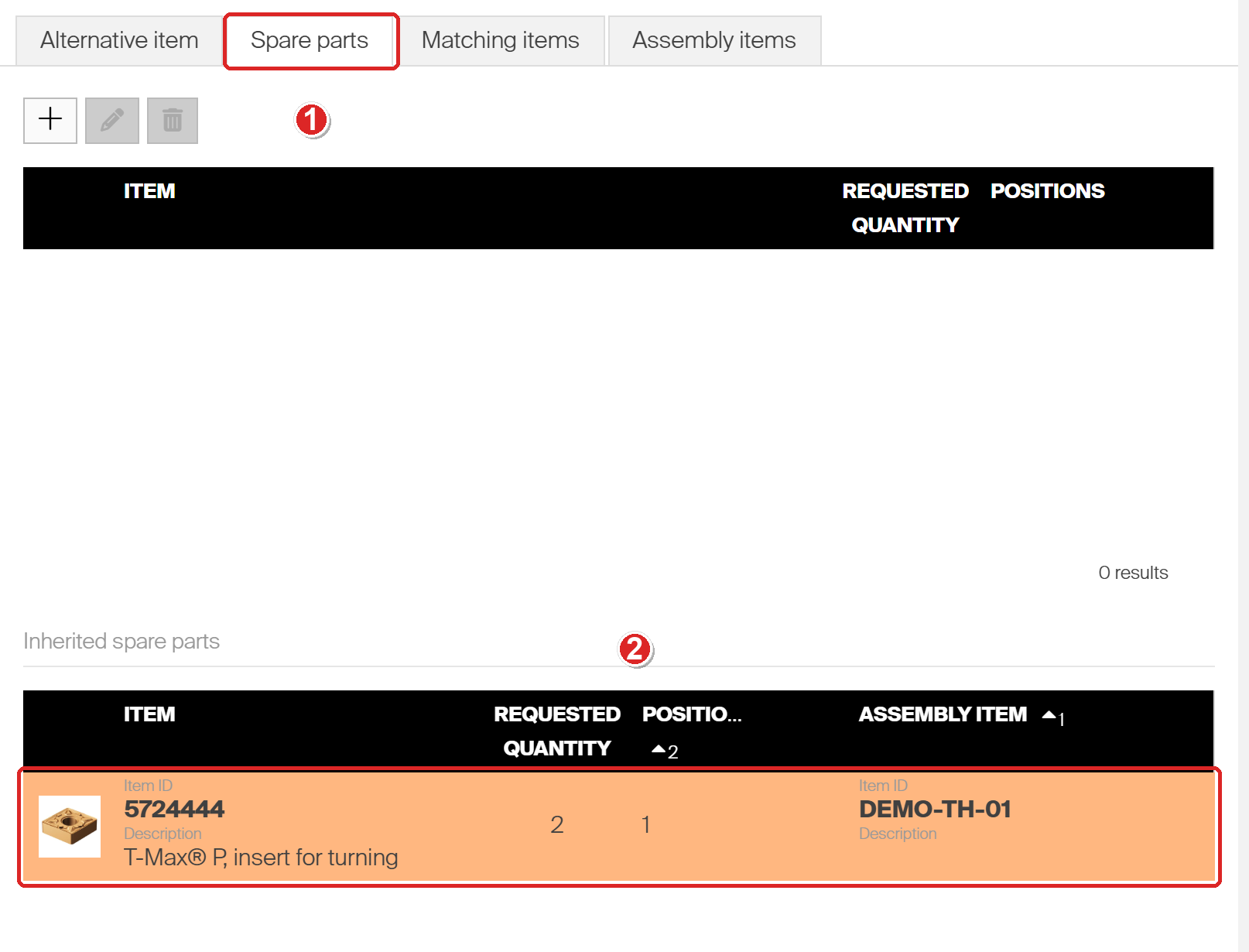
- The Spare parts tab of assembly DEMO-ASM-02. It has no spare parts of its own.
- It inherits insert 5724444 from its assembly item DEMO-TH-01. The Assembly item column shows where each inherited part comes from.
Spare parts on the Shop Floor Interface
On the quantity screen, the operator chooses Related items to open the Spare parts tab. Each spare part shows its position, the required quantity and what the device holds.
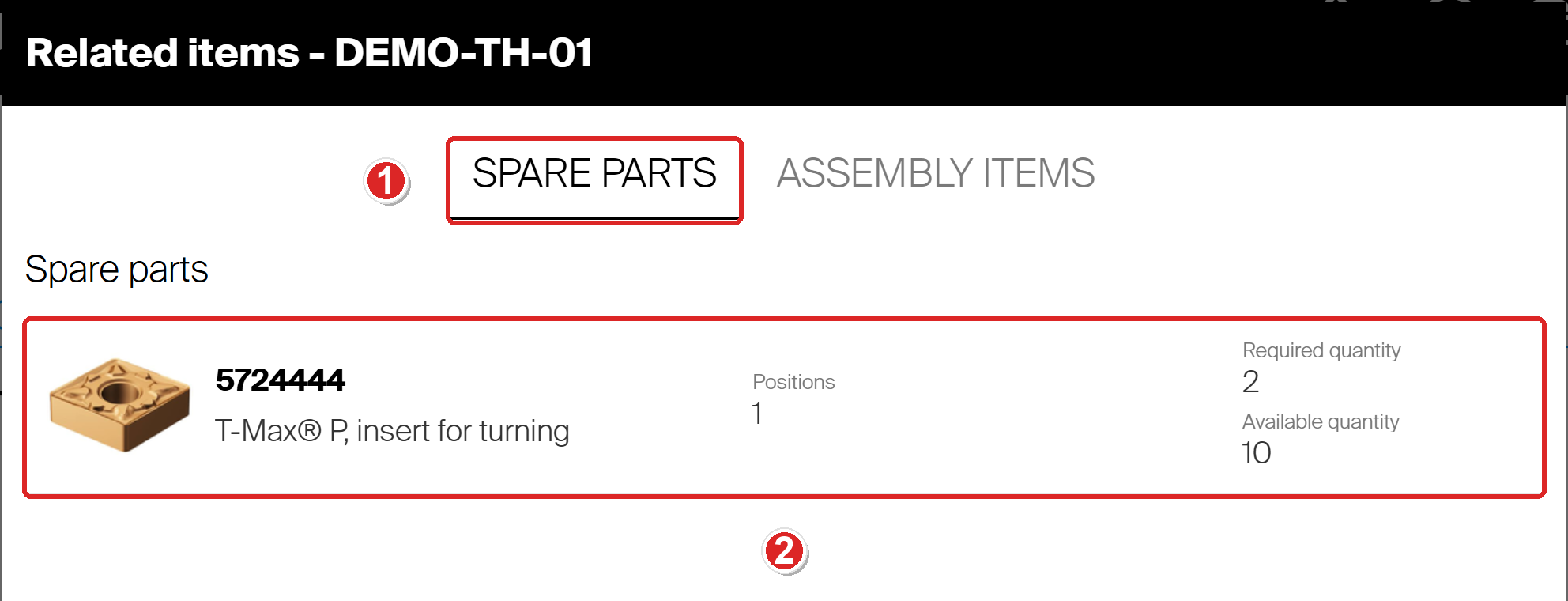
- The Spare parts tab lists the item’s spare parts.
- The spare part, with Positions, Required quantity and Available quantity.
Tapping a spare part opens Select quantity for that part, already set to the required quantity.
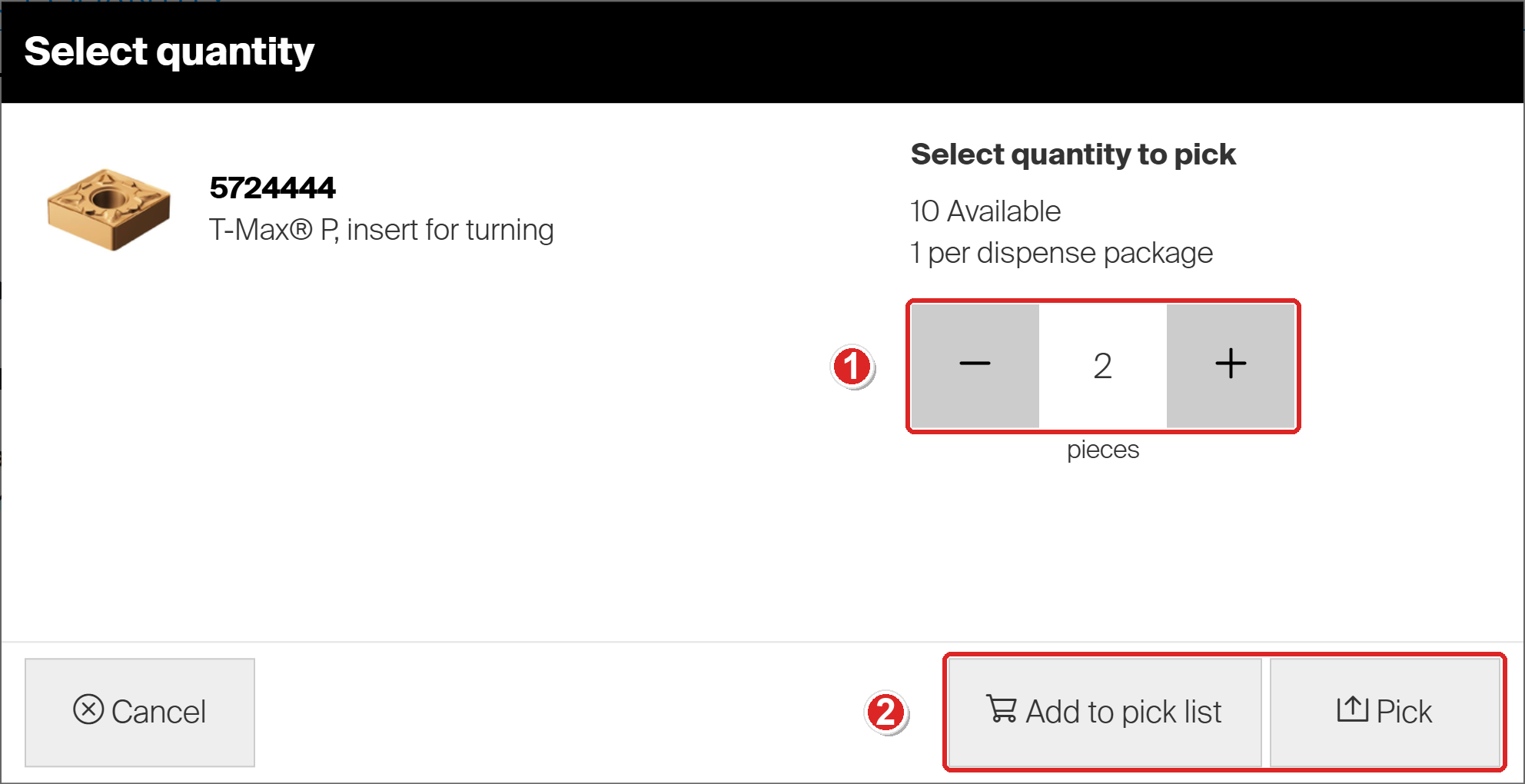
- The quantity starts at the Requested quantity from the Admin Portal, here 2. The operator can change it.
- Add to pick list collects the spare part with other items. Pick takes it out right away.
Matching items
Matching items are items that CRIBWISE finds related to this one, based on their ISO parameters. You cannot add or remove them by hand, so the tab has no buttons.
Note: ISO parameters come with items imported from a catalog, and only when the catalog supplies them. You can see an item’s values on its ISO parameters tab but you can’t add your own ISO parameters.
Assembly items
An assembly is a durable item built from other items, such as a tool holder with its insert. Its assembly items are the parts it is built from. Each one has a Requested quantity and a position. The same item can appear more than once, at different positions.
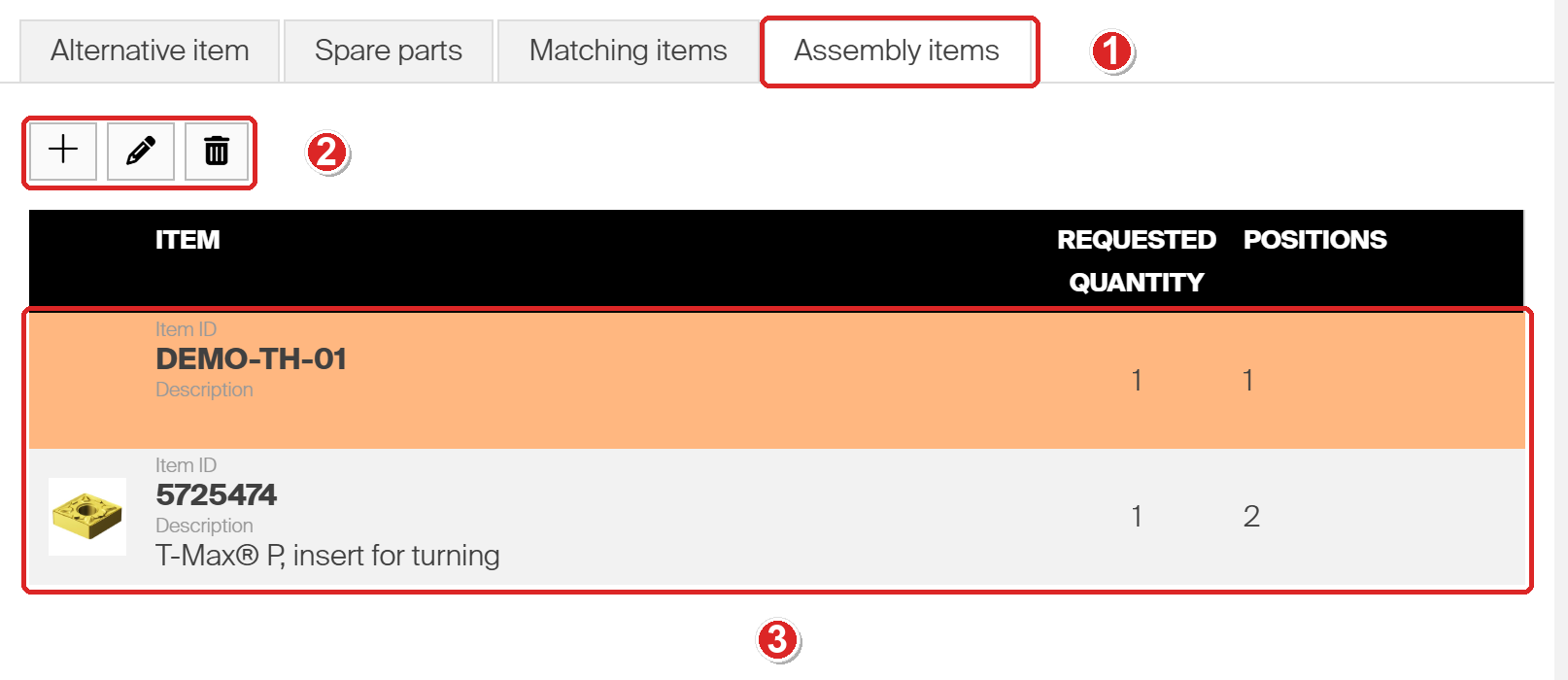
- The Assembly items tab of assembly DEMO-ASM-02.
- Add assembly item, Edit assembly item and Delete assembly item.
- The parts: tool holder DEMO-TH-01 at position 1 and insert 5725474 at position 2.
The buttons appear only when the item is an assembly. For any other item, the tab lists the assemblies the item belongs to, under Is in assembly. An item can only be made an assembly while its type is Durable and it is still in Defined status. See How to set up an assembly in the Admin Portal.
On the SFI, the Assembly items tab lists each part with its position, the required quantity and what the device holds.
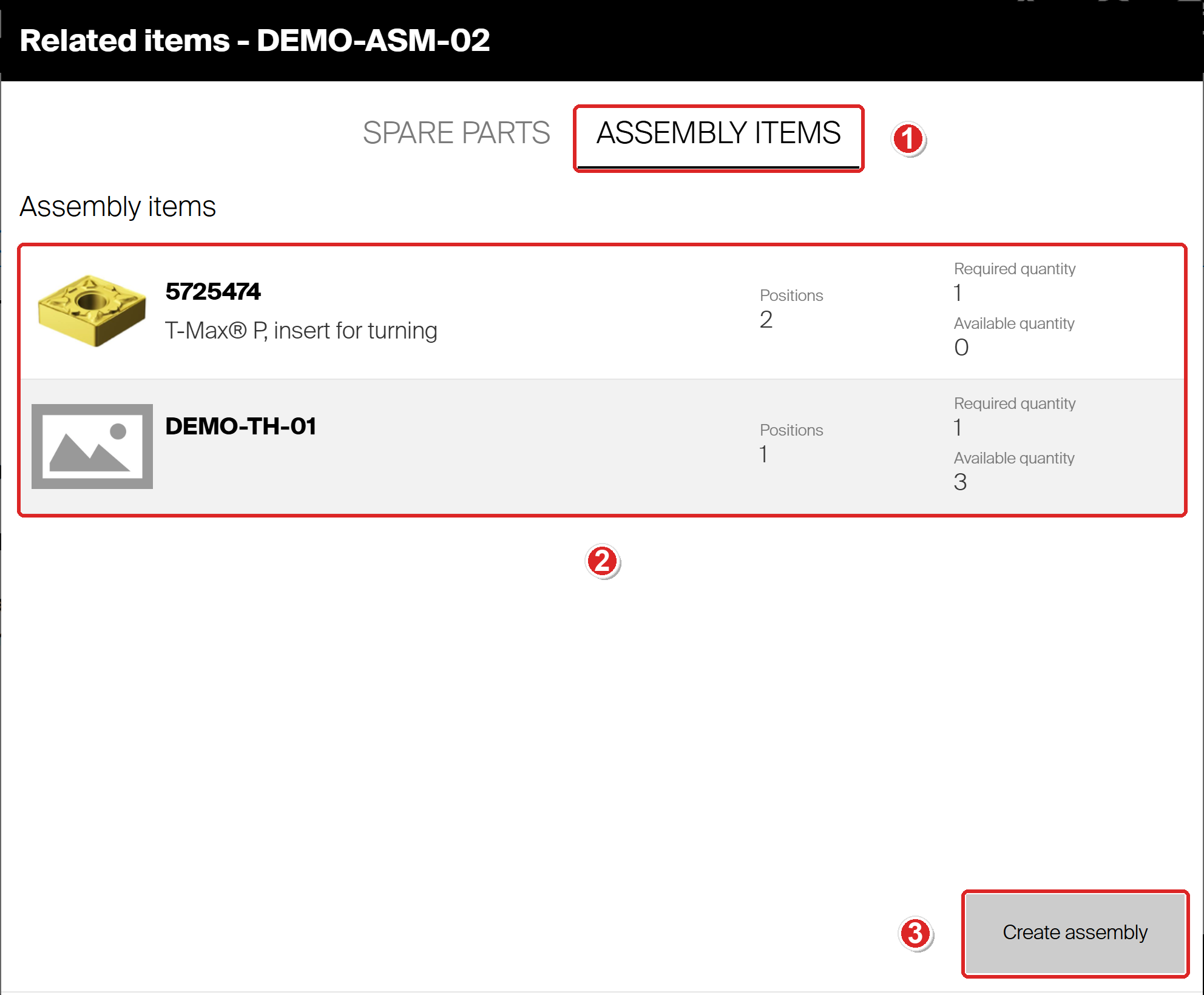
- The Assembly items tab under Related items.
- Each part, with Positions, Required quantity and Available quantity.
- Create assembly starts building a new assembly from these parts.
For the full shop-floor flow, see How to create, stock, and pick an assembly on the Shop Floor Interface.
Common confusion
| People often think… | But actually… |
| An item can have several alternatives. | Only one. A chain forms because each alternative’s own alternative is inherited. |
| An assembly needs its components’ spare parts entered again. | It inherits them. They show under Inherited spare parts. |
| Matching items can be added by hand. | CRIBWISE calculates them from ISO parameters, which only catalog-imported items carry. |
| A part can only appear once in an assembly. | The same item can be added again at a different position. |
| You must save the item after changing a relation. | Each relation saves on its own, with OK or the panel’s own save button. |
Take action
Setting up substitutes? Add the alternative here, then decide when it may be picked with How to set up item substitutions and phase-in alternatives. Building a tool assembly? Follow How to set up an assembly in the Admin Portal.
Related articles
- How to set up item substitutions and phase-in alternatives – when an alternative item may be picked.
- How to set up an assembly in the Admin Portal – making an item an assembly and adding its parts.
- How to create, stock, and pick an assembly on the Shop Floor Interface – building an assembly on the shop floor.
- Understanding assemblies: bill of materials, cost, and stock – how assemblies behave in the system.
- How to pick an item – where the operator meets these relations.
- How to import items from a catalog – getting items with ISO parameters, which matching items need.