
What you can do
Set up a replacement item so operators are offered it automatically when the item they need is
out of stock. You also control whether that replacement may be picked before then, or only once
the main item has run out.
Before you start
- You need Admin Portal access to the item’s Related items view, and a
Shop Floor Interface login to check the result. - Both items must already exist. The replacement also needs a device assignment and a stock
location with stock — a replacement with no stock in the operator’s device is still
listed, but with 0 available. - Decide whether the replacement should be pickable in its own right, or held back until the
main item runs out. See Understanding item statuses for what each
status allows.
Important: An item can have only one alternative, and the link is
one-way. Setting item B as the alternative for item A does not make item A the alternative for
item B.
Quick start
Experienced users — set up a substitute in five steps:
- Open the item that runs out, in Data management > Items
- Click Related items
- Click Add alternative item on the Alternative
item tab - Select the replacement and click OK
- Set the replacement’s Status to Phase in if it
should only be picked once the main item runs out
Need more detail? Follow the full steps below.
Steps
Step 1 — Open the item’s related items
- Go to Data management > Items.
- Double-click the item that runs out — the one operators ask for today.
- Click Related items.
The drawer opens on the Alternative item tab, which holds three lists:
Alternative item for the replacement you choose, Inherited alternative
items for replacements further down the chain, and Is alternative for for
the items that point at this one.
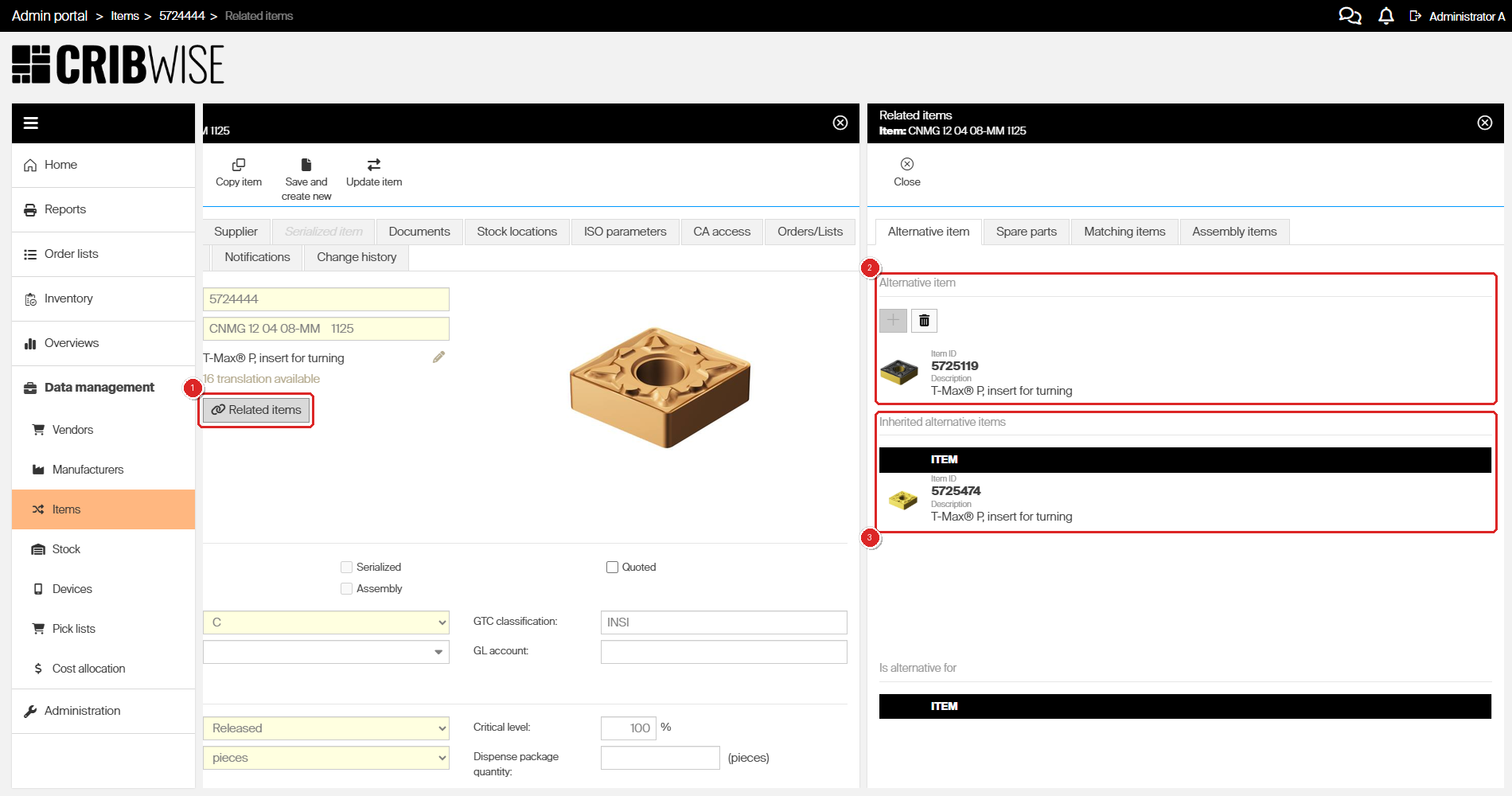
The Related items button (1) opens the drawer. Item 5724444 has item 5725119 as its Alternative item (2), and 5725474 arrives under Inherited alternative items (3) because 5725119 points at it. Add alternative item is greyed out, since one alternative per item is the limit.
Step 2 — Add the alternative item
- Click Add alternative item on the Alternative item tab.
- Select the replacement in the Select alternative item list.
- Click OK.
The replacement appears under Alternative item, Add alternative
item is greyed out, and Delete alternative item becomes available. The
relation is stored as soon as you click OK, so you do not have to save the item as
well.
Note: Since there is only one alternative per item, changing it
means removing the current one first with Delete alternative item.
Step 3 — Choose when the substitute may be picked
The replacement’s own status decides whether operators can reach it before the main item
runs out.
| If the replacement should… | Set its status to | What operators see |
|---|---|---|
| Be pickable on its own, and also be offered when the main item runs out | Released | A normal entry in the pick list, with its own quantity |
| Be held back until the main item runs out | Phase in | Not in the pick list at all — only reachable through the main item |
- Open the replacement item in Data management > Items.
- Under Daily use settings, set Status.
- Click Save item.
Important: A status change is only stored by Save
item. Leaving the form with Update item instead discards it silently
— reopen the item and it still shows the old status, with no error.
Step 4 — Check the result on the shop floor
- Log in to the Shop Floor Interface with an operator account.
- Tap Pick and search for the main item.
- Tap Related items at the bottom of the quantity screen.
Each alternative is listed with its available quantity. A substitute in Phase in shows
two numbers: 0/35 means 35 pieces are in the device but none may be picked yet,
because the main item is still in stock.
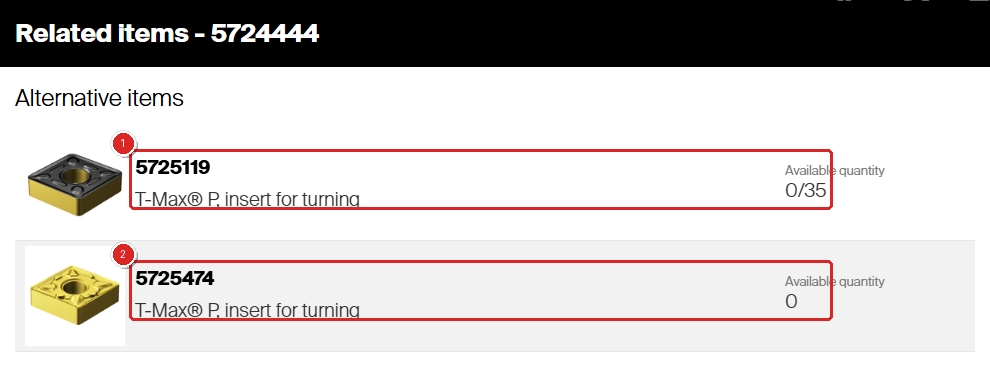
With the main item still in stock, phased-in substitute 5725119 reads 0/35 (1) — 35 pieces in the device, none of them pickable yet. Item 5725474 has no stock in this device at all, so it reads 0 (2).
Important: Use an operator login for this check. Administrators can
override picking rules, so on an administrator account phased-in items appear in the pick list as
normal and their availability reads plain 35 instead of
0/35.
Success: the replacement is listed under Alternative item in
the Admin Portal, and an operator who opens the main item sees it under Related
items with the availability you intended.
How substitutes behave during picking
When the main item runs out
The empty item stays in the pick list, but its row changes: the Quantity
caption becomes Alternative quantity, and the number shown is what its substitutes
have available instead.
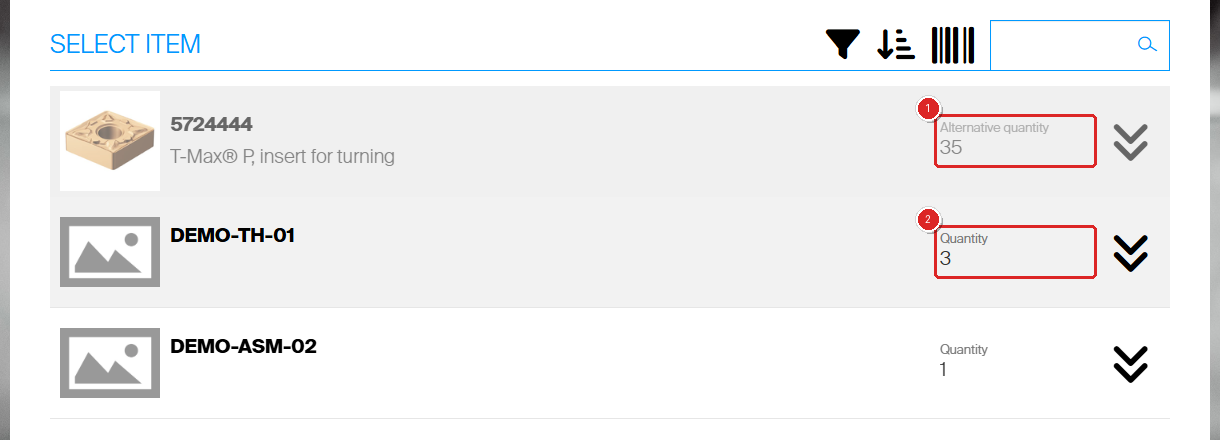
Item 5724444 is out of stock, so its row reads Alternative quantity 35 (1) — the stock its substitutes hold. The item below it still shows its own Quantity (2).
Selecting that row opens All item locations on the Alternative
items tab, where every alternative in the chain is listed with its availability.
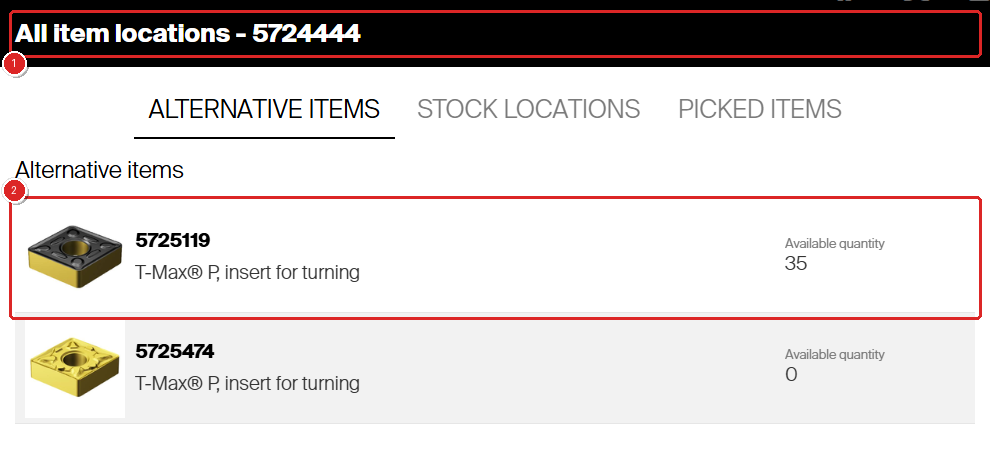
The All item locations dialog (1) opens on Alternative items and offers item 5725119 with 35 available (2). The phase-in block has lifted now that the main item is empty.
Selecting an alternative that has stock continues the same pick with that item.
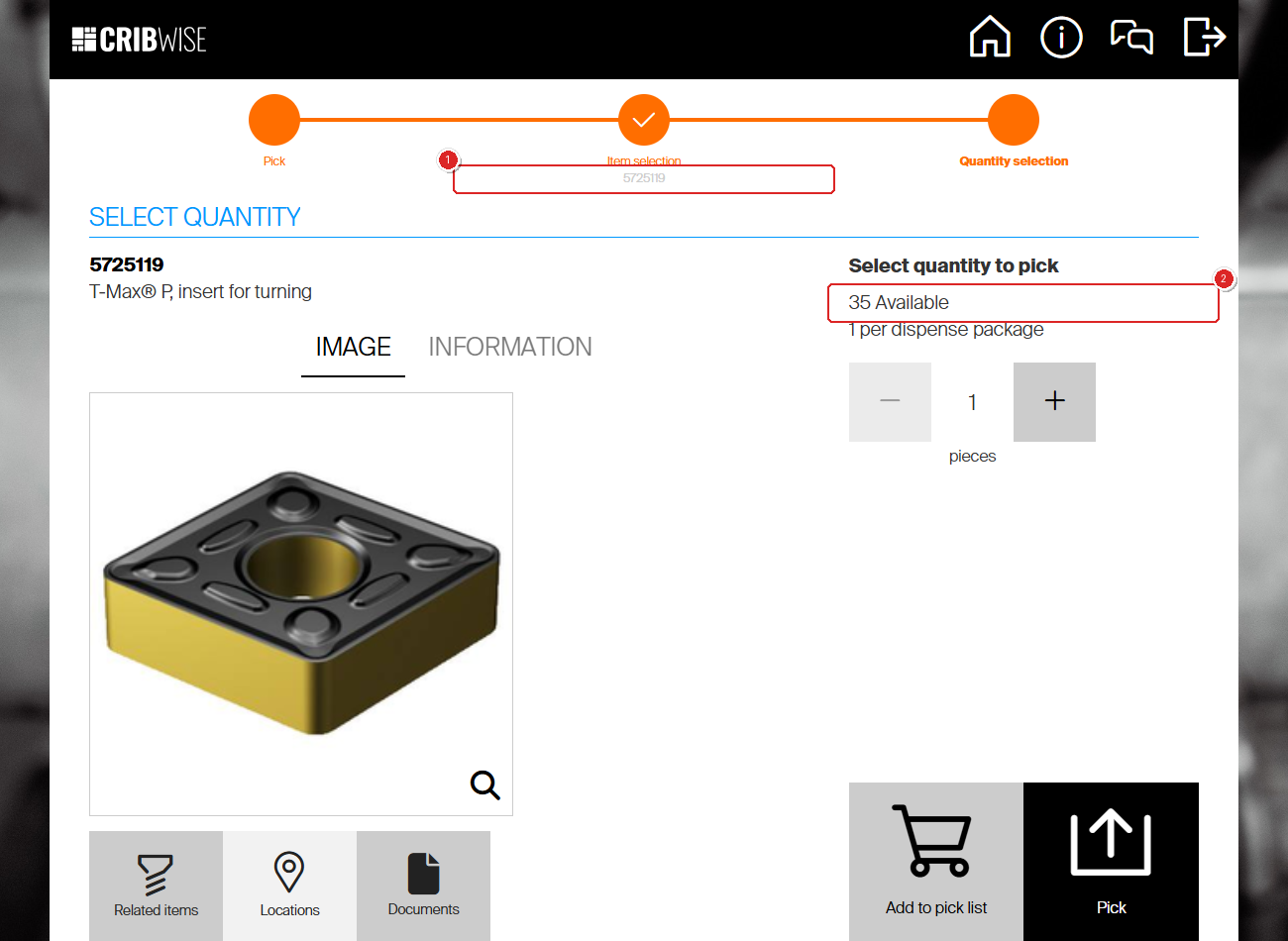
The pick continues with substitute 5725119 (1), which offers all 35 pieces (2).
Note: Restocking the main item locks the phased-in substitutes
again. Their availability goes straight back to 0/x.
Chains of substitutes
An alternative brings its own alternative with it. If item A has item B as its alternative and
item B has item C, then C shows up under Inherited alternative items on item A and
is offered to the operator alongside B. You never add C to A yourself.
Every item in the chain still has to meet the same two conditions to be picked: it needs
available quantity in the operator’s device, and if it is in Phase in it cannot be
picked while the item it substitutes for is still in stock.
Retiring the main item for good
When the main item is being replaced permanently, set it to Phase out so no new stock
is ordered while operators use up what is left, and set the replacement to Released so it
stands on its own in the pick list.
Next steps
- Set up the rest of the chain — add an alternative to the replacement too,
so a second fallback is offered automatically. See
Item relations: alternatives, substitutes, and assemblies. - Plan the statuses — decide when the main item moves to
Phase out and the replacement to Released. See
Understanding item statuses.
Troubleshooting
| Problem | Likely cause | Fix |
|---|---|---|
| Add alternative item is greyed out | The item already has an alternative, and there is only one per item | Click Delete alternative item, then add the new one |
| The status is back to its old value when you reopen the item | The form was left with Update item, which does not store the change | Set the status again and click Save item |
| The replacement is never offered | The relation sits on the wrong item — the link is one-way | Open the item that runs out and add the replacement as its alternative |
| The substitute shows 0 rather than 0/x | It has no stock in the device the operator is using | Assign it to that device and a stock location, then restock it |
| The substitute is listed but cannot be picked | It is in Phase in and the main item still has stock | Wait until the main item runs out, or set the substitute to Released |
| A phased-in item can be picked straight from the pick list | The session is an administrator one, and administrators override picking rules | Repeat the check with an operator login |
Related articles
- Item relations: alternatives, substitutes, and assemblies —
where the alternative is set, alongside spare parts, matching items and assemblies. - Understanding item statuses — what Released,
Phase in and Phase out allow. - How to pick an item — the pick flow where substitutes are
offered. - Understanding item relations – Alternative items, Spare parts,
Matching items and Assembly — how the same relations look to an operator.