
What you can do
Connect Zoller TMS to CRIBWISE with an API key, so Zoller can send items and withdrawal orders and read stock back from your devices.
Zoller built the interface together with CRIBWISE for sites that manage tools in Zoller TMS and store and buy them in CRIBWISE.
How the integration works
Zoller does all the talking. It calls the CRIBWISE REST interfaces over HTTPS and signs in with an API key that you create in the Admin Portal. CRIBWISE has no Zoller settings of its own – the key is the only thing you set up on the CRIBWISE side.
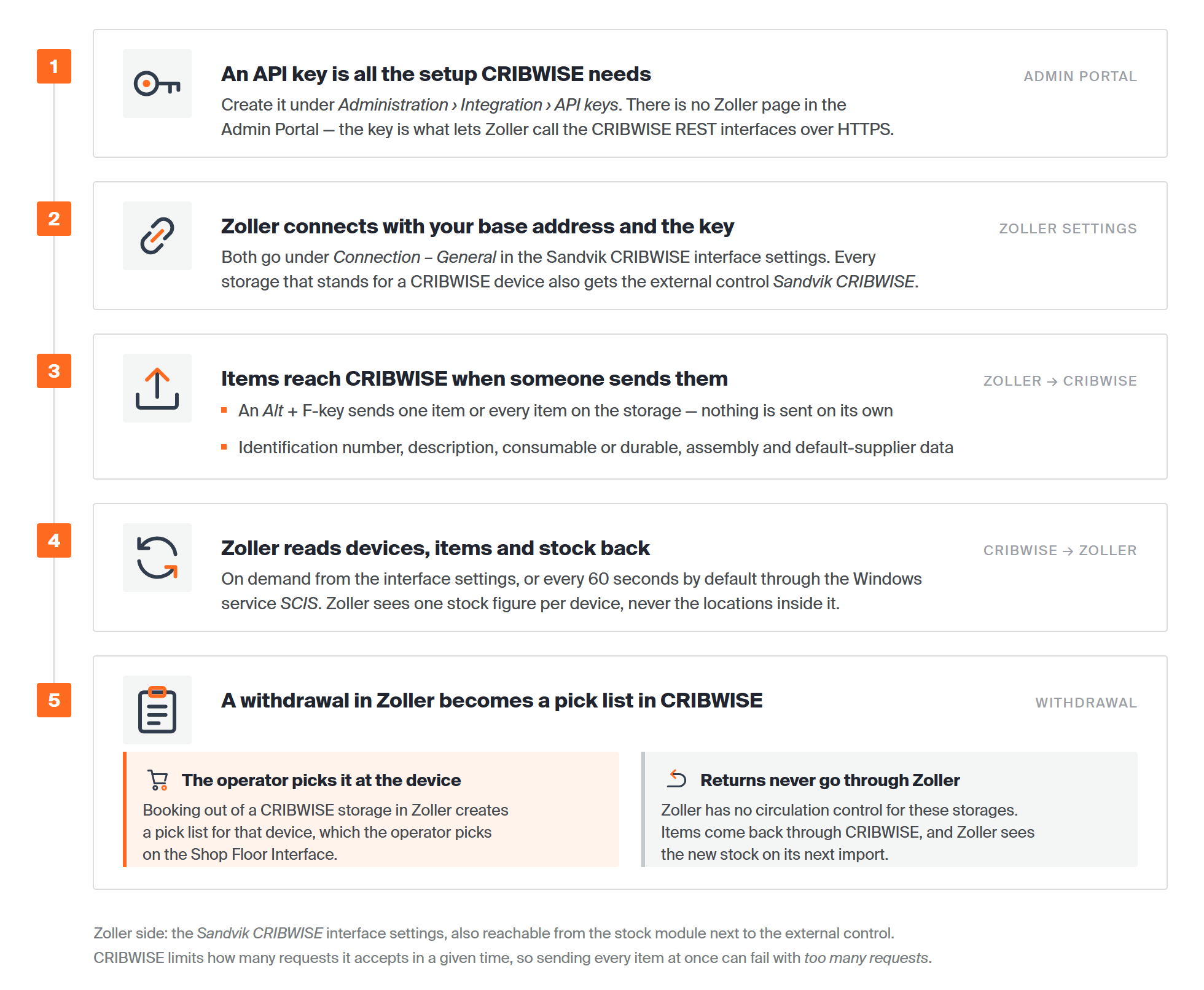
What moves between Zoller TMS and CRIBWISE, and in which direction.
What moves in each direction
| What | Direction | When it happens |
|---|---|---|
| Items – accessories, components, tools and fixtures | Zoller → CRIBWISE | When a Zoller user sends them, one item or every item on a storage. Nothing is sent automatically. |
| Item deletions | Zoller → CRIBWISE | When a Zoller user deletes an item in CRIBWISE, in the same way. |
| Withdrawal orders | Zoller → CRIBWISE | When someone books items out of a CRIBWISE storage in Zoller. Each one becomes a pick list in CRIBWISE. |
| Devices, items and stock | CRIBWISE → Zoller | On demand from Zoller’s interface settings, or on a timer through the Zoller Windows service SCIS – every 60 seconds by default. |
| Open withdrawal orders | CRIBWISE → Zoller | On demand. Zoller lists the orders still open in CRIBWISE and can delete them. |
Which item data is exchanged
| Zoller data | Direction | What to know |
|---|---|---|
| Identification number | Both ways | Identifies the item in both systems. It must be unique across accessories, components, tools and fixtures. |
| Description | Both ways | – |
| Use class – consumable or durable | Both ways | Applies to components and accessories. Zoller also splits them into regrinding parts, such as drills, and multiple-use parts, such as inserts. When it cannot tell which one an item is, you choose during import. |
| Assembly yes or no | Zoller → CRIBWISE only | – |
| Package size, article number and price per piece | Both ways | Supplier data. Zoller uses the item’s default supplier, or the first assigned supplier if there is no default. An item without a supplier exchanges no supplier data. |
| Delivery time | Both ways | Imported into Zoller only when CRIBWISE holds it in days. |
| Stock | CRIBWISE → Zoller only | One quantity per device. Zoller does not know where each item sits inside the device. |
Suppliers themselves are not imported into Zoller. After an import, assign suppliers to the items in Zoller.
Important: Zoller has no circulation control for CRIBWISE storages. Items taken out through Zoller come back through a CRIBWISE return, never through Zoller.
Before you start
From CRIBWISE:
- The Zoller TMS integration add-on enabled on your subscription. Your CRIBWISE contact enables it in the Customer Management Portal.
- Admin Portal access with the Manage integrations permission. Without it, Integration is missing from the Administration menu. See Admin Portal permissions reference.
- Your base address: the host your Admin Portal runs on, without the portal path. If you open the portal at
https://solutionaddress.com/adminportal/yourcompany, the base address ishttps://solutionaddress.com. - Every item you want in Zoller assigned to a device. Zoller cannot import an item that has no place in a CRIBWISE device.
- Enable predefined pick lists switched on in System settings > Stock daily use, so operators can pick Zoller’s withdrawal orders on the Shop Floor Interface. See How to create a pick list in the Admin Portal.
From Zoller:
- ZOLLER TMS Tool Management Solutions Silver, version 1.19.0 or later.
- The SANDVIK CRIBWISE interface, Zoller item 8774305, bought from Zoller. Zoller charges installation and commissioning separately.
- Administrator rights in Zoller TMS for the interface settings.
- A Zoller server that can reach CRIBWISE over HTTPS. For cloud CRIBWISE, allow outbound traffic to the integration endpoints listed in System requirements and supported browsers.
- Identification numbers that are unique across accessories, components, tools and fixtures.
Quick start
Experienced users – connect the two systems in 5 steps:
- Create an API key named Zoller TMS under Administration > Integration > API keys.
- Copy the Key value.
- Enter your base address and the key under Connection – General in Zoller’s Sandvik CRIBWISE interface settings.
- Import the CRIBWISE devices and items you want in Zoller.
- Assign the external control Sandvik CRIBWISE to each imported storage.
Need more detail? Follow the full steps below.
Steps
You do steps 1 to 3 in the CRIBWISE Admin Portal, and steps 4 to 7 in Zoller TMS.
Step 1 — Open the API keys list
- In the Admin Portal, open the Administration menu.
- Select Integration.
- In the Integration services pane, select API keys.
The API keys list opens. It shows every key on your tenant with its name and expiration date.
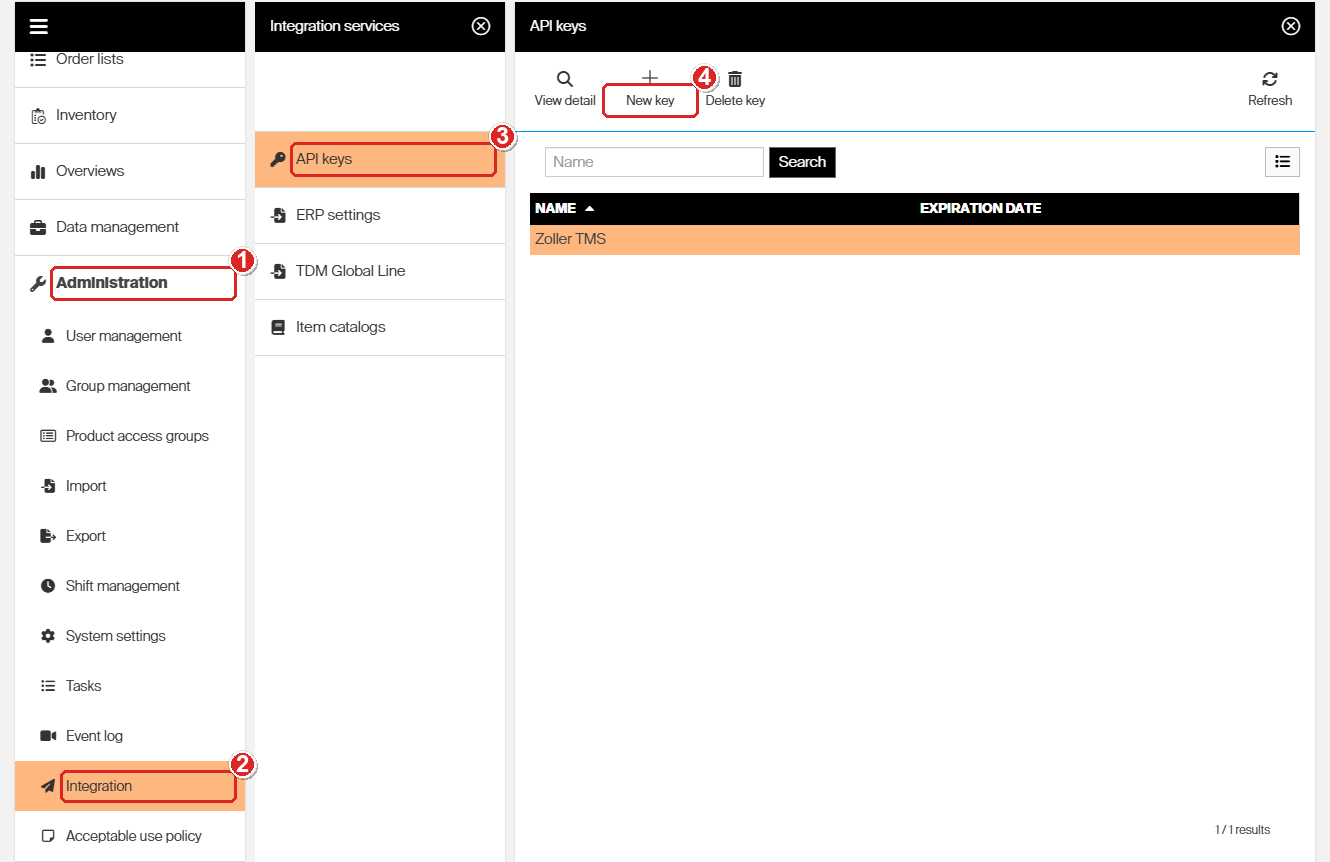
API keys sit under Administration > Integration > API keys. There is no separate Zoller entry.
Step 2 — Create a key for Zoller
- Select New key.
- Enter a Name that says what the key is for, such as Zoller TMS.
- Select Save key.
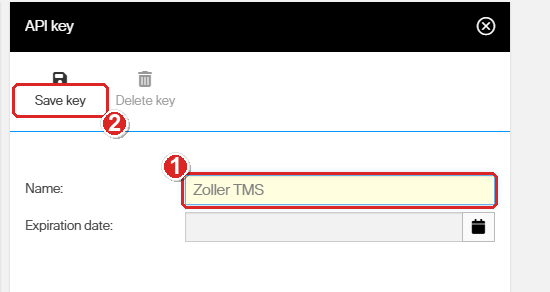
Name the key after Zoller and save it.
Leave Expiration date empty unless your security policy needs one. A key stops working at the end of its expiration date, and Zoller stops syncing with it.
Tip: Give Zoller its own key rather than sharing one with your ERP or another integration. Then you can revoke Zoller’s access without breaking anything else.
Step 3 — Copy the key
The Key field appears only after the key is saved. Its value is your customer short name and a long code, for example yourcompany_0f14d0ab-9605-4a62-a9e4-5ed26688389b.
- Select the Copy to clipboard button next to the Key value.
- Keep the value somewhere safe until you enter it in Zoller in step 4.
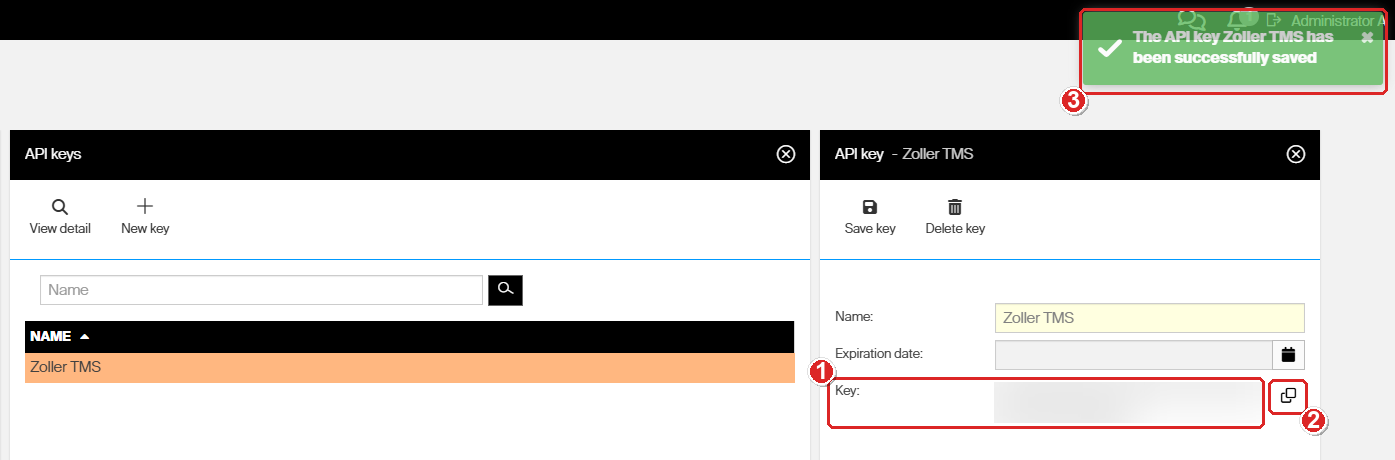
The Key field appears once the key is saved. The value is blurred here.
Warning: The key works like a password. It opens the CRIBWISE REST interfaces on your tenant, so share it with whoever sets up Zoller only through a secure channel.
Step 4 — Connect Zoller to CRIBWISE
Steps 4 to 7 need administrator rights in Zoller TMS. The Zoller manual under Further documentation shows each Zoller screen.
- In Zoller TMS, make sure the Sandvik CRIBWISE service is activated.
- Open the Sandvik CRIBWISE interface settings. You can also reach them from the stock module, with the button to the right of the external control selection.
- In the Connection – General section, enter your CRIBWISE base address.
- In the same section, paste the API key as the access key.
Important: Leave the Connection – Endpoints section as it is. Zoller asks you not to change it.
Optional: in the Functions section, turn on Consider withdrawal orders. Zoller then subtracts the quantity on open withdrawal orders from the CRIBWISE stock it imports. Imports take a little longer.
Note: A new API key can take a few minutes to start working – up to four on our test system. If Zoller is refused right after you created the key, wait and try again.
Step 5 — Import devices and items into Zoller
- In the interface settings, tick Import for each CRIBWISE storage you want in Zoller. Each storage is one CRIBWISE device.
- In the list of items from those storages, tick Import for each item you want.
- Check the Article type and Use class columns for items Zoller could not classify on its own.
- Start the import.
| Column | What it shows |
|---|---|
| Existing article types | The item type the item already has in Zoller, if it exists there. |
| Quantity | Stock in Zoller. |
| Quantity CRIBWISE | Stock in CRIBWISE. |
| Quantity Orders | Quantity on open withdrawal orders. Shown only when Consider withdrawal orders is on. |
| Article type | The item type to import as, when the item exists in Zoller under more than one type. |
| Use class | Regrinding part or multiple-use part, for components and accessories Zoller cannot classify on its own. |
Step 6 — Assign the external control
- Open each Zoller storage that stands for a CRIBWISE device.
- Assign the external control Sandvik CRIBWISE.
Zoller shows a CRIBWISE device as a storage without storage locations. It knows how many of each item are in the device, not where each one sits.
Step 7 — Schedule the stock import
Without a schedule, Zoller only reads CRIBWISE stock when someone imports it by hand. The Zoller Windows service SCIS – SANDVIK CRIBWISE Import Service – repeats the import on a timer. We recommend it.
- On a central server with access to the Zoller database, run
setupSCIS.exeas an administrator. It is inMisc\AddOns\Storage\SandvikCribwise\SetupSCIS. - In the SCIS configuration program, open the Settings tab and enter the same database settings as in Zoller TMS.
- Set the import interval in seconds. The default is 60.
- Select Test and press Enter to run one import.
- When the test reports Import Ok, select Install.
- Select Start, then close the program with OK.
The service appears in Windows Services as ZOLLER Sandvik CRIBWISE Import Service SCIS. Its user needs write rights in the installation folder.
Success: Your CRIBWISE devices appear in Zoller as storages with the Quantity CRIBWISE column filled in, and the SCIS test run ends with Import Ok.
Working with the integration
Send items from Zoller to CRIBWISE
Items created in Zoller do not reach CRIBWISE on their own. A Zoller user sends them, and only items on a storage with the external control Sandvik CRIBWISE can be sent.
- In the storage module, on the Single components, Tools, Accessories or Fixtures tab, use the Alt + F-key shortcuts to send or delete the marked item, or every item on the storage.
- In the Single components, Tools, Accessories or Fixtures module, on the Storage tab, send or delete the loaded item.
The Zoller manual lists the exact keys. Sending needs the Zoller user right Create data record, and deleting needs Delete data record.
Note: CRIBWISE accepts a limited number of requests in a given time. Sending or deleting every item at once can fail with too many requests. Send single items instead, or ask CRIBWISE support to raise the limit.
Withdrawal orders and pick lists
When someone books items out of a CRIBWISE storage in Zoller, Zoller creates a withdrawal order in CRIBWISE. It arrives as a pick list for that device, which the operator picks on the Shop Floor Interface under Pick list. See How to pick items from a pick list on the Shop Floor Interface.
In the Admin Portal, the lists appear with every other pick list under Data management > Pick lists.
To see the orders still open in CRIBWISE from Zoller, open the Functions section of the interface settings. Double-click an order to see its items. To remove one, tick Delete and press F8.
Further documentation
Zoller wrote three documents with the details of the Zoller side. For questions about them, ask your Zoller TMS contact.
- 8774305 Datasheet (EN) – what the interface does and what it needs.
- 8774305 Manual (EN) – connection settings, importing, the external control, sending items and withdrawal orders, with a picture of each Zoller screen.
- 8774305 Installation and Configuration (EN) – installing, testing and starting the SCIS import service.
Troubleshooting
| Problem | Likely cause | Fix |
|---|---|---|
| Integration is missing from the Administration menu. | Your user group does not have the Manage integrations permission. | Ask an administrator to add the permission to your user group. |
| Zoller is refused right after you created the key. | A new key takes a few minutes to start working. | Wait a few minutes and try again. |
| Zoller keeps refusing the key. | The key was copied incompletely, the base address includes the portal path, or the key belongs to another tenant. | Copy the key again with Copy to clipboard. Enter the host only, without /adminportal/yourcompany. |
| The connection worked, then stopped. | The key expired or was deleted. | Check the key in API keys. Set a later expiration date, or create a new key and enter it in Zoller. |
| An item is missing from Zoller’s import list. | The item is not assigned to a device in CRIBWISE. | Add the item to a device in CRIBWISE, then import again. |
| Items created in Zoller do not appear in CRIBWISE. | Items are only sent on request, and only from storages with the external control Sandvik CRIBWISE. | Assign the external control, then send the items with the Alt + F-key shortcuts. Check that Zoller runs version 1.19.0 or later. |
| Sending every item fails with too many requests. | CRIBWISE limits how many requests it accepts in a given time. | Send single items, or ask CRIBWISE support to raise the limit. |
| Operators cannot see Zoller’s withdrawal orders on the Shop Floor Interface. | Enable predefined pick lists is off. | Turn it on in System settings > Stock daily use. |
| Zoller shows more stock than operators can pick. | Open withdrawal orders are not subtracted from the imported stock. | Turn on Consider withdrawal orders in the Functions section of Zoller’s interface settings. |
| Supplier data is missing in Zoller after an import. | Zoller does not import suppliers, and an item without a supplier exchanges no supplier data. | Assign suppliers to the items in Zoller. |
Related articles
- How to authenticate with the REST API – the full life of an API key: expiry, revocation and the tokens it issues.
- How to pick items from a pick list on the Shop Floor Interface – how operators pick the lists Zoller creates.
- How to create a pick list in the Admin Portal – pick list settings, including Enable predefined pick lists.
- How to return, scrap, and recycle items in SFI – where items taken out through Zoller come back.
- System requirements and supported browsers – the network endpoints to allow for integration services.
- CRIBWISE REST API — endpoint overview – the interfaces the API key opens.
- How to integrate WinTool TMS with CRIBWISE – the equivalent integration for WinTool.