
What you’ll learn
How a Sielaff ASK 200 master cabinet is set up as a storage device in CRIBWISE: the settings it needs, the 28 shelf modules it creates, and why its locations are defined from the Shop Floor Interface.
Storage device settings
| Setting | Value |
| Type | Location controlled (Coil) |
| Manufacturer | Sielaff ASK200 |
| Cabinet type | Master cabinet |
| IP address | Set according to the physical connection to the device. The manufacturer default 10.60.80.1 stays valid until the address is changed manually on the physical machine. |
Defining the locations is an automatic process started from the Shop Floor Interface. See How to use Sielaff ASK200 and TB300 for managing the machine.
Important: There can be only one master cabinet per device.
Module structure
- 28 modules are created automatically.
- One module represents one shelf.
- Modules cannot be changed manually.
Stock location structure
- First dimension: 1-1.
- Second dimension: 1-86, where the number is the distance in centimetres from the shelf edge to the midpoint of the location.
- Locations are defined separately for each module.
- Locations cannot be changed manually.
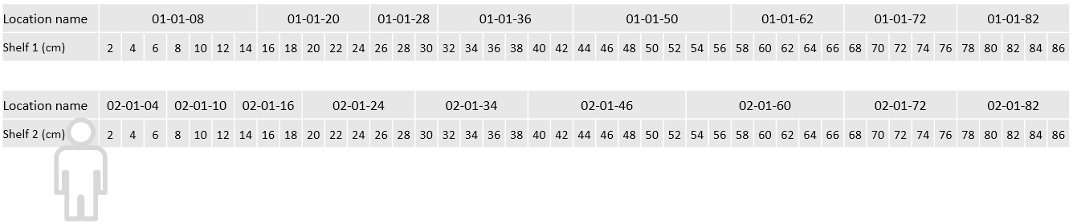
Example location structure. The size of a location depends on its real size in the machine.
Common confusion
| People often think… | But actually… |
| Modules and locations are maintained in the Admin Portal. | Both are generated automatically, and manual changes are not allowed. |
| The default IP address can be left as it is for every cabinet. | It is valid only until the address is changed on the physical machine – check the machine. |
| A device can have several master cabinets. | Only one. Further cabinets are added as extension cabinets. |
Take action
Ready to add the cabinet? Create the device and its storage device in the Admin Portal – see How to configure storage devices.
Related articles
- Sielaff ASK 200 Extension cabinet – storage device setup – add cabinets to the same device.
- How to use Sielaff ASK200 and TB300 – daily work and location definition on the machine.
- How to configure storage devices – create and configure a storage device in the Admin Portal.
- How to set up ASK200 extension cabinets (networking and IP) – the network side of a multi-cabinet setup.