
What you can do
Set up the RFID reader on a Sielaff ASK200 so the SFI reads card IDs correctly, by clearing the RFID mask in the ASK Guard configuration file.
Without this change, ASK Guard alters the scanned data before the SFI sees it.
Before you start
- Use the attached manual to set the reader up: RFID settings ver1 ASK200 (PDF).
- Use PuTTY rather than HyperTerminal, wherever the manual mentions it.
- You need access to the Windows desktop on the cabinet PC, and to the Task Manager.
Steps
Step 1 — Clear the RFID mask
- Close ASK Guard in the Task Manager.
- Open
C:\ASK\INIs\Ask_guard.ini. - Find the line
MaskaRFIDMaska_Text=[1] [2].... - Change it to
MaskaRFIDMaska_Text=, removing everything after the equals sign. - Save the file and start ASK Guard again.
Step 2 — Verify the reader
Check the result in one of two ways:
- Start ASK Guard and scan a card into Notepad.
- Open PuTTY, connect to COM2 and scan a card.
Success: The scanned card data arrives unchanged.
Other reader settings
Everything else is configured in the AppBlaster program, at C:\DRIVERs\TWN4DevPack312d\AppBlaster.
The scanner sends the ID in hex, while the SFI shows it as decimal.
Note: When you use the Tracker template to test which read option works, PuTTY always shows the value in hex.
Most key fobs use EM4x02.
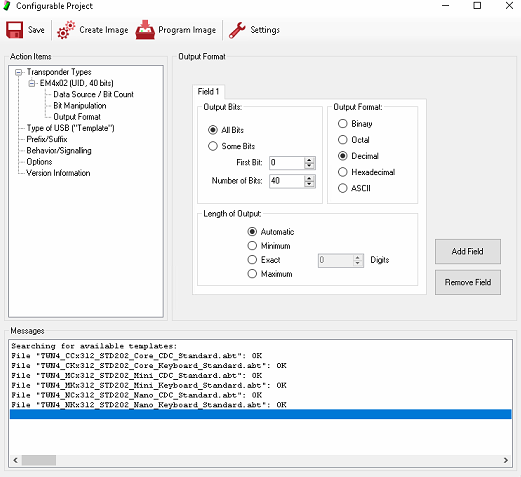
Reader settings for the ASK200.
Troubleshooting
| Problem | Likely cause | Fix |
| The scanned card data looks altered. | The RFID mask in Ask_guard.ini is still set. | Clear MaskaRFIDMaska_Text= and restart ASK Guard. |
| The value in PuTTY does not match the SFI. | The scanner sends hex, the SFI displays decimal. | Expected – compare the converted value, not the raw string. |
| A card is not read at all. | The card technology is not the one the reader is configured for. | Check the card type – most key fobs are EM4x02 – and the AppBlaster configuration. |
Related articles
- How to use Sielaff ASK200 and TB300 – daily work on the machine.
- Sielaff ASK 200 Master cabinet – storage device setup – the storage device settings.
- Supported hardware accessories: scanners and RFID readers – tested readers and supported card technologies.
- How to create and manage users – connecting an RFID card to a user.