
What you’ll learn
What it takes to control an existing Weland Compact Store from CRIBWISE: what the CompactTalk server must provide, which elevator modes the machine has to be in, and the information you need before creating the storage device.
Weland units work through the normal Shop Floor Interface and are set up by selecting Weland as the storage device solution. The integration supports Weland accessories such as laser pointers and the confirm and cancel buttons on the physical device.
Note: CRIBWISE sells neither the physical storage unit nor the Weland CompactTalk server. CRIBWISE connects to a CompactTalk server that the customer or a Weland representative configures for CRIBWISE during setup.
Prerequisites for the integration
- All communication between CRIBWISE and the Weland elevator goes through the Weland CompactTalk server, which must be installed and configured.
- Every accessory – laser pointer, pedal, display – must be configured through the CompactTalk server.
- The CompactTalk server must be reachable over TCP/IP from the PC where the SFI is installed. The port comes from the CompactTalk Configuration app (CTConfig.exe) and is 20010 by default. That port must be open for inbound connections on the PC running the CompactTalk server.
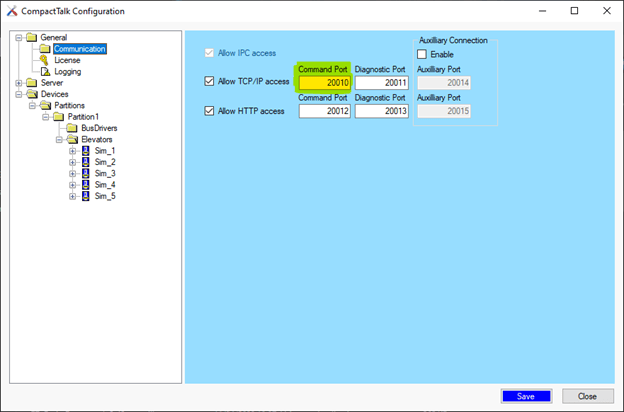
The communication port in the CompactTalk configuration.
Elevator mode
The elevator must be in Automatic and Remote mode, and enabled, before it accepts remote commands from CRIBWISE.
Important: An operator has to switch the elevator back to Remote mode and the enabled state every time the control panel or the elevator restarts, and after any interruption during operation – for example when the safety barrier is intercepted.
The current mode can be checked in the CompactTalk Service Monitor application (CTMonitor.exe).
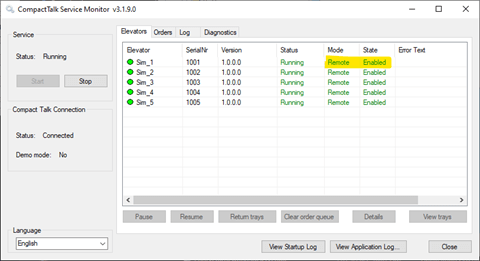
Checking the elevator mode in CTMonitor.
The operator sets the modes on the elevator control panel in this order. If an option is missing, check the privileges of the user logged in to the panel.
1. Enable Automatic mode.
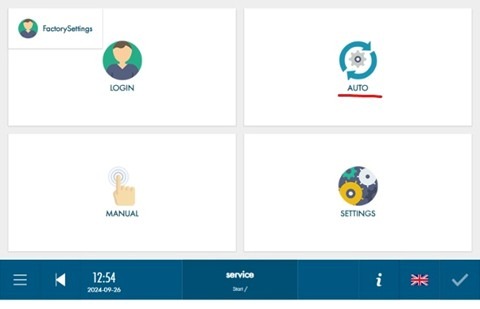
Automatic mode.
2. Enable Remote mode.
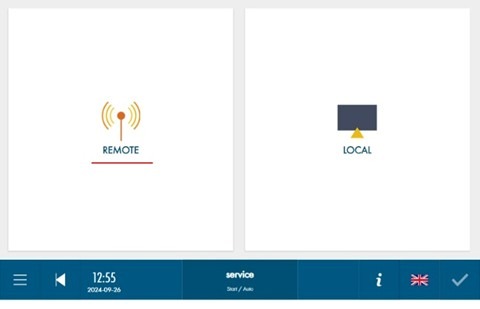
Remote mode.
3. Set the enabled state.
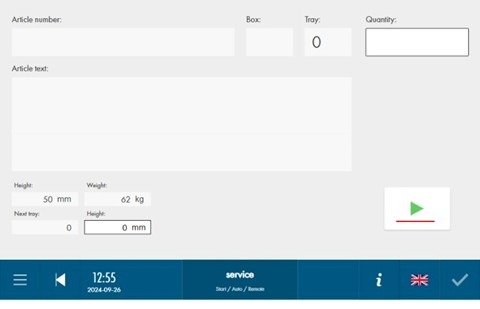
Enabled state.
Optional control panel settings
What an operator may do on the elevator control panel is limited by the user rights of the account logged in there. Those rights are set on the panel itself, and the accounts are unrelated to CRIBWISE users.
Tip: Give that user the privilege to update tray heights – tray height management is not handled by CRIBWISE. Do not give it the privilege for manual or local control of the elevator, since those actions are outside CRIBWISE control and allow access to stored goods without any record.
Automatic tray height adjustment can be set in Settings – Factory setup on the control panel, so CRIBWISE flows are not interrupted when the height of a tray increases.
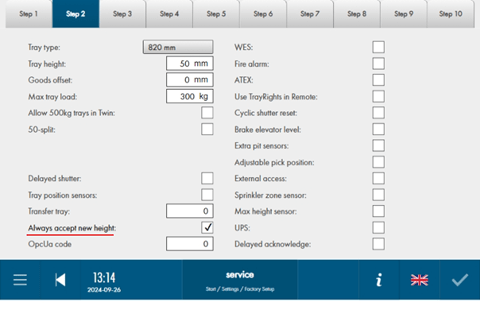
Automatic tray height adjustment.
Preparations in CRIBWISE
Have this information ready before creating the storage device:
| Information | Where it comes from |
| IP address and port | The CompactTalk server address, port 20010 by default. |
| Opening number | Always 1, since only a single opening is supported. In rare cases 2, when CRIBWISE should operate an opening other than the main one. |
| Elevator ID | CompactTalk Configuration application (CTConfig.exe). |
| Tray dimensions | CompactTalk Configuration application. |
| Number of trays | CompactTalk Configuration application. |
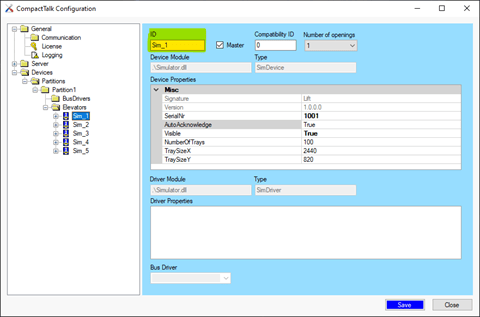
Elevator ID.
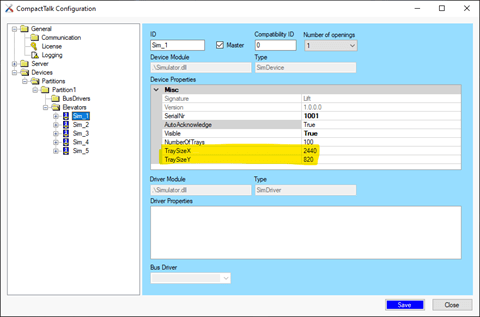
Tray dimensions.
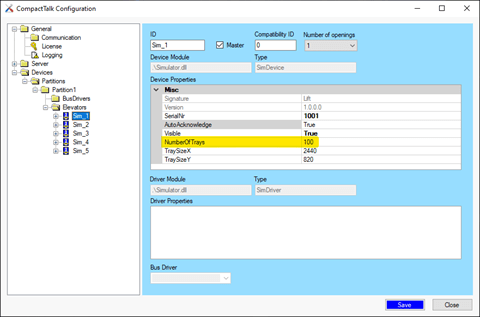
Number of trays.
Enter the collected values on the new storage device in the CRIBWISE Admin Portal.
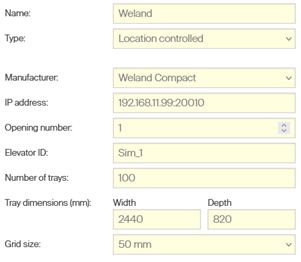
The storage device in the Admin Portal.
Note: The name of the storage device and the grid size do not affect the integration and can be set to suit the customer.
Common confusion
| People often think… | But actually… |
| CRIBWISE drives the elevator and its accessories directly. | Everything goes through the CompactTalk server, including laser pointer, pedal and display. |
| Remote mode is set once at installation. | It must be set again after every restart and after any interrupted operation. |
| Tray heights are managed from CRIBWISE. | They are not. Give the panel user the right to update tray heights, and enable automatic adjustment. |
| Several openings can be operated. | Only one opening is supported. |
Take action
Prerequisites in place? Create the storage device as described in How to configure storage devices, using the settings reference in Weland Compact – storage device setup.
Related articles
- Weland Compact – storage device setup – settings, module and location structure.
- How to configure storage devices – create and configure a storage device in the Admin Portal.
- How to use lift machines (Kardex, Modula, Hänel) – daily picking and restocking on a lift.
- How to create and manage devices – the device a storage device belongs to.