
What you’ll learn
How the B2B interface exchanges messages with a vendor ERP and SCM: the two message types involved, which CRIBWISE field fills each XML node, and where each message is sent or received.
The two message types
| Message | Direction | Endpoint |
| Order request (OR) | CRIBWISE to vendor | Sent directly to the B2B interface from the Admin Portal. |
| Order acknowledgment (OA) | Vendor to CRIBWISE | Received on an endpoint running on MMA, then forwarded to the right Admin Portal installation and customer based on the information it carries. |
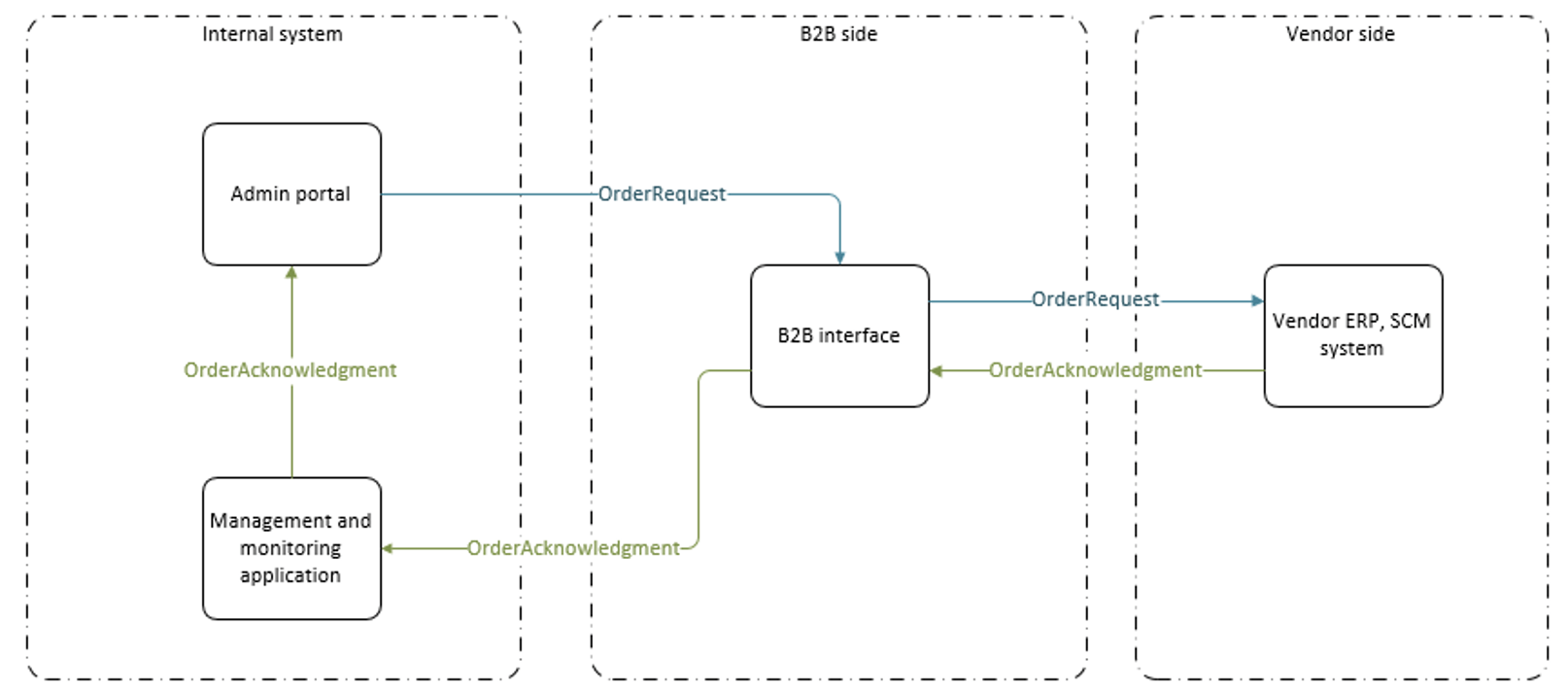
B2B communication between CRIBWISE and the vendor systems.
Note: The XML structures follow the B2B OR and OA schemas. See the B2B documentation for the schemas themselves – the samples below show which CRIBWISE field fills each node.
Order request
An order request is generated in XML when an order is created in CRIBWISE, following the B2B OR schema, and sent to the B2B interface set on the vendor detail in the Admin Portal. The message structure:
<?xml version="1.0"?>
<PurchaseOrderCreateRequest xmlns:xsd="http://www.w3.org/2001/XMLSchema">
  <MessageHeader xmlns="">
    <ID></ID>
    <CreationDateTime></CreationDateTime>
    <SenderParty>
      <InternalID></InternalID>
    </SenderParty>
    <RecipientParty>
      <InternalID></InternalID>
    </RecipientParty>
  </MessageHeader>
  <PurchaseOrder xmlns="">
    <ID></ID>
    <PurchaseOrderTypeCode></PurchaseOrderTypeCode>
    <ProcessingTypeCode></ProcessingTypeCode>
    <BuyerPostingDateTime></BuyerPostingDateTime>
    <BuyerParty>
      <SellerID></SellerID>
    </BuyerParty>
    <ProductRecipientParty>
      <SellerID></SellerID>
      <Address>
        <OrganisationFormattedName></OrganisationFormattedName>
        <PhysicalAddress>
          <CountryCode></CountryCode>
          <RegionCode></RegionCode>
          <StreetPostalCode></StreetPostalCode>
          <CityName></CityName>
          <StreetName></StreetName>
        </PhysicalAddress>
      </Address>
    </ProductRecipientParty>
    <TextCollection>
      <Text>
        <TypeCode></TypeCode>
        <ContentText></ContentText>
      </Text>
    </TextCollection>
    <References>
      <BODReference>
        <ReferenceType></ReferenceType>
        <ReferenceID></ReferenceID>
      </BODReference>
      <BODReference>
        <ReferenceType></ReferenceType>
        <ReferenceID></ReferenceID>
      </BODReference>
      <BODReference>
        <ReferenceType></ReferenceType>
        <ReferenceID></ReferenceID>
      </BODReference>
    </References>
    <Item>
      <ID></ID>
      <Product>
        <OrderingCode></OrderingCode>
        <BuyerID></BuyerID>
      </Product>
      <ValueAddedService>
        <CategoryCode></CategoryCode>
        <Code></Code>
        <TypeCode></TypeCode>
        <ItemCreateIndicator></ItemCreateIndicator>
      </ValueAddedService>
      <ShipToLocation>
        <UnloadingLocation>
          <InternalID></InternalID>
        </UnloadingLocation>
      </ShipToLocation>
      <DateTerms>
        <RequestedDate></RequestedDate>
      </DateTerms>
      <TextCollection>
        <Text>
          <TypeCode></TypeCode>
          <ContentText></ContentText>
        </Text>
      </TextCollection>
      <TotalValues>
        <RequestedQuantity></RequestedQuantity>
      </TotalValues>
    </Item>
  </PurchaseOrder>
</PurchaseOrderCreateRequest>
What fills each node
Nodes not listed below are fixed values from the schema.
| Node | Filled with |
MessageHeader / ID |
An automatically generated GUID that uniquely identifies the message. |
MessageHeader / CreationDateTime |
The time the order request was generated. |
SenderParty / InternalID |
Sender identification. Always SmartSupply. |
RecipientParty / InternalID |
Identifies the receiving system. From MasterData.Vendor.IntegrationId. |
PurchaseOrder / ID |
The order ID – system generated, or from a custom order ID range in system settings – including any ID prefix set for the order. |
ProcessingTypeCode |
NOR for a normal order, CON for consignment, Z1KE for a consignment invoice request (billing order), SERV for a service order. |
BuyerPostingDateTime |
The time the order request was generated. |
BuyerParty / SellerID |
The customer ID in the receiving system. From MasterData.Vendor.CustomerNumber. |
ProductRecipientParty / SellerID |
The customer address ID in the vendor’s system. From Vendor.CustomerShipToId, or Order.CustomShipToId when the order overrides the vendor value. If neither is set, the node is left out of the message. |
Address / OrganisationFormattedName |
The customer name from System settings – Company information – Name. Empty if not set. |
PhysicalAddress / CountryCode |
Two-character country code of the stock address. From Stock.Stock.CountryCode. |
PhysicalAddress / RegionCode |
Region code of the stock address, up to six characters. From Stock.Stock.RegionCode. |
PhysicalAddress / StreetPostalCode |
Postal code of the stock address. From Stock.Stock.PostalCode. |
PhysicalAddress / CityName |
City of the stock address. From Stock.Stock.City. |
PhysicalAddress / StreetName |
Street and number of the stock address. Stock.Stock.Street + space + Stock.Stock.StreetNumber. |
TextCollection / Text / TypeCode |
Always Z005 when order notes exist. |
TextCollection / Text / ContentText |
The order notes. From Order.Notes. |
BODReference – DropShipOrderRef |
ReferenceID carries the order reference. From Order.Reference. |
BODReference – MarkingCode |
ReferenceID carries the stock name (stock-level orders) or the device name (device-level orders). |
BODReference – CustomerAccount |
ReferenceID carries the technical order and customer identification, as <system ID>-<customer ID>-<order technical ID>-<PO/SO>. |
Item / ID |
The line number, starting at 1 and incrementing by 1 for each item in the order. |
Product / OrderingCode |
The item identification on the vendor side. From Purchase.PurchaseOrderItem.OrderCode. |
Product / BuyerID |
Purchase.PurchaseOrderItem.VASContent when HasValueAddedServices is true, otherwise Purchase.PurchaseOrderItem.ExternalId. |
ValueAddedService |
Present only when Purchase.PurchaseOrderItem.HasValueAddedServices is true. CategoryCode and ItemCreateIndicator are fixed values; Code comes from VASCode and TypeCode from VASTypeCode. |
UnloadingLocation / InternalID |
The target device for the item. From Purchase.Order.DeviceName for device-level orders, or Purchase.PurchaseOrderItem.DeviceName for stock-level orders. |
DateTerms / RequestedDate |
The delivery date requested by the customer. From Purchase.PurchaseOrderItem.RequestedDeliveryDate. |
Item / TextCollection / Text |
TypeCode is always Z125 for an item-level note; ContentText comes from Order.PurchaseOrderItem.Note. |
TotalValues / RequestedQuantity |
The ordered quantity, in the purchase unit of measure for purchase orders or the dispense unit of measure for service orders and consignment invoices. From Purchase.PurchaseOrderItem.TotalQuantity. |
Order acknowledgment
The vendor system generates an order acknowledgment from the order request it received and sends it back through the B2B interface. There is a single endpoint for all customers and brand installations, running on the MMA application; MMA uses the ID in the acknowledgment to forward it to the right brand and customer. The message structure:
<?xml version="1.0" encoding="utf-16"?>
<PurchaseOrderCreateConfirmation xmlns:xsd="http://www.w3.org/2001/XMLSchema">
  <MessageHeader xmlns="">
    <CreationDateTime></CreationDateTime>
  </MessageHeader>
  <PurchaseOrderConfirmation xmlns="">
    <StatusCode></StatusCode>
    <ID></ID>
    <PurchaseOrderTypeCode></PurchaseOrderTypeCode>
    <ProcessingTypeCode></ProcessingTypeCode>
    <SalesAndServiceBusinessArea>
      <SalesOrganisationID></SalesOrganisationID>
      <DistributionChannelCode></DistributionChannelCode>
      <DivisionCode></DivisionCode>
    </SalesAndServiceBusinessArea>
    <SellerID></SellerID>
    <BuyerPostingDateTime></BuyerPostingDateTime>
    <BuyerParty>
      <SellerID></SellerID>
      <Address>
        <OrganisationFormattedName></OrganisationFormattedName>
        <PhysicalAddress>
          <CountryCode></CountryCode>
          <CountryName></CountryName>
          <StreetPostalCode></StreetPostalCode>
          <CityName></CityName>
          <StreetName></StreetName>
        </PhysicalAddress>
      </Address>
    </BuyerParty>
    <SellerParty>
      <SellerID></SellerID>
      <Address>
        <OrganisationFormattedName></OrganisationFormattedName>
        <PhysicalAddress>
          <CountryCode></CountryCode>
          <CountryName></CountryName>
          <StreetPostalCode></StreetPostalCode>
          <CityName></CityName>
          <StreetName></StreetName>
        </PhysicalAddress>
      </Address>
      <ContactPerson>
        <Address>
          <Communication />
        </Address>
      </ContactPerson>
    </SellerParty>
    <DeliveryTerms>
      <Incoterms>
        <ClassificationCode></ClassificationCode>
        <TransferLocationName></TransferLocationName>
      </Incoterms>
    </DeliveryTerms>
    <CashDiscountTerms>
      <Code></Code>
      <Description></Description>
    </CashDiscountTerms>
    <TotalValues>
      <GrossAmount currencyCode=""></GrossAmount>
      <TotalAmount currencyCode=""></TotalAmount>
    </TotalValues>
    <References>
      <BODReference>
        <ReferenceType></ReferenceType>
        <ReferenceID></ReferenceID>
      </BODReference>
    </References>
    <Item>
      <StatusCode></StatusCode>
      <ID></ID>
      <SellerID></SellerID>
      <Product>
        <OrderingCode></OrderingCode>
      </Product>
      <Price>
        <NetAmount currencyCode=""></NetAmount>
      </Price>
      <ConfirmedPrice>
        <NetUnitPrice>
          <Amount currencyCode=""></Amount>
          <BaseQuantity></BaseQuantity>
        </NetUnitPrice>
        <GrossUnitPrice>
          <Amount currencyCode=""></Amount>
          <BaseQuantity></BaseQuantity>
        </GrossUnitPrice>
      </ConfirmedPrice>
      <ProductRecipientParty>
        <SellerID></SellerID>
        <Address>
          <OrganisationFormattedName></OrganisationFormattedName>
          <PhysicalAddress>
            <CountryCode></CountryCode>
            <CountryName></CountryName>
            <StreetPostalCode></StreetPostalCode>
            <CityName></CityName>
            <StreetName></StreetName>
          </PhysicalAddress>
        </Address>
        <ContactPerson>
          <Address />
        </ContactPerson>
      </ProductRecipientParty>
      <DateTerms>
        <RequestedDate></RequestedDate>
      </DateTerms>
      <TotalValues>
        <RequestedQuantity></RequestedQuantity>
      </TotalValues>
      <ConfirmedScheduleLine>
        <DeliveryPeriod>
          <StartDateTime timeZoneCode=""></StartDateTime>
        </DeliveryPeriod>
        <Quantity></Quantity>
      </ConfirmedScheduleLine>
    </Item>
  </PurchaseOrderConfirmation>
</PurchaseOrderCreateConfirmation>
What is mapped back into CRIBWISE
Most of an acknowledgment is vendor-side detail that CRIBWISE displays but does not store. These nodes are read back into the order:
| Node | Mapped to |
PurchaseOrderConfirmation / ID |
The order ID, returned from the order request – including any ID prefix set for the order. |
PurchaseOrderConfirmation / SellerID |
The order ID on the vendor side. Stored as Purchase.Order.TrackingNumber. |
BODReference – CustomerAccount |
ReferenceID carries the technical order and customer identification, as <system ID>-<customer ID>-<order technical ID>-<PO/SO>. Returned from the order request. |
DeliveryPeriod / StartDateTime |
The expected delivery date. Stored to Purchase.PurchaseOrderItemHistory.Date with Type=1. |
ConfirmedScheduleLine / Quantity |
The quantity expected on that date. Stored to Purchase.PurchaseOrderItemHistory.Quantity. |
Purchase.Order.ReceivedByVendorDate is set to the date and time the acknowledgment was received.
Common confusion
| People often think… | But actually… |
| Both messages travel the same way. | Order requests go straight from the Admin Portal to the B2B interface, while acknowledgments arrive on an MMA endpoint and are routed from there. |
| The order type is fixed. | ProcessingTypeCode distinguishes normal, consignment, consignment invoice request and service orders. |
| Address data comes from the vendor. | The delivery address is built from the stock address and the company information in system settings. |
| Every node is always present. | Optional nodes are omitted when the corresponding CRIBWISE field is empty – the ship-to ID, for example. |
Take action
Setting B2B up for a vendor? Configure the interface on the vendor detail – see How to manage vendors – and check that the stock address and company information the messages draw on are complete in system settings.
Related articles
- How to manage vendors – the integration tab where the B2B interface and the identifiers used in these messages are set.
- System settings – company information and order ID ranges used in an order request.
- Consignment management: setup, ordering, and invoicing – the consignment and invoice-request order types.
- CRIBWISE REST API – endpoint overview – the alternative integration route.