
What you’ll learn
How an AutoCrib VX1000 is set up as a storage device in CRIBWISE: the settings it needs, the modules created for its columns, and how stock locations are defined from the configuration Excel.
Storage device settings
| Setting | Value |
| Type | Location controlled |
| Manufacturer | AutoCrib VX1000 |
| IP address | The IP address of the controller. Default: 192.168.255.2 |
Module structure
- Each column is a separate module.
- 10 modules are created during the first save of the storage device: 5 rotating columns and 5 static columns.
Stock location structure
- Locations are created by importing the VX1000 configuration Excel. The same file template is used to update the location structure later.
- Each column has 15 levels. A location on one level can span several levels above it.
- Each column on each level can be split into one or more locations of the same size.
- Levels in rotating columns (11X … 15X) can be split to 1, 1/2, 1/3, 1/4, 1/6 or 1/12 of the full column size, giving 1, 2, 3, 4, 6 or 12 locations on that level.
- Levels in solid columns (101 … 105) can be split to 1/2 or 1/3 of the full column size, giving 1 or 2 locations on that level.
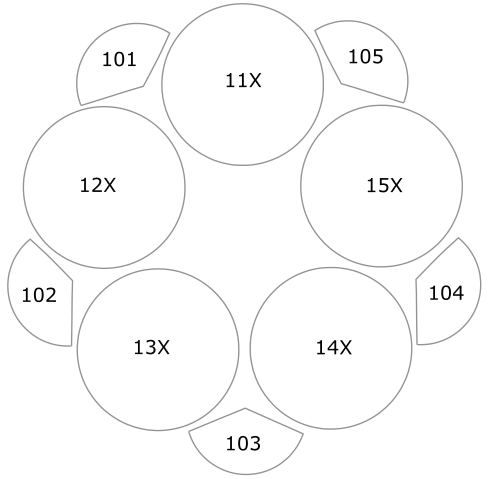
Modules and locations as they appear for a VX1000.
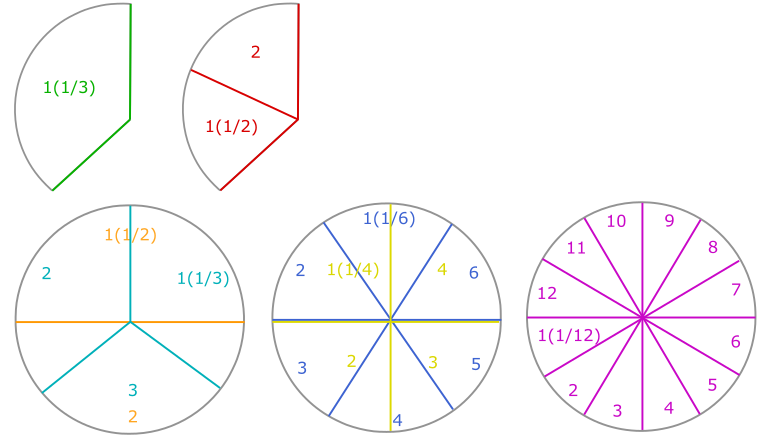
Column and level layout.

How a level is split into locations.
Common confusion
| People often think… | But actually… |
| Locations are created by hand in CRIBWISE. | They come from the VX1000 configuration Excel, and the same template is used for later updates. |
| All columns can be split the same way. | Rotating columns support 1, 1/2, 1/3, 1/4, 1/6 and 1/12 splits; solid columns only 1/2 and 1/3. |
| The 10 modules must be created manually. | They are created automatically on the first save of the storage device. |
Take action
Ready to add the cabinet? Create the device and its storage device in the Admin Portal – see How to configure storage devices.
Related articles
- How to configure storage devices – create and configure a storage device in the Admin Portal.
- How to create and manage devices – the device a storage device belongs to.
- AutoCrib VX500 – storage device setup – settings for the smaller VX model.
- AutoCrib LX2000 – storage device setup – settings for the LX2000.