
What you’ll learn
How an AutoCrib AutoLocker FX is set up as a storage device in CRIBWISE: the settings it needs, how modules follow the controller addresses, and what happens to locations when addressing changes.
Storage device settings
| Setting | Value |
| Type | Location controlled |
| Manufacturer | AutoCrib AutoLocker FX |
| IP address | The IP address of the controller. Default: 192.168.255.2 |
Module structure
- One module is created automatically for every available address in the controller (1-126).
- The module address corresponds with the machine addressing.
Stock location structure
- One location is created for each module that has a physical location connected, by location address.
- Connected modules are checked at SFI startup, which can delete existing locations if they were reconnected to another address.
- You can create additional locations from the Admin Portal and the SFI for connected modules.
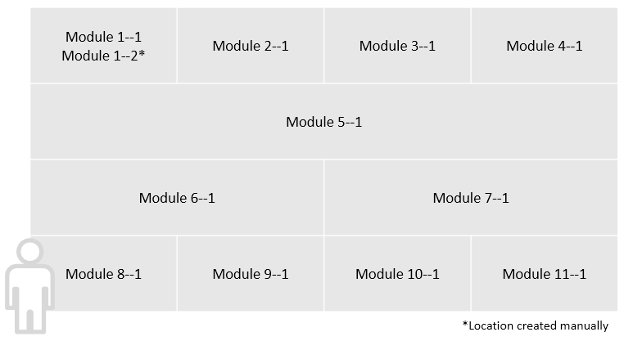
Modules follow the controller addresses.
Changing the location structure
Module addresses are changed with the AutoCrib configuration software. Every change to the addressing is reflected at SFI startup:
- For every connected module, at least one location is ensured – created if needed.
- For every module that is not connected, existing locations are deleted.
Additional locations can be created manually, the same way as for Lista LDC drawers.
Warning: Changing a location address deletes the location on the original address and creates a new one on the new address. The location is not moved, and all existing assignments are removed.
Warning: A location created in a module that is not connected is deleted at the next SFI restart.
Common confusion
| People often think… | But actually… |
| Modules must be created for each locker. | One module is created automatically for every controller address, 1 to 126. |
| Re-addressing a location moves it with its assignments. | The old location is deleted and a new one created – assignments are lost. |
| Locations survive a reconnection to another address. | They can be deleted at SFI startup when the module is no longer connected. |
Take action
Ready to add the cabinet? Create the device and its storage device in the Admin Portal – see How to configure storage devices.
Related articles
- How to configure storage devices – create and configure a storage device in the Admin Portal.
- Lista LPC, LDC – storage device setup – the manual location creation this device shares with LDC drawers.
- How to create and manage devices – the device a storage device belongs to.
- Supported storage devices – configuration reference – settings for every supported manufacturer in one place.