
What you’ll learn
What CRIBWISE does to protect your data – data centres, access control, encryption, backups, network security and incident response – and what you should do on your side to match it.
Security is teamwork: each section below states how CRIBWISE works, and what you can do. Ask us if anything is unclear.
Where your data lives
| System | What it holds |
| Microsoft Azure | The application itself – users, devices, items, transactions and events. CRIBWISE is built on Microsoft technologies and hosted in their data centres, relying on the security controls Microsoft manages. |
| CRIBWISE ERP and Chargebee | Customer data related to subscription management, invoicing and payments. |
| TopDesk and Salesforce | Support data – basic customer information and service orders or incidents. Mainly the customer account manager and related contact details. |
Our contract with Microsoft, together with our own controls, keeps customer data secured according to best practice. Microsoft’s compliance offerings cover national, regional and industry-specific requirements – see Azure trusted cloud.
Physical security
Data centre security
Microsoft Azure runs in data centres managed and operated by Microsoft or their partners. These geographically dispersed sites comply with key industry standards for security and reliability, such as ISO/IEC 27001:2013 and NIST SP 800-53, and are managed, monitored and administered around the clock by Microsoft operations staff. The Azure network architecture provides connectivity from the internet to the data centres, and every workload deployed on Azure – IaaS, PaaS or SaaS – uses that network.
More on Azure infrastructure security.
Access control to premises and facilities
Microsoft takes a layered approach to physical security to reduce the risk of unauthorised physical access: approval is required at the facility perimeter, at the building perimeter, inside the building and on the data centre floor.
More on Azure physical security.
Developer security
Access control to systems
Developers are assigned to development projects in DevOps only after signing a non-disclosure agreement. Developers, system administrators and operators all authenticate through Sandvik’s corporate identity provider, with personalised accounts only and two-factor authentication.
Authorization uses Azure role-based access control (Azure RBAC) for fine-grained access to system resources. The Microsoft DevOps build process connects through Azure App Registrations, with a security model based on certificates or keys. Passwords for system administrators, operators and users follow rules for length and complexity – lower and upper case characters, special characters and numbers.
Access control to back-end data
Access to customer data by the development team is denied by default. When a support case requires it, the system administrator provides only the information needed for that case. Access to customer data is controlled by Sandvik’s corporate identity provider, with personalised accounts and two-factor authentication.
Data
Azure provides data segregation, at-rest protection, in-transit protection, redundancy and destruction – see Azure data protection.
Data storage
Stored data is encrypted at storage level in the Azure environment, covering active, backed up and archived data. In certain cases data is encrypted at database, record or document level as well. Data is segregated per tenant – user or organisation – using logical isolation.
Data in transit
Data in transit is protected with secured network communications and VNETs where applicable. All incoming and outgoing traffic is encrypted with TLS 1.2. Traffic between Azure data centres additionally uses encryption by default with MACsec, an IEEE standard at the data-link layer. Access from external systems goes through the Microsoft Azure Gateway service, which adds a further layer of security.
Data deletion
In a multi-tenant environment such as Azure, careful attention is paid to keeping one customer’s data from leaking into another’s, and to making deleted data inaccessible – in most cases including to the customer who owned it. Destruction techniques vary with the type of data object, whether storage or databases.
Data backups
The cloud version uses Azure SaaS storage – SQL, Blob storage and Cosmos DB. These services can be recovered to any point up to 30 days back. For specific customers we can recover deleted objects as a service, where the customer has no export of their own to import instead.
Backups are stored in the same region as the application runs (West Europe, Netherlands), and backups of backups are replicated to North Europe (Ireland).
Application security
How we work
Role-based access control is used at every level of the CRIBWISE landscape, which consists of three distinct applications: the Customer Management Portal, the Customer Admin Portal and the Shop Floor Interface.
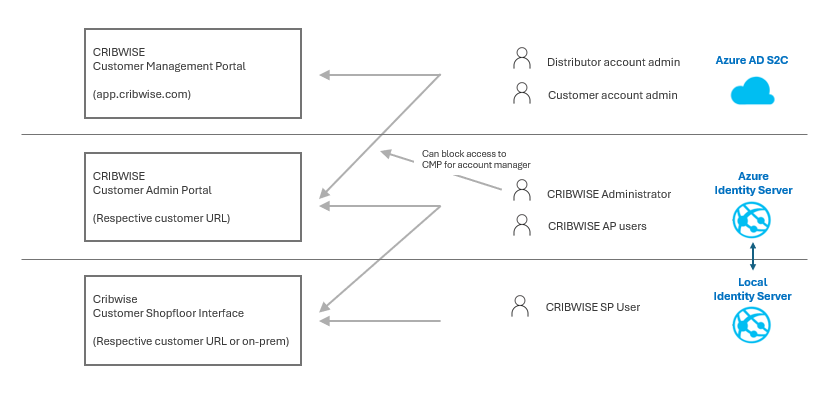
The three applications and how their roles relate.
Customer Management Portal
A sales unit (distributor) account admin can create trial and active customers, request quotes, manage the number of licences, order add-ons and cancel accounts. Depending on the role assigned, this user may also have access to the Customer Admin Portal.
At first sign-up a customer account manager is created – the end customer user who must approve the SaaS terms and conditions before the account is accessible. This user has a more limited view of the account in the CMP, and can log in to the customer instance of the Admin Portal.
In the CMP, a customer account administrator can see the customer id and secrets, download installers, and see licence quantities, activated add-ons and service or support tickets. Account managers – both sales unit and customer – are the first users who can log in to the customer instance and configure the system: users, vendors, items, devices and so on.
The first customer account admin can create additional customer account users. These users are notified of any change to the SaaS terms and conditions, including the DPA and sub-processor lists.
Customer Admin Portal
These users are created in the application, with roles and permissions from the settings of that customer instance. There are no users initially, so the first one must be created by a CMP account admin.
A user can be set as system administrator in the Admin Portal. That user can block Admin Portal access for account admin users in system settings – affecting both customer account admins and sales unit account admins. Logins and login attempts to the Admin Portal are written to the event log, whether they come from identity server users or from account admin users in Azure AD B2C.
Customers can request an add-on to connect Admin Portal authentication to their own identity provider through SAML 2.0 – see How to configure Single Sign-On (SSO).
Shop Floor Interface
A user created in the Admin Portal with the role and permissions to access the SFI is synchronised to the on-premise identity server, which manages logins on the physical device.
The SFI is built to work without a connection to the Admin Portal for up to 30 days. Because it is an on-premise device shared in the storage area, SSO and connections to your own identity provider are not allowed for it – RFID cards are used for login instead.
What you can do
Use the Admin Portal to manage your account. The general rule is that individuals should not have more information or permissions than their daily work requires. Revoke access when employees leave or change position.
- Do not share accounts.
- Use the change password setting when new users are created, which forces a password change at first sign-in.
- Activate the retry policy: set the number of login attempts allowed and the lock period, and use the function that notifies admins when accounts are locked.
- Activate diagnostics if you want mail on every login attempt or successful login, in the Admin Portal and the SFI.
- Connect to your own identity provider.
- Block all account administrator access to the Admin Portal – it can be opened temporarily when needed.
Physical security of devices
How we work
Physical goods delivered by CRIBWISE or a reseller come with Windows IoT Professional installed by default.
- A default user exists on the PC with a blank password and UAC set to never notify. This allows fully automatic deployment and restart of the device when new CRIBWISE versions are available.
- The operating system takes security updates from Microsoft only.
- The SFI is a web application built on Chromium, and the remember-password function is disabled so no user’s credentials are stored on the device.
- Basic Microsoft Defender is present. No other virus protection is installed.
The SFI stores no critical information on the device and can be fully recovered by reinstalling the application. User and password data is encrypted on the local identity server.
For support purposes all devices ship with TeamViewer installed and a set password, and our support organisation has the TeamViewer ID and password. That gives support full access to the device where network settings permit.
What you can do
Protect your physical assets from damage and unauthorised access with strict authorization controls where the asset stands.
- Set up your own domain user account on the PC. Auto update then stops working – disable it in the device settings – because a domain account must be entered when the PC reboots after installation.
- Install your own virus protection. Exclude the application folders and C:/Storage from scans, or quarantined application files will cause problems.
- Ask at installation for TeamViewer to generate its password on request, so support can only connect when someone at the device hands the password over.
- Or ask at installation for TeamViewer to be uninstalled. Support can then only guide the local user.
- Separate these devices from the general production and office network.
Network, platform and infrastructure security
How we work
CRIBWISE is built and operated in a VPN in Azure. The application and its integration endpoints are reached by external users and systems through an Application Gateway.
- The Application Gateway logs traffic to Sandvik’s central 24/7 SOC, which analyses anomalies and acts together with the central CSIRT and the CRIBWISE team.
- Web application firewall (WAF) protection is configured and active.
- Incoming and outgoing calls use fixed IP addresses.
To run an SFI and synchronise it with the cloud Admin Portal, HTTPS is used and port 443 must be open. The SFI support function that creates support tickets automatically needs smtp.sendgrid.net on port 587. All communication between the on-premise SFI and the cloud Admin Portal is triggered from the SFI upwards.
What you can do
Choose your network settings to match the physical security decisions above. Data on an SFI computer is fully synchronised to the Admin Portal every 15 minutes and can be reinstalled without data loss.
- Use network segmentation between office devices and CRIBWISE devices, so a virus cannot spread between them.
- Limit device access to the internet by whitelisting our fixed IP addresses.
- If an integration has CRIBWISE send data to a web service or FTP in your network, whitelist our outgoing IP.
- Instead of IP addresses you can whitelist our base URL, such as app.cribwise.com, or the URL of your distributor.
Resilience and availability
How we work
CRIBWISE runs in the Azure cloud with storage as a service from Microsoft. Databases can be recovered to any point up to 30 days back for static data, and up to 7 days back for transaction and event data.
Our recovery process is documented and, depending on the scenario, runs automatically or semi-automatically with manual steps. If the cloud Admin Portal becomes unavailable, on-premise devices keep working for up to 30 days. Once the services are back, on-premise devices synchronise everything that was missed. A business continuity plan describes the critical resources needed to recover the services.
What you can do
Keep a disaster recovery plan or business continuity plan for your own business, based on the worst-case scenarios you can identify.
- Export application data – users, devices, assignments, items – regularly. Outages on our side are recovered by us, but a user may delete a critical object, such as a device holding all its items, location assignments and current stock levels. CRIBWISE has no recovery service for individual objects deleted by a user or by a customer-defined integration.
- Work actively with user permissions, and limit delete permissions to users who understand the consequences.
- Schedule a report with all item location data. Together with a physical cabinet key, depending on the storage solution, it lets you locate and pick items if a storage unit is down after a PC crash or similar.
Incident response
How we work
- All relevant traffic logs go to Sandvik’s central 24/7 SOC, which analyses anomalies and resolves security incidents together with the central CSIRT and the CRIBWISE team.
- The CRIBWISE team monitors service health and responds to customer-reported incidents according to the SLA.
- If a security incident involves potentially leaked data, customers are informed according to GDPR rules.
What you can do
If an incident occurs, activate your business continuity plan.
Installation and support services
How we work
CRIBWISE uses both internal and external resources for installation services and first-line technical support. None of them have access to customer data unless the customer grants it, by creating a user in their Admin Portal or as an account administrator in the CMP.
Where an installation service requires data to be shared – when a service partner sets the system up completely – secure file transfer is used, and data is kept out of mail conversations.
What you can do
When you give an external user access to your instance, delete the user or revoke the access once the service is performed. Do not send sensitive information such as user lists to a service partner by email.
Training
How we work
All CRIBWISE employees receive cybersecurity training through Sandvik’s Security Awareness programme.
What you can do
Educate your employees in cybersecurity best practices. Your employees are the best protection against cybercrime.
Software development
The CRIBWISE development teams work agile, following Microsoft Azure DevOps with a multi-environment setup and fully automated deployment pipelines, and the OWASP Top 10:2021.
Compliance
Data privacy (GDPR and other privacy laws)
CRIBWISE is fully GDPR compliant. All personally identifiable information is managed separately from production data and deleted according to CRIBWISE retention rules. As part of Sandvik, we run a privacy compliance programme together with the group.
For the privacy policy, cookie management or a personal data request, see Data privacy – Sandvik Group.
Frameworks
Sandvik and CRIBWISE work towards the NIST Cybersecurity Framework.
Common confusion
| People often think… | But actually… |
| CRIBWISE can restore anything a user deletes. | Databases recover to a point in time, but there is no recovery service for individual objects deleted by a user or an integration. Export regularly. |
| The shop floor stops when the cloud is unavailable. | An SFI keeps working for up to 30 days and synchronises when the service returns. |
| SSO can be used on shop floor devices too. | SSO covers the Admin Portal. Shared on-premise devices use RFID cards instead. |
| Support cannot reach a delivered device. | Devices ship with TeamViewer and a set password known to support. Ask for on-request passwords or removal at installation. |
| Antivirus can be installed without further thought. | Exclude the application folders and C:/Storage, or quarantined files break the application. |
Take action
Tighten your own side first: review user permissions and delete rights, activate the retry policy and change-password setting, and decide whether account administrators should reach the Admin Portal at all. Then consider single sign-on and network segmentation for shop floor devices.
Related articles
- How to configure Single Sign-On (SSO) – connect Admin Portal logins to your own identity provider.
- System requirements – fixed IP addresses, ports and supported platforms.
- How to create and configure a user group – where roles and permissions are granted.
- Admin Portal permissions reference – every permission and what it allows.
- How to create and manage users – account hygiene in the Admin Portal.