
What you’ll learn
How a Kuway FMB-L-05 cabinet is set up as a storage device in CRIBWISE: the settings it needs, and the single module and locations it creates automatically on the first save.
Storage device settings
| Setting | Value |
| Type | Location controlled |
| Manufacturer | Kuway FMB-L-05 |
| Port number | Set according to the physical connection to the device |
Module structure
- One module per cabinet.
- The module is created automatically when the storage device is saved for the first time.
Stock location structure
- First dimension: 1-1.
- Second dimension: 1-99, the number of locations.
- All locations are created automatically when the storage device is saved for the first time.
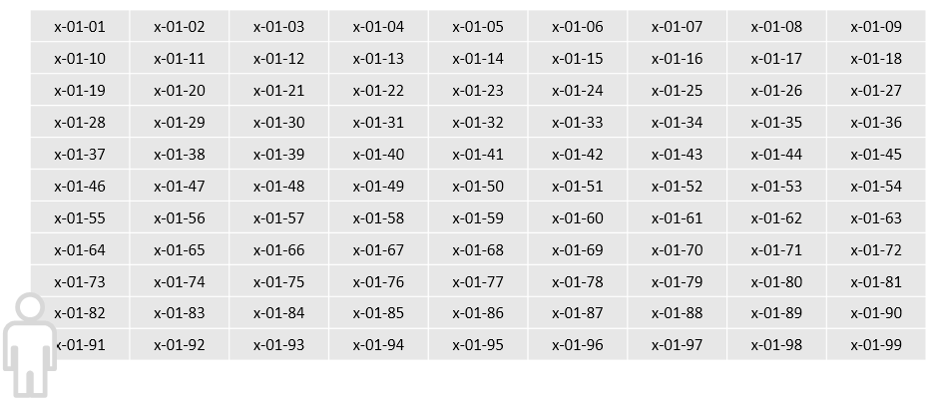
All locations sit in the single module.
Common confusion
| People often think… | But actually… |
| Modules and locations must be created by hand. | Both are created automatically on the first save of the storage device. |
| The cabinet needs an IP address. | It is addressed by port number, set from the physical connection. |
| The location count can be raised above 99. | The second dimension runs 1-99. |
Take action
Ready to add the cabinet? Create the device and its storage device in the Admin Portal – see How to configure storage devices.
Related articles
- How to configure storage devices – create and configure a storage device in the Admin Portal.
- How to create and manage devices – the device a storage device belongs to.
- How to find Device ID and Storage Device ID – identify a device when configuring it.
- Supported storage devices – configuration reference – settings for every supported manufacturer in one place.