
What you’ll learn
How a Sielaff TB300 coil machine is set up as a storage device in CRIBWISE: the settings it needs, the 28 shelf modules it creates, and why its locations are defined from the Shop Floor Interface rather than by hand.
Storage device settings
| Setting | Value |
| Type | Location controlled (Coil) |
| Manufacturer | Sielaff TB300 |
| IP address | Set according to the physical connection to the device, targeting the controlling software of the cabinet. The default is 127.0.0.1 (localhost), which stays valid until the address is changed manually on the physical machine. |
| Serial number | The serial number of the cabinet |
Defining the locations is an automatic process started from the Shop Floor Interface. See the SFI user manual for more about managing a TB300 machine.
Module structure
- 28 modules are created automatically.
- One module represents one shelf.
- Modules cannot be changed manually.
Stock location structure
- First dimension: 1-1.
- Second dimension: 1-86, where the number is the distance in centimetres from the edge of the shelf to the midpoint of the location.
- Locations are defined separately for each module.
- Locations cannot be changed manually.
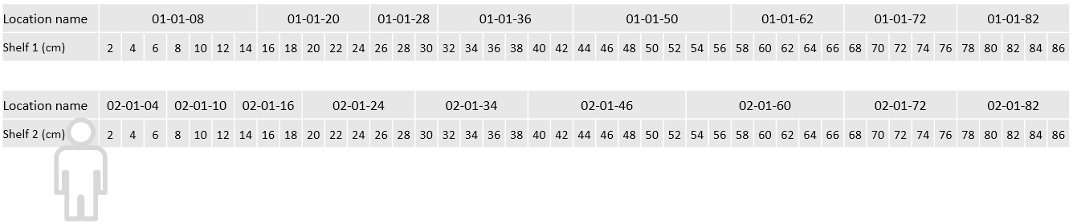
Example location structure. The size of a location depends on its real size in the machine.
Common confusion
| People often think… | But actually… |
| Modules and locations are maintained in the Admin Portal. | Both are generated automatically, and manual changes are not allowed. |
| The default IP address 127.0.0.1 is wrong. | It is the valid default until the address is changed on the physical machine. |
| The second dimension is a location number. | It is the distance in centimetres from the shelf edge to the midpoint of the location. |
Take action
Ready to add the machine? Create the device and its storage device in the Admin Portal – see How to configure storage devices – then start the location definition from the SFI.
Related articles
- How to configure storage devices – create and configure a storage device in the Admin Portal.
- How to create and manage devices – the device a storage device belongs to.
- Getting started with Shop Floor Interface: layout and menus – where the location definition is started.