
What you’ll learn
How CRIBWISE routes items into purchase orders, service orders, service lists and transfer lists – and the simple rule behind which one an item ends up on.
The system supports two flows: buying new items from vendors, and sending items from production for service or calibration. Both work by adding items to orders and lists, each with its own lifecycle.
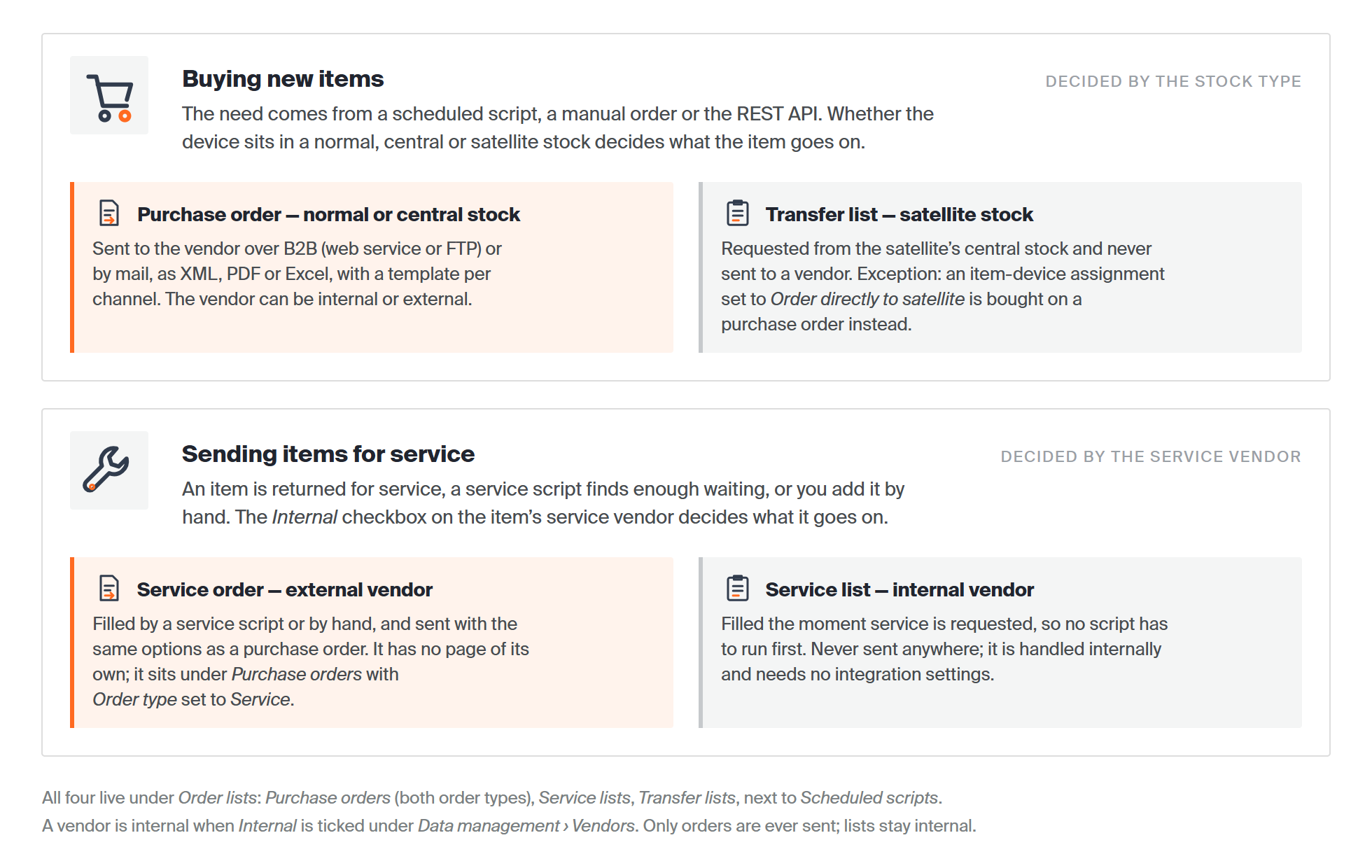
The two flows and the one setting that decides each: the stock type for buying, the service vendor’s Internal flag for service. Orders are sent to a vendor; lists never leave CRIBWISE.
Orders and lists at a glance
| Type | What it holds | Sent to | Where to find it |
| Purchase order | New items to be purchased from a vendor, internal or external. | The vendor – by e-mail or B2B (web service or FTP), as PDF, Excel or XML. | Order lists > Purchase orders |
| Service order | Items from production to be serviced by an external vendor. | The vendor – the same send options as a purchase order. | Order lists > Purchase orders, with Order type set to Service. |
| Service list | Items from production to be serviced by an internal vendor. | Nobody – it is handled internally. | Order lists > Service lists |
| Transfer list | New items to be transferred from a central stock to a device in a satellite stock. | Nobody – it is handled internally. | Order lists > Transfer lists |
In short: internal operations use lists – service and transfer. External operations use orders – purchase and service.
Where to find them in the Admin Portal
Everything in both flows sits under one main menu, Order lists:
- Purchase orders – every order, of both types. The Type column and the Order type field on the order separate Purchase from Service. There is no separate service order page.
- Service lists – one list per internal service vendor and device.
- Transfer lists – requests from a satellite stock to its central stock.
- Consignment invoice requests – what was consumed from consigned stock, billed back to the vendor. See consignment management.
- Scheduled scripts – the rules that fill orders and lists automatically.
An open order has the buttons Save order, Send order and Create preview, and four tabs: General information, Ordered items, Send options and History. Send options is where you choose B2B or mail, and the format and template to send.
Which one an item ends up on
Orders and lists are created manually, by a scheduled script, or through the REST API. When an automated task’s rules are fulfilled, the item is routed by these rules:
- To be purchased, and the device is in a normal or central stock – the item goes on a purchase order to its vendor.
- To be purchased, and the device is in a satellite stock – the item goes on a transfer list, to come from central stock. The exception is an item-device assignment set to Order directly to satellite, which is purchased for the satellite device instead.
- To be serviced, and the service vendor is external – the item goes on a service order.
- To be serviced, and the service vendor is internal – the item goes on a service list, the moment service is requested. No script has to run first.
A vendor counts as internal when Internal is ticked on the vendor, under Data management > Vendors. The Internal column in the vendor list shows the same flag.
What fills them automatically
Under Order lists > Scheduled scripts, New script offers three kinds:
- Classic purchase or service script – replenishes new items or sends items to service using predefined rules.
- Custom purchase script – replenishes new items with custom rules and filtering.
- Custom service script – sends items to service with custom rules and filtering.
Service lists are the exception: they are filled directly when service is requested, so no script is involved.
Common confusion
| People often think… | But actually… |
| Everything that needs buying becomes a purchase order. | In a satellite stock it becomes a transfer list from central stock instead. |
| Service always means a service order. | An internal service vendor gets a service list, which needs no integration settings. |
| Service orders have their own page in the menu. | They share Order lists > Purchase orders with purchase orders. Order type is what tells them apart. |
| Orders and lists only come from scripts. | They can also be created manually, or through the REST API. |
| An item can only reach a service list after a script has run. | Items with an internal service vendor are added as soon as service is requested. |
| Lists are sent somewhere. | Only orders are sent to a vendor. Lists are internal. |
Take action
Need one order now? Create it by hand with how to create manual purchase orders. Want this to run by itself? Set up the rules in purchase order scripts or custom scheduled scripts. Once items are on a service order or service list, get them out of the device with how to pick items for a service order.
Related articles
- How to view and filter purchase orders – finding orders of both types in the order list.
- How to create manual purchase orders – building an order yourself, field by field.
- Understanding purchase order scripts: automated reorder rules – the rules that fill a purchase order.
- Custom scheduled scripts: flexible rules for automated ordering – freely defined rules and schedules.
- Understanding service scripts: automated calibration checks – how items reach a service order.
- Understanding service lists – the internal service flow in detail.
- Understanding transfer lists – the internal route from central stock to a satellite.