
What you’ll learn
How a purchase order script decides to reorder: the seven rules it can use, how package sizes and item states affect what is ordered, and what the two demand options add.
A purchase order script acquires additional items for a device when the physical quantity there falls below a defined threshold – maximum quantity, minimum quantity or order point. Those thresholds are set on the item-device assignment.
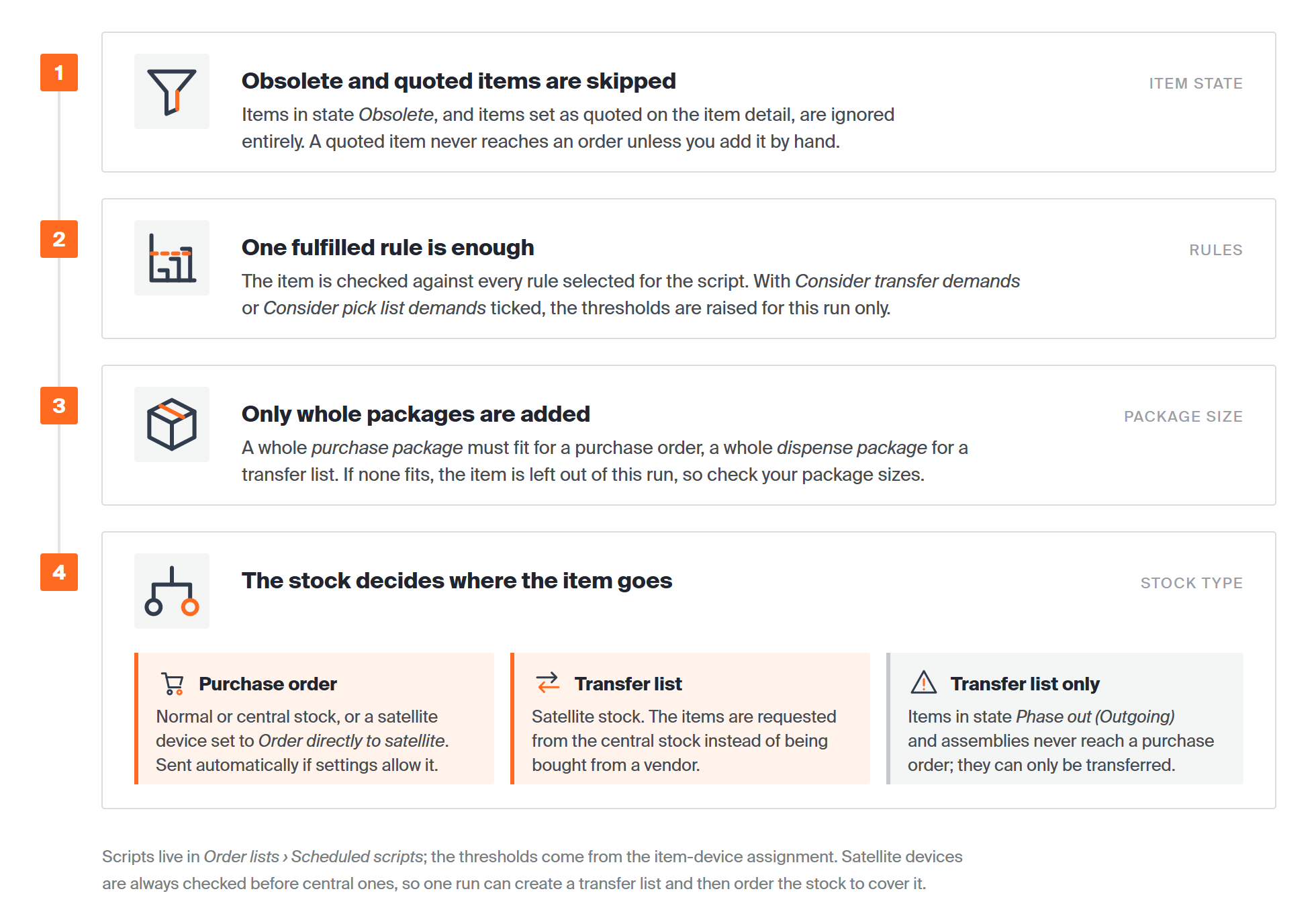
What happens to each item in one run: the skip check, the rules, the package check and the destination. Each is described below.
What happens when a rule is fulfilled
One or more rules can be selected per script. When the script runs, it checks whether any item in the monitored device fulfils at least one of them. What happens next depends on the stock:
| Stock | Result |
| Normal or central | The items are added to a purchase order, which can be sent to the vendor automatically depending on the script and vendor settings. |
| Satellite | The items are added to a transfer list, requesting them from the central stock. |
| Satellite with Order directly to satellite | The item goes on a purchase order for that device instead of being requested from central stock. |
What the script skips
- Package size is respected. An item goes on a purchase order only if a whole purchase package fits, and on a transfer list only if a whole dispense package fits.
- Items in state Obsolete are ignored entirely.
- Items in state Phase out (Outgoing) are not added to orders, but can still go on transfer lists.
- Items set as quoted on the item detail are ignored – add them to an order by hand.
- Assemblies can only be added to a transfer list, never to a purchase order.
The rules
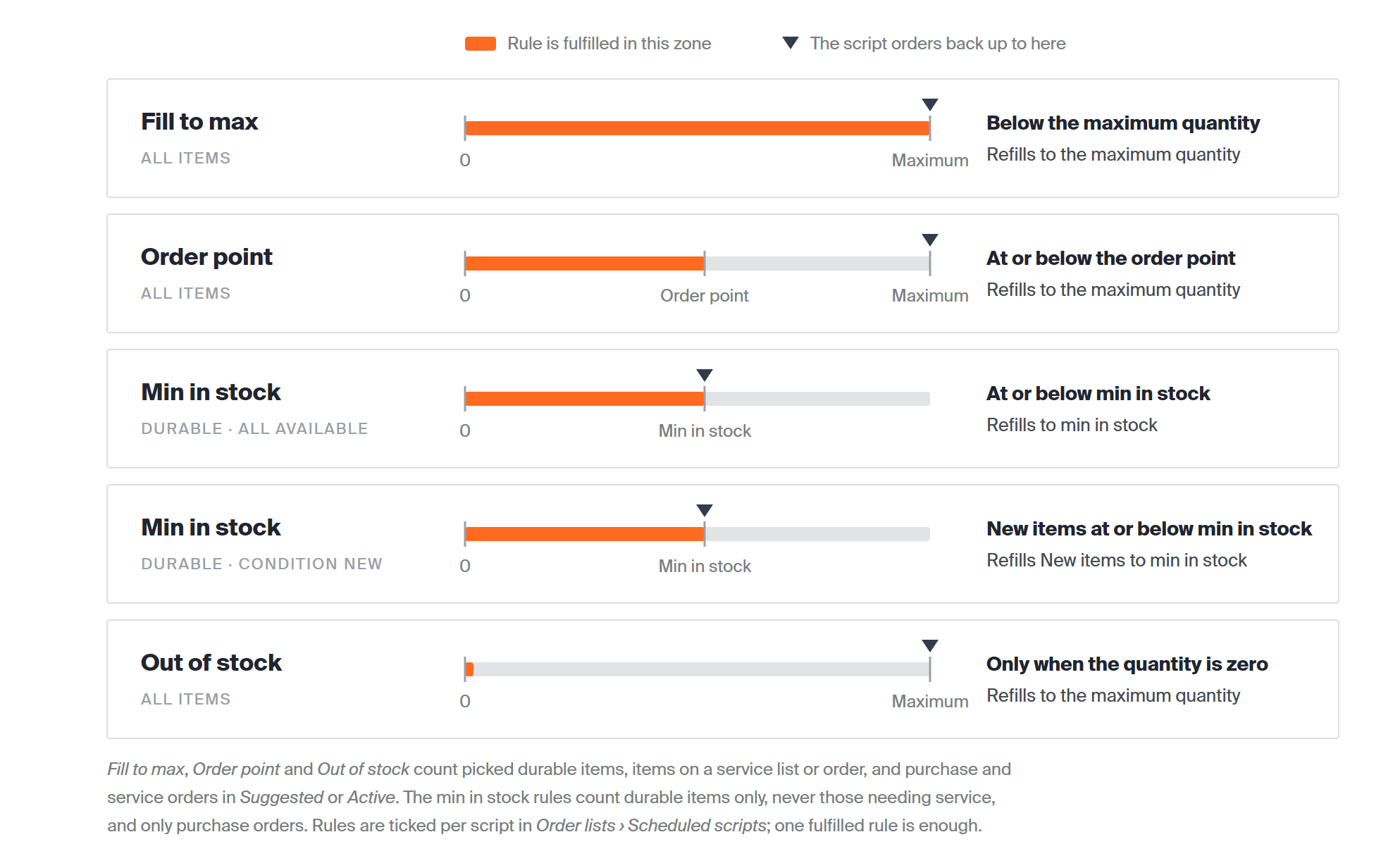
The five rules side by side: the orange zone is where each rule is fulfilled, the marker is how far it orders back up. Each is described in full below.
Fill to max
Fulfilled when the available quantity in the device – including picked durable items and items on a service list or order – is below the maximum quantity. The quantity ordered fills up to the maximum quantity.

Information relating to durable items only is marked in bold. Purchase and service orders are counted in status Suggested or Active.
Order point
Fulfilled when the available quantity in the device – including picked durable items and items on a service list or order – is at or below the order point. The quantity ordered fills up to the maximum quantity.

Purchase and service orders are counted in status Suggested or Active.
Min in stock (all available items)
Fulfilled when the available quantity of a durable item in the device is at or below the min-in-stock quantity. Durable items in any condition count as available, except those needing service. The quantity ordered fills up to the min-in-stock quantity.

Purchase orders are counted in status Suggested or Active.
Min in stock (new items only)
Fulfilled when the available quantity of a durable item in condition New is at or below the min-in-stock quantity. The quantity ordered fills the items in condition New up to that quantity.

Only items in condition New are counted.

Purchase orders are counted in status Suggested or Active.
Important: This rule cannot be applied to consumable items.
Out of stock
Fulfilled when the available quantity in the device – including picked durable items and items on a service list or order – reaches zero. The quantity ordered fills up to the maximum quantity.

Purchase and service orders are counted in status Suggested or Active.
Consider transfer demands
With this option active, the script also counts quantities on transfer lists when it checks devices in a central stock. It takes the total still to be picked for transfer lists from that central stock – requested quantity minus picked quantity – and checks whether it is available, or expected to be, across all devices of the stock.

Purchase and service orders are counted in status Suggested or Active.
If the quantity is not available, the system finds the item in a device of that central stock and temporarily raises the purchase information there by the demand from the transfer lists. The script then checks the device against its rules with those raised values, and restores the original values when it finishes.
Important: An item on a transfer list that is not assigned in any device of the related central stock is not ordered. Where an item is assigned in several devices of the stock, only the first device found takes the additional demand.
Note: This setting has no effect on devices in normal and satellite stocks. Satellite devices are always checked before central ones, so one script can create a transfer list for a satellite device and immediately count that demand for the central stock device.
Example
Device 1 is in a central stock, with order point 20 and maximum quantity 50, and currently holds 25. A transfer list for the stock still needs 30 items for a satellite device.
- Option off: the Order point rule orders nothing, because 25 is above the order point – even though the stock cannot supply the 30 items the transfer list needs.
- Option on: the script sees the shortfall and temporarily raises the purchase information in Device 1 by 30, to maximum quantity 80 and order point 50. The Order point rule then orders 55 items: 30 for the transfer list and 25 to fill up to the maximum.
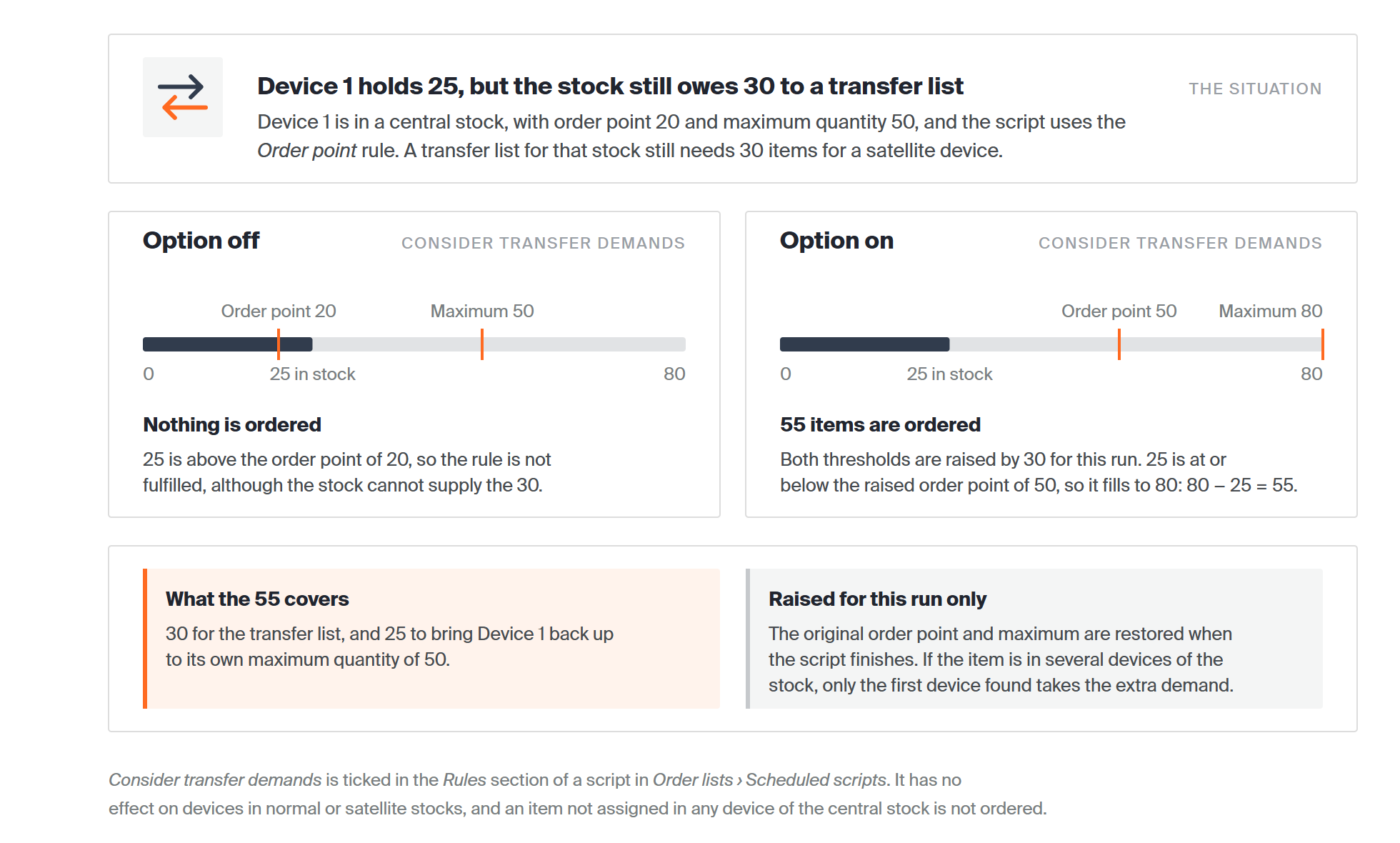
The same device, run with the option off and with it on. The raised thresholds last only for the run.
Consider pick list demands
With this option active, the script also counts quantities on active predefined pick lists for a device. It takes the total still to be picked from all active pick lists for that device – pick lists without a target device are ignored – and checks whether it is available for picking there, or expected from Suggested or Active orders.

Information relating to durable items only is marked in bold.
If the required quantity is not available and the item is assigned in the device, the purchase information of that assignment is raised by the quantity the pick lists need. The script uses the raised values, then restores the originals when it finishes – the same mechanism as for transfer demands.
Important: An item required by a pick list but not assigned in the target device is not ordered.
Common confusion
| People often think… | But actually… |
| A fulfilled rule always creates a purchase order. | In a satellite stock it creates a transfer list instead, unless Order directly to satellite is set. |
| The exact missing quantity is ordered. | Only whole packages are added – purchase package for orders, dispense package for transfer lists. |
| Every item is considered. | Obsolete and quoted items are skipped, phase-out items only reach transfer lists, and assemblies never reach a purchase order. |
| Demand options change the thresholds permanently. | The purchase information is raised only for the duration of the script run. |
Take action
Ready to set one up? Define the thresholds on the item-device assignment, then create the script under Order lists → Scheduled scripts. For freely defined rules and schedules, see custom scheduled scripts.
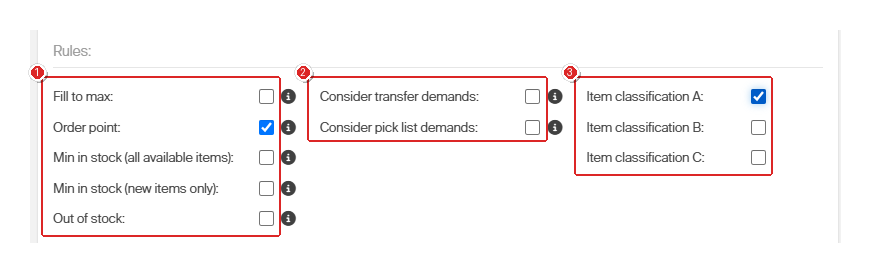
Where the rules are chosen: the Rules section of a scheduled script. Setting one up step by step is covered in how to set up scheduled purchase and service scripts.
Related articles
- Custom scheduled scripts: flexible rules for automated ordering – when the seven rules are not enough.
- Understanding purchasing and service workflows – orders and lists, and which one an item lands on.
- Item supplier settings reference – the purchase package quantity the script respects.
- How to optimize stock levels and order points – get the thresholds these rules compare against right.