
What you’ll learn
Read your current stock straight out of CRIBWISE: two REST endpoints return the quantity of every item in every stock, and the condition and location of every serialized item.
Both endpoints are read-only. They take no parameters, return the whole picture in one response, and change nothing in CRIBWISE.
Note: These are the ERP REST interfaces that run on your own Admin Portal address. They are not the paid cloud API on
api.cribwise.com– see CRIBWISE REST API – endpoint overview if you are unsure which one you are integrating against.
The two endpoints at a glance
GenerateReport |
GenerateSerializedItemsReport |
|
|---|---|---|
| Method | GET | GET |
| Path | [AP_base_uri]/ERP/ItemsStatus/GenerateReport |
[AP_base_uri]/ERP/ItemsStatus/GenerateSerializedItemsReport |
| Answers | How much of each item is in stock right now? | Where is each serial number, and what condition is it in? |
| Covers | Every item assigned to a device, with quantities per stock and per cost allocation. | Every serialized item, with one entry per serial number. |
| Root property | ItemStatuses |
SerializedItemsStatuses |
| Same data in the Admin Portal | Overviews > Item overview – see Item overview dashboard reference. | Overviews > Serialized items – see Understanding the serialized item overview. |
| Watch out for | Items with no device assignment are missing from the response, even when they exist in the item list. | With no serialized items, the root property is null, not an empty array. See the warning below. |
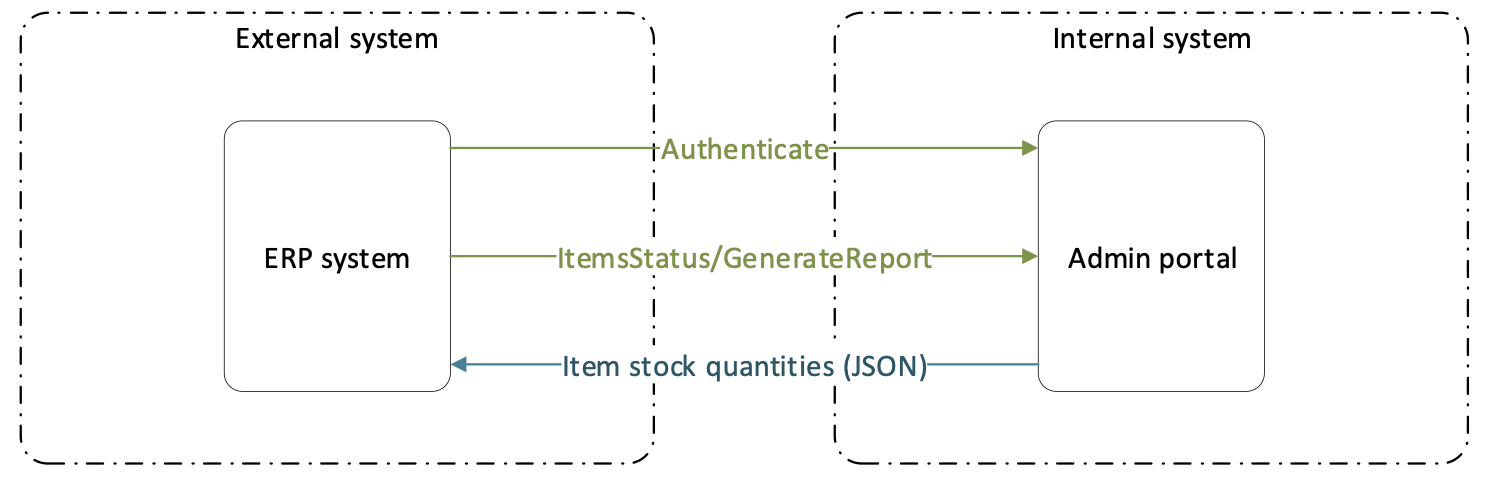
Both endpoints follow the same shape: authenticate, call, read the JSON.
Before you call
| What you need | Detail |
|---|---|
| Base address | The host your Admin Portal runs on, without the portal path and without your company name. If you open the portal at https://solutionaddress.com/adminportal/yourcompany, call https://solutionaddress.com/ERP/ItemsStatus/GenerateReport. |
| An API key | Created in the Admin Portal under Administration > Integration > API keys. The key already identifies your company, which is why the endpoint path does not carry it. |
| An access token | Post the key to [AP_base_uri]/adminportalidentity/connect/token with client_id=erp_client, grant_type=client_credentials, and scope=erp_api. The response carries a bearer token and its lifetime in expires_in – currently one hour. Read that field rather than hard-coding the hour. Full walkthrough: How to authenticate with the REST API. |
| The header on every call | Authorization: Bearer {access_token} |
| A permission, to make the key | Creating or reading an API key needs Manage integrations. Without it, Integration does not appear in the Administration menu – see Admin Portal permissions reference. |
Important: Pass the API key exactly as the Admin Portal shows it, including the part before the underscore. That prefix identifies your company; a key with the prefix stripped off is rejected with
invalid_client.
The interface also publishes its own contract at [AP_base_uri]/ERP/swagger/docs/v1. It confirms that both endpoints are GET and take no parameters, but it declares their responses only as a generic object – so the field tables below are the reference for what actually comes back.
GenerateReport – stock quantities
Returns every item currently held in your stocks, with the quantity in each stock and the quantity picked to each cost allocation.
Request
GET [AP_base_uri]/ERP/ItemsStatus/GenerateReport
Authorization: Bearer {access_token}
There are no query parameters and no request body. The endpoint accepts GET only.
Which items appear
An item is reported only when it is assigned to a device. Open the item, go to the Stock locations tab, and look at Device assignments. An item with an empty device assignment table is left out of the report even when the item itself is active.

Two device assignments (2) on the Stock locations tab (1). This item is reported; an item with no rows here is not.
The item’s Status matters as well. Released items are reported. Items set to Defined or Obsolete are out of circulation – they cannot be picked or ordered – see Understanding item statuses.

The Item ID (1) becomes the Id in the response. The Status (2) decides whether the item is reported at all.
Note: CRIBWISE has five item statuses: Defined, Phase in, Released, Phase out, and Obsolete. If an older integration specification filters this report on a status called Outgoing, it is filtering on a value that does not exist and the API never returns.
Response
A real response from a test company, trimmed to one of its two items:
{
  "ItemStatuses": [
    {
      "Id": "5724444",
      "Name": "CNMG 12 04 08-MM    1125",
      "Description": "T-Max® P, insert for turning",
      "Consumable": true,
      "InStock": true,
      "BellowCriticalLevel": false,
      "ItemStockStatus": "Ok",
      "VendorOrderCode": "CNMG 12 04 08-MM    1125",
      "VendorId": "Sandvik Coromant",
      "VendorName": "Sandvik Coromant",
      "ManufacturerOrderCode": "5724444",
      "ManufacturerId": "Sandvik Coromant",
      "ManufacturerName": "Sandvik Coromant",
      "IsAssembly": false,
      "IsSerialized": false,
      "StockStatuses": [
        { "Id": "Default.Stock.Stock865", "Name": "Stock", "Quantity": 30 }
      ],
      "MachineStatuses": [],
      "ProductionCellStatuses": [],
      "LeadTime": null,
      "IsAtOrderPoint": false
    }
  ]
}
Item fields
| Field | Type | Max length | What it holds |
|---|---|---|---|
Id |
string | 50 | The item ID from the Admin Portal. |
Name |
string | 100 | The item name. |
Description |
string | 400 | The item description in the default language. |
Consumable |
boolean | – | True for a consumable item, false for a durable one. |
InStock |
boolean | – | True when the item has stock on hand. |
BellowCriticalLevel |
boolean | – | True when the quantity has fallen below the item’s critical level. The field name is spelled Bellow in the API – match it exactly. |
ItemStockStatus |
string | – | One of Ok, Alert, or Critical. An item on several devices can return more than one value separated by a pipe (|). |
VendorOrderCode |
string | 50 | The order code the vendor uses for this item. |
VendorId / VendorName |
string | 50 / 100 | The vendor. |
ManufacturerOrderCode |
string | 50 | The manufacturer’s order code. |
ManufacturerId / ManufacturerName |
string | 50 / 100 | The manufacturer. |
IsAssembly |
boolean | – | True when the item is an assembly. |
IsSerialized |
boolean | – | True when the item is serialized. Its serial numbers are in the other report. |
LeadTime |
integer | – | Vendor lead time. null when no lead time is set on the item. |
IsAtOrderPoint |
boolean | – | True when the quantity has reached the order point. |
StockStatuses |
array | – | Quantity per stock. See below. |
MachineStatuses / ProductionCellStatuses |
array | – | Picked durable items held at a cost allocation. Empty when nothing is picked to one. |
If item custom fields are defined, they arrive as extra properties named after the escaped custom field name, each a string of up to 400 characters. Read them by name rather than by position – adding a custom field changes what the response contains.
How the quantities are grouped
StockStatuses holds one entry per stock, not one per device. An item spread across two devices in the same stock arrives as a single entry whose Quantity is the sum.

The item (1) holds 30 pieces, split across two devices (3) – 20 on TX750 and 10 on Device1. The API reports one stock entry of 30. The State column (2) is the ItemStockStatus.
| Field | Type | Max length | What it holds |
|---|---|---|---|
Id |
string | 50 | The stock identifier, for example Default.Stock.Stock865. |
Name |
string | 100 | The stock name as shown in the Admin Portal. |
Quantity |
integer | – | Total quantity of the item in that stock, across every device in it. |
Entries in MachineStatuses and ProductionCellStatuses follow the same shape and cover durable items that are picked and currently sitting at a cost allocation rather than in a device. Both arrays are empty when nothing is picked to one. The Admin Portal shows the same thing under Overviews > Picked items locations.
What Ok, Alert, and Critical mean
| Value | When it is returned |
|---|---|
Ok |
Quantity in stock is above 120% of the threshold. |
Alert |
Quantity in stock is between 120% and 100% of the threshold. |
Critical |
Quantity in stock is below 100% of the threshold. |
The threshold comes from the order point and the critical quantity. For durable items the quantity in stock excludes picked items and is compared with the minimum quantity. For an item on several devices, the worst state wins. The same logic drives the State column described in Item overview dashboard reference.
GenerateSerializedItemsReport – serial numbers
Returns every serialized item in the system, and for each one a list of its instances – the individual serial numbers – with the location, condition, and service state of each.
Request and empty response
GET [AP_base_uri]/ERP/ItemsStatus/GenerateSerializedItemsReport
Authorization: Bearer {access_token}
As with the other endpoint there are no parameters, and only GET is accepted. When the company has no serialized items, the whole response is this:
{ "SerializedItemsStatuses": null }
Warning: The empty result is
null, not[]. Code that loops straight overSerializedItemsStatusesthrows on a company that has no serialized items yet. Check fornullfirst.
Response with data
Each entry describes one serialized item and carries its instances:
{
  "SerializedItemsStatuses": [
    {
      "Id": "string",
      "Name": "string",
      "Description": "string",
      "VendorId": "string",
      "VendorName": "string",
      "VendorOrderCode": "string",
      "ManufacturerId": "string",
      "ManufacturerName": "string",
      "IsAssembly": true,
      "Instances": [
        {
          "SerialNumber": "string",
          "InstanceStatus": "New",
          "StockId": "string",
          "StockName": "string",
          "DeviceId": "string",
          "DeviceName": "string",
          "StorageDeviceName": "string",
          "AvailabilityState": "InDevice",
          "StockLocationId": "string",
          "StockLocationName": "string",
          "LoanTimeEnds": "2017-04-03T12:36:28Z",
          "ServiceInformation": {
            "ServiceTriggerDate": "2017-04-03T12:36:28Z",
            "TimePickedRemaining": 0,
            "NumberOfPicksRemaining": 0,
            "LastService": "2017-04-03T12:36:28Z",
            "InActiveServiceOrder": true
          }
        }
      ]
    }
  ]
}
Serialized item fields
| Field | Type | Max length | What it holds |
|---|---|---|---|
Id |
string | 50 | The item ID. |
Name |
string | 100 | The item name. |
Description |
string | 400 | The item description. |
VendorId / VendorName |
string | 50 / 100 | The vendor. |
VendorOrderCode |
string | 50 | The vendor’s order code. |
ManufacturerId / ManufacturerName |
string | 50 / 100 | The manufacturer. |
IsAssembly |
boolean | – | True when the item is an assembly. |
Instances |
array | – | One entry per serial number. See below. |
Instance fields
Every instance field has a matching column in the Admin Portal, which is the quickest way to sanity-check what an integration receives.
| Field | Type | Max length | Column in Serialized item overview |
|---|---|---|---|
SerialNumber |
string | 50 | Serial number |
InstanceStatus |
string | – | Condition |
StockId / StockName |
string | 50 / 100 | Part of Location |
DeviceId / DeviceName |
string | 50 / 100 | Part of Location |
StorageDeviceName |
string | 100 | Part of Location |
StockLocationId / StockLocationName |
string | 50 / 150 | The location address in Location |
AvailabilityState |
string | – | Location shows In production or In service instead of a place when the instance is out |
LoanTimeEnds |
date and time | – | Loan time ends |
ServiceInformation.ServiceTriggerDate |
date and time | – | Service will trigger at |
ServiceInformation.TimePickedRemaining |
integer | – | Time picked remaining |
ServiceInformation.NumberOfPicksRemaining |
integer | – | Remaining # of picks |
ServiceInformation.LastService |
date and time | – | Last service |
ServiceInformation.InActiveServiceOrder |
boolean | – | No column – true while the instance sits on an open service order |
Condition and availability values
InstanceStatus |
Shown in the Admin Portal as | What it means |
|---|---|---|
New |
New | Not used yet. Set when the instance is first stocked. |
Used |
Used | Picked and returned as used. |
ForService |
For service | Returned for service, or flagged automatically by a service rule. |
Refurbished |
Refurbished | Restocked from a service order. |
Scrap |
Scrap | Scrapped by a user, or automatically by a loan time or scrap rule. |
InAssembly |
In assembly | Picked to build an assembly composition. |
Conditions are never set by hand – they follow from picks, returns, restocks, and scrapping. AvailabilityState answers a different question, namely where the instance is: InDevice, InProduction, InService, or InAssembly. For the full picture see Understanding the serialized item overview.
Responses other than 200
| Status | Body | What went wrong | Fix |
|---|---|---|---|
| 401 | {"Message":"Authorization has been denied for this request."} |
The Authorization header is missing, malformed, or carries an expired or invalid token. |
Fetch a fresh token and send it as Authorization: Bearer {access_token}. |
| 405 | {"Message":"The requested resource does not support http method 'POST'."} |
The call used POST, PUT, or DELETE. | Both endpoints are GET only. |
| 404 | "No action was found on the controller 'ItemsStatus'" |
The path is misspelled – a stray space, a wrong action name, or a company name inserted before /ERP/. |
Check the path against the table at the top of this article. The base address carries no company name. |
| 400 | {"error":"invalid_client"} from the token endpoint |
The API key was rejected before any report call was made. | Send the key exactly as the Admin Portal shows it, prefix included, and check the key still exists and has not passed its expiration date. |
Common confusion
| People often think… | But actually… |
|---|---|
| The report shows everything in the item list. | Only items assigned to a device are reported. An item with no device assignment is missing from the response even though it exists. |
ItemStockStatus is OK. |
The API returns Ok with a lowercase k. A case-sensitive comparison against OK never matches. |
| An empty serialized report is an empty array. | It is null. Test for null before iterating. |
StockStatuses breaks the quantity down per device. |
It breaks it down per stock. Two devices in one stock arrive as one entry holding the combined quantity. |
| The serialized report carries purchase information. | The instance fields cover location, condition, and service only – no purchase fields are defined. For order data use the purchase order endpoints in ERP REST Purchase orders. |
| These endpoints have to be switched on first. | They are always active. What you need is a valid API key. |
| A report call returns a request GUID like the create endpoints do. | No. These are read endpoints, so the data comes back in the response itself – there is nothing to collect afterwards. |
Take action
Ready to make the call? Start with How to authenticate with the REST API to create a key and exchange it for an access token, then GET /ERP/ItemsStatus/GenerateReport and compare what you get with Overviews > Item overview in the Admin Portal.
Related articles
- CRIBWISE REST API – endpoint overview – all 28 ERP REST endpoints, and how authentication and the async write model work.
- How to authenticate with the REST API – creating an API key and exchanging it for a bearer token.
- Item overview dashboard reference – the Admin Portal screen that shows the same quantities, column by column.
- Understanding the serialized item overview – conditions, locations, and service state of every serial number.
- Understanding item statuses – what Defined, Phase in, Released, Phase out, and Obsolete control.
- How to manage items with the REST API – the endpoints that create and update the items this report reads.
- ERP REST Purchase orders – ordering the items that turn up in the stock report.