
What you’ll learn
Cost allocation lets you capture which project, machine, operation, or work order a pick or return belongs to, so spending can be tracked and reported per cost carrier. This article explains how a cost allocation structure is built from steps, value types, and hierarchy — and shows a worked example.
Cost allocation at a glance
A cost allocation structure is an ordered set of steps (up to eight). Each step has a value type that controls how the user selects a value on the Shop Floor Interface (SFI) during picking and returning.
| Value type | How the user selects a value on SFI | Affects following steps? |
|---|---|---|
| List | Picks from a fixed list of values defined in the Admin Portal. Users cannot enter a value outside the list. | No |
| Text | Types any text value. Input can be limited by length, and a validation list can require an allowed value. | No |
| Hierarchy | Picks from values filtered by earlier selections. Hierarchy units can have items and users assigned, which restrict the item list and who may select the value. | Yes |
Each List or Text step can be mandatory or optional. An optional step can be skipped without a value. During a pick or return, the user must specify all mandatory steps in the order defined by the structure.
How sets and devices fit together
A structure, its values, and its hierarchy are all defined within a cost allocation set. You can have one or more sets, each with its own steps, values, and hierarchy – for example, different sets for different parts of production.
Important: Each device always uses a single set. The set a device uses is defined by its stock or directly on the device detail. See How to create and manage stocks and How to create and manage devices.
Terms
| Term | Definition |
|---|---|
| CA set | A cost allocation structure, consisting of steps, values, and hierarchy. |
| Step / level | A part of the structure that identifies the cost allocation of a pick or return. |
| Step name | The label that tells the user what to select (for example Machine, Work order). |
| Step value type | Defines how the end user selects the step value (List, Text, or Hierarchy). |
| Cost allocation structure | The order and value types of the steps (for example Production <hierarchy>: Machine – <hierarchy>: Operation – <list>: Work order – <text>). |
| Cost allocation unit | One specific value of a specific step (for example Machine 1, Work order 1245687). |
| Cost allocation hierarchy | The relations between hierarchy units (for example Production 1 → Machine 1). |
| Cost allocation hierarchy unit | A unit that can be related to units of previous or following steps, and can have items or users assigned. |
How a structure is defined
Defining cost allocation involves these stages, all done inside a CA set:
- Create the CA set.
- Define the CA structure (the steps and their value types).
- Define the CA units (the values for each step).
- Assign items and users to hierarchy units.
- Connect hierarchy units into a hierarchy.
For the full procedure, see How to create and manage cost allocation sets.
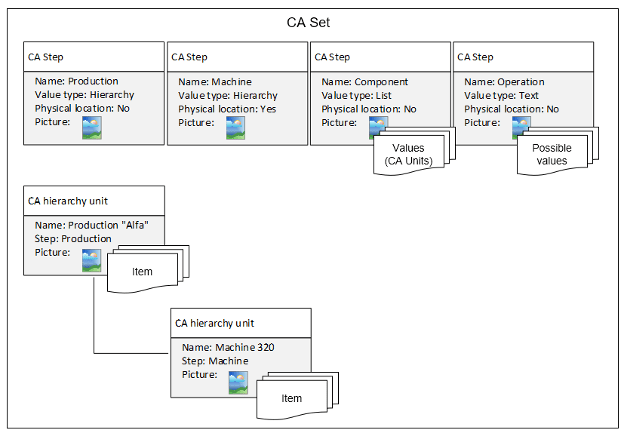
A completed cost allocation set with its steps, values, and hierarchy defined.
Worked example
This example uses a four-step structure:
| Step | Step name | Value type | Values |
|---|---|---|---|
| 1 | Production | Hierarchy | Production 1, Production 2 |
| 2 | Machine | Hierarchy | Machine 1, Machine 2 |
| 3 | Operation | List | Operation 1, Operation 2 |
| 4 | Work order | Text | N/A |
The Production and Machine values are linked in a hierarchy:

The hierarchy links each Production value to its related Machine values.
During picking, the user works through the steps in order:
- The list of Productions appears first. The user selects Production 1.
- Only machines related to Production 1 appear. In this case only Machine 1 is shown.
- All Operations appear (a list value type does not depend on earlier selections). The user selects Operation 1.
- A text field appears for the Work order. The user enters ABC and confirms.
The picked item is allocated under Production 1 > Machine 1 > Operation 1 > Work order “ABC”.
Common confusion
| People often think | But actually |
|---|---|
| A device can use several cost allocation sets. | A device always uses exactly one set, defined by its stock or on the device detail. |
| Every step filters the next one. | Only Hierarchy steps filter following steps. List and Text steps are independent. |
| Hierarchy steps can be optional. | Hierarchy steps are always required. Only List and Text steps can be optional. |
Take action
Ready to build a cost allocation set? Go to How to create and manage cost allocation sets for the step-by-step guide. To let operators enter free-text values for a step, see How to configure custom cost allocation lists and hierarchies.
Related articles
- How to create and manage cost allocation sets – create sets and define steps, values, and hierarchy.
- How to configure custom cost allocation lists and hierarchies – add custom list and hierarchy values.
- How to create and manage stocks – set the default CA set for a stock.
- How to create and manage devices – assign a CA set directly to a device.
- How to pick an item – see how cost allocation is selected during picking.