
What you’ll learn
How a Hänel Lean-Lift or Multi-Space is set up as a storage device in CRIBWISE: what the HOST-COM controller must provide, the settings CRIBWISE needs, the two operation modes, and how modules and locations are built.
Hänel lifts work through the normal Shop Floor Interface and are set up by selecting Hänel as the storage device solution.
Note: CRIBWISE sells neither the physical storage unit nor the required Hänel HOST-COM server. CRIBWISE connects to a HOST-COM server that the customer or a Hänel representative configures for CRIBWISE during setup.
Storage device settings
| Setting | Required | What to enter |
| Type | Yes | Location controlled |
| Manufacturer | Yes | Hänel Lean-Lift Multi-Space |
| IP address | Yes | Address including port number, pointing at the Hänel controller |
| Lift number | Yes | Distinguishes between several machines on one controller. Use 1 for a single lift. |
| Access point number | Yes | Addresses the opening of the machine. Use 1 for a single opening. |
| Number of trays | Yes | How many trays the machine has |
| Tray dimensions | Yes | Width and depth in millimetres, defining the area where locations can be placed |
| Grid size | No | The smallest possible location size on a tray |
Prerequisites for the integration
- The Hänel HOST-COM controller must be up and running.
- The controller must be reachable over TCP/IP from the PC where the SFI is installed – directly or over the company network.
- The controller must have host communication enabled. This has to be done after every restart of the controller: once the system boots, press Enter until the confirmation message appears, or perform the manual operation.
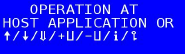
The message that confirms host communication is enabled.
Have this information ready when the storage device is created in the Admin Portal:
- IP address of the controller.
- Access point number – typically 1 for a single opening.
- Lift number.
- Tray dimensions.
- Number of trays.
Operation modes
| With safety equipment and remote control module | Without safety equipment | |
| Control | Fully remote – a command from the SFI starts the movement. | Remote, but every movement must be confirmed on the machine panel. |
| Operator effort | Works like other lift machines. | The operator moves between the SFI and the machine panel during each flow. |
| Verification | Tested by CRIBWISE via simulator only. | – |
Without safety equipment, every SFI flow runs like this:
- The user requests an item, for example to pick.
- The SFI sends the command to the lift and tells the user to go to the machine panel, which prompts to start the movement.
- The user starts the movement on the panel.
- The SFI allows the operation to be confirmed once the tray arrives at the opening.
- The user confirms on the SFI that the operation is finished – the item is taken out of the location.
- The SFI prompts the user to return to the machine panel to store the tray back.
- The user starts that movement on the panel.
- The SFI continues the flow: fetch another tray, or show the summary.
Module structure
- Each tray is a separate module.
- An empty module is created for every tray, based on the number of trays set when the storage device was created.
Stock location structure
- Locations are created by the device admin on the Shop Floor Interface.
- Each location has its own width and depth, and a place on the tray defined by X and Y coordinates.
Locations on a tray are always named from the front left corner to the back right corner, starting at 1. Sublocations are named the same way within their base location, extending the name of that base location.

How locations are numbered on a tray.
Limitations
- Only a single opening can be controlled.
- The LED bar is not supported.
Common confusion
| People often think… | But actually… |
| CRIBWISE talks to the lift directly. | It connects to the Hänel HOST-COM server, which must be configured for CRIBWISE. |
| Host communication is enabled once. | It has to be enabled again after every controller restart. |
| Both openings of a lift can be used. | Only one opening per unit can be controlled. |
Take action
Prerequisites in place? Create the device and its storage device in the Admin Portal – see How to configure storage devices.
Related articles
- How to configure storage devices – create and configure a storage device in the Admin Portal.
- How to use lift machines (Kardex, Modula, Hänel) – daily picking and restocking on a lift.
- Kardex Shuttle and Megamat – storage device setup – the equivalent setup for Kardex units.
- How to create and manage devices – the device a storage device belongs to.