
What you’ll learn
A GTC package import fills in your CRIBWISE item fields for you. This article shows where each field’s value comes from, so you know what an import will create before you run one.
A GTC package is an offline catalog in Generic Tool Catalog version 2.0 format, delivered as a ZIP file by a vendor or supplier. CRIBWISE reads it with the P21 Component, which transfers the package data into its own structure and hands it on for import.
GTC package import at a glance
| What applies | |
|---|---|
| Format accepted | GTC version 2.0, as a ZIP file |
| Where you run it | Admin Portal → Data management > Items > Import items > GTC package |
| What it creates | Items with names, descriptions, barcodes, order codes, documents and technical characteristics — plus the assembly, if the package describes one |
| Who reads the package | The P21 Component, whose Simple API converts the package into Public Assembly Structure (PAS) format |
| Where the values come from | Most fields are mapped from PAS. GTC classification and item type are read straight from the package |
| Subscription needed | None. Unlike a live supplier catalog, a GTC package is a file you already have |
Where the import happens
You import a package from the Items list in the Admin Portal. Open Data management > Items, select Import items in the toolbar, then choose GTC package in the Item import panel. The supplier catalogs you subscribe to are listed above it, and Results below it.
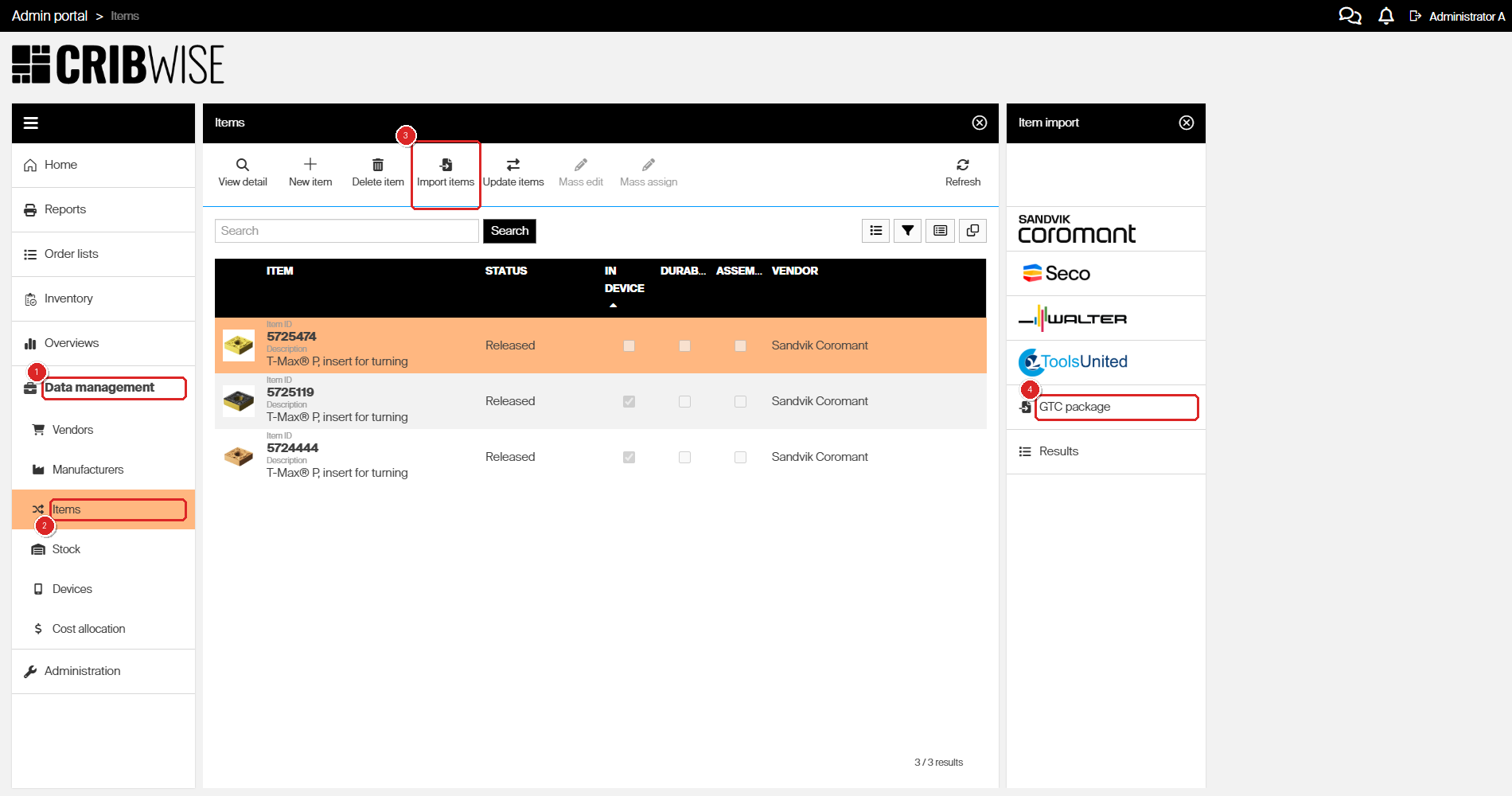
The Item import panel opens on the right when you select Import items (3). GTC package (4) sits below the subscribed supplier catalogs.
Note: This article explains what the import does with your data. For the procedure itself — setting the vendor and manufacturer, attaching the ZIP file and checking the results — see How to import items from a GTC package.
Fields mapped from the PAS structure
The P21 Component’s Simple API transforms GTC package data into Public Assembly Structure (PAS) format. CRIBWISE then maps PAS to its own item fields as shown below. For more about the Simple API, refer to the P21 Component documentation.
| CRIBWISE item | P21 Component Simple API PAS |
|---|---|
| Item ID | ComponentItem Id |
| Item Name | ComponentItem Name |
| Item Description | ComponentItem Description, as default description without culture code |
| Item Barcode | ComponentItem → Alias Value where Id = EAN |
| Item Vendor order code | ComponentItem Id |
| Item Manufacturer order code | ComponentItem Id |
| Item → Document Type = Image | ComponentItem → Document StringType = product_picture |
| Item → Document Type = Drawing | ComponentItem → Document StringType = product_2d_drawing |
| Item → Document Type = Other | ComponentItem → Document StringType = other than above |
| Item → Document Name | ComponentItem → Document FileName |
| Item → Document Reference type | Internal |
| CatalogItem → StringCharacteristic → Name | ComponentItem → StringParameterValue → Definition ShortName |
| CatalogItem → StringCharacteristic → Value | ComponentItem → StringParameterValue Value |
| CatalogItem → StringCharacteristic → Index | ComponentItem → StringParameterValue → Location index |
| CatalogItem → BooleanCharacteristic → Name | ComponentItem → BooleanParameterValue → Definition ShortName |
| CatalogItem → BooleanCharacteristic → Value | ComponentItem → BooleanParameterValue Value |
| CatalogItem → BooleanCharacteristic → Index | ComponentItem → BooleanParameterValue → Location index |
| CatalogItem → IntegerCharacteristic → Name | ComponentItem → IntegerParameterValue → Definition ShortName |
| CatalogItem → IntegerCharacteristic → Value | ComponentItem → IntegerParameterValue Value |
| CatalogItem → IntegerCharacteristic → Index | ComponentItem → IntegerParameterValue → Location index |
| CatalogItem → RealNumberCharacteristic → Name | ComponentItem → DecimalParameterValue → Definition ShortName |
| CatalogItem → RealNumberCharacteristic → Value | ComponentItem → DecimalParameterValue Value |
| CatalogItem → RealNumberCharacteristic → Index | ComponentItem → DecimalParameterValue → Location index |
Two patterns are worth noticing. The ComponentItem Id lands in three places — Item ID, Vendor order code and Manufacturer order code — so all three start out identical. And every document arrives as an Internal reference, which means the file is stored in CRIBWISE rather than linked to an outside location.
Fields read straight from the package
Information that PAS does not carry is obtained directly from the GTC package, from its package_assortment.xml file.
| CRIBWISE item | GTC package |
|---|---|
| Item GTC classification | package_assortment.xml → item → gtc_generic_class_id |
| Item Type = Consumable | package_assortment.xml → item → gtc_generic_class_id = INS* |
| Item Type = Durable | package_assortment.xml → item → gtc_generic_class_id <> INS* |
The item type therefore follows the GTC generic class in the package. A class beginning with INS makes the item a consumable; any other class makes it a durable.
Important: The consumable/durable choice cannot be changed after an item is created, so the package decides it for you. If a package classifies an item differently from how you use it, create that item manually with the type you need instead of importing it.
Common confusion
| People often think… | But actually… |
|---|---|
| A GTC package and a supplier catalog are the same thing | A catalog import pulls live data from a catalog you subscribe to. A GTC package is a file you already hold, and it needs no subscription |
| Any GTC file can be imported | Only GTC version 2.0 is supported, and it has to be the ZIP file — not an unpacked folder |
| The package sets the vendor and the manufacturer | Neither name is read from the package. You pick both from a list while setting up the import |
| Every alias in the package becomes a barcode | Only the alias whose Id is EAN becomes the item barcode. Other aliases are ignored |
| Item descriptions arrive in every language the package holds | CRIBWISE takes the default description, the one without a culture code |
Take action
Ready to import a package? Go to How to import items from a GTC package for the step-by-step guide.
Related articles
- How to import items from a GTC package — the procedure this mapping applies to, from opening the panel to reading the results
- How to import items from a catalog — import from a live supplier catalog instead of a file
- How to update items from an external catalog — refresh items you already have with newer catalog data
- How to create an item manually — create a single item when no package or catalog carries it
- Item fields and settings reference — every field on the item screen, including GTC classification and item type
- How to integrate Tool Library with CRIBWISE — Tool Library sends its assemblies as GTC packages, so this mapping applies there too