
What you’ll learn
What standard cost is in CRIBWISE, how it is calculated, and how usage cost is derived from it when an item is picked.
Standard cost is the value CRIBWISE puts on one piece of an item. It is the figure behind the value of your stock and, for most items, behind the cost of every pick. You never type it in – the system calculates it for the whole catalogue from one setting.
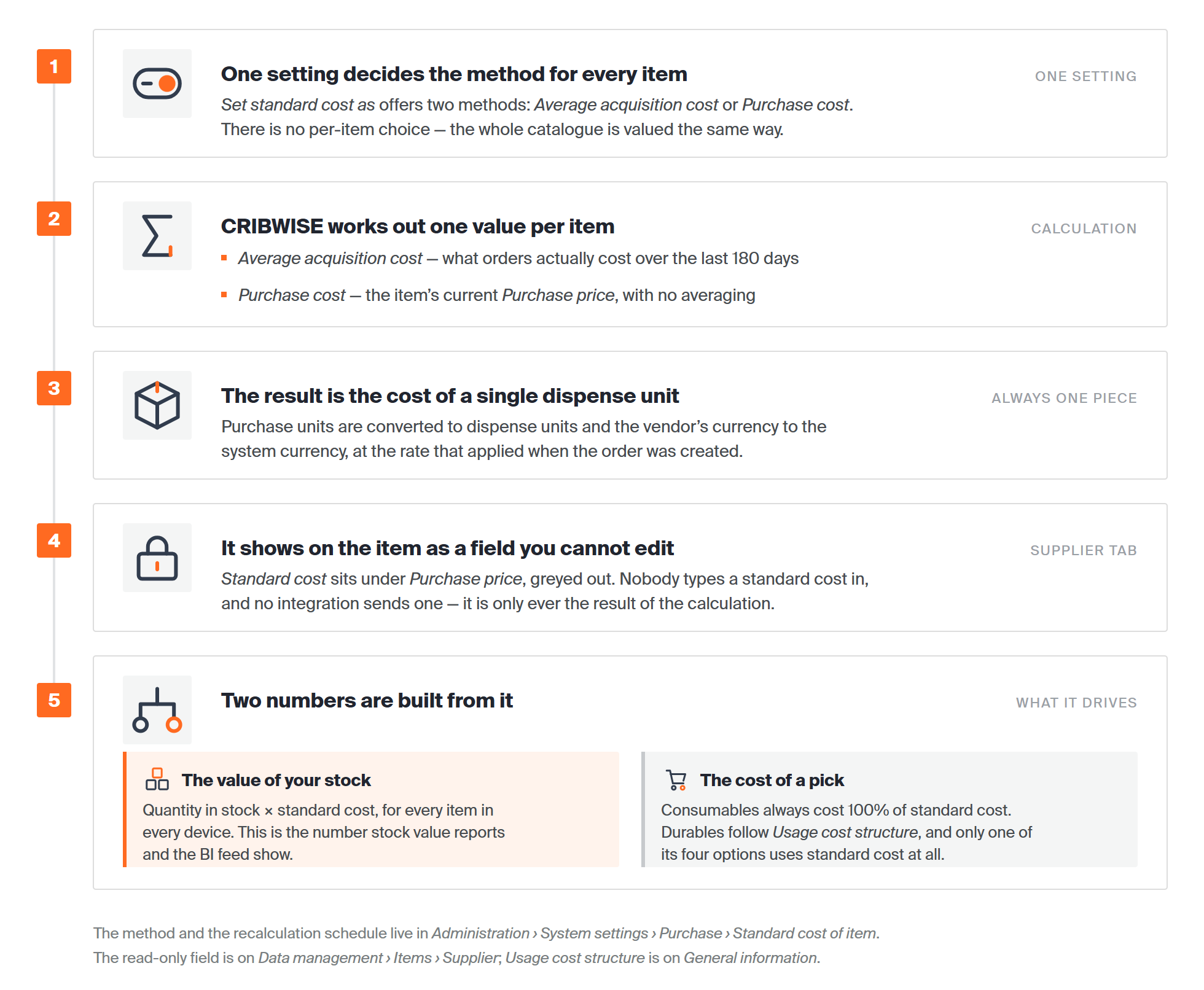
Where an item’s standard cost comes from, and what it is used for.
What standard cost actually is
Standard cost is CRIBWISE’s own unit value for an item – one number per item that the system reaches for whenever it has to put money on that item. Three things define it:
- It is calculated, never entered. On the item’s Supplier tab, Standard cost is greyed out and cannot be typed into. No integration sets it either: the ERP item interface sends a purchase price, not a standard cost. It is only ever the output of the calculation described below.
- It is one value per item, for the whole system. Not per device, not per stock, not per transaction. Two devices holding the same item value it identically.
- It is the cost of a single dispense unit, in the system currency. Purchase units are converted to dispense units, and the vendor’s currency to the system currency, using the conversion ratio valid when the order was created.

On the item’s Supplier tab: (1) Purchase price, which you maintain; (2) Purchase gross price, which never affects standard cost; (3) Standard cost, greyed out because the system calculates it. All three are shown per piece in the system currency.
It helps to be clear about what standard cost is not:
- It is not the price on a particular invoice. With Average acquisition cost it is a rolling average across recent orders, so it can differ from the price you last paid.
- It is not what the operator is charged for a pick. That is usage cost, and only some of the ways of calculating usage cost use standard cost at all.
- It is not something you can tune for one site. The calculation method is a single system-wide setting.
Note: Standard cost is always shown in the dispense unit of measure and in the system currency.
Where standard cost is used
| Used for | How |
|---|---|
| The value of your stock | Quantity in stock × standard cost, for every item in every device. This is the figure stock value reports show. |
| The cost of a pick | Consumable items always generate a usage cost of 100% of standard cost. Durable items follow their Usage cost structure setting, which may or may not use standard cost. |
| Reporting and BI | The BI item-level feed publishes StandardCost per item alongside a TotalCost for the quantity held. |
The two calculation methods
The method is common to all items – it cannot be set per item – and is chosen with Set standard cost as in system settings, under Purchase › Standard cost of item.
| Average acquisition cost | Purchase cost | |
|---|---|---|
| Based on | All purchase and service orders sent in the past 180 days. | The current purchase price of the item. |
| Updated when | A recalculation runs. | The purchase price changes – automatically. |
| Represents | The average cost of getting one more item into production. | What the item costs to buy right now. |
| Choose it when | Prices move and you want stock valued at what you actually paid. | You want standard cost to track the price list with no lag. |
Average acquisition cost
Standard cost is the average cost of obtaining an additional item for production: the average price of new items purchased and the average price of servicing items from production, over all purchase and service orders sent in the past 180 days.

The formula behind the average acquisition cost.
The total price from purchase orders is converted from purchase units to dispense units, and from the vendor’s currency to the system currency, using the conversion ratio valid when the order was created. Standard cost then expresses the cost of a single dispense unit.
Where an item has no purchase or service orders in the past 180 days, standard cost is set to the current price per piece at the time of recalculation. For a new item, it is set from the price per piece when the item is first saved.
Purchase cost
Standard cost follows the current purchase price of the item. Whenever the purchase price is updated, standard cost is updated with it, recalculated to dispense units and system currency using the conversion ratio valid at the time of the change. The purchase gross price does not affect standard cost.
Recalculation
Recalculation reflects any change that affects standard cost.
- With average acquisition cost, it re-checks all orders from the past 180 days.
- With purchase cost, standard cost already updates with every price change, so recalculation picks up later changes in the currency conversion ratio between the vendor’s currency and the system currency.
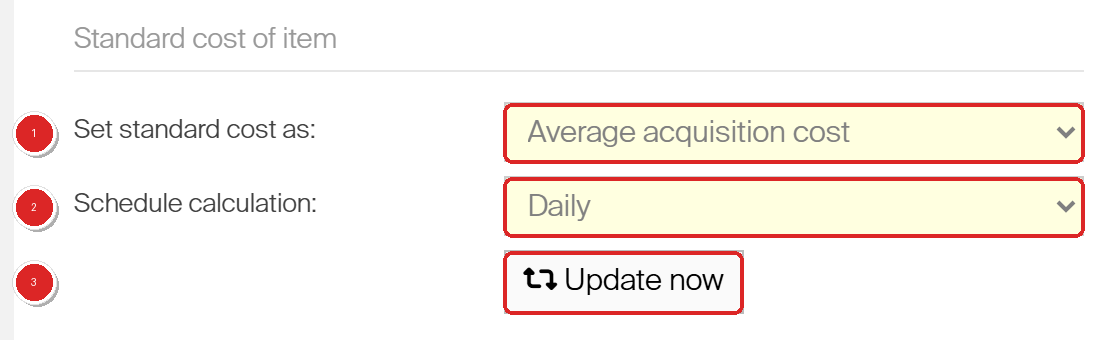
System settings › Purchase › Standard cost of item: (1) Set standard cost as chooses the method for every item; (2) Schedule calculation sets how often the recalculation runs; (3) Update now runs it immediately.
Schedule calculation offers Never, Daily, Weekly, Monthly and Yearly. Update now runs the recalculation on demand, without waiting for the schedule.
Important: After changing the calculation method, select Update now so the new setting takes effect. Existing standard costs are not rewritten until a recalculation runs.
Usage cost
Usage cost is the cost of a pick. For consumable items, each pick generates a usage cost of 100% of standard cost, and there is nothing to configure – the field does not appear on a consumable item at all. For durable items you choose how usage cost is generated with Usage cost structure on the item’s General information tab:
| Usage cost structure | How usage cost is calculated | Field it adds |
|---|---|---|
| Percentage of standard cost | A percentage of the item’s standard cost per dispense unit. The only option that uses standard cost. | Value, in % |
| Fixed per pick | A manually set cost per dispense unit. Standard cost is not involved. | Cost |
| Per time in cost allocation | A cost for each period the item is out in production, between pick and return. Standard cost is not involved. | Time specification and Cost |
| Per item state | Depends on the state of the picked item: a new item costs its purchase price per dispense unit, a refurbished item its service price, and a used item nothing. Standard cost is not involved. | None – the prices come from the Supplier tab |

Usage cost structure on a durable item: (1) the calculation method; (2) the field it adds – here Value, a percentage of standard cost.
Note: For assemblies, standard cost is calculated from all the durable items used in the assembly.
Common confusion
| People often think… | But actually… |
|---|---|
| Standard cost can be typed in on the item. | The field is read-only. It only changes when the calculation runs. |
| Standard cost is the price paid on the last order. | With Average acquisition cost it is an average over 180 days of orders, so it can differ from the latest price. |
| The calculation method can be set per item. | It is a single system-wide setting that applies to the whole catalogue. |
| Changing the method updates the costs at once. | A recalculation must be run afterwards, with Update now or on the schedule. |
| Usage cost always comes from standard cost. | Only Percentage of standard cost uses it. The other three durable options ignore it entirely. |
| Standard cost is shown in the vendor’s currency. | Always in the system currency, per dispense unit. |
| The purchase gross price feeds into standard cost. | It does not. Only the purchase price and the service price are used. |
Take action
Choose the method with Set standard cost as in Administration › System settings › Purchase › Standard cost of item, then select Update now to recalculate – or set Schedule calculation so it runs by itself. To see the result, open any item and look at Standard cost on its Supplier tab.
Related articles
- All system settings quick reference – where the calculation method and the recalculation schedule live.
- Item fields and settings reference – every field on an item, including Usage cost structure and the Supplier tab prices.
- How to configure currencies for purchasing – the conversion ratios used in the calculation.
- How to create and manage cost allocation sets – what Per time in cost allocation books the usage cost against.
- Understanding assemblies: bill of materials, cost, and stock – how an assembly derives its cost.
- Default reports reference: 19 built-in reports – where stock value and usage cost are reported.