
What you can do
Send CRIBWISE purchase, stock, and transaction data to your ERP or other business system automatically, as XML files. You choose which events to send, where to deliver them (FTP, e-mail, or a web service), and how often.
Each event type is a separate sending interface. When an interface is active, CRIBWISE builds an XML file from the data changed since the last run and delivers it to the channels you selected.
Before you start
- You need Admin Portal access with permission to open Administration > Integration.
- Have your destination ready: an FTP or SFTP server, an e-mail address, or a web service endpoint that can receive the files.
- Decide which events you want to export. See What each interface sends below.
Important: Most interfaces send only data created after you activate them. Events that happened before activation are not exported. The two exceptions are Send stocks values and Send serialized items status, which always send the full current state.
Quick start
Experienced users — set up an export in 5 steps:
- Open Administration > Integration > ERP settings.
- Tick the interfaces you want under Active interfaces.
- Choose a delivery format (FTP, E-mail, or Web service) and fill in its fields.
- Set the Sending interval.
- Click Save.
Need more detail? Follow the full steps below.
Steps
Step 1 — Open the ERP settings screen
In the Admin Portal, go to Administration, open Integration, then select ERP settings.
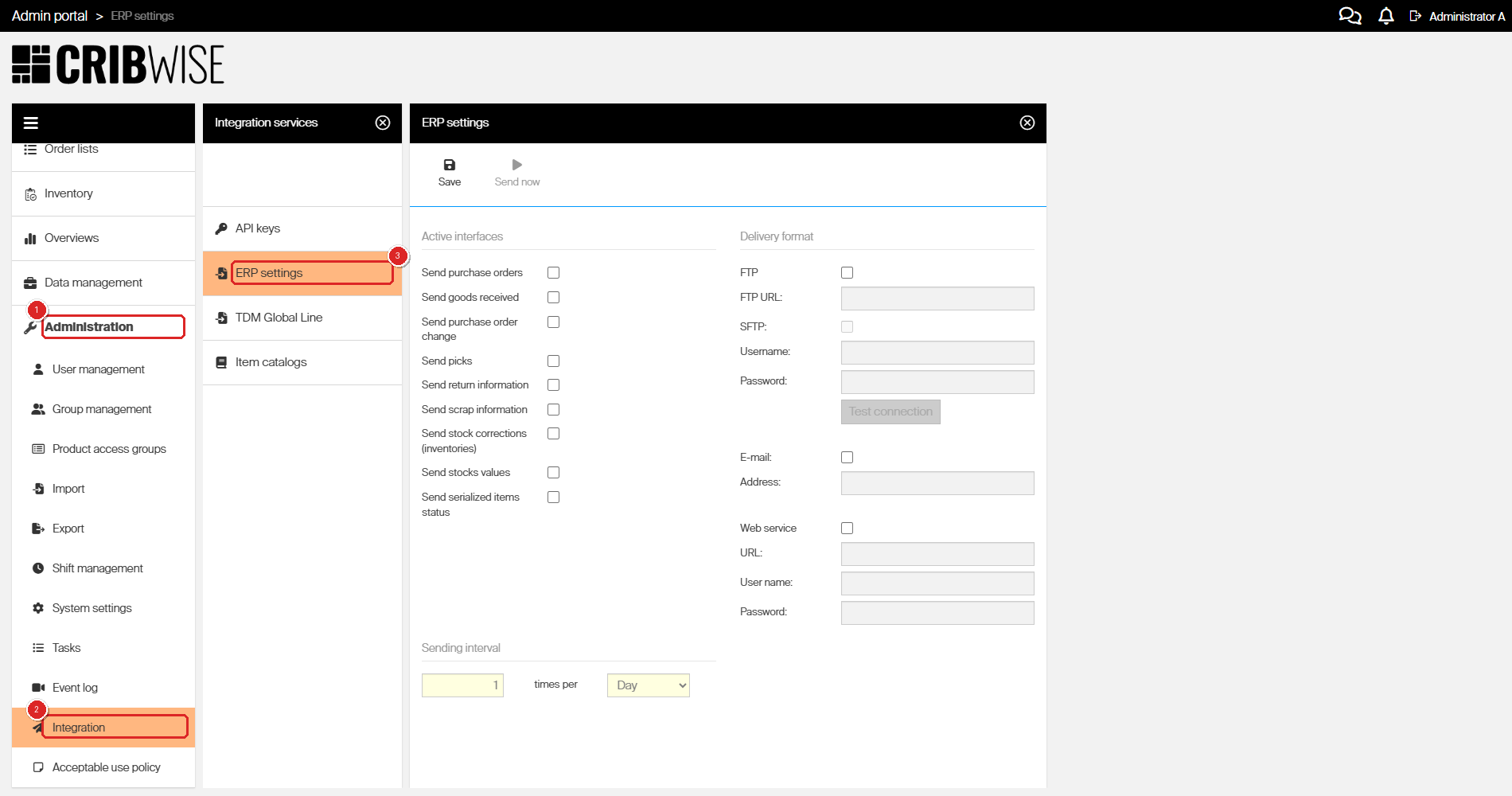
The ERP settings screen lives under Administration > Integration.
Step 2 — Activate the interfaces you need
Under Active interfaces, tick each event you want to export. Each ticked interface produces its own XML file. Leave the rest unticked.
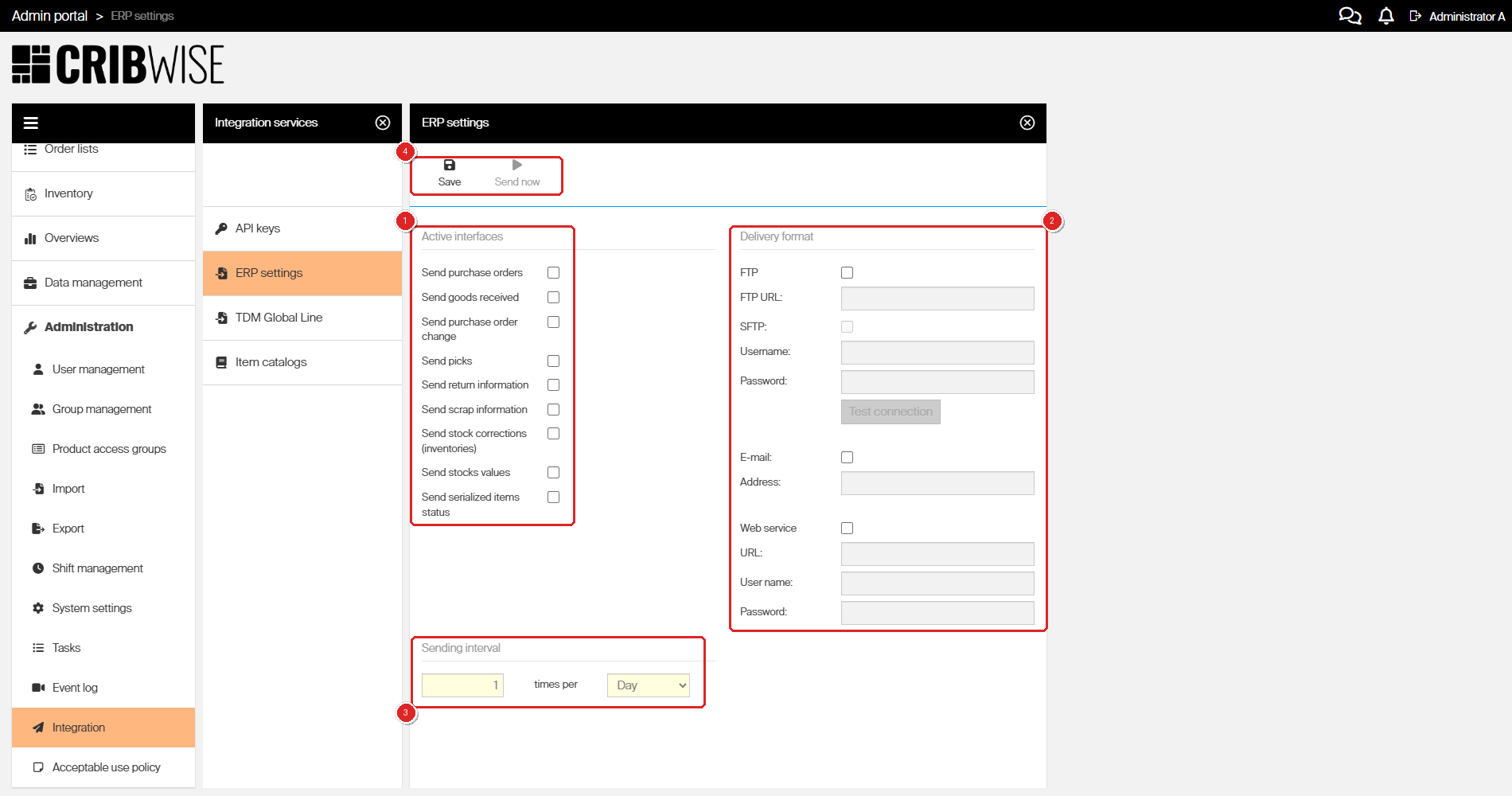
The ERP settings screen: (1) the interfaces to send, (2) the delivery format, (3) how often to send, and (4) Save / Send now.
Not sure what each one exports? See What each interface sends.
Step 3 — Choose how the data is delivered
Under Delivery format, turn on one or more channels and fill in the connection details. You can send to several channels at once.
| Channel | What to enter | How the file is delivered |
|---|---|---|
| FTP / SFTP | Server URL, username, and password. Tick SFTP for a secure connection. Use Test connection to check the credentials. | One XML file per active interface is uploaded to the server. Files always go to the user’s root folder — a path to a specific sub-folder is not supported. The URL may include a port number. |
| A recipient address. | Each active interface is sent as a separate e-mail with the XML file attached. | |
| Web service | Endpoint URL, plus an optional username and password for basic authentication. | Each active interface is posted to the endpoint. The request is multipart/form-data with the XML supplied as a file stream. |
Step 4 — Set the sending interval
Under Sending interval, enter a number and choose Hour or Day — for example, 1 time per Hour. At each interval, CRIBWISE checks whether there is anything new to send for your active interfaces and, if so, builds and delivers the files.
Note: Only Send stocks values and Send serialized items status send at every interval regardless of activity — they always report the current state.
Step 5 — Save (and send a test)
- Click Save to store the configuration.
- To push the data immediately instead of waiting for the next interval, click Send now.
Success: Your settings are saved, the interfaces you ticked stay selected, and files begin arriving at your chosen channels on schedule (or straight away if you used Send now).
What each interface sends
| Interface | Sends | When |
|---|---|---|
| Send purchase orders | The complete purchase order with all ordered items. | When a new order is set to active. |
| Send goods received | The goods received against an order. A decrease is shown as a negative quantity. | When goods are received. |
| Send purchase order change | The old and new status of an order. | When an order status changes. |
| Send picks | All picks made on the Shop Floor Interface since the last run. | Each interval. |
| Send return information | All returns since the last run. | Each interval. |
| Send scrap information | All scrap operations since the last run. | Each interval. |
| Send stock corrections (inventories) | All physical quantity changes made during inventory since the last run. | Each interval. |
| Send stocks values | Current stock quantities and their value (quantity × standard cost), per stock, device, item, and condition. | Every interval — always the full current state. |
| Send serialized items status | All serialized items and their instances (serial numbers), with location, state, and service information. | Every interval — always the full current state. |
Note: Item descriptions follow your system language when a translation exists. Every XML file carries CustomerId and CustomerShortName in its root element. Dates are in UTC, and purchase-order quantities are in the purchase unit of measure.
XML schema reference
Each interface produces an XML file that validates against the schema below. The shared types are defined in XSD common types at the end.
Send purchase orders
Contains each newly active order and its items. Expected date is in UTC. The target device appears at PurchaseOrder level for device-level orders, or at OrderItem level for stock-level orders. Quantities are in the purchase unit of measure.
<?xml version="1.0" encoding="UTF-8"?>
<xs:schema xmlns:xs="http://www.w3.org/2001/XMLSchema"
 xmlns:commonType="http://sandvik/smartsupply/CommonTypes"
 xmlns="http://sandvik/smartsupply/Purchase/PurchaseOrderReport"
 targetNamespace="http://sandvik/smartsupply/Purchase/PurchaseOrderReport"
 elementFormDefault="qualified" >
 <xs:import namespace="http://sandvik/smartsupply/CommonTypes" schemaLocation="CommonTypes.xsd"/>  <xs:element name="PurchaseOrder" >
 <xs:complexType>
 <xs:sequence>
 <xs:element name="CustomerId" type="xs:int" />
 <xs:element name="CustomerShortName" type="commonType:String50CharMax" nillable="false" />
 <xs:element name="Orders" type="Order" maxOccurs="unbounded" />
 <xs:element name="Currency" type="xs:string" />
 </xs:sequence>
 </xs:complexType>
 </xs:element>  <xs:complexType name="Order">
 <xs:sequence>
 <xs:element name="OrderId" type="commonType:String50CharMax"/>
 <xs:element name="OrderDate" type="xs:dateTime"/>
 <xs:element name="Status" type="commonType:OrderStatus" />
 <xs:element name="OrderType" type="commonType:OrderType" />
 <xs:element name="Vendor" type="commonType:String100CharMax" />
 <xs:element name="VendorId" type="commonType:String50CharMax" />
 <xs:element name="Stock" type="commonType:String100CharMax" />
 <xs:element name="Device" type="commonType:String100CharMax" />
 <xs:element name="DeviceId" type="commonType:String50CharMax" />
 <xs:element name="PurchaseOrderReference" type="commonType:String400CharMax" nillable="true" />
 <xs:element name="OrderItems" type="OrderItem" maxOccurs="unbounded" />
 </xs:sequence>
 </xs:complexType>  <xs:complexType name="OrderItem">
 <xs:sequence>
 <xs:element name="Device" type="commonType:String100CharMax" />
 <xs:element name="DeviceId" type="commonType:String50CharMax" />
 <xs:element name="ItemId" type="commonType:String50CharMax" />
 <xs:element name="ItemName" type="commonType:String100CharMax" />
 <xs:element name="ItemDescription" type="commonType:String400CharMax" />
 <xs:element name="TotalPrice" nillable="true" type="xs:decimal" />
 <xs:element name="Currency" type="commonType:String100CharMax" />
 <xs:element name="Vendor" type="commonType:String100CharMax" />
 <xs:element name="VendorId" type="commonType:String50CharMax" />
 <xs:element name="OrderCode" type="commonType:String50CharMax" />
 <xs:element name="Quantity" type="xs:decimal" />
 <xs:element name="UnitOfMeasure" type="xs:string" nillable="true"/>
 <xs:element name="ExpectedDate" type="xs:dateTime" nillable="true"/>
 <xs:element name="ItemCustomFields" type="commonType:ItemCustomFieldsType" minOccurs="0" nillable="true" />
 </xs:sequence>
 </xs:complexType>
</xs:schema>
Send goods received
Generated when goods are received. A decrease is shown as a negative quantity. Quantities are in the purchase unit of measure.
<?xml version="1.0" encoding="UTF-8"?>
<xs:schema xmlns:xs="http://www.w3.org/2001/XMLSchema"
 xmlns:commonType="http://sandvik/smartsupply/CommonTypes"
 xmlns="http://sandvik/smartsupply/Purchase/GoodsReceivedReport"
 targetNamespace="http://sandvik/smartsupply/Purchase/GoodsReceivedReport"
 elementFormDefault="qualified">
 <xs:import namespace="http://sandvik/smartsupply/CommonTypes" schemaLocation="CommonTypes.xsd"/>  <xs:element name="GoodsReceived" >
 <xs:complexType>
 <xs:sequence>
 <xs:element name="CustomerId" type="xs:int" />
 <xs:element name="CustomerShortName" type="commonType:String50CharMax" nillable="false" />
 <xs:element name="Orders" type="GoodsReceivedItem" maxOccurs="unbounded" />
 </xs:sequence>
 </xs:complexType>
 </xs:element>  <xs:complexType name="GoodsReceivedItem">
 <xs:sequence>
 <xs:element name="Device" type="commonType:String100CharMax" />
 <xs:element name="DeviceId" type="commonType:String50CharMax" />
 <xs:element name="ItemId" type="commonType:String50CharMax" />
 <xs:element name="ItemName" type="commonType:String100CharMax" />
 <xs:element name="ItemDescription" type="commonType:String400CharMax" />
 <xs:element name="Quantity" type="xs:decimal" /> <xs:element name="UnitOfMeasure" type="xs:string" minOccurs="0" nillable="true" />
 <xs:element name="Vendor" type="commonType:String100CharMax" />
 <xs:element name="VendorId" type="commonType:String50CharMax" />
 <xs:element name="OrderCode" type="commonType:String50CharMax" />
 <xs:element name="OrderId" type="commonType:String50CharMax" />
 <xs:element name="User" type="commonType:String100CharMax" />
 <xs:element name="UserFirstName" type="commonType:String100CharMax" minOccurs="0" nillable="true" />
 <xs:element name="UserLastName" type="commonType:String100CharMax" minOccurs="0" nillable="true" />
 <xs:element name="UserGroup" type="commonType:String100CharMax" />
 <xs:element name="ItemCustomFields" type="commonType:ItemCustomFieldsType" minOccurs="0" nillable="true" />
 </xs:sequence>
 </xs:complexType>
</xs:schema>
Send purchase order change
Generated when an order status changes.
<?xml version="1.0" encoding="UTF-8"?>
<xs:schema xmlns:xs="http://www.w3.org/2001/XMLSchema"
 xmlns:commonType="http://sandvik/smartsupply/CommonTypes"
 xmlns="http://sandvik/smartsupply/Purchase/PurchaseOrderChangeReport"
 targetNamespace="http://sandvik/smartsupply/Purchase/PurchaseOrderChangeReport"
 elementFormDefault="qualified">
 <xs:import namespace="http://sandvik/smartsupply/CommonTypes" schemaLocation="CommonTypes.xsd"/>  <xs:element name="PurchaseOrderChange" >
 <xs:complexType>
 <xs:sequence>
 <xs:element name="CustomerId" type="xs:int" />
 <xs:element name="CustomerShortName" type="commonType:String50CharMax" nillable="false" />
 <xs:element name="Orders" type="OrderChangeItem" maxOccurs="unbounded" />
 </xs:sequence>
 </xs:complexType>
 </xs:element>  <xs:complexType name="OrderChangeItem">
 <xs:sequence>
 <xs:element name="OrderId" type="commonType:String50CharMax"/>
 <xs:element name="VendorId" type="commonType:String50CharMax" />
 <xs:element name="TimeStamp" type="xs:dateTime"/>
 <xs:element name="OldStatus" type="commonType:OrderStatus" />
 <xs:element name="NewStatus" type="commonType:OrderStatus" />
 <xs:element name="Message" type="xs:string" />
 </xs:sequence>
 </xs:complexType> </xs:schema>
Send picks
Generated when a pick made on the SFI is synchronized to the Admin Portal. All picks since the last run are in one file.
<?xml version="1.0" encoding="utf-8" ?>
<xs:schema xmlns:xs="http://www.w3.org/2001/XMLSchema"
 xmlns:commonType="http://sandvik/smartsupply/CommonTypes"
 xmlns="http://sandvik/smartsupply/erp/events"
 targetNamespace="http://sandvik/smartsupply/erp/events"
 elementFormDefault="qualified">
 <xs:import namespace="http://sandvik/smartsupply/CommonTypes" schemaLocation="CommonTypes.xsd"/>  <xs:element name="PicksReport" >
 <xs:complexType>
 <xs:sequence>
 <xs:element name="CustomerId" type="xs:int" />
 <xs:element name="CustomerShortName" type="commonType:String50CharMax" nillable="false" />
 <xs:element name="Picks" type="PickType" maxOccurs="unbounded" />
 </xs:sequence>
 </xs:complexType>
 </xs:element>  <xs:complexType name="PickType">
 <xs:complexContent>
 <xs:extension base="commonType:EventType">
 <xs:sequence>
 <xs:sequence>
 <xs:element name="CostAllocations" type="commonType:CostAllocationType" minOccurs="0" maxOccurs="8" />
 </xs:sequence>
 </xs:sequence>
 </xs:extension>
 </xs:complexContent>
 </xs:complexType>
</xs:schema>
Send return information
Generated when a return made on the SFI is synchronized to the Admin Portal. All returns since the last run are in one file.
<?xml version="1.0" encoding="utf-8" ?>
<xs:schema xmlns:xs="http://www.w3.org/2001/XMLSchema"
 xmlns:commonType="http://sandvik/smartsupply/CommonTypes"
 xmlns="http://sandvik/smartsupply/erp/events"
 targetNamespace="http://sandvik/smartsupply/erp/events"
 elementFormDefault="qualified">
 <xs:import namespace="http://sandvik/smartsupply/CommonTypes" schemaLocation="CommonTypes.xsd"/>  <xs:element name="ReturnsReport" >
 <xs:complexType>
 <xs:sequence>
 <xs:element name="CustomerId" type="xs:int" />
 <xs:element name="CustomerShortName" type="commonType:String50CharMax" nillable="false" />
 <xs:element name="Returns" type="ReturnType" maxOccurs="unbounded" />
 </xs:sequence>
 </xs:complexType>
 </xs:element>  <xs:complexType name="ReturnType">
 <xs:complexContent>
 <xs:extension base="commonType:EventType">
 <xs:sequence>
 <xs:element name="TypeOfReturn" type="xs:string" nillable="true"/>
 <xs:sequence>
 <xs:element name="CostAllocations" type="commonType:CostAllocationType" minOccurs="0" maxOccurs="8" />
 </xs:sequence>
 </xs:sequence>
 </xs:extension>
 </xs:complexContent>
 </xs:complexType>
</xs:schema>
Send scrap information
Generated when a scrap made on the SFI is synchronized to the Admin Portal. All scrap operations since the last run are in one file.
<?xml version="1.0" encoding="utf-8" ?>
<xs:schema xmlns:xs="http://www.w3.org/2001/XMLSchema"
 xmlns:commonType="http://sandvik/smartsupply/CommonTypes"
 xmlns="http://sandvik/smartsupply/erp/events"
 targetNamespace="http://sandvik/smartsupply/erp/events"
 elementFormDefault="qualified">
 <xs:import namespace="http://sandvik/smartsupply/CommonTypes" schemaLocation="CommonTypes.xsd"/>  <xs:element name="ScrapsReport" >
 <xs:complexType>
 <xs:sequence>
 <xs:element name="CustomerId" type="xs:int" />
 <xs:element name="CustomerShortName" type="commonType:String50CharMax" nillable="false" />
 <xs:element name="Scraps" type="ScrapType" maxOccurs="unbounded" />
 </xs:sequence>
 </xs:complexType>
 </xs:element>  <xs:complexType name="ScrapType">
 <xs:complexContent>
 <xs:extension base="commonType:EventType">
 <xs:sequence>
 <xs:element name="TypeOfReturn" type="xs:string" nillable="true"/>
 <xs:element name="Reason" type="xs:string" nillable="true" />  <xs:sequence>
 <xs:element name="CostAllocations" type="commonType:CostAllocationType" minOccurs="0" maxOccurs="8" />
 </xs:sequence>
 </xs:sequence>
 </xs:extension>
 </xs:complexContent>
 </xs:complexType>
</xs:schema>
Send stock corrections (inventories)
Generated when a stock correction (inventory) made on the SFI is synchronized to the Admin Portal. All corrections since the last run are in one file.
<?xml version="1.0" encoding="utf-8" ?>
<xs:schema xmlns:xs="http://www.w3.org/2001/XMLSchema"
 xmlns:commonType="http://sandvik/smartsupply/CommonTypes"
 xmlns="http://sandvik/smartsupply/erp/events"
 targetNamespace="http://sandvik/smartsupply/erp/events"
 elementFormDefault="qualified">
 <xs:import namespace="http://sandvik/smartsupply/CommonTypes" schemaLocation="CommonTypes.xsd"/>  <xs:element name="InventoriesReport" >
 <xs:complexType>
 <xs:sequence>
 <xs:element name="CustomerId" type="xs:int" />
 <xs:element name="CustomerShortName" type="commonType:String50CharMax" nillable="false" />
 <xs:element name="Inventories" type="InventoryType" maxOccurs="unbounded" />
 </xs:sequence>
 </xs:complexType>
 </xs:element>  <xs:complexType name="InventoryType">
 <xs:complexContent>
 <xs:extension base="commonType:EventType">
 <xs:sequence>
 <xs:element name="Reason" type="xs:string" />
 <xs:element name="ExpectedQuantity" type="xs:int" />
 </xs:sequence>
 </xs:extension>
 </xs:complexContent>
 </xs:complexType>
</xs:schema>
Send stocks values
Generated at every interval. Quantity in stock reflects the items in stock locations at the moment the report is built (dependent on device synchronization). Total value is quantity × item standard cost, per device, stock, and condition.
<?xml version="1.0" encoding="UTF-8"?>
<xs:schema xmlns:xs="http://www.w3.org/2001/XMLSchema"
 xmlns:commonType="http://sandvik/smartsupply/CommonTypes"
 xmlns="http://sandvik/smartsupply/Stock/SendStocksValueReport"
 targetNamespace="http://sandvik/smartsupply/Stock/SendStocksValueReport"
 elementFormDefault="qualified" >
 <xs:import namespace="http://sandvik/smartsupply/CommonTypes" schemaLocation="CommonTypes.xsd"/>  <xs:simpleType name="ItemTypeType">
 <xs:restriction base="xs:string">
 <xs:enumeration value="Unknown" />
 <xs:enumeration value="Consumable" />
 <xs:enumeration value="Durable" />
 </xs:restriction>
 </xs:simpleType>  <xs:complexType name="ItemCustomFieldsType">
 <xs:sequence>
 <xs:element name="CustomField" maxOccurs="unbounded">
 <xs:complexType>
 <xs:simpleContent>
 <xs:extension base="xs:string">
 <xs:attribute name="name" type="xs:string" use="required" />
 </xs:extension>
 </xs:simpleContent>
 </xs:complexType>
 </xs:element>
 </xs:sequence>
 </xs:complexType>
 <xs:element name="StocksValueReport" >
 <xs:complexType>
 <xs:sequence>
 <xs:element name="CustomerId" type="xs:int" />
 <xs:element name="CustomerShortName" type="commonType:String50CharMax" nillable="false" />
 <xs:element name="StocksValues" type="StockValue" maxOccurs="unbounded" />
 </xs:sequence>
 </xs:complexType>
 </xs:element>  <xs:complexType name="StockValue">
 <xs:sequence>
 <xs:element name="StockId" type="commonType:String50CharMax" nillable="false" />
 <xs:element name="StockName" type="commonType:String100CharMax" nillable="false" />
 <xs:element name="DeviceId" type="commonType:String50CharMax" nillable="false" />
 <xs:element name="DeviceName" type="commonType:String100CharMax" nillable="false" />
 <xs:element name="ItemId" type="commonType:String50CharMax" nillable="false" />
 <xs:element name="ItemName" type="commonType:String100CharMax" nillable="false" />
 <xs:element name="ItemDescription" type="commonType:String400CharMax" minOccurs="0" nillable="true" />
 <xs:element name="ItemType" type="ItemTypeType" />
 <xs:element name="QuantityInStock" type="xs:int" /> <xs:element name="UnitOfMeasure" type="xs:string" minOccurs="0" nillable="true" />
 <xs:element name="TotalValue" type="xs:decimal" />
 <xs:element name="IsSerialized" type="xs:boolean" />
 <xs:element name="ItemCustomFields" type="ItemCustomFieldsType" minOccurs="0" nillable="true" />
 </xs:sequence>
 </xs:complexType>
</xs:schema>
Send serialized items status
Generated at every interval, containing the current status of all serialized items and their instances.
<?xml version="1.0" encoding="utf-8"?>
<xs:schema id="SerializedItemsStatus"
 targetNamespace="http://sandvik/smartsupply/Stock/SerializedItemsStatusReport"
 elementFormDefault="qualified"
 xmlns="http://sandvik/smartsupply/Stock/SerializedItemsStatusReport"
 xmlns:xs="http://www.w3.org/2001/XMLSchema">
 <xs:element name="SerializedItemsStatusReport">
 <xs:complexType>
 <xs:sequence>
 <xs:element name="CustomerId" type="xs:int" />
 <xs:element name="CustomerShortName" type="commonType:String50CharMax" nillable="false" />
 <xs:element name="SerializedItemsStatuses" type="SerializedItemStatus" maxOccurs="unbounded" />
 </xs:sequence>
 </xs:complexType>
 </xs:element>  <xs:complexType name="SerializedItemStatus">
 <xs:sequence>
 <xs:element name="Id" type="xs:string"/>
 <xs:element name="Name" type="xs:string"/>
 <xs:element name="Description" type="xs:string"/>
 <xs:element name="VendorId" type="xs:string"/>
 <xs:element name="VendorName" type="xs:string"/>
 <xs:element name="VendorOrderCode" type="xs:string"/>
 <xs:element name="ManufacturerId" type="xs:string"/>
 <xs:element name="ManufacturerName" type="xs:string"/>
 <xs:element name="IsAssembly" type="xs:boolean"/>
 <xs:element name="Instances" type="SerializedInstance" maxOccurs="unbounded"/>
 <xs:element name="ItemCustomFields" type="ItemCustomFieldsType" minOccurs="0" nillable="true" />
 </xs:sequence>
 </xs:complexType>  <xs:complexType name="SerializedInstance">
 <xs:sequence>
 <xs:element name="SerialNumber" type="xs:string" />
 <xs:element name="InstanceStatus" type="xs:string" />
 <xs:element name="StockId" type="xs:string" />
 <xs:element name="StockName" type="xs:string" />
 <xs:element name="DeviceId" type="xs:string" />
 <xs:element name="DeviceName" type="xs:string" />
 <xs:element name="StorageDeviceName" type="xs:string" />
 <xs:element name="AvailabilityState" type="xs:string" />
 <xs:element name="StockLocationId" type="xs:string" />
 <xs:element name="StockLocationName" type="xs:string" />
 <xs:element name="LoanTimeEnds" type="xs:dateTime" nillable="true" />
 <xs:element name="ServiceInformation" type="ServiceInformation" maxOccurs="1" />
 </xs:sequence>
 </xs:complexType>  <xs:complexType name="ServiceInformation">
 <xs:sequence>
 <xs:element name="ServiceTriggerDate" type="xs:dateTime" nillable="true" />
 <xs:element name="TimePickedRemaining" type="xs:int" nillable="true" />
 <xs:element name="NumberOfPicksRemaining" type="xs:int" nillable="true" />
 <xs:element name="LastService" type="xs:dateTime" nillable="true" />
 <xs:element name="InActiveServiceOrder" type="xs:boolean" />
 </xs:sequence>
 </xs:complexType>  <xs:complexType name="ItemCustomFieldsType">
 <xs:sequence>
 <xs:element name="CustomField" maxOccurs="unbounded">
 <xs:complexType>
 <xs:simpleContent>
 <xs:extension base="xs:string">
 <xs:attribute name="name" type="xs:string" use="required" />
 </xs:extension>
 </xs:simpleContent>
 </xs:complexType>
 </xs:element>
 </xs:sequence>
 </xs:complexType>
</xs:schema>
XSD common types
The interfaces above share the following common schema:
<?xml version="1.0" encoding="utf-8"?>
<xs:schema id="CommonTypes"
 elementFormDefault="qualified"
 xmlns="http://sandvik/smartsupply/CommonTypes"
 targetNamespace="http://sandvik/smartsupply/CommonTypes"
 xmlns:xs="http://www.w3.org/2001/XMLSchema">  <xs:simpleType name="OrderStatus">
 <xs:restriction base="xs:string">
 <xs:enumeration value="None"/>
 <xs:enumeration value="New"/>
 <xs:enumeration value="Suggested"/>
 <xs:enumeration value="Active"/>
 <xs:enumeration value="Closed"/>
 <xs:enumeration value="Cancelled"/>
 </xs:restriction>
 </xs:simpleType>  <xs:simpleType name="OrderType">
 <xs:restriction base="xs:string">
 <xs:enumeration value="None"/>
 <xs:enumeration value="Purchase"/>
 <xs:enumeration value="Service"/>
 <xs:enumeration value="Calibration"/>
 </xs:restriction>
 </xs:simpleType>  <xs:simpleType name="ItemTypeType">
 <xs:restriction base="xs:string">
 <xs:enumeration value="Unknown" />
 <xs:enumeration value="Consumable" />
 <xs:enumeration value="Durable" />
 </xs:restriction>
 </xs:simpleType>  <xs:simpleType name="Character">
 <xs:restriction base="xs:string">
 <xs:maxLength value="1" />
 </xs:restriction>
 </xs:simpleType>  <xs:simpleType name="String50CharMax">
 <xs:restriction base="xs:string">
 <xs:maxLength value="50" />
 </xs:restriction>
 </xs:simpleType>  <xs:simpleType name="String100CharMax">
 <xs:restriction base="xs:string">
 <xs:maxLength value="100" />
 </xs:restriction>
 </xs:simpleType>  <xs:simpleType name="String400CharMax">
 <xs:restriction base="xs:string">
 <xs:maxLength value="400" />
 </xs:restriction>
 </xs:simpleType>  <xs:complexType name="CostAllocationType">
 <xs:sequence>
 <xs:element name="LevelId" type="String50CharMax" />
 <xs:element name="LevelName" type="String100CharMax" />
 <xs:element name="DefinitionId" type="String50CharMax" minOccurs="0" nillable="true" />
 <xs:element name="DefinitionValue" type="String100CharMax" minOccurs="0" nillable="true" />
 <xs:element name="CostCarrier" type="String400CharMax" minOccurs="0" nillable="true" />
 <xs:element name="Value" type="String400CharMax" minOccurs="0" nillable="true" />
 <xs:element name="IsPhysical" type="xs:boolean" /> </xs:sequence>
 </xs:complexType>  <xs:complexType name="ItemCustomFieldsType">
 <xs:sequence>
 <xs:element name="CustomField" maxOccurs="unbounded">
 <xs:complexType>
 <xs:simpleContent>
 <xs:extension base="xs:string">
 <xs:attribute name="name" type="xs:string" use="required" />
 </xs:extension>
 </xs:simpleContent>
 </xs:complexType>
 </xs:element>
 </xs:sequence>
 </xs:complexType>  <xs:complexType name="EventType">
 <xs:sequence>
 <xs:element name="Id" type="xs:string" />
 <xs:element name="ItemId" type="String50CharMax" />
 <xs:element name="ItemName" type="String100CharMax" />
 <xs:element name="ItemDescription" type="String400CharMax" minOccurs="0" nillable="true" />
 <xs:element name="ItemType" type="ItemTypeType" />
 <xs:element name="OrderCode" type="String50CharMax" />
 <xs:element name="ItemOwnClassification" type="Character" minOccurs="0" nillable="true" />
 <xs:element name="SerialNumber" type="String50CharMax" minOccurs="0" nillable="true" />
 <xs:element name="VendorId" type="String50CharMax" />
 <xs:element name="VendorName" type="String100CharMax" />
 <xs:element name="ManufacturerId" type="String50CharMax" minOccurs="0" nillable="true" />
 <xs:element name="ManufacturerName" type="String100CharMax" minOccurs="0" nillable="true" />
 <xs:element name="OrderId" type="String50CharMax" minOccurs="0" nillable="true" />
 <xs:element name="OrderReference" type="String400CharMax" minOccurs="0" nillable="true" />
 <xs:element name="CategoryId" type="String50CharMax" minOccurs="0" nillable="true" />
 <xs:element name="CategoryName" type="String100CharMax" minOccurs="0" nillable="true" />
 <xs:element name="CategoryPath" type="xs:string" minOccurs="0" nillable="true" />
 <xs:element name="StockId" type="String50CharMax" />
 <xs:element name="StockName" type="String100CharMax" />
 <xs:element name="DeviceId" type="String50CharMax" />
 <xs:element name="DeviceName" type="String100CharMax" />
 <xs:element name="StockLocationId" type="String50CharMax" />
 <xs:element name="StockLocationRule" type="xs:string" minOccurs="0" nillable="true" />
 <xs:element name="Quantity" type="xs:int" />
 <xs:element name="UnitOfMeasure" type="xs:string" minOccurs="0" nillable="true" />
 <xs:element name="IsConsignment" type="xs:boolean" />
 <xs:element name="IsAssembly" type="xs:boolean" />
 <xs:element name="IsSerialized" type="xs:boolean" />
 <xs:element name="Timestamp" type="xs:dateTime" />
 <xs:element name="ItemCustomFields" type="ItemCustomFieldsType" minOccurs="0" nillable="true" />
 <xs:element name="User" type="String100CharMax" />
 <xs:element name="UserFirstName" type="String100CharMax" minOccurs="0" nillable="true" />
 <xs:element name="UserLastName" type="String100CharMax" minOccurs="0" nillable="true" />
 <xs:element name="UserGroup" type="String100CharMax" />
 </xs:sequence>
 </xs:complexType>
</xs:schema>
Troubleshooting
| Problem | Likely cause | Fix |
|---|---|---|
| No files arrive after activating an interface | Most interfaces only send data created after activation, and only when there is new activity. | Create a matching event (for example, a pick), then wait for the next interval or click Send now. |
| FTP delivery fails | Wrong server URL or credentials, or the path points to a sub-folder. | Use Test connection to verify credentials. Point the URL at the server root — sub-folders are not supported. Include the port only if it is non-standard. |
| Web service returns an error | The endpoint rejects the request or the authentication is missing. | Confirm the endpoint accepts multipart/form-data with a file stream, and add the basic-auth username and password if required. |
| Stock values look out of date | Values depend on device synchronization at the moment the report is built. | Make sure the relevant devices are synchronized, then check the next report. |
Related articles
- How to set up custom data export (FTP, Azure, email) — export data on a schedule with more destination options.
- Getting started with the CRIBWISE API — pull data on demand instead of receiving scheduled files.
- CRIBWISE REST API — endpoint overview — the REST alternative to XML sending interfaces.
- How to integrate CRIBWISE with SAP — a full ERP integration example.
- BI interface — feed CRIBWISE data into business-intelligence tools.