
What you’ll learn
How FIFO decides which stock location an item is picked from in CRIBWISE, and why a restock changes that order. Understanding this explains why the same item is dispensed from one location for weeks and then suddenly from another.
FIFO at a glance
FIFO, or First In, First Out, is the method CRIBWISE uses to make sure the oldest stock is always issued first during a pick. It is built in, applies to both consumables and durables, and there is nothing to switch on.
| Picking | Restocking | |
|---|---|---|
| Does FIFO apply? | Yes — always | No |
| What decides the location order | Oldest stock first | Cabinet type, storage device ID, storage module order, location name |
| Effect on the queue | Drains the first location until it is empty | Moves the refilled location to the end of the queue |
| Can you turn it off? | No | — |
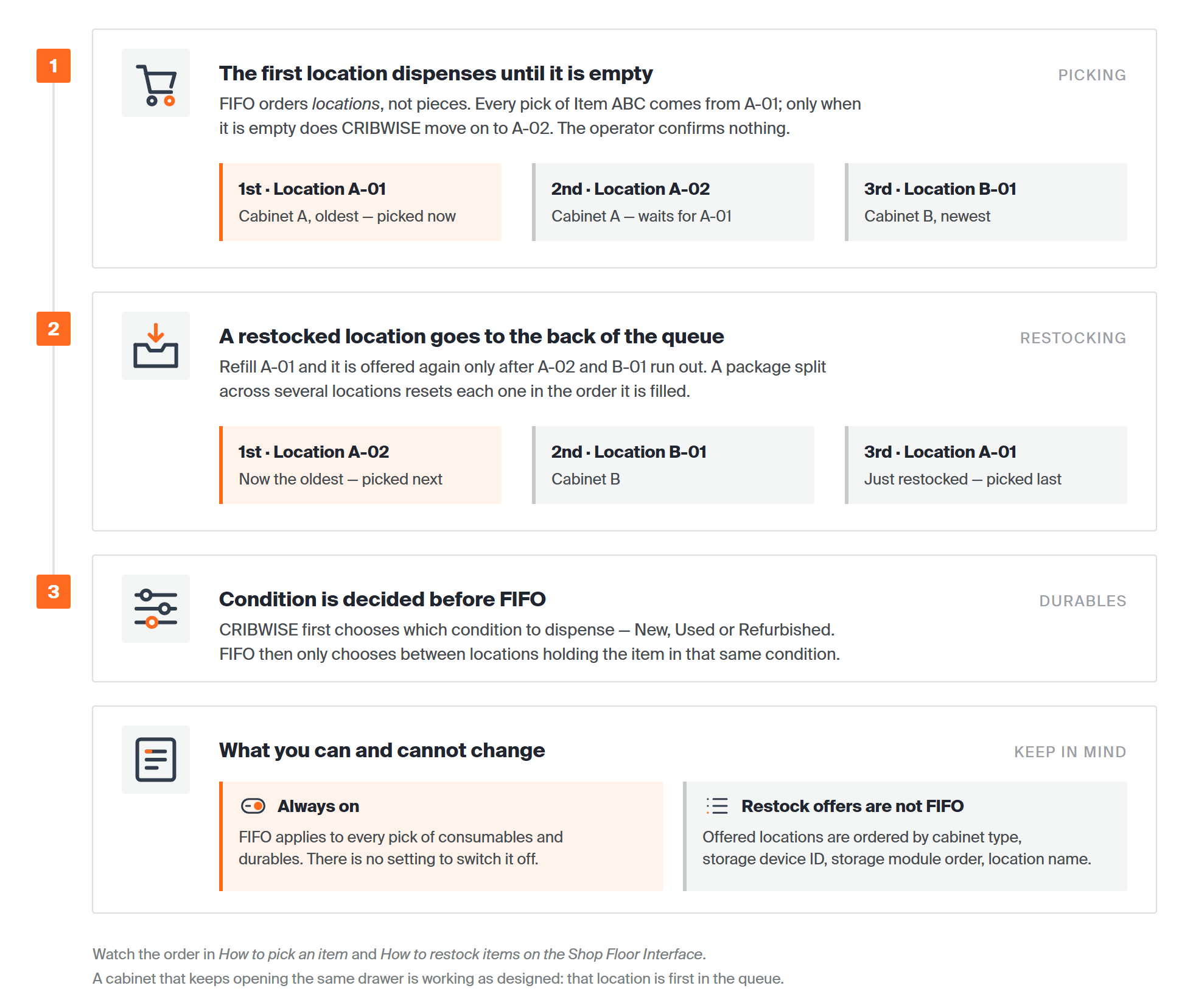
FIFO is a queue of stock locations. Picking empties the front of the queue; restocking sends a location to the back of it; for durables, condition is decided first.
How FIFO picks a location
When an operator picks an item, CRIBWISE records the location the item was picked from. That same location keeps dispensing until it is empty.
Once the location is empty, CRIBWISE moves on and issues the same item from the next location in the FIFO order. Nothing needs to be confirmed — the operator simply picks the item and the system chooses where it comes from.
Note: FIFO orders locations, not individual pieces. Two pieces sitting in the same location are interchangeable as far as FIFO is concerned.
FIFO and durables
For durables, the condition of the stock — New, Used or Refurbished — takes priority over FIFO. CRIBWISE first decides which condition to dispense, and only then applies FIFO within it.
FIFO is therefore applied only when there are several locations holding the same item in the same condition. If an item exists as both New and Refurbished, the condition decides the pick order before FIFO gets a say.
| Situation | What decides the location |
|---|---|
| Three locations, all New | FIFO — oldest of the three |
| One New location, one Refurbished | Condition — FIFO is not involved |
| Two New locations, one Refurbished | Condition first, then FIFO between the two New locations |
What restocking does to the queue
Restocking resets FIFO. When an item is restocked to a location, that location is placed at the end of the FIFO queue. The most recently restocked stock is always picked last, which is exactly what FIFO is for.
No FIFO logic applies during restocking. The locations offered for the restock are ordered by:
- Cabinet type
- Storage device ID
- Storage module order
- Location name
Important: A restock never jumps the queue. If you refill a location that operators have been picking from, that location will not be offered again until every other location holding the item is empty.
Splitting a package across locations
When a restocked package is large enough to be divided across several locations, each location is reset in the order it is refilled. This happens because the dispense quantity allows the package to be split — so the first location filled sits ahead of the second in the queue.
Common confusion
| People often think… | But actually… |
|---|---|
| FIFO is a setting that can be switched off. | FIFO is always enabled and cannot be turned off. |
| Restocking a location makes it the next one to dispense. | The opposite. A restocked location goes to the back of the queue. |
| The cabinet is broken because it keeps opening the same drawer. | That location is first in the FIFO queue. It will keep dispensing until it is empty. |
| FIFO picks the oldest durable regardless of condition. | Condition wins. FIFO only breaks ties between locations holding the same condition. |
| FIFO also decides where a restock is placed. | No FIFO logic applies during restocking. Locations are ordered by cabinet type, storage device ID, storage module order and location name. |
Take action
FIFO needs no configuration, so there is nothing to set up. To see it at work, follow How to pick an item and watch which location the item comes from. To see how a delivery changes the order, follow How to restock items on the Shop Floor Interface.
Related articles
- How to pick an item — the pick flow in which FIFO chooses the location.
- How to restock items on the Shop Floor Interface — the operation that sends a location to the back of the queue.
- Understanding stock structure: stocks, devices, and locations — what storage devices, storage modules and locations are.
- Item overview dashboard reference — where to see the quantity held per condition, per location.
- Managing serialized items and serial numbers — how New, Used and Refurbished are tracked on durable items.
- How to manage stock locations (Shop Floor Interface) — inspecting and correcting the locations a queue is built from.