
Admin Portal permissions reference
Read time: ~4 minutes
Applies to: Admin Portal
What you’ll learn
Every Admin Portal permission available in user groups — what it controls and when to enable it.
AP general privileges
These permissions control access to features within Admin Portal.
| Permission | What it controls |
|---|---|
| Perform inventory from admin portal | Start inventory of an open storage device from Admin Portal |
| Enable privileges override | Override user group settings for individual users |
| Export | Export data to Excel files |
| Import | Import data via Excel files |
| Manage consignment invoice requests | Manage consignment invoice requests — when disabled, automatic invoicing cannot be set up on vendor detail, invoice requests are hidden, and invoice templates cannot be managed |
| Manage integrations | Set up ERP sending interfaces, generate/read API keys, and manage integrations to third-party systems |
| Run tasks | Manually start periodic system tasks on demand (e.g., recalculation of access rights or reporting data generation) |
| Access event log | View the system event log |
| View item overviews | Access Item overview, Serialized items overview, and Picked items locations |
| Access dashboard | View the dashboard on the AP home screen and pin reports to it |
| ABC classification | Access and perform ABC classification of items based on historical consumption |
| Stock optimization | Access and perform stock optimization based on historical consumption and purchasing schedule |
AP entity privileges
These permissions control create, read, update, and delete (CRUD) access for specific objects in Admin Portal. Each entity can have up to four permissions:
| Permission | What it allows |
|---|---|
| Create | Add new records of this entity type |
| Read | View existing records |
| Update | Edit existing records |
| Delete | Remove records |
AP system settings privileges
These permissions control which tabs in System settings the user can access.
| Permission | Tab it unlocks |
|---|---|
| General settings | General settings tab |
| Stock administration | Stock administration tab |
| Purchase | Purchase tab |
| Access control | Access control tab (login policies, password rules) |
| Stock daily use | Stock daily use tab |
| Diagnostics | Diagnostics tab |
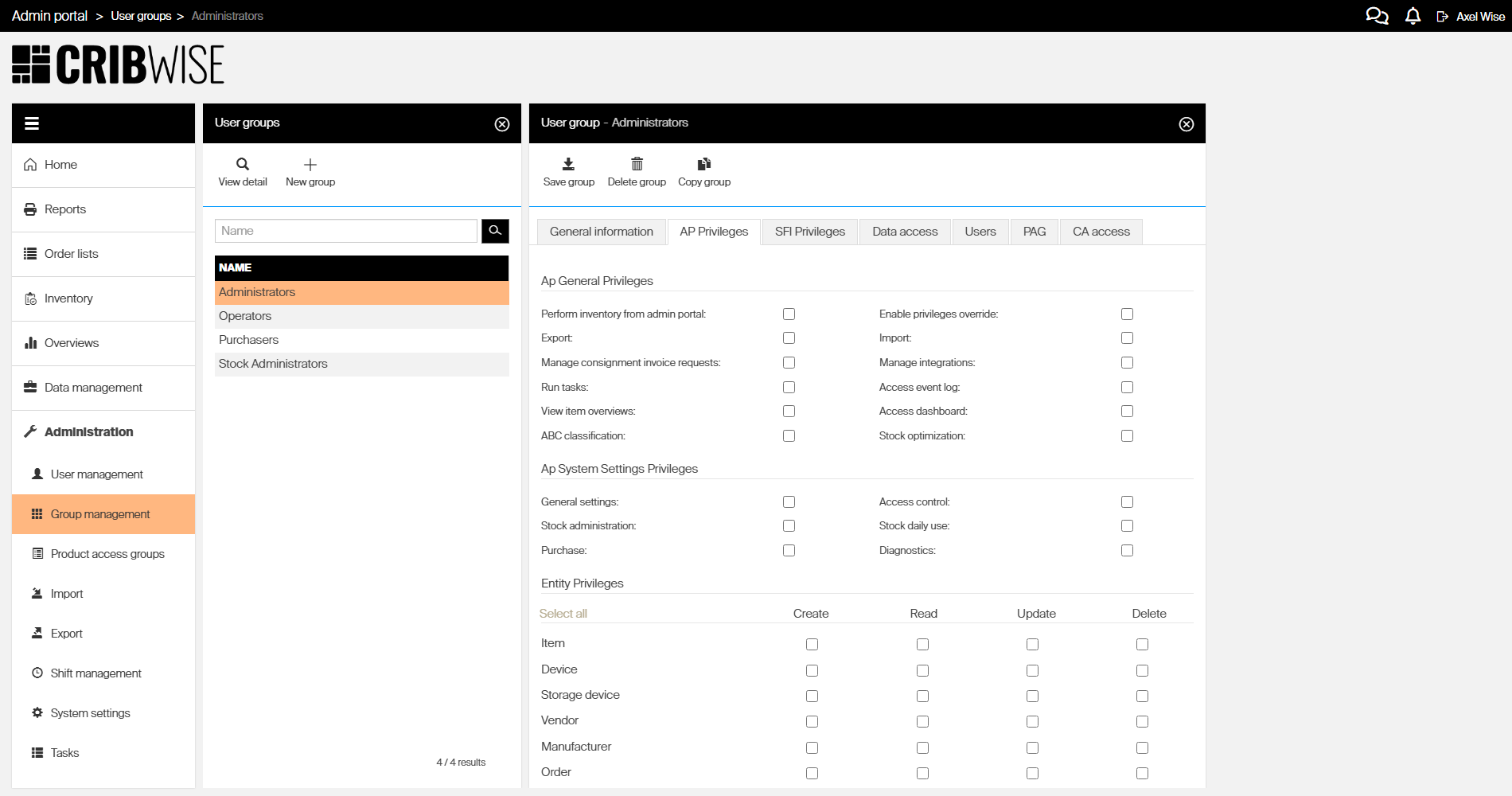
The AP Privileges tab in group management — checkboxes control each permission.
The Administrators shortcut
Enabling the Administrators checkbox on the General information tab grants full access to every AP and SFI feature — it overrides all privilege settings on the AP Privileges and SFI Privileges tabs.
However, data access restrictions still apply to administrators. If a stock, device, report, or vendor is restricted on the Data access tab, administrators cannot see it.
Important: Only grant Administrator status to users who genuinely need unrestricted access. For most roles, configure specific permissions instead.
Take action
Ready to configure these permissions? Go to How to create and configure a user group for the step-by-step guide.
Related articles
- How to create and configure a user group — how the permission model works
- How to create and configure a user group — step-by-step group setup
- SFI permissions reference — every SFI permission explained
- How to manage users and permissions — hub for all user management tasks
- System settings — configure system-wide settings