
Cost allocation serves to define structure and content of cost allocation specification to allow users properly allocate their picking and returning actions on Shop Floor Interface (SFI). Definition of cost allocation structure consists from steps/levels (up to eight) and values for these steps. These steps are set in specific order and have specific value type defined. Each type affects how users select the value:
- List – Possible values to select for this step are defined in AP, users are not allowed to enter different value than specified in the list on SFI. Their selection does not affect following steps
- Text – Users are allowed to enter any text value on SFI. Input can be restricted to number of characters. Validation list can be specified, then only values from this list are considered as correct. Their selection does not affect following steps
- Hierarchy – Every value (hierarchy unit) of this step can be assigned to a hierarchy (to another hierarchy unit from previous or following step with hierarchy type). Users are presented with values based on his selection on previous steps. Hierarchy units can have items and users assigned. Items assigned to specific unit affect content of item list shown during a picking flow, assignment of users affect what hierarchy units can user select during this step
Each step (except Hierarchy) can be set as mandatory or optional.
If step is selected as optional, user can skip it without specifying a value.
During pick/return flow on SFI users must specify values of all mandatory steps in the order defined by the cost allocation structure.
Structure, values and hierarchy are defined within Cost allocation set.
There can be one or more cost allocation sets. Each set has its own steps, values and hierarchy.
Each device is then possible to setup to use specific set – f.e. there can be different CA sets used in devices in different part of production.
Each device always uses single set. What set is used by device is defined by its stock or directly on device detail.
See Manage stocks and Manage device.
Terms definition
| Term | Definition |
| CA set | Definition of cost allocation structure, consisting from steps, values and hierarchy |
| Step/level | Part of cost allocation structure to identify cost allocation of pick or return |
| Step name | Name of the step identifying what value has to be selected (f.e. Machine, Work order) |
| Step value type | Defines how end-user selects step value |
| Cost allocation structure | Order and value types of steps (f.e. Production <hierarchy> -> Machine <hierarchy> -> Operation <list> -> Work order <text>) |
| Cost allocation unit | One specific value of specific step to be selected by end-user (f.e. Machine 1; Work order 1245687). Selection is based on step value type |
| Cost allocation hierarchy | Relations between Cost allocation hierarchy units (f.e. Production 1 -> Machine 1) |
| Cost allocation hierarchy unit | Specific type of Cost allocation unit. Can be related to other hierarchy units of previous or following steps to define hierarchy. Can have items or users assigned |
Definition of cost allocation
Definition of cost allocation involves following steps:
- Create CA set
- Define CA structure
- Define CA units
- Assign items and users to CA hierarchy units
- Connect CA hierarchy units to hierarchy
After all steps are performed, cost allocation can be set as shown bellow: 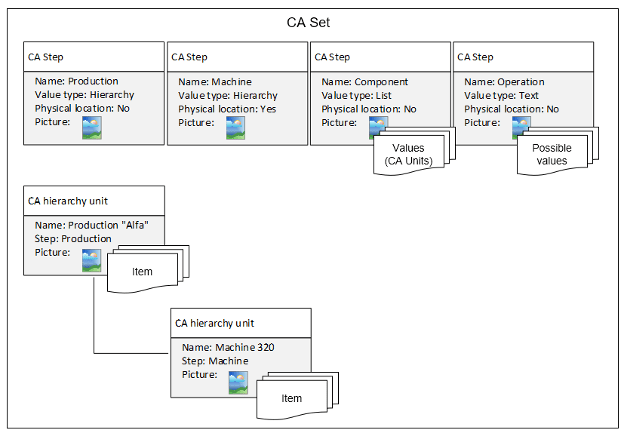
Cost allocation example
Following example demonstrates the concept of cost allocation. Structure is defined by these steps:
| Step number | Step name | Value type | Values |
| 1 | Production | Hierarchy | Production 1 Production 2 |
| 2 | Machine | Hierarchy | Machine 1 Machine 2 |
| 3 | Operation | List | Operation 1 Operation 2 |
| 4 | Work order | Text | N/A |
Values from steps Production and Machine are defined in following hierarchy:
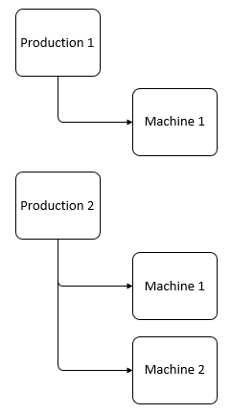
During picking process when cost allocation is about to be defined, user is presented with list of Productions as a first step.
After Production 1 is selected, all related machines to this selection are displayed as the second step.
In this case only Machine 1 will be visible.
After selection of machine list of operations is displayed. Because list value type is independent on previous selection, all values for operation will be listed as a third step.
After selection of operation (f.e. Operation 1) user is presented with text field to enter work order as a last step (f.e. ABC).
User enters text and confirms.
Cost allocation definition is complete, picked item will be allocated under Production 1 – Machine 1 – Operation 1 – Work order ABC.