
Following interfaces allow to work with pick lists.
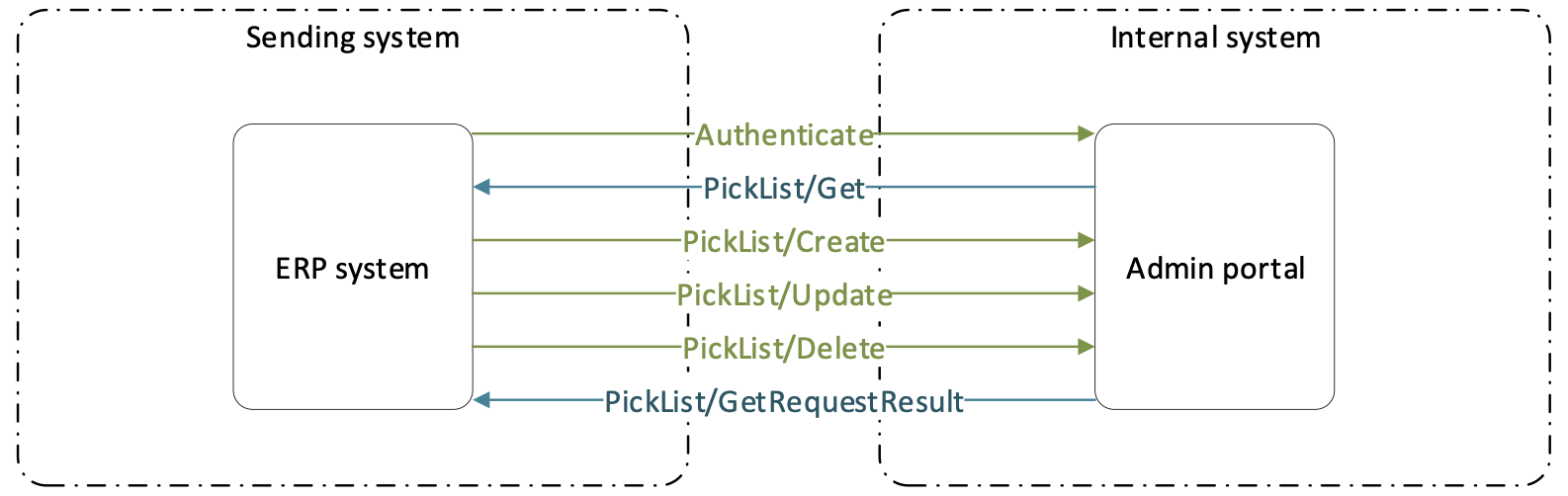
PickList/Get
URL
{url}/ERP/PickList/Get
Type GET
Description Interface returns all pick lists currently created for a customer. All pick lists are shown, even if pick list is not longer valid due to changes on CA or items.
Schema Type information are marked orange in the schema. Values marked in bold are mandatory information. Values marked in blue must refer to existing entity.
[
 {
 "Id": "string", 50
 "Name": "string", 100
 "CostAllocationSetId": "string", 50
 "CostAllocations": [
 {
 "StepType": "string", Step name
 "Value": "string" Value name
 }
 ],
 "Items": [
 {
 "Id": "string", Item business Id
 "QuantityForPick": 0
 }
 ],
 "Users": [
 "string"
 ],
 "UserGroups": [
 "string"
 ],
 "AllowChangeQuantity": true,
 "FixedQuantities": true, "TargetDate": "2021-12-10T09:58:01.950Z", "DeviceId": "string",
 "Status": "string" enum (Active, Invalid, Closed)
 }
]
PickList/Create
URL {url}/ERP/PickList/Create
Type POST
Description Interface allows to create a new pick lists. Pick list is identified by unique Id and name. Cost allocation set is mandatory to be specified only in case, when there is more than one CA set available. If only one set is available, it is automatically selected if it is not explicitly defined in the model. Cost allocation selection can be predefined for each pick list or left null to leave selection on user. If cost allocation is predefined, steps and values must match current settings in system. Reference to step type is by step name. Reference to value is by value name. List of items contains references to items available in the pick list. Quantity for each item is mandatory. Reference to item is by Item ID. Item must exist in system.
Schema Type information are marked orange in the schema. Values marked in bold are mandatory information. Values marked in blue must refer to existing entity. Same schema as from PickList/Get interface is supported. Parameters not allowed to be specified will be ignored.
[
 {
 "Id": "string", 50
 "Name": "string", 100
 "CostAllocationSetId": "string", 50
 "CostAllocations": [
 {
 "StepType": "string", Step name
 "Value": "string" Value name
 }
 ],
 "Items": [
 {
 "Id": "string", Item business Id
 "QuantityForPick": 0
 }
 ],
 "Users": [
 "string"
 ],
 "UserGroups": [
 "string"
 ],
 "AllowChangeQuantity": true,
 "FixedQuantities": true, "TargetDate": "2021-12-10T09:58:01.950Z", "DeviceId": "string",
 "Status": "string" enum (Active, Invalid, Closed)
 }
]
PickList/Update
URL
{url}/ERP/PickList/Update
Type POST
Description Interface allows to update existing pick lists. Existing pick list is identified by unique Id and name. List of CA and items is updated to match exactly information provided to update (update can result to clearing of CA or items from list if empty CA or item array is sent). Only information sent to the interface will be updated. It is not mandatory to provide complete schema. Cost allocation set is mandatory to be specified only in case, when there is more than one CA set available. If only one set is available, it is automatically selected if it is not explicitly defined in the model. Cost allocation selection can be predefined for each pick list or left null to leave selection on user. If cost allocation is predefined, steps and values must match current settings in system. Reference to step type is by step name. Reference to value is by value name. List of items contains references to items available in the pick list. Quantity for each item is mandatory. Reference to item is by Item ID. Item must exist in system.
Schema Type information are marked orange in the schema. Values marked in bold are mandatory information. Values marked in blue must refer to existing entity. Same schema as from PickList/Get interface is supported. Parameters not allowed to be specified will be ignored. Only updated parameters can be provided, with Id and Name as minimum for pick list identification.
[
 {
 "Id": "string", 50
 "Name": "string", 100
 "CostAllocationSetId": "string", 50
 "CostAllocations": [
 {
 "StepType": "string", Step name
 "Value": "string" Value name
 }
 ],
 "Items": [
 {
 "Id": "string", Item business Id
 "QuantityForPick": 0
 }
 ],
 "Users": [
 "string"
 ],
 "UserGroups": [
 "string"
 ],
 "AllowChangeQuantity": true,
 "FixedQuantities": true, "TargetDate": "2021-12-10T09:58:01.950Z", "DeviceId": "string",
 "Status": "string" enum (Active, Invalid, Closed)
 }
]
PickList/Delete
URL
{url}/ERP/PickList/Delete
Type POST
Description Interface allows to delete existing pick lists. Reference to existing pick list for deletion is by Id and Name.
Schema Type information are marked orange in the schema. Values marked in bold are mandatory information. Values marked in blue must refer to existing entity. Same schema as from PickList/Get interface is supported. Id and Name is minimum and only required information for pick list deletetion.
[
 {
 "Id": "string", 50
 "Name": "string", 100
 }
]
PickList/GetRequestResult
URL
{url}/ERP/PickList/GetRequestResult
Type GET
Description Method returns result of create/update method based on GUID of previous calling. For the request, following statuses can be shown:
- ‘Created’ – Request has been received but it has not been added to task queue yet
- ‘Ready’ – Request has been added to task queue and is currently waiting to be executed
- ‘Running’ – Changes are currently in progress according the request
- ‘Completed’ – All changes required by the request has been finished
- ‘Failed’ – Request has failed to be performed
All changes are described in Result array:
- ‘Errors’ – Object has not been created/updated/deleted due do validation error
- ‘Created’ – Objects successfully created
- ‘Updated’ – Objects successfully updated
- ‘Deleted’ – Objects successfully been deleted
If any validation errors are found, these errors are listed separately for each object referring to invalid parameter.
Schema
{
 "Message": "string",
 "Status": "Created",
 "Result": {
 "Errors": [
 "string"
 ],
 "CreatedPickLists": [
 "string"
 ],
 "UpdatedPickLists": [
 "string"
 ],
 "DeletedPickLists": [
 "string"
 ]
 }
}