
What you’ll learn
The ERP REST item endpoints let an external system create and update CRIBWISE items in bulk, one JSON array per call. This article lists the three item endpoints, documents every field the item payload accepts, and shows how to read the result of a write that CRIBWISE has queued.
Paths on this page are relative to [AP_base_uri], the host your Admin Portal runs on without the portal path. Every call needs a bearer token – see How to authenticate with the REST API.
The item endpoints at a glance
| Method | Endpoint | Body | Answers with |
|---|---|---|---|
| POST | /ERP/ReceiveItems/Create |
An array of item objects | A request GUID. The items are created in the background. |
| POST | /ERP/ReceiveItems/Update |
An array of item objects, each with at least an Id |
A request GUID. The changes are applied in the background. |
| GET | /ERP/ReceiveItems/GetRequestResult |
None. Takes requestGuid as a query parameter |
The status of that request and the IDs it created or updated. |
All three endpoints work on the same item contract, so a payload you can create with is also a payload you can update with. The difference is which fields are mandatory.
How an item call works
A write travels through three stages. The response you get back covers only the first two.
- Authenticate. Exchange your API key for a bearer token and send it as an
Authorization: Bearerheader on every call. - Send the items. Post the array to
CreateorUpdate. CRIBWISE validates that the body parses, queues the work, and answers200with a request GUID as a plain string. - Collect the result. Pass that GUID to
GetRequestResultto find out whether the queued work succeeded.
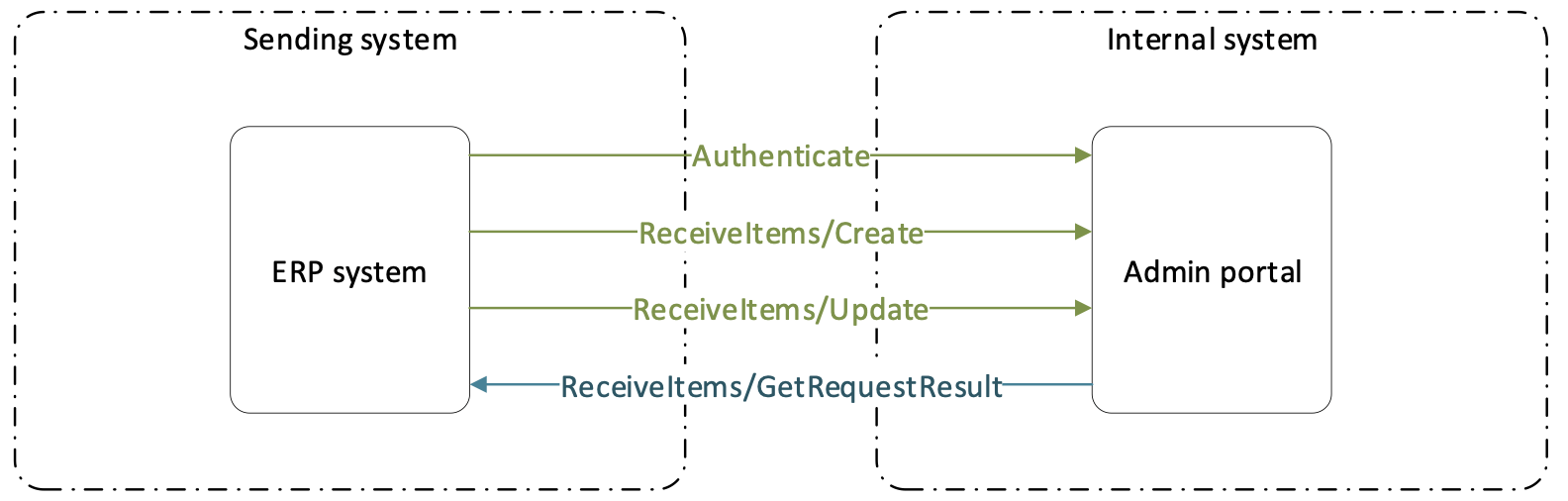
The ERP system drives all four calls. CRIBWISE never calls back.
Important: Treat a
200as “queued”, not as “done”. Business validation runs when the queued job executes, so an integration that stops at stage 2 silently misses every rejected item.
Create items
POST [AP_base_uri]/ERP/ReceiveItems/Create
The body is an array, so one call can create many items. Eight fields are mandatory on every object: Id, Name, Description, Type, Status, Classification, UsageCostStructure, and Cost.
Any field that points at another record – a vendor, a manufacturer, an alternative item, a spare part – must name an ID that already exists. Create the vendor and the manufacturer first; see ERP REST Vendors and How to create manufacturers with the REST API.
Example create request
[
  {
    "Id": "5725474",
    "Name": "CNMG 19 06 12-MM 2025",
    "Description": "T-Max P, insert for turning",
    "Type": "Consumable",
    "Status": "Released",
    "Classification": "C",
    "UsageCostStructure": "PercentageOfStandardCost",
    "Cost": 100,
    "VendorId": "SANDVIK-COROMANT",
    "VendorOrderCode": "CNMG 19 06 12-MM 2025",
    "PricePerPiece": 12.5,
    "PurchasePackageQuantity": 10,
    "DispensePackageQuantity": 1,
    "Category": ["Turning", "Inserts"]
  }
]
This item is created as Released rather than Defined, which is why the purchasing fields are present: as soon as an item leaves Defined, CRIBWISE requires VendorId, VendorOrderCode, PricePerPiece, and PurchasePackageQuantity.
Example create response
"3f2504e0-4f89-11d3-9a0c-0305e82c3301"The response is the request GUID as a JSON string, not an object. Keep it – it is the only way to find out what happened.
Update items
POST [AP_base_uri]/ERP/ReceiveItems/Update
The update endpoint takes the same item contract, but only Id is mandatory and Id itself cannot be changed. Send just the fields you want to change; anything you leave out keeps its current value.
Three rules decide what a value does:
- A field with a value sets that value.
- A field sent as
nullor as an empty string clears the value. - A field left out of the payload is untouched.
The SpareParts and AssemblyItems arrays follow their own version of the same rule. Leaving the array out keeps the current list, sending a filled array replaces the list, and sending an empty array removes every entry.
Warning:
"SpareParts": []deletes every spare part relation on the item. Serializers that emit empty arrays for empty collections will wipe these lists on every update.
Example update request
[
  {
    "Id": "5725474",
    "CriticalLevel": 20,
    "PricePerPiece": 13.75,
    "BarCode": ""
  }
]
This call raises the critical level, sets a new price, and clears the barcode. Every other field on the item is left alone.
Item field reference
The table covers both endpoints. On create and On update give the rule for the same field in each call, so you do not have to compare two lists.
String lengths are the maximum the system accepts. Numbers are integers unless the type says otherwise.
| Field | Type | On create | On update | Notes |
|---|---|---|---|---|
Id |
string, 50 | Required | Required, cannot be changed | Selects the item to update. Must be unique across the system. |
Name |
string, 100 | Required | Optional | |
Description |
string, 400 | Required | Optional | Sets the description in the default language. Additional languages cannot be set through this interface. |
Type |
enum: Consumable, Durable | Required | Only while Status is Defined |
|
Status |
enum: Defined, PhaseIn, Released, PhaseOut, Obsolete | Required | Optional | Cannot be set back to Defined. |
Classification |
enum: A, B, C | Required | Optional | The item’s own ABC classification. |
UsageCostStructure |
enum: PercentageOfStandardCost, FixedPerPick, PerTimeInCa, PerItemState | Required | Optional | Must be PercentageOfStandardCost when Type is Consumable. |
Cost |
decimal | Required | Optional | Must be 100 when Type is Consumable. |
CategoryId |
string, 50 | Optional | Optional | When sent, Category is ignored. |
Category |
array of string, 100 each | Optional | Optional | Category names in hierarchy order, within the item’s own category tree. Ignored when CategoryId is sent. |
GtcClassification |
string, 50 | Optional | Optional | |
BarCode |
string, 50 | Optional | Optional | |
CriticalLevel |
integer | Optional | Optional | |
AlternativeItemId |
string, 50 | Optional | Optional | Must point to an item that already exists. |
IsQuoted |
boolean | Optional | Optional | Earlier versions of this page spelled the field IsQouted. The contract uses IsQuoted. |
IsSerialized |
boolean | Optional | Only while Status is Defined |
true only when Type is Durable. |
IsAssembly |
boolean | Optional | Optional | true only when Type is Durable. |
DispensePackageQuantity |
integer | Optional | Optional | |
DispenseUnit |
string | Optional | Optional | A unit name from the Dispense unit of measure list, such as pieces. |
DispenseUnitRatio |
integer | Optional | Optional | Goes with DispenseUnit. |
VendorId |
string, 50 | Required once Status is not Defined |
Cannot be cleared once Status is not Defined |
Must point to a vendor that already exists. Not available on assemblies. |
VendorOrderCode |
string, 50 | Required once Status is not Defined |
Cannot be cleared once Status is not Defined |
Not available on assemblies. |
PricePerPiece |
decimal | Required once Status is not Defined |
Cannot be cleared once Status is not Defined |
Not available on assemblies. |
PurchasePackageQuantity |
integer | Required once Status is not Defined |
Cannot be cleared once Status is not Defined |
Not available on assemblies. |
PurchaseUnit |
string | Optional | Optional | A unit name from the Purchase unit of measure list. |
PurchaseUnitRatio |
integer | Optional | Optional | Goes with PurchaseUnit. |
LeadTimeUnits |
enum: Months, Weeks, Days, Hours | Required when LeadTimeValue is sent | Cannot be cleared while LeadTimeValue is set | Not available on assemblies. |
LeadTimeValue |
integer | Required when LeadTimeUnits is sent | Cannot be cleared while LeadTimeUnits is set | Not available on assemblies. |
ManufacturerId |
string, 50 | Optional | Optional | Must point to a manufacturer that already exists. Not available on assemblies. |
ManufacturerOrderCode |
string, 50 | Optional | Optional | Not available on assemblies. |
TimeSpecificationUnit |
enum: Months, Weeks, Days, Hours | Required when UsageCostStructure is PerTimeInCa |
Cannot be cleared while UsageCostStructure is PerTimeInCa |
Cannot be sent with any other UsageCostStructure. |
TimeSpecificationValue |
integer | Required when UsageCostStructure is PerTimeInCa |
Cannot be cleared while UsageCostStructure is PerTimeInCa |
Cannot be sent with any other UsageCostStructure. |
HasServiceOrCalibration |
boolean | Optional | Optional | true only when Type is Durable. |
ServiceCalibration |
object | Required when HasServiceOrCalibration is true |
Required while HasServiceOrCalibration is true |
See Service and calibration below. |
HasValueAddedServices |
boolean | Optional | Optional | |
ValueAddedServices |
object | Required when HasValueAddedServices is true |
Required while HasValueAddedServices is true |
See Value added services below. |
SpareParts |
array of objects | Optional | Optional, replaces the whole list | See Spare parts and assembly items below. |
AssemblyItems |
array of objects | Optional | Optional, replaces the whole list | Only on an item with IsAssembly set to true. |
CustomFields |
object | Optional | Optional | See Custom fields and categories below. |
HasSpecialHandling |
boolean | Optional | Optional | Matches Special handling for restock and return in the item detail. |
Note:
DispenseUnit,DispenseUnitRatio,PurchaseUnit,PurchaseUnitRatio, andHasSpecialHandlingare in the live item contract but were absent from this page until this revision. They are documented here from the matching fields in the item detail. Confirm them against your own installation before an integration depends on them.
Service and calibration
The ServiceCalibration object is read only when HasServiceOrCalibration is true, which in turn is allowed only on a durable item.
| Field | Type | Required | Notes |
|---|---|---|---|
| ServiceVendorId | string, 50 | Required | The technical vendor. Must point to a vendor that already exists. |
| ServiceCode | string, 50 | Required | |
| ServicePrice | decimal | Required | Not available on assemblies. |
| TimeInterval | object: Hours, Days, Weeks (integer) | Optional | Only when IsSerialized is true. |
| DueDate | date and time, ISO 8601 | Optional | Only when IsSerialized is true. |
| TimeAfterFirstUseUnit | enum: Months, Weeks, Days, Hours | Optional | Only when IsSerialized is true. |
| TimeAfterFirstUseValue | integer | Required when TimeAfterFirstUseUnit is sent | |
| LeadTimeUnit | enum: Months, Weeks, Days, Hours | Optional | The lead time of the service, not of the purchase. |
| LeadTimeValue | integer | Required when LeadTimeUnit is sent | |
| NumberOfTimesUsed | integer | Optional | Only when IsSerialized is true. |
| TimePicked | object: Hours, Days, Weeks (integer) | Optional | Only when IsSerialized is true. |
| MinQuantityForService | integer | Optional |
The contract itself marks only ServiceVendorId and ServiceCode as required. The other rules in this table are business validations, applied when the queued job runs rather than when the request is accepted.
Value added services
The ValueAddedServices object is read only when HasValueAddedServices is true.
| Field | Type | Required | Notes |
|---|---|---|---|
| Code | string, 100 | Required when HasValueAddedServices is true |
|
| TypeCode | string, 3 | Required when HasValueAddedServices is true |
|
| Content | string, 60 | Optional |
Spare parts and assembly items
Both arrays hold objects with the same three properties. SpareParts lists the parts that belong to an item; AssemblyItems lists the components of an assembly.
| Field | Type | Required | Notes |
|---|---|---|---|
| SparePartId | string, 50 | Required in every SpareParts object | Must point to an item that already exists. |
| AssemblyItemId | string, 50 | Required in every AssemblyItems object | Can point only to items with IsAssembly set to false. |
| Quantity | integer | Required in every object | |
| Positions | string, 50 | Required in every object | Earlier versions of this page called this field Position in the spare part list. The contract uses Positions in both arrays. |
Custom fields and categories
CustomFields is an object of name and value pairs, not an array. Each name must match a custom field defined in system settings, and up to three can be set. A name the system does not recognise is ignored without an error, and on update a custom field you do not send keeps its value. Values are strings of up to 400 characters. See Custom fields.
Category is an array of category names, in hierarchy order from the top down, within the item’s own category tree. Send CategoryId instead when you already know the ID – when both are present, Category is ignored.
Where the fields appear in the Admin Portal
Every field in the payload writes a box in the item detail, under Data management > Items > View detail. Use these two screens to check what a call actually did.
General information tab

The General information tab of item 5725474.
| # | Field in the Admin Portal | Field in the payload |
|---|---|---|
| 1 | Item ID | Id |
| 2 | Name | Name |
| 3 | Description | Description |
| 4 | Consumable / Durable, Serialized, Assembly, Quoted | Type, IsSerialized, IsAssembly, IsQuoted |
| 5 | Own classification | Classification |
| 6 | Own category | CategoryId or Category |
| 7 | GTC classification | GtcClassification |
| 8 | Status | Status |
| 9 | Dispense unit of measure | DispenseUnit |
| 10 | Critical level | CriticalLevel |
| 11 | Dispense package quantity | DispensePackageQuantity |
Supplier tab

The Supplier tab of the same item.
| # | Field in the Admin Portal | Field in the payload |
|---|---|---|
| 1 | Vendor | VendorId |
| 2 | Order code | VendorOrderCode |
| 3 | Purchase price | PricePerPiece |
| 4 | Barcode | BarCode |
| 5 | Purchase unit of measure | PurchaseUnit |
| 6 | Purchase package quantity | PurchasePackageQuantity |
| 7 | Lead time | LeadTimeValue and LeadTimeUnits |
| 8 | Manufacturer | ManufacturerId |
| 9 | Manufacturer item ID | ManufacturerOrderCode |
Two boxes on this tab have no field in the item contract: Purchase gross price and Standard cost. Neither can be written through this interface – see Understanding item costs: standard cost and usage cost.
Read the result of a request
GET [AP_base_uri]/ERP/ReceiveItems/GetRequestResult?requestGuid={guid}
| Parameter | In | Required | Value |
|---|---|---|---|
requestGuid |
Query string | Yes | The GUID returned by the Create or Update call. |
The response reports the status of the request as a whole, and then lists what happened to each item.
Request statuses
| Status | What it means |
|---|---|
| Created | The request arrived but is not in the task queue yet. |
| Ready | The request is in the task queue, waiting to run. |
| Scheduled | The request is scheduled to run. This value is in the contract but was not described in earlier documentation, so treat it as not finished yet. |
| Running | The items are being created or updated. |
| Completed | Every change in the request has finished. Read the result arrays to see what each item did. |
| Failed | The request could not be performed. |
Result arrays
| Array | What it holds |
|---|---|
Errors |
One entry per validation error, naming the item and the parameter that failed. An item listed here was not written. |
CreatedItems |
The IDs of the items that were created. |
UpdatedItems |
The IDs of the items that were updated. |
Example result response
{
  "Message": "",
  "Status": "Completed",
  "Result": {
    "Errors": [],
    "CreatedItems": ["5725474"],
    "UpdatedItems": []
  }
}
A request can reach Completed while individual items sit in Errors. Always read the arrays, not just the status.
Check the contract on your own installation
The Admin Portal host serves a Swagger page for these interfaces at [AP_base_uri]/ERP/swagger, and the raw definition at [AP_base_uri]/ERP/swagger/docs/v1. It shows the endpoints and the exact item contract that your version exposes, which is the fastest way to settle a question about a field name.

The ReceiveItems group on the Swagger page, expanded to show its three operations.
Tip: Compare the
ItemDtodefinition on that page with the field table above before you file a support case about a field that will not save. A property the contract does not list is dropped without an error.
Common confusion
| People often think… | But actually… |
|---|---|
A 200 response means the items were created. |
It means the request was queued. The items exist only once GetRequestResult lists them under CreatedItems or UpdatedItems. |
| An update has to carry the whole item. | Only Id is required. Fields you leave out stay unchanged – but a field sent as null or an empty string is cleared. |
Sending "SpareParts": [] leaves the spare parts alone. |
An empty array removes every spare part. Leave the array out of the payload to keep the current list. |
| The field list on this page is the whole contract. | Your own installation is the authority. Five fields – DispenseUnit, DispenseUnitRatio, PurchaseUnit, PurchaseUnitRatio, and HasSpecialHandling – were missing from this page until this revision, so check the Swagger page for your version. |
| A misspelled field name causes an error. | It does not. A property the contract does not know is ignored, and the item is written without it. This is why IsQouted silently did nothing. |
| Items can be deleted through this interface. | There is no delete endpoint for items. Set Status to Obsolete instead. |
Take action
Ready to make your first call? Start with How to authenticate with the REST API to create an API key and exchange it for a bearer token, then post a single-item array to Create and read the result back with GetRequestResult.
Related articles
- How to authenticate with the REST API – how to create an API key and exchange it for a bearer token.
- CRIBWISE REST API – endpoint overview – all 28 documented ERP endpoints, grouped by resource.
- How to read item status with the REST API – the read endpoints that report stock quantities and serialized item instances.
- ERP REST Vendors – create the vendors that
VendorIdandServiceVendorIdpoint to. - Item fields and settings reference – what each field on the item detail does.
- Understanding item statuses – what changes when an item moves out of
Defined. - Custom fields – how to define the custom fields that
CustomFieldswrites to.