
What you’ll learn
The /ERP/CostAllocation/ endpoints create cost allocation values, build the hierarchy between them, and restrict which items may be picked in it. This article documents all six endpoints, the JSON each one takes, and how every field maps to the Cost allocation screens in the Admin Portal.
These endpoints belong to the ERP REST interfaces, which run on your own Admin Portal address. For authentication, the base address, and the other seven resources, start at CRIBWISE REST API – endpoint overview.
Note: These endpoints write the structure of cost allocation – the values and their relations. They do not book costs. A cost is recorded when an operator picks or returns an item and selects a value, as described in Understanding cost allocation: structure, setup, and examples.
The six endpoints at a glance
Paths are relative to [AP_base_uri], the host your Admin Portal runs on without the portal path. Each endpoint links to its full schema further down.
| Method | Endpoint | What it does | Answers with |
|---|---|---|---|
| POST | /ERP/CostAllocation/Create |
Creates cost allocation values for one step, for example a new machine on the Machine step. | A request GUID |
| POST | /ERP/CostAllocation/UpdateHierarchy |
Creates relations between values that already exist, for example placing a project under a machine. | A request GUID |
| POST | /ERP/CostAllocation/DeleteHierarchy |
Removes relations between values. The values themselves stay in the set. | A request GUID |
| POST | /ERP/CostAllocation/UpdateItemRestrictions |
Sets which items may be picked at one specific place in the hierarchy. | A request GUID |
| GET | /ERP/CostAllocation/GetHierarchy |
Returns the whole hierarchy, including its item, user, and user group restrictions. | The hierarchy |
| GET | /ERP/CostAllocation/GetRequestResult |
Returns the outcome of one of the four POST calls, looked up by its GUID. | The request result |
The five endpoints that work on a set take the set ID in the path, as a query parameter, or – on Create only – as a property in the body. GetRequestResult takes no set ID at all, because a request GUID already identifies the set the request was sent to.
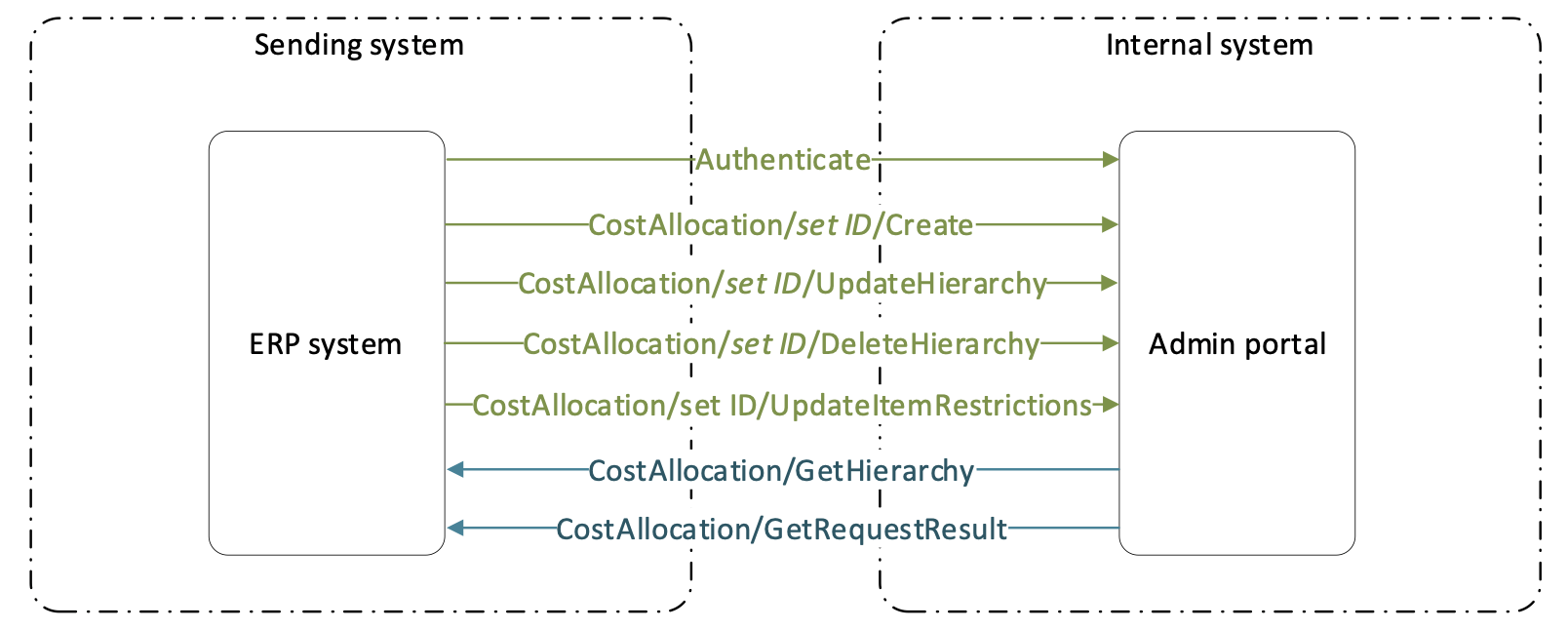
The four write endpoints send data into CRIBWISE; the two read endpoints send data back.
Before you call
- An access token. Every call carries an
Authorization: Bearerheader. Create an API key in the Admin Portal and exchange it for a token – see How to authenticate with the REST API. - A cost allocation set with the right steps. Values can only be created on a step whose value type is Hierarchy or List. Steps of type Text take free input at pick time and hold no predefined values.
- The step’s cost allocation name. The
TypeandStepTypefields reference a step by name, so the name has to match what is configured in the set. - The set ID, if your system has more than one cost allocation set.
Important: These endpoints add to and prune the structure. They cannot create a set, add a step, or change a step’s value type – that work happens in the Admin Portal, as described in How to create and manage cost allocation sets.
Which set the call goes to
Every cost allocation call works on exactly one set. Which one depends on how many sets exist:
- One set only. Leave the set ID out. That set is selected automatically.
- More than one set. Put the set ID in the path. Without it the request cannot be processed.
Set IDs live in Data management > Cost allocation, in the SET ID column. The result count in the lower right tells you whether you are in the one-set case or not.

Two sets exist here, so every call has to name one: /ERP/CostAllocation/Demo-CA/Create.
There are three ways to name the set, and they are interchangeable:
| Form | Example | Works on |
|---|---|---|
| Path segment | POST /ERP/CostAllocation/Demo-CA/Create |
All five set endpoints |
| Query parameter | POST /ERP/CostAllocation/Create?setId=Demo-CA |
All five set endpoints |
SetId in the body |
{ "SetId": "Demo-CA", "CostAllocationValues": [ … ] } |
Create only |
Tip: A set ID is not the same as a set name. Demo Set is the name;
Demo-CAis the ID, and the ID is what every one of these three forms takes.
How the JSON maps to the Admin Portal
Every field in these schemas has a counterpart on a Cost allocation screen. Reading them side by side is the quickest way to see what a call will change.
Steps: what Type and StepType must match
Open a set and the General information tab lists its steps. The COST ALLOCATION NAME column is the value that Type (on Create) and StepType (on every hierarchy endpoint) must contain. The VALUE TYPE column decides whether the step can hold values at all.

This set has three hierarchy steps – Machine, Project, and Operation – so Machine, Project, and Operation are the only names its calls can use.
The order of the steps matters as much as the names. A hierarchy call always starts at the first hierarchy step and works down in order, one level per nesting.
Values: what Create writes
A cost allocation value is one entry on one step – the machine ABB on the Machine step, for example. Create writes four of its fields.

Callouts 1 to 4 are the four fields in the Create schema. Custom value and Picture have no field in the schema and can only be set in the Admin Portal.
Hierarchy: what UpdateHierarchy and DeleteHierarchy write
The Values tab holds the two things the API works on. CA values on the left is the flat list that Create adds to. CA hierarchy on the right is the tree that UpdateHierarchy and DeleteHierarchy reshape.

A value has to exist in the left pane before it can be placed in the right one.
Each nesting level in the JSON is one step down the tree. In the set above, ABB (Machine) contains PO-TEST-2025-0018 (Project), which contains OP 10 (Operation) – and that is exactly the shape the Instances array takes.
Restrictions: what UpdateItemRestrictions writes
Select a node in CA hierarchy and choose Restrict to see the restrictions that apply at that one place in the tree. The pane has three tabs, and they are the three arrays in the schema. Only Items can be written through the API.

Restrictions belong to one instance, not to the value. The header names the full path – OP 10 under ABB and PO-TEST-2025-0018 – and the same OP 10 elsewhere in the tree keeps its own restrictions.
Important:
UsersandUserGroupsare ignored on every write, on all four POST endpoints. They exist in the schemas only so that a hierarchy read back fromGetHierarchycan be posted again unchanged. Maintain user and user group restrictions in the Admin Portal.
Endpoint reference
CostAllocation/Create
POST [AP_base_uri]/ERP/CostAllocation/<set ID>/Create
POST [AP_base_uri]/ERP/CostAllocation/Create
Creates new cost allocation values on one step. The step is referenced by name and must already exist, and its value type must be Hierarchy or List.
| Field | Type | Max length | What it is |
|---|---|---|---|
Type |
string | 100 | The cost allocation name of an existing step, for example Machine. Shown as Step on the value. |
Value |
string | 100 | The value itself, for example ABB. Shown as Value. |
IsActive |
boolean | – | Whether operators can select the value. Shown as Active. |
CostCarrier |
string | 4000 | The cost carrier the value reports against. Shown as Cost carrier. |
The body also takes an optional SetId property alongside CostAllocationValues, as a third way of naming the set.
Send the body as JSON with Content-Type: application/json. Example request body – two machines on the Machine step:
{
  "CostAllocationValues": [
    {
      "Type": "Machine",
      "Value": "ABB",
      "IsActive": true,
      "CostCarrier": "CC-1000"
    },
    {
      "Type": "Machine",
      "Value": "Brother",
      "IsActive": true,
      "CostCarrier": "CC-1001"
    }
  ]
}
A value created on a hierarchy step is not usable yet. It appears in CA values, but until UpdateHierarchy puts it in the tree, no operator can select it.
CostAllocation/UpdateHierarchy
POST [AP_base_uri]/ERP/CostAllocation/<set ID>/UpdateHierarchy
POST [AP_base_uri]/ERP/CostAllocation/UpdateHierarchy
Creates relations between values that already exist. It never creates a value: if the value is missing, create it with Create first. Only values on steps of value type Hierarchy can be placed in the tree.
The rules the body has to follow:
- Start at the root – the first hierarchy step in the set – and keep the step order going down.
- Send only the part of the tree you are adding. A full hierarchy is never required.
- A value that already sits in the place you send is reused, not duplicated.
All four hierarchy endpoints share one body shape:
| Field | Type | Required | Max length | What it is |
|---|---|---|---|---|
Value |
string | Yes | 100 | The value of an existing definition, for example ABB. |
StepType |
string | Yes | 100 | The cost allocation name of the step that value belongs to, for example Machine. |
Items |
array of strings | No | 50 each | Item IDs, taken from the item detail. Written by UpdateItemRestrictions only; ignored here. |
Users |
array of strings | No | 100 each | User names. Ignored on every write. |
UserGroups |
array of strings | No | 100 each | User group names. Ignored on every write. |
Instances |
array | No | – | The child definitions one step further down, in the same shape. Nest as deep as the set has hierarchy steps. |
Example request body – put operation OP 10 under project PO-TEST-2025-0018 under machine ABB:
[
  {
    "Value": "ABB",
    "StepType": "Machine",
    "Instances": [
      {
        "Value": "PO-TEST-2025-0018",
        "StepType": "Project",
        "Instances": [
          {
            "Value": "OP 10",
            "StepType": "Operation"
          }
        ]
      }
    ]
  }
]
CostAllocation/DeleteHierarchy
POST [AP_base_uri]/ERP/CostAllocation/<set ID>/DeleteHierarchy
POST [AP_base_uri]/ERP/CostAllocation/DeleteHierarchy
Removes relations between hierarchy values. The values stay in CA values and can be placed again later. The body is the same shape as UpdateHierarchy, and the same root-first, in-order rule applies.
Two rules decide what actually disappears:
- Everything below the last value in the path you send is deleted with it.
- A value that still has relations you did not name stays where it is.
Both rules at work on the same starting hierarchy:
| Hierarchy before | Path sent | Hierarchy after | Why |
|---|---|---|---|
A1 > B1 > C1A1 > B2 > C1A1 > B2 > C2 |
A1 > B2 |
A1 > B1 > C1 |
B2 goes, and C1 and C2 below it go with it. A1 stays because B1 was not named. |
A1 > B1 > C1A1 > B2 > C1A1 > B2 > C2 |
A1 > B2 > C1 |
A1 > B1 > C1A1 > B2 > C2 |
Only C1 under B2 goes. B2 stays because C2 was not named, and C1 under B1 is a different instance. |
Warning: Deleting a relation deletes every relation underneath it, and the call reports success as soon as the request is queued. Read back the branch with
GetHierarchybefore you send a delete, so you know what sits below the value you are naming.
CostAllocation/UpdateItemRestrictions
POST [AP_base_uri]/ERP/CostAllocation/<set ID>/UpdateItemRestrictions
POST [AP_base_uri]/ERP/CostAllocation/UpdateItemRestrictions
Sets which items may be picked at one place in the hierarchy. The body is the same shape again, and it addresses a place in the tree the same way: root first, in step order. Only the part of the tree you want to change has to be sent.
What happens depends on how you send the Items array:
| You send | Result for that place in the hierarchy |
|---|---|
Items with item IDs |
The restrictions are replaced by exactly the IDs you sent. |
Items as an empty array |
All item restrictions are removed. |
No Items field at all |
Item restrictions are left untouched. |
Example request body – allow two items on OP 10 under ABB and PO-TEST-2025-0018:
[
  {
    "Value": "ABB",
    "StepType": "Machine",
    "Instances": [
      {
        "Value": "PO-TEST-2025-0018",
        "StepType": "Project",
        "Instances": [
          {
            "Value": "OP 10",
            "StepType": "Operation",
            "Items": [
              "10-000123",
              "10-000456"
            ]
          }
        ]
      }
    ]
  }
]
Note: An empty
Itemsarray and a missingItemsfield mean opposite things. If your integration serialises empty collections by default, it will clear restrictions it never meant to touch.
CostAllocation/GetHierarchy
GET [AP_base_uri]/ERP/CostAllocation/<set ID>/GetHierarchy
GET [AP_base_uri]/ERP/CostAllocation/GetHierarchy
Returns the complete hierarchy of the set, with the restrictions on every instance: items by item ID, users by user name, and user groups by user group name. This is the one write-related endpoint that answers with data rather than a request GUID, so there is no result to collect afterwards.
The response uses the same shape as the write bodies, which means a branch can be read, edited, and posted back to UpdateHierarchy without reshaping it.
[
  {
    "Value": "string",
    "StepType": "string",
    "Items": [
      "string"
    ],
    "Users": [
      "string"
    ],
    "UserGroups": [
      "string"
    ],
    "Instances": [
      { "...child definitions, same shape..." }
    ]
  }
]
CostAllocation/GetRequestResult
GET [AP_base_uri]/ERP/CostAllocation/GetRequestResult?requestGuid=<GUID>
Returns the outcome of a create, update, or delete request. The four POST endpoints answer 200 with the GUID of the request and put the work in a queue, so this call is where the work is actually reported on.
| Parameter | Value |
|---|---|
requestGuid |
The GUID returned by the POST call. |
The result reports two levels of status. Status covers the request as a whole and has six possible values:
| Request status | What it means |
|---|---|
| Created | The request arrived but is not in the task queue yet. |
| Ready | The request is in the task queue, waiting to run. |
| Running | The changes are being applied. |
| Completed | Every change in the request has finished. Check the object status to see what each one did. |
| Failed | The request could not be performed. |
| Scheduled | The request is held for a later run. Like Created, Ready, and Running, it is not a final status – keep polling. |
Result.Status covers each object the request touched:
| Object status | What it means |
|---|---|
| None | The object was not created, updated, or deleted, because it failed validation. |
| Created | The object was created. |
| Updated | The object was updated. |
| Deleted | The object was deleted. |
Validation errors are listed per object, next to the parameter that caused them. CreatedItems returns the IDs of every cost allocation value created, together with the ID of the step it belongs to.
{
  "Message": "string",
  "Status": "Created",
  "Result": {
    "Status": "None",
    "Errors": [
      "string"
    ],
    "CreatedItems": [
      "string"
    ]
  }
}
Important: A request can come back Completed while individual objects sit at None. An integration that stops at the
200from the POST, or that checks only the request status, will silently miss every validation error.
If a call does not do what you expected
| Problem | Likely cause | Fix |
|---|---|---|
| The request cannot be processed at all. | More than one cost allocation set exists and the set ID is missing from the path. | Read the set ID from Data management > Cost allocation and add it: /ERP/CostAllocation/<set ID>/…. |
Create reports objects at status None. |
Type does not match a step in the set, or it names a step whose value type is Text. |
Check the COST ALLOCATION NAME and VALUE TYPE columns on the set’s General information tab. |
UpdateHierarchy reports objects at status None. |
The value does not exist yet, or the path skips a level or starts below the root. | Create the value first, then send the path from the first hierarchy step down, one nesting level per step. |
| Item restrictions disappeared after an unrelated update. | The body sent Items as an empty array, which clears the restrictions on that instance. |
Leave Items out entirely when the call is not meant to change restrictions. |
| The integration treats a healthy request as an error. | It compares Status against a five-value list and does not know Scheduled. |
Treat only Completed and Failed as final, and keep polling on anything else. |
| User restrictions sent through the API never appear. | Users and UserGroups are ignored on every write. |
Set them on the hierarchy node in the Admin Portal, under Restrict. |
Common confusion
| People often think… | But actually… |
|---|---|
A 200 means the values are in. |
It means the request was queued. The objects exist only once GetRequestResult reports them as Created. |
Create makes a value available to operators. |
On a hierarchy step it does not. The value also has to be placed in the tree with UpdateHierarchy. |
DeleteHierarchy deletes the values. |
It deletes relations. The values stay in CA values and can be placed in the hierarchy again. |
| Restrictions belong to a value. | They belong to one instance of that value. The same value in two places in the tree carries two independent sets of restrictions. |
| Every array in the schema is written. | Users and UserGroups are always ignored, and Items is written only by UpdateItemRestrictions. They are in the other schemas so that GetHierarchy output can be posted straight back. |
| The set ID is the set name. | They are separate fields, and the URL takes the ID. |
Take action
Ready to make the first call? Create an API key and get a token with How to authenticate with the REST API, read your current structure with GetHierarchy, and build from there.
Related articles
- CRIBWISE REST API – endpoint overview – all 28 ERP REST endpoints, the base address, and how a call works.
- How to authenticate with the REST API – how to create an API key and exchange it for a bearer token.
- Understanding cost allocation: structure, setup, and examples – steps, value types, and hierarchy explained from the ground up.
- How to create and manage cost allocation sets – building sets, steps, values, and restrictions in the Admin Portal.
- How to configure custom cost allocation lists and hierarchies – the Custom value option, which the API cannot set.
- How to manage items with the REST API – the item endpoints, and where the item IDs used in
Itemscome from.