
CRIBWISE implements and maintains technical and organizational security measures to protect customer assets and data. We recognize that data security is crucial for our clients’ business success. We are fully committed to maintaining a high level of privacy and security within our systems, policies and business operations. This includes but are not limited to secure software development, secure data centers, host hardening and network security. We are constantly working on improving our security posture. Remember, security is a teamwork. Ask us if you have any questions!
CRIBWISE are primarily built on technologies provided by Microsoft and hosted in their datacenters. Information entered into the application, like users, devices, items transactions and events. As a foundation in our security measures we rely on the security controls managed by Microsoft. Our contract with Microsoft as well as our own controls secures that customer data are secured according to best practice. Microsoft offers a comprehensive set of compliance offerings that complies with national, regional, and industry-specific requirements governing the collection and use of data. For more information on these security measures, please visit https://azure.microsoft.com/en-us/overview/trusted-cloud
Some customer data related to subscription management and payments is stored in our ERP and our invoicing and subscription system Chargebee. Some support data like basic customer information and Service orders or Incidents related to a customer is stored in TopDesk and Sales Force. Data stored in these systems is mainly Customer Account Manager and related contact details.
Physical Security
Data center security
Microsoft Azure runs in datacenters managed and operated by Microsoft or their partners. These geographically dispersed datacenters comply with key industry standards, such as ISO/IEC 27001:2013 and NIST SP 800-53, for security and reliability. The datacenters are managed, monitored, and administered by Microsoft operations staff. The operations staff has years of experience in delivering the world’s largest online services with 24 x 7 continuity. The Azure network architecture provides connectivity from the Internet to the Azure datacenters. Any workload deployed (IaaS, PaaS, and SaaS) on Azure is leveraging the Azure datacenter network.
For more information on Azure infrastructure security, please visit https://docs.microsoft.com/en-us/azure/security/fundamentals/infrastructure
Access control to premises and facilities
Microsoft takes a layered approach to physical security, to reduce the risk of unauthorized users gaining physical access to data and the datacenter resources. Datacenters managed by Microsoft have extensive layers of protection: access approval at the facility’s perimeter, at the building’s perimeter, inside the building, and on the datacenter floor.
For more information on Azure physical security, please visit https://docs.microsoft.com/en-us/azure/security/fundamentals/physical-security
Developer Security
Access control to systems
Developers are assigned to the development projects in DevOps after signature of NDA(Non Disclosure Agreement) and in order to get access to the development system they use Sandvik’s corporate Identity Provider by using personalized accounts only and two-factor authentication. System administrators and operators are authenticated via Sandvik’s corporate Identity Provider by using personalized accounts only and two-factor authentication. Authorization is implemented using Azure role-based access control (Azure RBAC) system with fine-grained access management to system resources in Microsoft Azure. Microsoft DevOps build process is connected using Azure App Registrations with security model based on certificates or keys. Password for system administrators, system operators and system users follows rule for length and complexity (lower and upper characters, special characters and numbers).
Access control to Back-end data
Access to customer data by development team is denied by default. When access to data related to a support case is needed then the needed information for given support case is provided by the system administrator. Access to customer data is controlled by Sandvik’s corporate Identity Provider by using personalized accounts only and two-factor authentication.
Data
Azure provides customers with strong data security, both by default and as customer options. This includes data segregation, at-rest data protection, in-transit data protection, data redundancy and data destruction.
For more information on Azure data protection, please visit https://docs.microsoft.com/en-us/azure/security/fundamentals/protection-customer-data
Data Storage
Stored data is encrypted at storage level in Microsoft Azure environment. This is valid for active, backed up and archived data that resides in the Microsoft Azure environment. In certain cases, data might be encrypted on database, data record or document level. Data is segregated per each tenant (user or organization) using logical isolation mechanisms.
Data in Transit
Data in transit is protected using secured network communications and VNETs where applicable. All incoming and outbound traffic is encrypted using TLS 1.2. Additionally, “encryption by default” using MACsec (an IEEE standard at the data-link layer) is enabled for all Azure traffic travelling between Azure datacenters to ensure confidentiality and integrity of customer data. Access from eternal systems is done via Microsoft Azure Gateway service that adds additional layer of security when accessing data.
Data Deletion
In a multi-tenant environment such as Microsoft Azure, careful attention is taken to ensure that one customer’s data is not allowed to either “leak” into another customer’s data, or when a customer deletes data, no other customer (including, in most cases, the customer who once owned the data) can gain access to that deleted data. Data destruction techniques vary depending on the type of data object being destroyed, whether it be storage, or databases.
Data Back-ups
In general for our cloud version we use Microsoft Azure SaaS storage (SQL, Blob storage and Cosmos dB) as a part of the application landscape. This SaaS services can be recovered to any point up to 30 days back. for specific customers we can recover by customers deleted objects as a service (if not exports have been made by customers that can be used to import.) Our back-ups are stored in same region as the application runs (West Europe Netherlands) and back-ups of back-up are also replicated in North Europe Ireland.
Application Security
How do we work
Role Based Access Control (RBAC) is used at all levels in the application landscape of CRIBWISE. manage accounts and operationally control users in the application. CRIBWISE landscape contains three distinct applications, Customer Management Portal, Customer Admin Portal and Shopfloor interface.
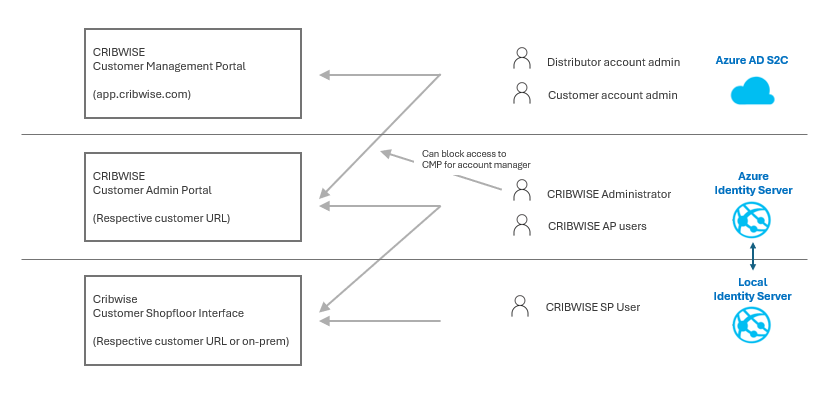
Customer Management Portal
Sales Unit (Distributor) account admin can create trial customers, active customers, request quotes, manage the number of licenses, order addons and cancel accounts.
Based on assigned role for the Sales Unit account administrator this user could have access to Customer Admin Portal.
Upon first sign-up a Customer Account manager is created (End customer user that needs to approve SaaS T&C before account is accessible) this user will have a more limited view access into its account in Customer Management Portal (CMP) but also be able to login to the Customer instance of Admin portal.
In CMP Customer account administrator could see customer id, secrets, download installers, qty of licenses, activated addons, service/support tickets) CMP Account managers (Both Sales Unit and Customer account) will be the first users that can start login to customer instance (Admin Portal) and configure the system, create user, vendors items, devices and so on.
First customer account admin can create additional customer account users.
These are users that will get notified of any changes in Saas T&C including DPA or Sub-processor lists.
Customer Admin Portal
This are users created in the application with roles and permissions according to settings in the specific customer instance. There are no users in the system initially, so the 1st user must be created by an CMP account admin user.
In Admin Portal a user can be set as system administrator, this user can in system setting make access to Admin Portal blocked for any Account admin user (This will affect both Customer account admins and Sales Unit (Distributor) account admin users) Logins and login attempt to Admin portal regardless of Identity server users or account admin users from Azure AD B2C gets logged in event log.
Customer could request addon to allow connect the authentication of users in Admin Portal to their own Identity provider through SAML 2.0 (SSO)
Shop Floor interface
User created in Admin Portal with role and permissions to access ShopFloor Interface will be synchronized to on premise Identity Server to manage logins to physical device.
ShopFloor Interface are built to be able to work without connection to Admin portal up to 30 days. As Shopfloor interface is aim to be a On premise physical device that is shared at the storage area we do not allow SSO or connection to own Identity provider for these devices but rather RFID cards are used for login of these devices.
What can you do on your side
Use the Admin Portal to manage your account. The general rule should always be that individuals should not have access to more information and permissions to perform actions than they need in their daily work. Make sure to revoke access when employees leave the company or change their position.
- Do not share accounts!
- Make sure to use change password setting when New users are created. This force first time sign-in users to change the password.
- Activate the retry policy, specify number of login attempts allowed and lock period if failed, use notify admins function when accounts have been locked!
- You can also if needed activate the diagnostics to get mail on every login attempt/successful login in Admin Portal respective ShopFloor Interface.
- Connect to your own identity provider
- Block all account administrator access to Admin portal (Can be temporary opened when needed)
Physical security of devices
How do we work
When we deliver physical goods from CRIBWISE or any of our resellers, by default we have Windows IoT Professional as OS installed.
- There is a default user on the PC with blank password set and with UAC set to never notify. This enables fully automatic deployment and restart of any device when new versions are available of CRIBWISE.
- OS is set to make only security updates from Microsoft.
- As ShopFloor Interface is a web-based application and built on Chromium, we have disabled the remember password function to not remember other users login information on the device.
- Basic Microsoft Defender is on the devices but no other virus protection application
CRIBWISE Shopfloor information stores no critical information on the device and can be fully recovered by make a re-install of the application. User and password data are encrypted on local identity server.
Out of a support perspective we deliver all devices with TeamViewer installed with set password. Our support organization have access to TeamViewer ID and password! This gives support persons full access to this device if network settings permits.
What can you do
Make sure that you protect your physical assets from physical damage and/or access by having strict authorization controls where the asset is situated.
- Customer can set-up their own Domain user account on the PC. This would make the Auto Update function not work (Auto update should be disabled in device settings) as a user needs to enter domain account when PC reboots after installation.
- Customer could install their own Virus protection program on the device. Note that this could cause issues if virus program quarantine application files. The Application folders and C:/Storage should be excluded from scans to avoid issues.
- Upon installation customer can request to set the TeamViewer to have password generated on request (If support is needed customer must be at device and hand password to support user).
- Or upon installation customer can request to have TeamViewer uninstalled from Device. Support organization can only guide local user for support.
- A general recommendations would also be to separate this devices from general production or office network.
Secure network communications, platform, and infrastructure security
How do we work
CRIBWISE is built and operating in a VPN in Azure. The application and its integration endpoints are reached by external users/systems through an Application Gateway.
- This Application Gateway have logging activated that is passed through to Sandvik central 24/7 SOC. The Sandvik central SOC will analyze anomalies and together with the central CSIRT and the CRIBWISE team take appropriate actions.
- Wireless Application Firewall (WAF) protection is configured and active.
- We have fixed IP addresses for incoming and outgoing calls.
To be able to operate a ShopFloor Interface and synch to AdminPortal in cloud https communication protocol is used and port 443 needs to be open.
We also have a support function on the ShopFloor Interface to automatically create support tickets. To use this function smtp.sendgrid.net on port 587 need to be open.
All Communications between ShopFloor Interface on premise and Admin portal in Cloud is triggered from SFI On Premise up to Cloud!
What can you do on your side
You should consider the relevant security level and actions based on the decisions in Physical security explained in previous section with the Network settings. In general the data on a SFI computer is fully synched to Admin Portal (every 15min) and can be re-installed without any loss of data.
- We advice you to have network segmentation in place between office devices and any CRIBWISE devices. By this segmentation any virus could not spread to other parts in other networks.
- You can also limit the device access to internet by white label our fixed IP used for communication to CRIBWISE.
- If you are using any type of integration where CRIBWISE sends data to Webservice or FTP in your network you can white label our outgoing IP
- Instead of white label IP you could also white label our base URL like app.cribwise.com. or respective distributor URL.
Resilience – availability
How do we work
CRIBWISE works in Azure cloud with storage as a Service from Microsoft, we can recover data bases from any time up-to 30 days back in time (static data) and up-to 7 days back for (transaction/event data).
We have a well described recovery process that pending on scenario can be recovered automatically or semi automatically with manual steps. If our Admin Portal in cloud by any reason would get unavailable for some time still the On-premises installed devices will continue to work for up-to 30 days.
The principle of recover the Azure based Admin Portal data and make application available again. As soon the services are up on-premise devices will start synch data not synched since last update.
We have a business continuity plan describing the critical resources needed to recover the services and pending on scenario.
What can you do on your side
Make sure to always have a disaster recovery plan and/or a business continuity plan for your business. What are some of the worst-case scenarios that could happen and what will you do if that is the case?
- For application data like user, devices, assignments, items it would be a good idea to have a regular full export performed from CRIBWISE. Any system outage caused by us or the complete solution will be recovered by us. But in some cases maybe users delete critical objects in the system, (for example a device containing all items located in device, all location assignments, including current stock level). CRIBWISE have no recovery service for individual objects in customer instance if deletion is done by user or by customer defined integration.
- Actively work with user permissions and make sure to limit delete permissions to users that understands the consequences of deleting an object!
- You could also on schedule send a report containing all item location data. This could be used as a business continuity plan together with some physical Cabinet key (Pending on storage solution) to locate/pick items if there is a breakdown on individual storage due to PC crash or similar.
Incident response
How do we work
- All relevant logs on traffic that are created are sent to the Sandvik central 24/7 SOC. The Sandvik central SOC will analyze anomalies and together with the central CSIRT and the CRIBWISE team solve security incidents.
- Our CRIBWISE team monitors health of services and response to any customer reported incident based on SLA.
- If a security incident would occur, with any potential leaked data our customers will be informed according to GDPR rules.
What can you do on your side
If an incident would occur, activate your business continuity plan.
Installation and Support services
How do we work
CRIBWISE uses both intenal and external resources for managing installation services and 1st line technical support to customers. Non of these users have access to any of customers data unless customer gives this access by creating a user in their respective admin portal or as account administrator in CMP.
For some installation services data needs to be shared (if our service partner should completely set-up the system) we should use secure file transfer in these cases and avoid all mail conversations containing data.
What can you do
Make sure when you give any external users access to your instance that this user is deleted or access revoked when service have been performed. Also make sure not to send sensitive information like user lists and similar over e-mail to service partner.
Training
How do we work
All CRIBWISE employees receive cybersecurity training through Sandvik’s Security Awareness program.
What can you do on your side
Educate your employees in cybersecurity best practices. Remember that your employees are the best protection against cybercrimes!
Software development and Application security
The CRIBWISE development teams work agile and according to Microsoft Azure Devops, using multi environment set-up and fully automated deployment pipelines. OWASP Top 10:2021 Open web application security project
Compliance
Data privacy (GDPR and other relevant privacy laws)
CRIBWISE is fully GDPR compliant. All personally identifiable information is managed separately from production data and will be deleted according to retention rules of CRIBWISE. Since CRIBWISE is a part of Sandvik we have a privacy compliance program together with the group.
If you want to read our privacy policy, want to know more about our cookie management or want to do a personal data request please visit our common privacy page. Data privacy — Sandvik Group (home.sandvik)
Frameworks
At Sandvik and CRIBWISE we are working towards NIST Cybersecurity Framework. Cybersecurity Framework | NIST