
When the system is setup and users are created, stock structure must be prepared before end users can start working with the system. All relations and steps to define the stock structure are described bellow.
Stock structure is considered as a set of various objects and relations between them.
These objects are then used during daily use operations performed by end users.
As object covering all other entities stock can be considered. Inside each stock there are set of devices running SFI applications.
Each device can control one or more storage devices (physical cabinets or shelfs).
These storage devices can be composed from storage modules.
Each storage device contains stock locations.
Stock location is considered as the smallest part of the stock structure.
These stock locations are used to contain and dispense items.
Described configuration is visualized below. Each object is described in more details in the article.
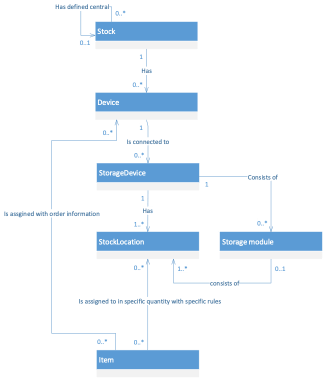
Recommended order for defining stock structure
Because of mandatory relations between stock structure content, some objects must be created in specific order. Recommended order is as follows:
- Define vendors (needed for creation of items)
- Define stocks (needed for creation of devices)
- Define devices (needed for creation of storage devices)
- After device is created, SFI application can be deployed on physical device and synchronization can start
- Define storage devices (stock locations are generated according to storage device settings)
- In case of location controlled storage device define storage modules
- Assign items to stock locations
Stock
Stock is logical and physical grouping of all devices located in same area or with similar purpose.
Stock can be one of three types – normal, central and satellite. Normal stock sends orders, in case of order is triggered, directly to vendor.
When items are delivered by the vendor, these items are directly restocked to device which triggers the order.
In central/satellite combination different approach to handling orders is used.
Each satellite stock requires central stock specified.
All daily use operations performed by end users are performed on devices assigned to satellite stock.
When order is about to be triggered from satellite stock, request is sent to central stock to obtain specific amount of items for restock. Only when there is not enough quantity of items in the central stock, purchase order is created and sent to vendor.
After items are received from the vendor, these items are restocked to central stock first before they are moved to satellite according to fulfill the request.
Device
Device is combination of hardware and software used to operate assigned storage devices.
Each device has its own database and is running SFI application.
Database is regularly synchronized with Admin portal server, which allows each device to run in disconnected mode up to 30 days.
End users are using devices to perform daily use operations above storage devices.
Storage device
Storage device is physical object (cabinet, shelf, vending machine) used to contain items and allowing dispensing of items to end users based on their selection on device.
There are two main types of storage devices – location controlled and open storage devices. Each storage device is divided into stock locations.
Location controlled storage devices can control assigned stock locations to dispense items or to enable user to pick items from particular stock location.
Based on specific type of location controlled storage device some operations cannot be performed (for example return).
Open storage devices are objects with defined structure of stock locations, where stock locations are not controlled by the system, for example shelf.
All dispensing actions must be done manually by a user.
Storage module
In case of location controlled storage devices each storage device consists of one or more storage modules.
Each module is identified by its address and contains defined structure of stock locations.
This address is used by the system to communicate with stock locations.
For vending machines, one storage module is typically one drawer.
This structure enables using combination of more drawer types in one cabinet.
Item
Item is a product (tool, accessory, spare part) which can be located in stock locations.
System tracks item locations and allow users to perform operations with this item.
Also tracks item quantities and, if necessary, order new items.
There are three main types of items – consumable, durable and serialized.
Consumable items cannot be reused and they cannot be returned back to system after they are picked. As example solid drills or inserts can be mentioned.
Durable items can be reused and can be returned back to system to enable future picking. For example indexable drills, adapters. Serialized items are a subset of durable items.
Each physical item has its own unique id to enable identification of physical item lifecycle. This enables advanced operations and automation with this type of items, like automatic service and calibration and keeping track of items condition.
Following table shows differences between item types:
| Consumable | Durable | Serialized |
| Cannot be reused | Can be reused | Act as durable |
| Can be returned back to system as not used | Can be returned back to system as used | Every physical piece is indetified |
| Cost of pick = purchase price | Cost of pick can be specified: • Fixed price per pick • Percentage of standard cost (average purchase and service price) • Per time picked |
Condition of every piece is tracked |
| Can be recycled | Can be scrapped | Pick can be limited by time (loan time) |
| Item can be serviced based on user action | Item can be automatically send to service according set conditions | |
| Can be recycled |
There are three relations how items are located in the stock structure:
- assignment to device (defines how many items are needed in the device)
- assignment to stock location (defines how many items can be placed in the stock location and in what condition)
- and physical assignment to stock location (defines how many items are physically located in the stock location).