
Release overview
On Sunday evening, February 12th, we will deploy a new version of CRIBWISE.
The Administration Portal (AP) will be updated seamlessly and will not have any downtime, new features will appear when done.
The new version of the ShopFloor Interface will be continuously available to customers for manual or automatic download and installation. The sequenced roll-out of SFI installers will take place during Sunday to Tuesday. This sequenced approach serves two purposes:
- The first, is to get early feedback from a few customers and if any unexpected behavior occurs, we can correct them before more customers are impacted.
- The second, is to relief some stress on the application download service.
Below you can find the highlights of this release and also the detailed list of improvements and bugs included.
Highlights
Catalogue mapping and update improvements
CRIBWISE introduces new capabilities in the item catalogue services.
Some of our customers have structures in how they present item data attributes that does not fully match the “one standard” mapping we have today.
This “one standard have caused some troublesome processes after first populating the items through catalogue to get pictures and ISO data then export items to excel correct item id’s, names or vendor order codes and make excel import.
The Mapping is stored for respective customer and catalogue provider.
You can find the mapping under integration menu –> Item catalogues –> Respective catalogue
Customers can change the mapping of the fields available in respective catalogue and where to place that attribute in CRIBWISE item data. You can even place the data in custom fields.
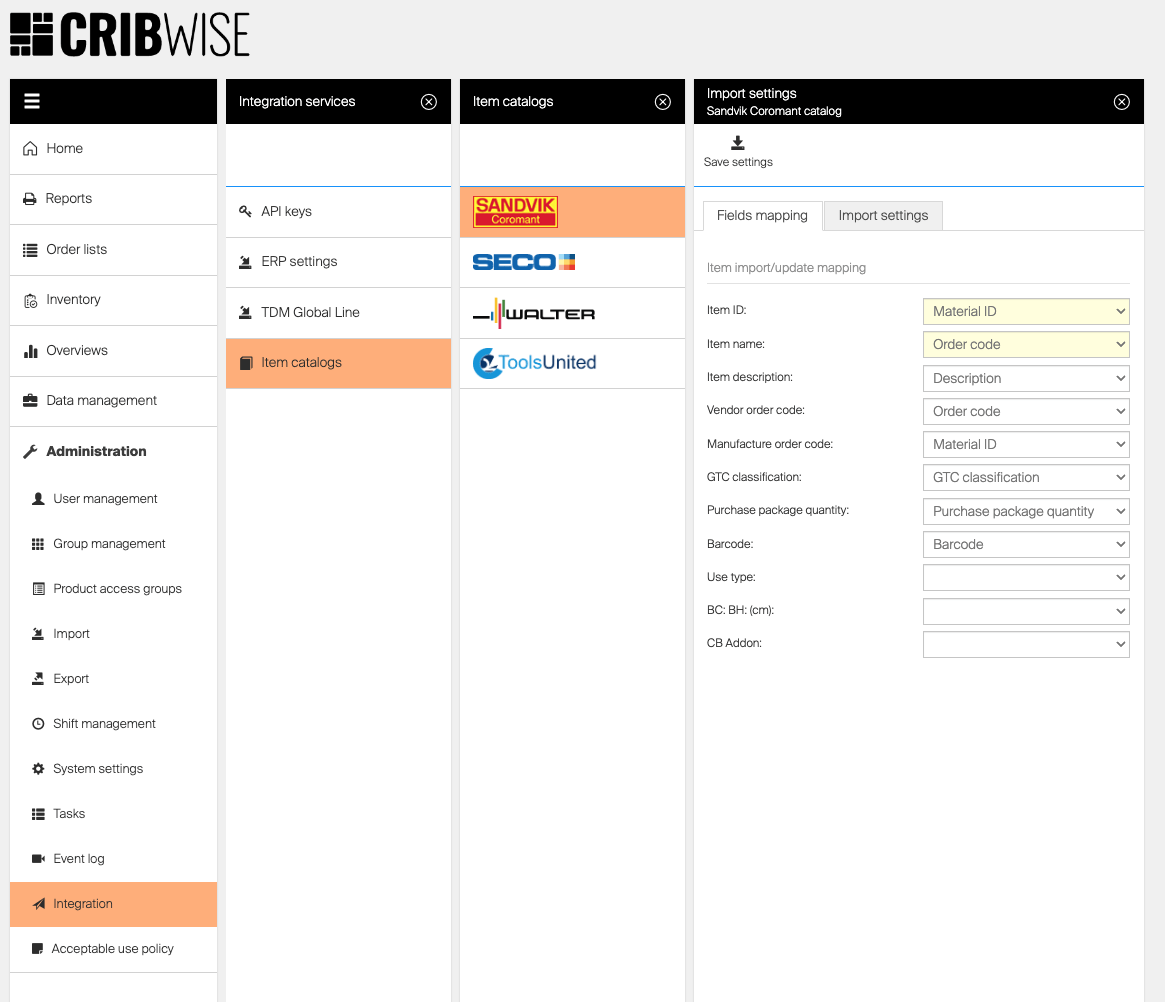
Under import settings tab you can also make some additional settings, like if you would like to import images and documents, import spare parts (create items in CRIBWISE for respective spare parts of requested item) and if ISO parameters should be imported.
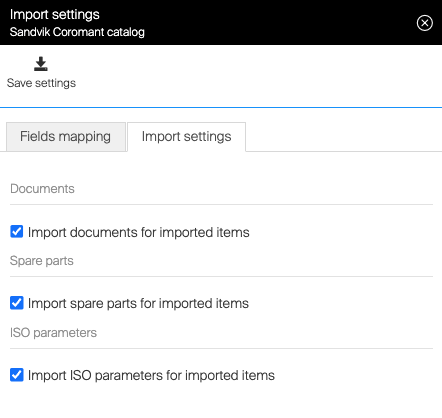
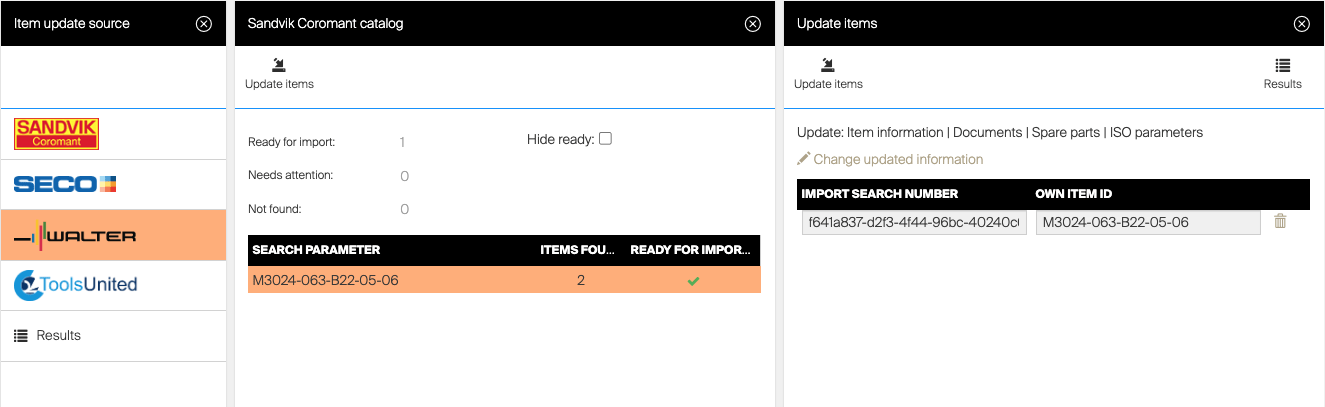
When importing new items the settings under import settings will always be applied. When you would like to update an existing item you can now also choose what fields/data to update.
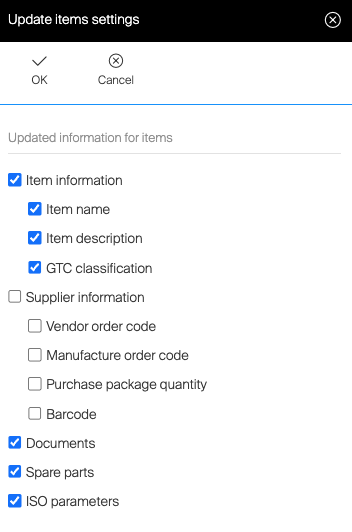
As base you will always get the settings made under respective catalogue but you can also Press “Change updated information”
You can then adjust what data to update during this specific update!
CRIBWISE Stock Optmizer update
We have since 2021, enabled and evaluated the Stock Optimizer feature for all of our customers. With positive results in savings but also feedback on enhancements to bring even further value to customers we will focus on improving this comprehensive feature.
In order for us to be able to further focus and develop the Stock Optimizer feature, to save time for our customers and full service distributors, we will make this feature chargeable.
Improvements in plan:
-
Guide users better when the tool is unable to provide a proposal due to missing historical data (too few purchases/picks)
-
If manual adjustments to the proposal is wanted, guide users better by presenting purchase and dispense package quantities
-
Enable possibilities to optimize Central and Satellite stocks
-
Offer an easy way to also optimize durable items
-
Export/import last used parameters
From April 10, 2023 (1.46 Release) this feature will be deactivated by default for all new customers and they will have to add this feature as add-on through CMP. More information to come in release notes 1.46.
For existing customers we will have the feature available until end of 2023 but from 2024 this feature will need to be ordered as an add-on for continuous activation.
Our estimated value will be 300 EUR per customer and year.
Lista LDC/LPC update
We have in this release prepared for a new version of Lista cabinets.
The key feature for operators for this new cabinet is better light-up of drawers to be picked from/returned to.
Other changes are more related to the set-up and configuration of the storage device, for the old version a config file was uploaded now you connect to an IP address and we ask for the configuration of the cabinet and creates needed locations.
There is a completely new back-end and communication protocol for this new version. Due to this change there will be a new “Manufacturer” when creating new storage devices alongside with the existing Lista. The new version is called Lista 2023
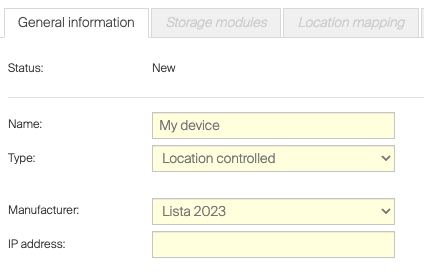
We have not yet any definite dates on when this new version will be available for order but indications from Lista targets 1st of April 2023. For when the current Lista version is no longer available for order Lista indicates 1st of July 2023.
Confirm changes in stock structure
For some of our storage machines the device tells the system which modules and locations that are available in the system.
This goes for Sielaff ASK200, AutoCrib LockerFX and next version of Lista machines. In some cases when a new machine is added to the network and have same IP address as an existing machine in the network, this can erase the current configuration (all locations, assigned items and create a withdraw of item quantities in the device).
For this reason we now introduce a manual check for this type of machines where person with permissions to manage location need to confirm a change before the change is actually executed.
Show purchase price in raw transaction log for picks
Up to now we have showed the transaction value in raw transaction reports based on standard cost (calculated average acquisition cost).
For distributors working with consignment they would like to have the purchase price on the pick transaction based on the price when pick transaction occur.
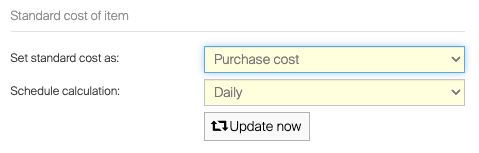
We have now introduced an option to calculate the standard cost based purchase cost as option to current method.
You can make this change under system setting and Purchase tab. Change the Set standard cost as: to “Purchase cost” instead of “average acquisition cost”.
To have purchase price changes to go through you should se Schedule calculation to daily, then standard cost will be equal to purchase price on the item after the calculation.
If you have made price updates manually and want the prices to update immediately you can press Update now.
Update in application installation process
When this 1.45 version have been installed on premise at customers we have made several improvement for future for coming updates that will make update process smoother.
First of all we will start to download the new version of SFI installer package in the background as soon it’s available, this compared to current process where we start the download when update is triggered (manually or automatic).
When the package is downloaded successfully the update can be triggered manually from SFi (If user have the permission) or when next Auto Update is triggered. By downloading first we will reduce the downtime for SFI as the update can start immediately.
The experience will be much better on slow networks!
Another change implemented is a better retry policy when by some reason the installation fails.
Smaller improvements
- Manufacturer tags in order template extended
We now add the Manufacturer name and Manufacturer item ID as tags to be added to order templates - Show obsolete items in SFI
When an item today is set ti obsolete as item status there is no possibility to remove the item from device through SFI. We have now made Obsolete items visible in assignment flows.
Release information
You will no longer find release notes and manuals in the self-service portal. All documents will be available in our Help Center. https://cribwise.com/help-center/upcoming-releases-2021-and-2022/
Release details
Admin Portal and Shop Floor Interface functionality added/changed
| Confirmation to remove assignment | On TX750 and KARDEX location management, confirmation added when option to remove assignment is selected. | Improvement |
| Extension of order and invoice templates | Two new tags added for order and invoice templates for item’s manufacturer and manufacturer code. | Improvement |
| Downloading update of SFI in background | When auto update is set for a SFI, update package is downloaded on background, not interrupting the SFI, and then applied on time specified for the auto update. | New |
| Retry of SFI auto update | When auto update fails, the update will be started again after short period of time in the same day, with maximum three attempts in a day. | Improvement |
| Allow to remove obsolete items from device | It is now allowed to manage obsolete items on SFI’s item management menu, allowing to remove these items from locations or from device. | Improvement |
| New option for calculation of item standard cost | New option added to set standard cost of item always according purchase price instead of average acquisition cost. | New |
| Item catalogs settings | For each external item catalog, settings have been added to allow specify custom mapping of information for items downloaded and updated from these catalogs. | New |
| Lista 2023 support | Added support for Lista 2023 vending cabinets. | New |
Admin Portal and Shop Floor Interface issues fixed
| Device selection can be invoked on physical devices | It is possible to click brand logo after login to on premise device to navigate to device selection screen. This option should be restricted as this screen has no meaning for on premise devices as there is always only single device. |
| ABC classification not working (‘service not available’) | ABC classification view is not working. |
| AP – text does not fit for some action buttons | When text does not fit for action button, it is cut with no information shown that something is missing. This can lead to misinterpretation of a function |
| System settings cannot be saved if no scrap reason code is specified | When all scrap reason codes are cleared in system settings and option Mandatory reason code for scrapping is turned off, system settings cannot be saved due to an error. |
| SFI menu buttons not aligned when description overlap to second line | For some languages where description (title) of the buttons on SFI navigation overlaps to the next line the button layout appears broken. |
| SFI not working on Turkish locale | For Windows in Turkish locale, SFI failed to control connected machines. |
| Consumable item can have minimum quantity specified | It is possible to have consumable item with minimal quantity. For such item it is not possible to save device assignment, as validation will not allow update due to the minimum quantity. |
| Cancel during flows with special handling does not work correctly | When the flow is cancelled on the screen with special handling there is no summary. |
| Export status appearing as Running while being already failed | The export to Excel was interrupted by a restart of modules and the UI status still appeared as Running after several days. |
| Vendor cannot be deleted when it is still referenced for item with inactive service | Cannot delete vendor if it is set as service vendor for an item with inactive service. |
| Order item edit on AP removes gross price on order | Edit of the order item on AP removes gross price per piece from the order item resulting in missing gross price per piece in all following transactions on both AP and SFI. |
| Cannot update large number of items against Coromant Catalog | When updating large number of items against Coromant Catalog (in hundreds), update may fail occasionally. |
| Improve performance of items update during synchronization on SFI | Performance of item synchronization is poor. |
| Testing of FTP connection is misleading | Option to test FTP connection (for ERP, vendor or report integration) behavior is misleading – when correct FTP values are entered, test will pass. After save and reopening the settings, the test will fail as it uses hashed password to test the connection. |
| Synchronization not running when information about mandatory versions is not obtained | Random problems with synchronization of the devices reported, when SFI shows information that version is not compatible. |
| Cannot enter @ character on TX750 with Danish keyboard | It is not possible to enter @ character in SFI text fields via touch keyboard or TeamViewer for devices with Danish keyboard. |
| Cannot save item when item type is changed | When new item or item in defined state is set to durable, if loan time is activated but not filled and item is then changed to consumable, it cannot be saved. |