
Release overview
On Wednesday Dec 15th in the evening, we will deploy a new version of CRIBWISE.
The administration portal and cloud devices will be down for a few minutes during the update.
In this release we deliver several interesting features and would also like to communicate about our newly released help center!
We have now moved our release notes and relevant manuals and release plans into this help center.
Since last release we have had some days with poor performance, and we have made some minor releases during the period.
We will also during this deployment (1.38) make some more improvements of synch process for SFI. Below you will find some additional highlighted features that are deployed.
Highlights
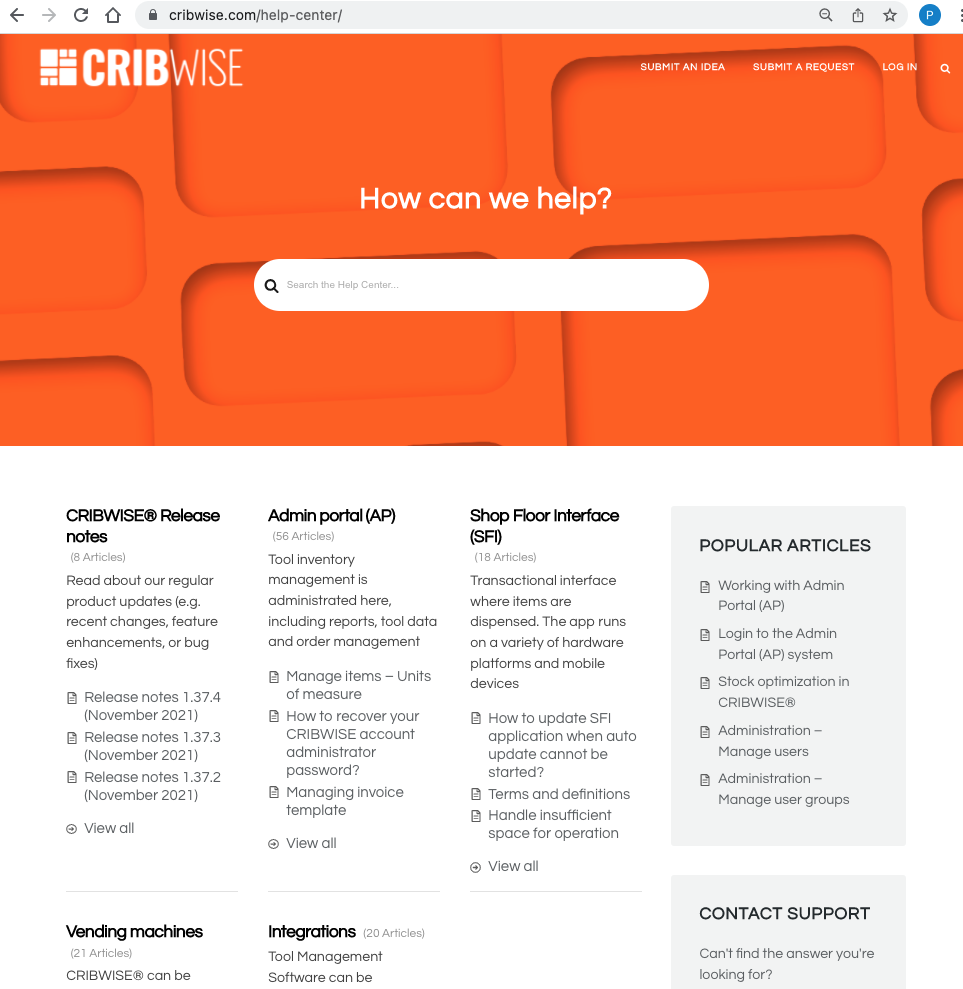
Help center
In November we launched our Help Center on our website where we publish manuals, release notes and descriptions of our capabilities and frequently asked questions.
We launch the help center to be more transparent and make information easily searchable for everyone.
From our Help Center you also find links to our request system and our idea portal.
You can find the portal at https://cribwise.com/help-center
Pick list functionality enhanced
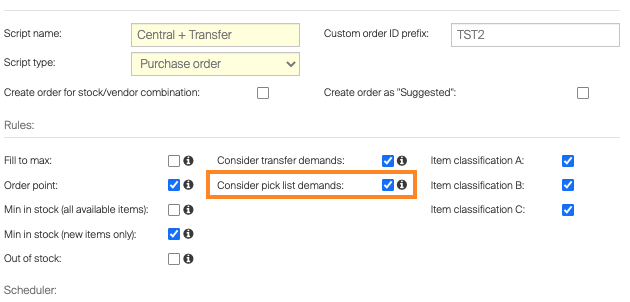
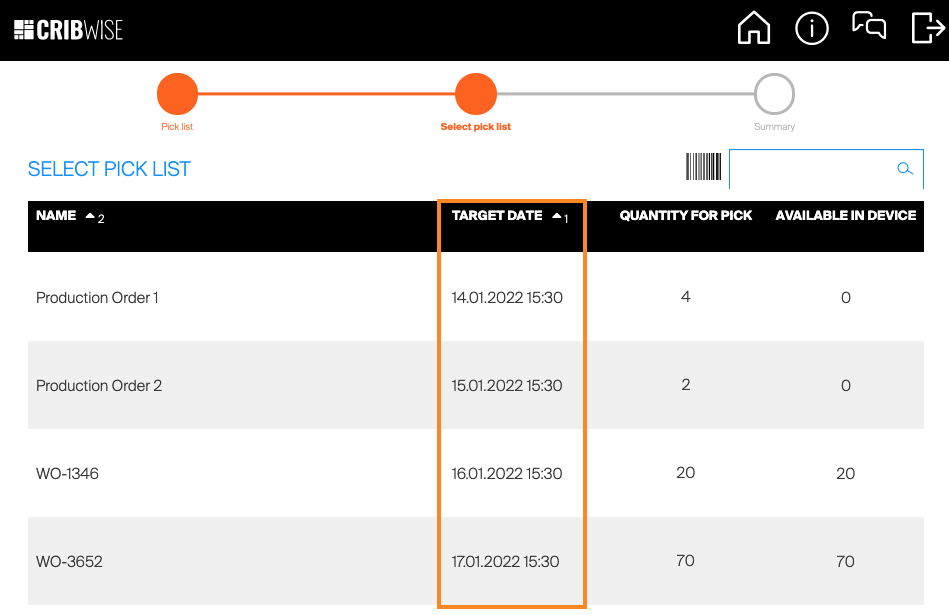
We have now enriched the pick list functionality to also be able to have pick lists create a demand by the purchasing script (similar as we have for transfer demand from satellite stocks) and have target date when the pick list should be ready/picked.
You could now create a pick list (assigned to a specific device) for a specific work order that should be ready a certain date.
If you set the order scripts to considering pick list demand this demand will be added on top of the regular order parameters to have Max quantity reached when Pick lists are consumed. (If the order parameters are set low this will be a demand driven replenishment method)
The target date for Pick list will serve as the pick priority for pick lists.
Both API’s and Excel import are updated to be able to handle needed attributes on the picklist object.
Units of measure implementation
We have up until now only worked with pieces as unit of measure in CRIBWISE application, but from this release we now can work multiple units and support working with one purchase unit of measure and another dispense unit of measure.
As an example you could buy boxes of cloves (10 pieces) from a supplier and dispense single pair of gloves to operators. Purchase price and quantities will show boxes on purchase order.
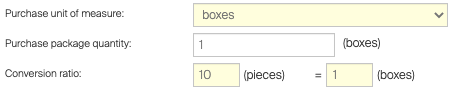
While the restock, stock values and consumption will be tracked in the dispense unit of measure.

In all shopfloor processes we also now visualize which unit of measure the operator is performing any transaction in.
Kardex Remstar integration update
In August we implemented the control of Kardex Remstar lifters through CRIBWISE application.
We have been able to control multiple lifters from one SFI with the JMIF in between but now we also introduce the capability to have multiple SFI controlling multiple lifters through same JMIF server.
As the JMIF server itself (purchased from Kardex) is expensive, we wanted to optimize the use of licenses to maximum.
A common way Kardex lifters are set-up is either to have opening on different floors in a building or set-up back to back, which makes it unpractical to run through same/one SFI.
To support this with multiple SFI without needing to have multiple JMIF installed we now can run any numbers of openings that the JMIF have been configured for (basic JMIF is 4 openings).
Note that these 4 openings can be on different physical locations but need to have network access to JMIF server and respective SFI.
New usage coststructure method
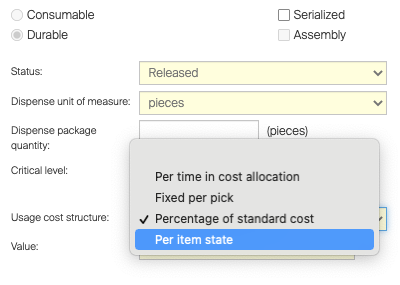
For durable items we now add a new usage cost structure method called “Per item state” When choosing this option, the cost of transaction records will be different based on the state of the item picked/returned. New state: From purchase price Used state: value will be 0 (zero) Refurbished: From Service purchase price
Special handing of variable item package quantity
We have request to be able to support choosing how many items should be restocked/retuned to specific location. The main reason for this to be supported is that in some cases vendors deliver their goods in non-standardized quantities per package and our restock process does not work when the expected pack sizes are not correct.
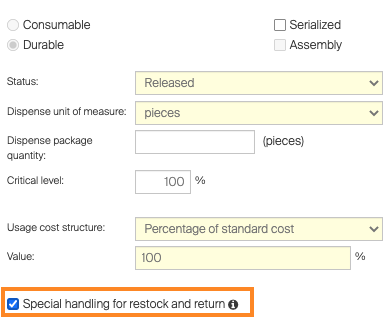
When this tickbox is set in the item detail the operator at Shop floor interface will be prompted to choose what location and quantity to be restocked into each location.
If the restock is from a purchase the options will only be locations set as New state.
Note that this will out rule the FIFO function built into the application and that this currently only work for open storage, any item tagged with “special handling can’t be stored in location-controlled device!
Smaller improvements
- Identifier in assignment data source if item have service or not (reports and BI interface)
- Moved device name on B2B orders so that device name will show at Goods Marking
- Extend search capabilities on Customer Management Portal for searching of customers
Release information
From this release you will not find release notes and manuals in the self-service portal.
All documents will be available in our help center athttps://cribwise.com/help-center
Release details
Admin Portal and Shop Floor Interface functionality added/changed
| Name | Description | Type |
| Changed mapping of item ID for import from SECO item catalog | When importing items from SECO item catalog, item number is now set as item ID instead of item designation. | Improvement |
| Option to generate cost of picks based on item state | For durable items, new option to set structure of usage cost has been added. This new option reflects state of picked item and generate usage cost only when new or refurbished item is picked. When used item is picked, no cost is generated. | New |
| Extension of assignment data source | In assignment data source for reporting and related BI interface, new field has been added to indicate if item has service or calibration allowed. | New |
| Allocation of quantity for pick lists | Scheduled scripts can now be set to check if there is any opened pick list for a device and if quantity requested by the pick list is available for pick. If not, script can generate order or transfer demand to cover this quantity. | New |
| Target device for pick lists | It is possible now to set pick list for specific device only. | New |
| Units of measure | Items now allow to have custom unit of measure used for dispense and purchasing. | New |
| Tools with special handling during restock and return | Item could be now set to require special handling during restock and return. In that case, operator must manually select location(s) where this item will be placed instead of leaving system to decide. | New |
| Allow change picked quantity | Based on user privilege, operator can now change picked quantity from a location of open storage device. | New |
| Change in order mapping for XML/B2B | Stock or device name in orders sent in XML format or sent to B2B interface is now shown in custom reference instead of organization information | Improvement |
| Support of multiple KARDEX machines operated by single JMIF instance | It is now possible to connect more SFI installations with KARDEX machine to a single JMIF controlling application. | Improvement |
| Performance stability improvements | Stability of performance of AP service has been improved to eliminate performance degradation in peak hours. | Improvement |
Admin Portal and Shop Floor interface issues fixed
| Name | Description |
| Order of CA steps not correct in Excel when step is removed | When CA step is removed from CA set, order of remaining steps is not recalculated when these steps are exported to Excel. |
| Synchronization of the item categories may fail when there are more than 2 levels in the categories structure | Failing synchronization of the item categories. Where there are more levels of the hierarchy in the item categories than 2 there is a random chance that the synchronization of the item categories fails. |
| Move item option visible on SFI when CA turned off for device/stock | Option to move item to another CA is still visible even when Use cost allocation option is tuned off for the device. |
| Item not shown properly during assign | Item row is not shown completely when item is being assigned in location controlled device. |
| Root level in CA hierarchy can be selected for delete or restrictions | When managing CA hierarchy, it is possible to select root level and press delete node or add restrictions. |
| Sending of support email does not work on Cribwise login screen in FF | Support dialog cannot be shown on login screen of Cribwise branded SFI in Firefox browser (version 92). |
| Chrome browser does not show newsfeed properly | Newsfeed on SFI login screen not shown in Chrome browser. |
| Item information not shown in notification when removing item from device | When item is selected to be removed from device from SFI and is placed on active order, warning toaster not fills item information placeholder and shows the placeholder instead. |
| Show news feed option on device is not working as expected for cloud devices | For cloud devices, decision if news feed on login screen is shown is not taken from device settings, but is connected with option “Show news feed on AP” from system settings. |
| Devices default language is not applied | Setting of default device language for cloud devices is not propagated to SFI. |
| Inventory cannot finish if inventory summary cannot be sent to email | When sending of inventory result is activated in system settings and email cannot be sent (in this case emails were not working from FAT environment due to sender not verified in Sendgrid), it is not possible to finish inventory in AP or SFI. |
| SFI – location assignment physical max qty cant be changed – purchase package qty and physical qty on location interfere | When device is set to dispense per packages only, SFI forces to set purchase and physical quantities to be only dispense package size. In case, when there is physical quantity in location not according dispense package size (could happened if package size is changed), item location assignment cannot be changed until physical quantity is properly changed to package size by inventory. |
| Daylight saving not reflected in update order API | When providing date/time via order API (like expected date, received by vendor date or shipping date), the date is not properly converted from UTC to customer’s time zone. |
| Misleading label for mass update of item purchase quantity | During item mass update, there is a field to update “Dispense package quantity”. But this field updates “Purchase package quantity” instead. |
| Long texts on machine’s display are not shown properly | When text shown on KARDEX control panel is too long (f.e. ID of an item), it is wrapped to next line and joined with text shown on this next line without any space. |
| Item custom fields can be lost by import | When item custom fields are not part of exported Excel sheet (custom fields were not marked for export), import of this file will erase values for custom fields from item. |
| Override cost allocation rules’ permission on user/user group does not work | When user is granted with ‘Override cost allocation rules’ permission by user settings or group settings, item restrictions and user restrictions are still applied to him during picking. |
| Return of items in pick list can lead to invalid quantity registered in location | When the same item is selected to be returned from two picks via return list and SFI offers single location for both picks, final quantity in that location updated only with one of these picks. |
| Working with purchase orders with hundreds of items is taking too long | Bad performance for customers with high amount of items. |
| Export on item overview does not contain UoM column | It is not possible export UoM measure column from Item preview |
| Orders cannot be sent / preview cannot be generated | It is not possible either to generate preview or the orders or to send to orders for customers with high amount of items. |