
Release overview
On Sunday evening, April 16th, we will deploy a new version of CRIBWISE. The Administration Portal (AP) will be updated seamlessly and will not have any downtime, new features will appear when done. The new version of the ShopFloor Interface will be continuously available to customers for manual or automatic download and installation. The sequenced roll-out of SFI installers will take place during Sunday to Tuesday. This sequenced approach serves two purposes:
- The first, is to get early feedback from a few customers and if any unexpected behavior occurs, we can correct them before more customers are impacted.
- The second, is to relief some stress on the application download service.
Below you can find the highlights of this release and also the detailed list of improvements and bugs included.
Highlights
Customer Management Portal 2.0
We now launch our new Customer Management Portal where Account administrators and Sales partners can manage and track their quotes, orders, deliveries and get full overview of assets and charges. We connect and give an overview of status both from our hardware suppliers and service providers into one view for our customers and sales partners.
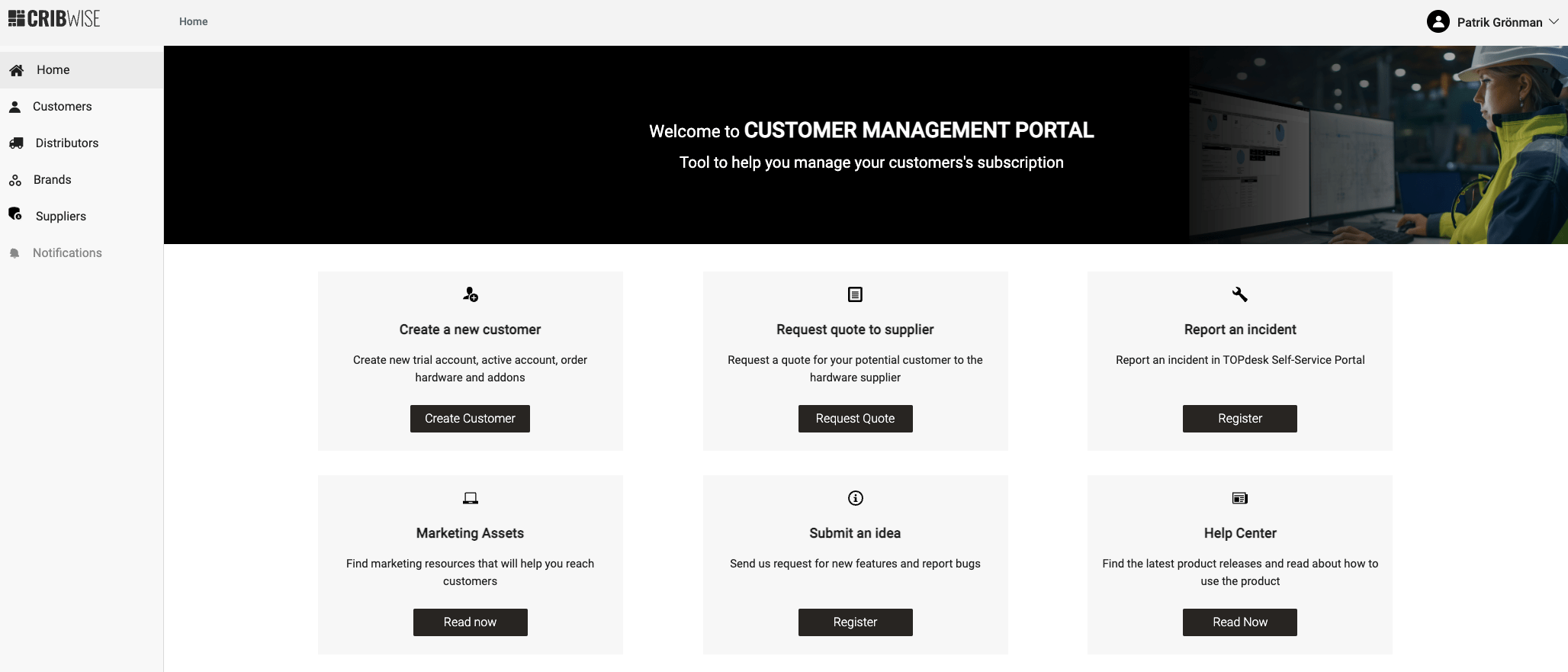
More information on this topic will be communicated through trainings, webinars and more details can be found in help center under Customer Account Management in our help center.
Assign barcode to item from ShopFloor interface
A feature that have been high on the wish list from our partners and customers is to be able to assign barcode on items from shopfloor interface. The challenge is that many times the barcode is not available in the source system when items are created and the process to manually identify the barcode on shopfloor and manually enter this in Admin portal is cumbersome.
Now we enable this feature in the assign item flow.
When you on Shopfloor interface are in the assign item flow and an item does not have a barcode specified, a new assign barcode icon will appear.
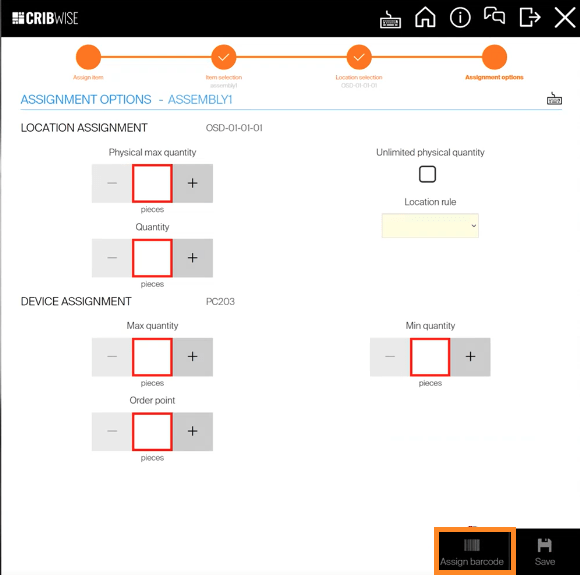
When you would like to add a barcode on a item that does not have the barcode assigned, the user simply click the icon, a pop-up will appear to ask user to scan the barcode from item.
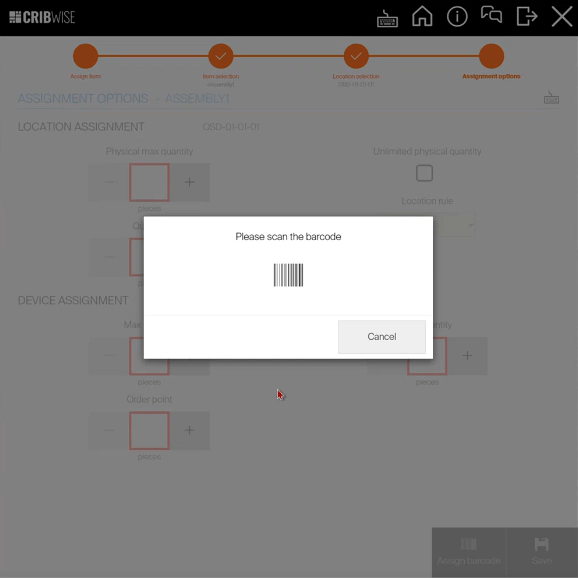
When scan of barcode is done, the barcode value is associated with the item and stored back to Admin portal and available in any other device to search by barcode scan. For the item that already have a barcode assigned the icon will not be shown and only way to change is from Admin Portal, either change the value or just remove the value and the icon will be offered again in the assign item flow or Manage item flow.
Tool Life tracking
We now implement a Tool Manager light version where we can track remaining Tool Life of an serialised assembly instance.
The pre-requisite to use the function will be that the item is defined as, Durable, Assembly and Serialised.
When the basic settings is made you also need to set-up the service process, (What needs to be done when item reach end of life) like send for internal indexing service. On the Supplier item tab settings you need to specify the metrics like tool life last 40 pieces or minutes (in cut) or meters (in cut) this is usually output that machines can deliver to operators.
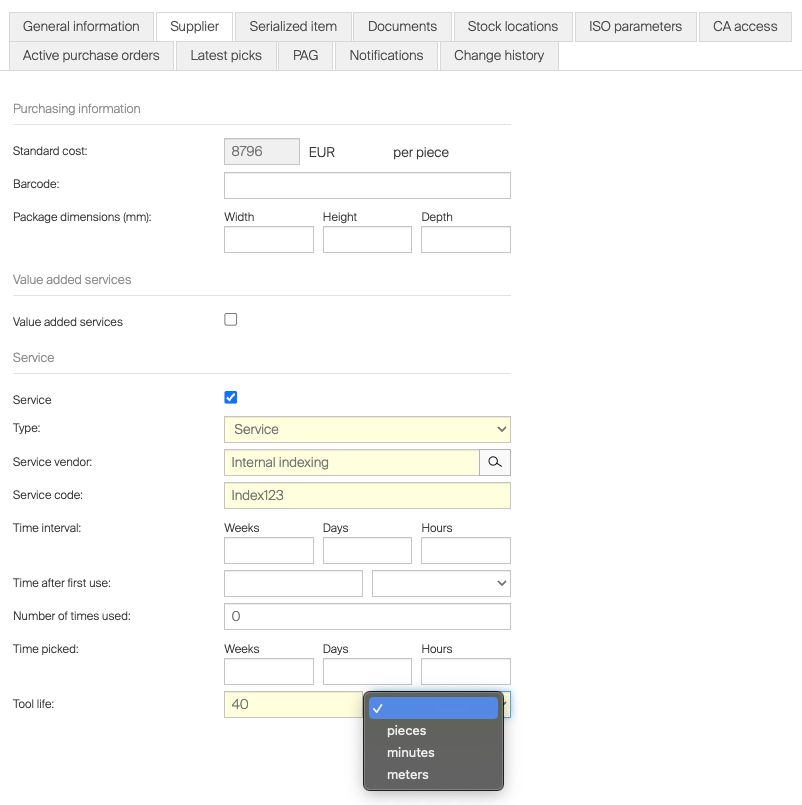
When all settings are made you can start to “build” assemblies through picking items. The feature comes to play when assembly is “returned as used”, the user will be prompted to input the consumed life of the specific instance returned.
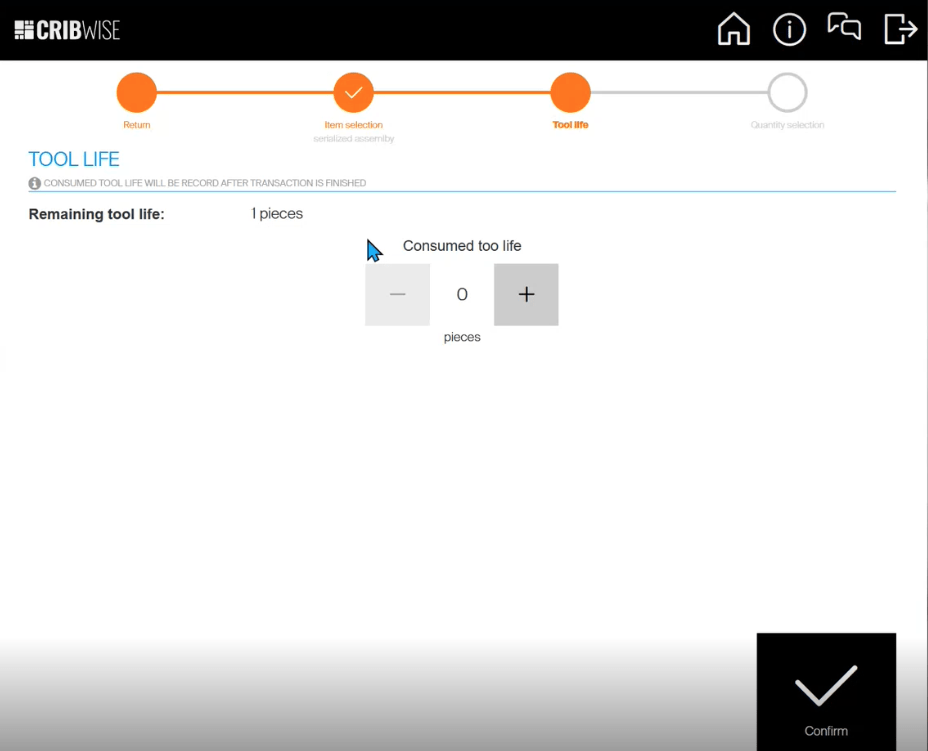
When the item has reach tool life remaining to zero the instance status will be automatically set to “For Service” and not be able to pick for use.
In the serialized items overview 3 new columns have been added, Tool Life remaining, Tool Life consumed, and a graphical bar remaining tool life.
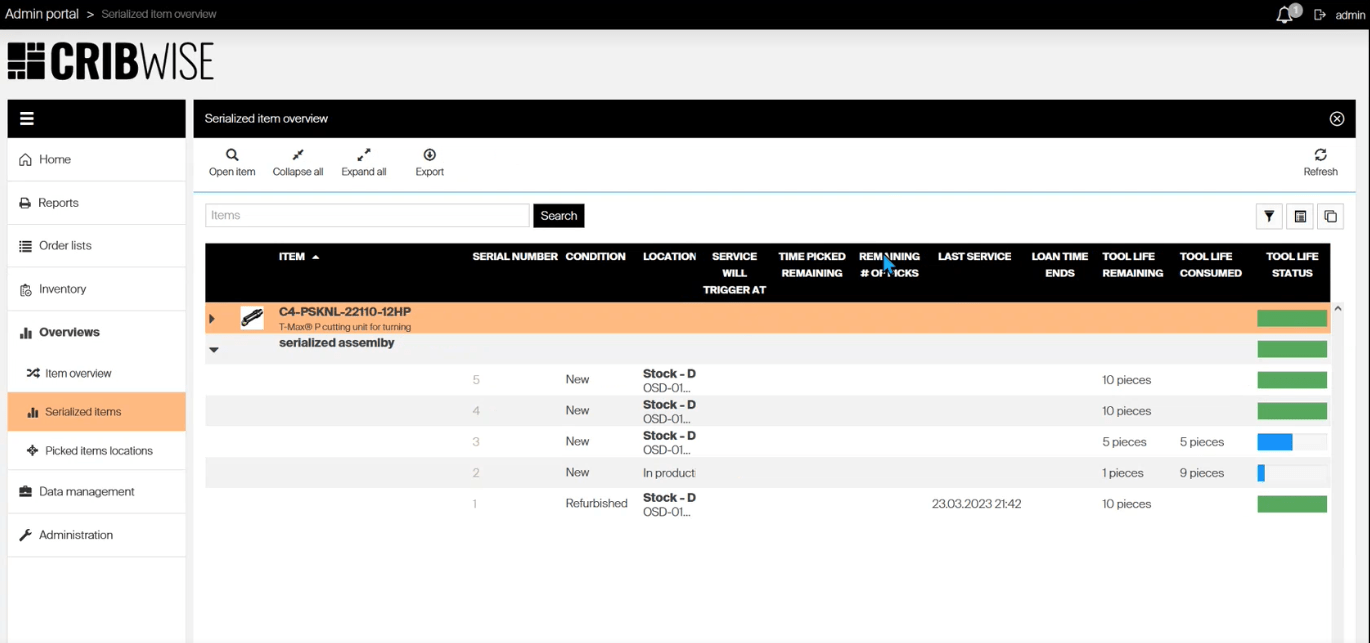
For customers with our API Access capability activated, our Serialized item instance API end-points are also updated with the Tool life information!
This Tool Life feature is activated through a free of charge addon “Tool life feature (MVP 2023)”
API Access end point extensions for Cost Allocation
We now adding end-point to fully be able to manage customers Cost Allocation structures fully through REST API. The method available today have been in the batch upload method which have been troublesome as data source needs to send in the complete structure in one post, if some things are wrong in the post the complete post get cancelled and it’s tricky to find and correct the issue. Also the challenge have been that we have no method except manually or export import to delete values created. With the new end-points leading systems can GET, POST, DELETE and UPDATE all hierarchies, restrictions and values, and also GET Sets and Steps.
Modula Lift system capability
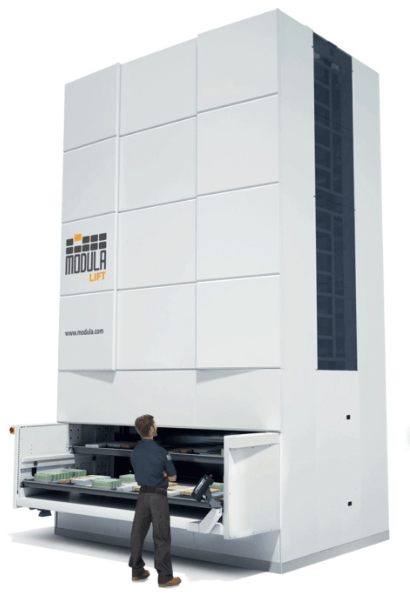
Modula is a commonly used storage system in the mid market segment. We now make Modula lifters available to be controlled by CRIBWISE, this also includes all accessories like displays and pointers. Worth noticing is that Lista storage lift system is a white label solution from Modula. The pre-requsite to control a Modula system is that the solution is delivered with Modulas LINK solution that CRIBWISE can integrate. Enabling the Modula interface is done through a Modula chargeble addon (Modula storage device controller) that needs to be added in Customer Management Portal on respective customer .
Changes in Storage device management
We now make some changes in the management of Storage devices,
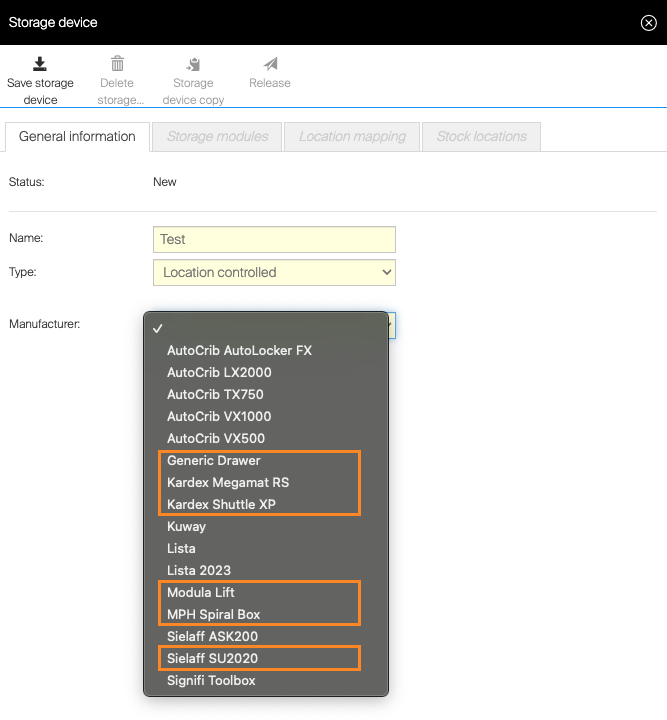
- Storage devices no longer supported have been removed from the list of devices
- Kuway cabinet renamed to Kuway (previously named as technical name FMB-L-05 in dropdown)
- Storage devices that are not part of CRIBWISE standard offer are removed and only made available by addon managed in Customer Management Portal.
- Modula storage device controller
- Kardex storage device controller
- Sielaff SU2020 storage device controller
-
MPH Spiral box storage device controller
This will not impact any already installed solutions, but if you by any reason delete a storage device that is not in the standard list and no addon is added in Custmer management portal you will not be able to select this again without adding the addon.
User Access to menus
We now have made more setting on the permissions for users groups customers to be able to limit access to menus in Admin portal. With this change it will really give a great granularity in permission to tailor groups both for internal users and external vendor users.
Add/Change customer number on script level
Today the customer number sent in as supplier customer ID in orders through B2B channel ar picked up only on the vendor settings. In some large accounts suppliers would like to split order into different accounts in their sales & delivery system for example an engine block line at the customer have one account while the crankshaft line should be recognised on another sales account. Today the only option for this is to create multiple vendors or make a more manual order channel like mail and enter the order information manually in system.
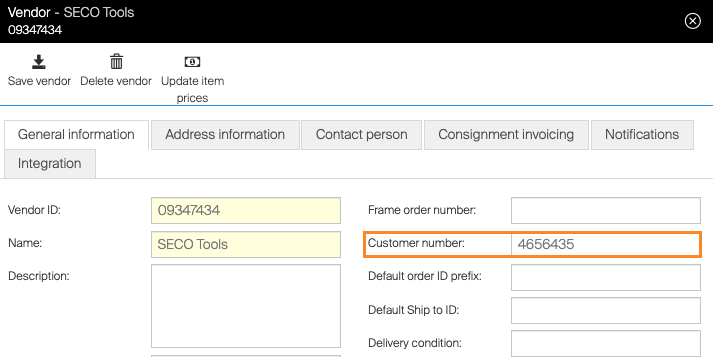
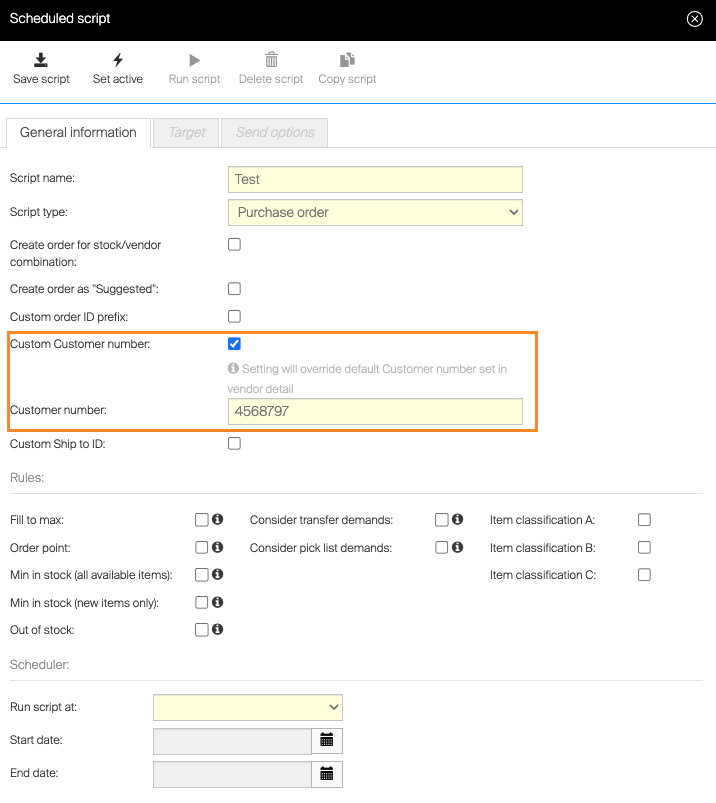
To solve this challenge we have now made it possible to override the customer number placed in the B2B order on script level. When making this override make sure that script have filters set in Target tab to only create order for that specific vendor and Stock/device combination, if this is not done all orders generated by this script to all vendors will get specified customer number!
Smaller improvements
- DormerPramet re-brand
We have made a complete remake of the branding of the Adminportal and Shopfloor interface for DormerPramet brand - Japanese language
Added as additional application language
Release information
You will no longer find release notes and manuals in the self-service portal. All documents will be available in our Help Center.
Release details
Admin Portal and Shop Floor Interface functionality added/changed
| Storage device naming and availability | Storage device types no longer supported are no longer available when creating a new storage device. Available storage device types is now based on subscription level. |
Improvement |
| Support for Japanese language | Japanese language added to list of supported languages. | New |
| User/user group permissions extended | User and user group permissions extended to manage access to: – run tasks – access event log – show item overviews – perform ABC classification – perform stock optimizationCRUD permissions extended to cover entities: – scheduled scripts – shifts |
Improvement |
| DormerPramet rebranding | DormerPramet design changes. | Improvement |
| Customer number on order level | It is now possible to set custom customer number for specific order and orders created by specific scheduled script. | New |
| Add barcode during assignment of item | When item has no barcode, it is possible to scan and add the barcode during assignment of this item to location. | New |
| Tool life tracking | For serialized assemblies, it is possible to define and track tool life of each specific assembly and automatically send the assembly to service once tool life is reached. | New |
| Manage cost allocations via API | Added API endpoints to cover management of cost allocations (sets, steps, values, hierarchies and hierarchy restrictions). | New |
| Support for Modula Lift system | Added support to operate Modula Lift storage system. | New |
| Proxy settings for on premise Admin Portal revised | Proxy settings removed for new on premise Admin Portal installation. Instead of custom proxy settings, Admin Portal always reflects proxy settings defined by operating system. | Improvement |
Admin Portal and Shop Floor Interface issues fixed
| Style of buttons in storage device detail is inconsistent | Buttons to add, edit or remove storage module in storage device detail on Admin Portal is not correct – add button size differs from other buttons. |
| Dialog selection mode on AP should always fill whole area with the grids | Once the size of the ‘Item’ column is changed in the item list that size is reflected in the ‘dialog’ mode as well. In the dialog mode the grid should always fill whole area as there is no way how to select / reset / move columns. |
| Item added to internal service list have purchase order code instead of service order code | Items added to the internal service list (either manually from AP UI or by synchronization from SFI where the items can be added automatically during return or restock) have wrong order code on the internal service list (purchase order code instead of service order code). |
| Cannot save item when item type is changed | When new item or item in defined state is set to durable, if loan time is activated but not filled and item is then changed to consumable, it cannot be saved. There is no error message indicating what the error is. |
| Too long vendor order code shown in excel import as ‘invalid row – business error’ | When order code in excel import file is longer than 50 characters such item cannot be imported to the database, however the error is then shown in the excel file as ‘invalid row (business error)’ making it hard to figure out what is wrong and what should be fixed. |
| Order with serialized item (quantity > 1) cannot be cancelled on SFI | Orders with serialized items with quantity > 1 cannot be cancelled on SFI ending with exception. |
| Uploading image for items and cost allocation can fail for large images | Conversion of uploaded image to thumbnail is not optimal (when uploading image document for item or setting image for cost allocation step or value) and may fail when uploading images in high resolution (above approximately 8000*6000). |
| KARDEX storage device is synced to SFI before it is released | When new storage device of type KARDEX is created on AP, it is possible to access KARDEX management on SFI to create locations and use the storage device before the storage device is changed to Released on Admin Portal. |
| Restoring of the default view is not immediately applied to the grid | Restoring of the default view is not immediately applied to the affected grid (for example item list). The list must closed and reopened for column selection / column sizes etc. to be applied. |
| On CRIBWISE brand – blue line divider missing in scheduled script detail | On scheduled script detail, there is a missing divider (blue line) below the toolbar icons. See the picture below. |
| Update against external catalogs can lead to to invalid data | When update of several items against external catalog is performed and some item is not found in external catalog, all following items are updated against invalid item in catalog. |
| Cancelling during waiting for door to close will stuck SFI | When dispense is invoked on TX750 or Lista 2023 with main door (TX750) or any drawer (Lista 2023) opened, SFI waits for user to close it to be able to continue. But if user will press cancel at this time, SFI will be stuck and there is no way to navigate to home other then restart UI. |
| Auto update started regardless of successful download of packages in the background | Auto update of SFI is started even though all packages are not already downloaded, resulting in packages are being downloaded while SFI is shut down, increasing downtime of the SFI during update. |
| Remove assignment on KARDEX layout management not working as expected | When working via KARDEX tray management screen, selecting a item to be removed from a location will remove all assigned items in that location. |
| Application gateway overwhelmed by download of SFI update | After release of SFI hotfix and publish of installers to all brands, background download started on all SFIs with auto update, caused data throughput in Application gateway reached its limit, causing whole environment slow. |
| Auto update not performed for devices with specific auto update settings | When device has auto update set to be started at 00:00, the update may never start. |
| Package quantity restrictions on SFI inconsistent | When updating purchase information for existing assignment for device set to dispense by package quantity, +/- buttons are not changing values by multiples of the package quantity, but still by 1. This behavior is inconsistent from setup of a new assignment, where +/- buttons reflect the package size. |
| When zooming in Safari the headings gets missplaced | When zooming in Safari the headings gets misplaced, seems to work for other browsers but Safari shows strange view as soon going from 100%. |
| Storage device initialization can be called twice | Initialization of the storage devices can be called twice which for some adapters can cause unexpected / undefined behavior if the initialization is not synchronized inside respective adapter. |
| Problems during assignment of codes to a shelves | Several issues found with assignment of code to a shelf in ASK 200 machine. Main case was found during reassignment of codes to all shelves due to HW replacement – SFI installation remained the same, but ASK got new shelves with new codes. |
| Import results list can not be reached | While opening the past importation list, the customer gets an error on the top right: “Not Specified Exception,” and the list doesn’t load up. |