
Release overview
On Sunday evening, December 18th, we will deploy a new version of CRIBWISE. The Administration Portal (AP) will be updated seamlessly and will not have any downtime, new features will appear when done. The new version of the ShopFloor Interface will be continuously available to customers for manual or automatic download and installation. The sequenced roll-out will take place during Sunday to Tuesday. This sequenced approach serves two purposes:
- The first, is to get early feedback from a few customers and if any unexpected behavior occurs, we can correct them before more customers are impacted.
- The second, is to relief some stress on the application download service.
Below you can find the highlights of this release and also the detailed list of improvements and bugs included.
Highlights
Ability to track Item changes now available in item details
CRIBWISE now introduces a history tab in the Item management detailed view. This enables users to see what changes have been made on an item and by whom. This simplifies potential trouble shooting and sheds a light on what has happened with the Item in the past.
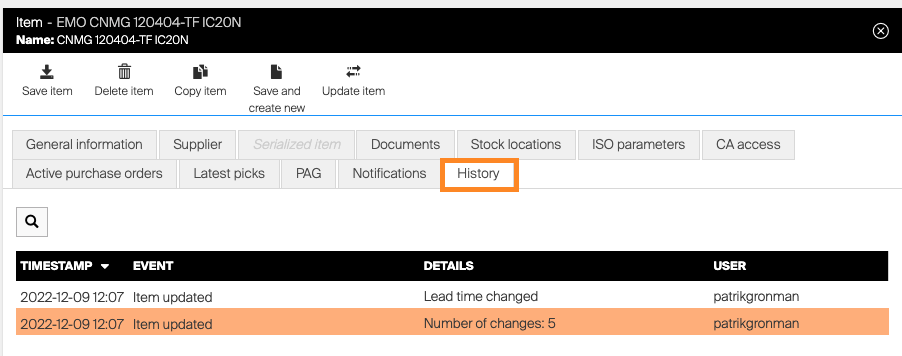
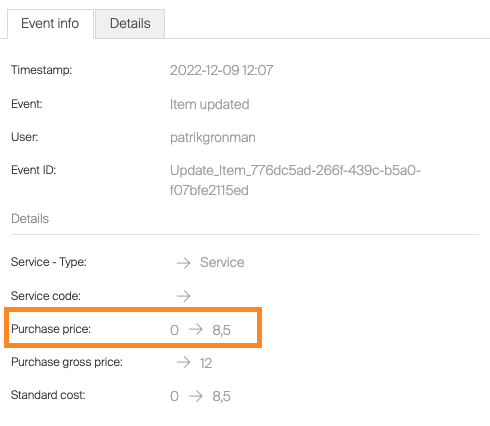
When you open up the details of a change you can see old and new values:
We will continue to add the history tab on more entities in future CRIBWISE releases!
Notification available for failed orders
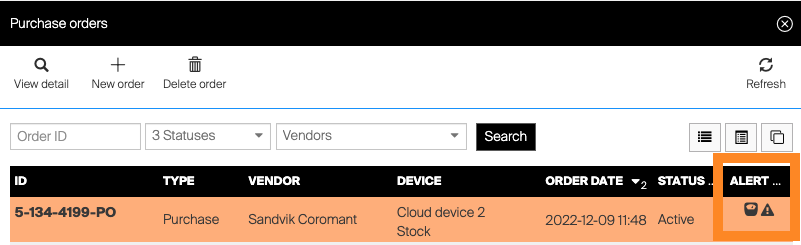
In last release, 1.43, we introduced a retry policy for orders that failed to be sent to defined channel. Now we enhance this functionality further with visual alerts in both order list and order detail view. The purchase order list will show exclamation mark in the alert column.
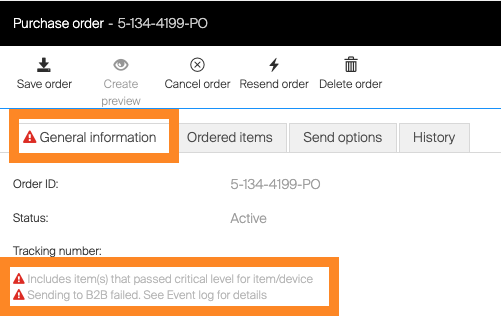
In order detail, there will be an exclamation mark in the general information tab and also an explanatory text of the channel failed.
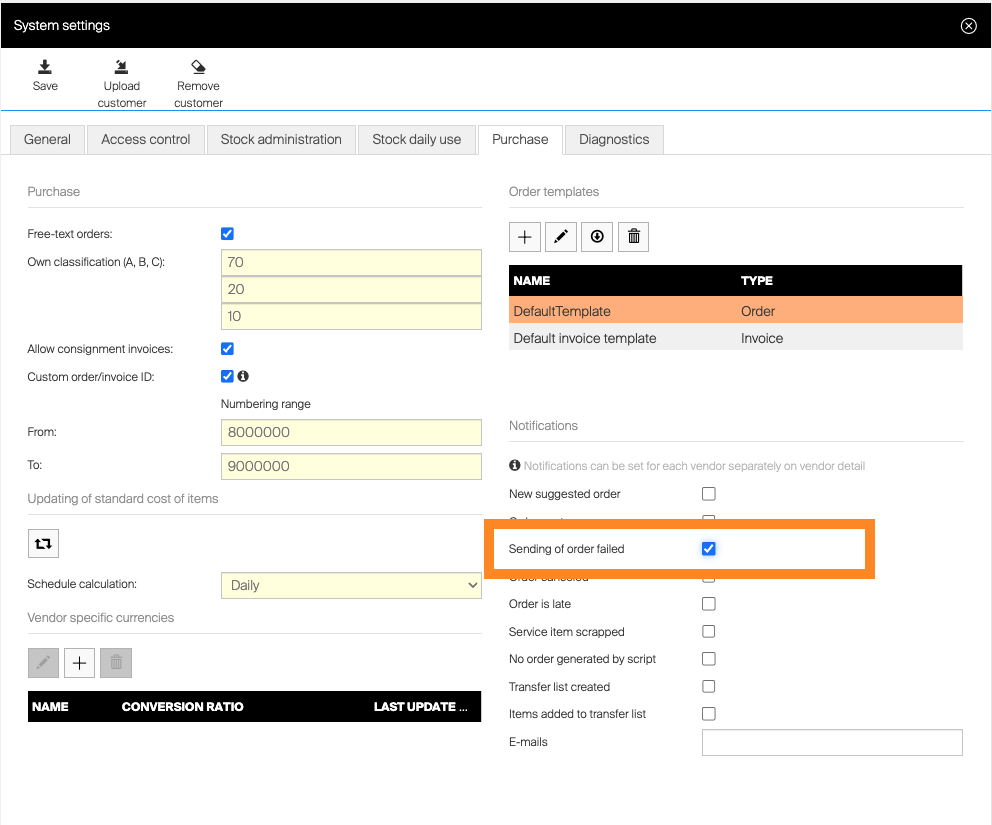
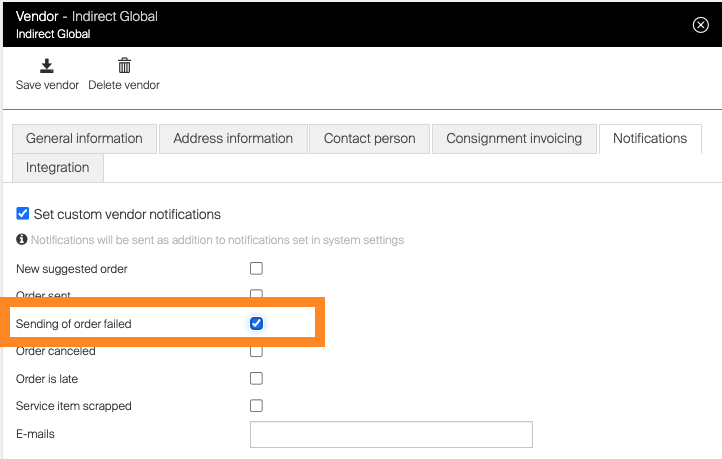
With this change we also enable customer to set up e-mail notifications on system settings and/or vendor level if order by any reason fails to be sent.
Notification setting in the applications System settings
Notification setting on vendor level
Introduction of Gross Price on Items
We now introduce a Gross price attribute on items. The driver for this is two folded.
- Some customers want to show a price to operators in SFI to indicate a value, but at the same time not show the actual purchase price.
- From a purchase perspective, this can be used to calculate discount levels on items.
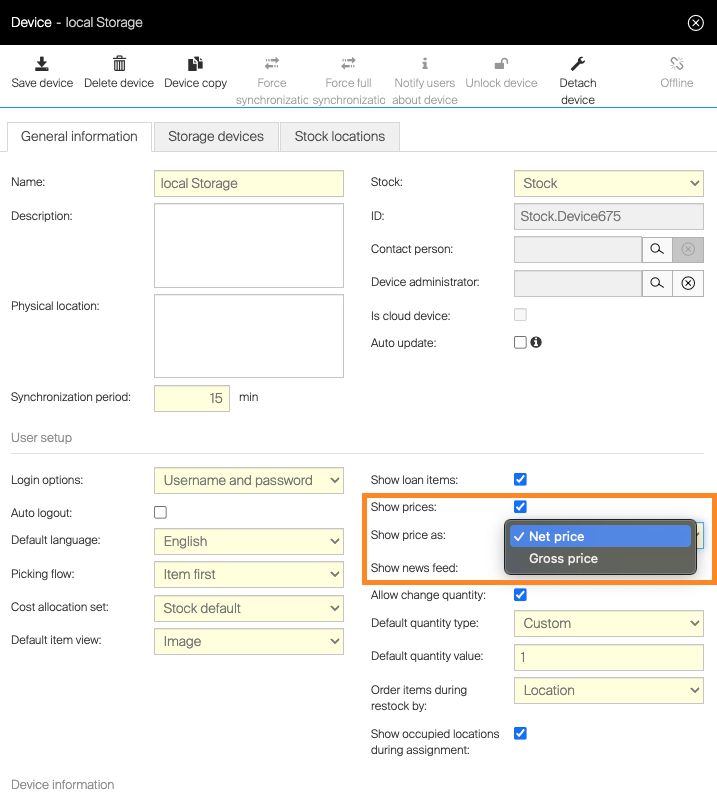
You can add/change this in device settings, first activate Show prices, then you will be able to choose between Net or Gross price. In addition, Gross price is implemented to connect to a future Price Update functionality we are currently in progress of developing for distributors and vendors.
More API end-points added related to Items in the CRIBWISE Integration Platform
We are continuously updating our integration capabilities and in this release we have added end-points for User and User group management.
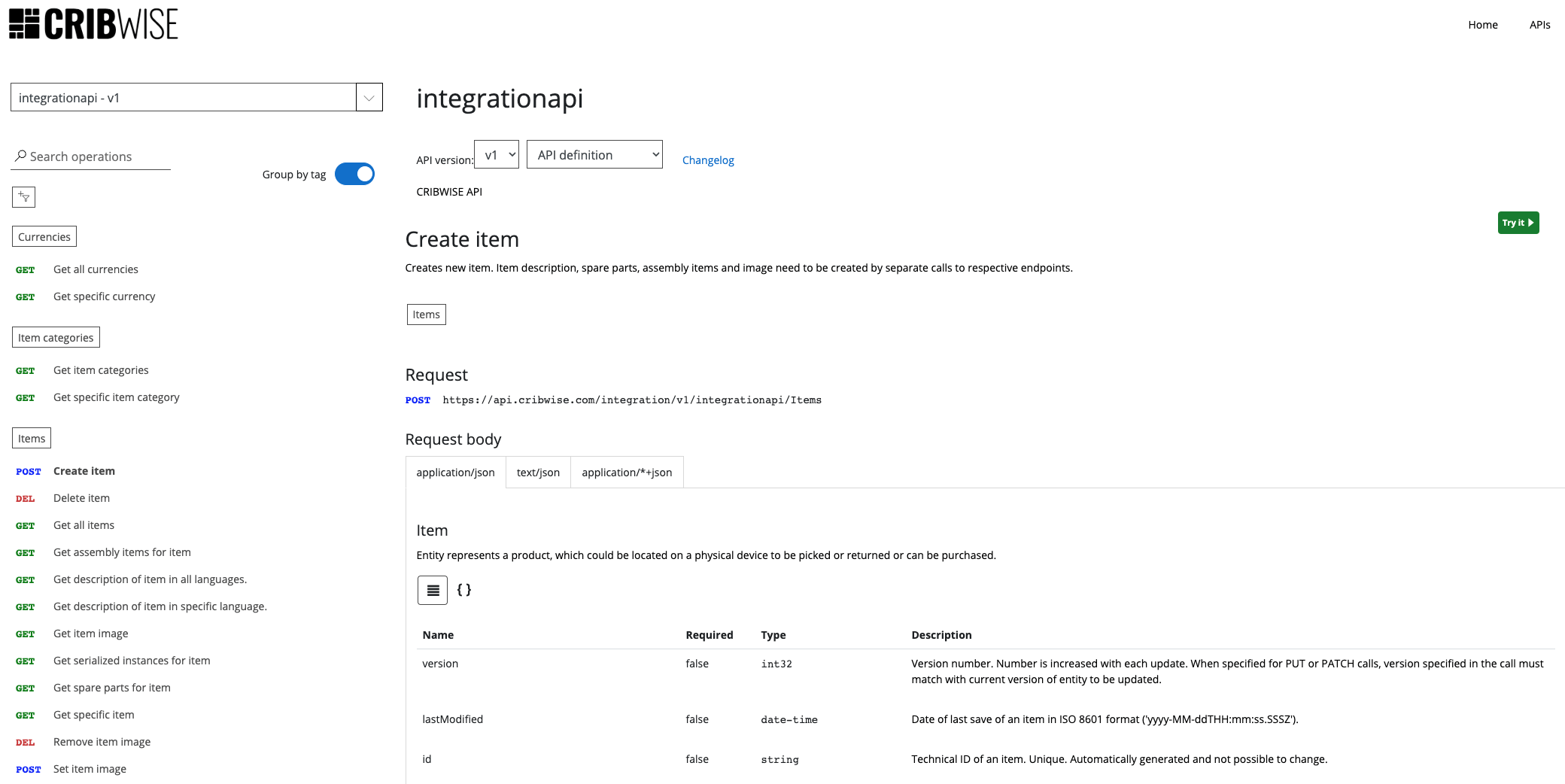
You can find more details related to the available end-points on the CRIBWISE API management platform at api.developer.cribwise.com. End-points in the API Management platform can be activated when customer has purchased CRIBWISE API Access Service Add-on.
Rework of barcode scanner and RFID reader capabilities
In Release 1.42 we moved our application from Internet Explorer to Chromium based technology, this caused some unwanted behavior of scanner devices like barcode and RFID readers. Since then, we have kept the field that should receive input data highlighted, in order for any reader to be able to place read content into said field. Due to this, we were forced to disable any keyboard automation in on-screen keyboard invoke. For a user to actually use the on-screen keyboard, they have been forced to manually invoke the keyboard by clicking on the corresponding keyboard icon. With this release, CRIBWISE now introduces a new back-end method to capture any keyboard activity to be placed in relevant field based on where you are in the different SFI flows. With this change, users now only have to highlight the field they want to type in and the on-screen keyboard will be invoked automatically. This also has a positive effect for users working with cloud devices in browser.
Smaller improvements
- Improvements in Restock and Return process for Items with special handling
Special handling is introduced for users to be able to select locations upon Restock and Return and we now simplified the flows to eliminate one step in this scenario. - Change in transaction behavior for Lista Cabinets
For Lista cabinets we have had a behavior that transactions were logged despite the location never being opened (Timed out). This has now been changed and the transaction is only logged when the location actually is opened. - Offline time restrictions for On Premise solutions
We now introduce a change to the behavior for on premise installations. For the application to stay operational, the connection must be validated at least once per year to confirm that a valid subscription is active. Previously this was only required upon installation.
Release information
You will no longer find release notes and manuals in the self-service portal. All documents will be available in our Help Center.
Release details
Admin Portal and Shop Floor Interface functionality added/changed
| Name | Description | Type |
| Improvement of SFTP file transfer | Updated process and components to transfer files via SFTP to provide more reliant solution and support for broader setup of target FTP servers. | Improvement |
| Gross purchase price for items | Items can now have gross purchase price defined. New device setting is now available to define if gross or net price (or not price at all) should be shown during picking and returning operations on Shop Floor Interface. | New |
| Improved FTP/SFTP connection test | When test of FTP or SFTP connection fails, detail of error is visible for administrator to help investigate the failing connection. | Improvement |
| Reworked support for barcode scanners and RFID readers and keyboard handling | Focus is now not needed in text fields on SFI in order to use barcode readers or RFID readers to populate data. It is possible now to search for an item via barcode without need to clear previously searched value. Search is now cleared automatically when the next barcode is scanned. On PC with touch support, touch keyboard is now shown automatically when entering a text field and hidden when the field is left. |
Improvement |
| Improved stability and performance of update service | Performance and stability of service providing SFI updates has been improved and stress tested to withstand load after new SFI version is released. | Improvement |
| Change time out behavior for Lista cabinets | For Lista cabinets, transaction is now not considered as completed after user’s inactivity if location (or drawer) was not opened before. | Improvement |
| Restock items with special handling right after locations are selected | When restocking and returning items with special handling, system allows now to physically place these items to target locations right after these locations are selected. | Improvement |
| Notifications for orders failed to be sent to vendor | It is now possible to set email notifications (on vendor and system level) to inform about any order, which failed to be sent to desired target (B2B, FTP or email). Any orders failed to be sent will also show alert in orders list and details of each failed target in order detail. |
New |
| Tracking of item change history | Any change made on item definition (item information, documents or related items) is now stored and shown on item detail with information about user who performed the change. | New |
| Extension of API | API extend with new endpoints to manage users, user groups and user keys. | New |
Admin Portal and Shop Floor Interface issues fixed
| Name | Description |
| Sorting is not kept when done by column not present in collapsed mode | When data in the list are sorted by the column which is not present in collapsed mode then sorting is lost (and probably default sorting is used) when detail is opened. |
| SFI toasters reset inactivity tracking | Once toaster (green notification) is shown on SFI, it is counted as user’s activity. SFI shows information toasters with each finished synchronization. Due to that, if SFI auto logout is set to interval higher than sync interval (like 30 minutes auto logout and 15 minutes sync interval), auto logout will never hit. |
| Order with custom items only cannot be sent when there is not assignment for device / vendor combination | When there is an order created with custom items only for device / vendor combination without any assigned item for that vendor on that device, the order cannot be sent. |
| SFI layout not correct for picking from predefined pick list | Layout is not correct on steps for picking from predefined pick lists – blue horizontal line used as a separator bellow step header is not shown. |
| Item overview – not possible to sort by all column | In item overview, it is not possible to sort by columns “Consignment” and “State”, even thought it is possible to click to header of there columns to visually activate the sorting. |
| Date picker in reports not shown properly in Portuguese | When AP language is in Portuguese, date picker shown to select custom time period in advance filter of reports is not displayed properly and is partially hidden. |
| Max length of text CA step value is not validated | There is no validation for maximum length of text entered to a CA text step. When maximum length is exceeded, pick cannot be finished. |
| Document type is not mandatory when creating new document for item causing unhandled error | When new document for item is created, the Document type field looks like mandatory however it is not and user can press ‘Save’ even in case the document type is not filled resulting in backend exception. |
| Promise missing during loading CA restrictions for users | When list of user restrictions is opened for CA value in hierarchy on AP, there is no promise (loading) shown. List is opened as blank and users are listed after some time without any indication of loading. |
| Long names in multiselect dropdowns are not shown properly | When entity has a long name, it is not shown properly in multiselect dropdown lost, f.e. filters in report. “…” is shown instead of the name, making identification impossible. |
| Default login method generates error for new cloud devices | When login with card/Coges is set as default value for new devices, creation of new cloud device is not possible until the default value is changed in system settings. |
| Loan time cannot be turned off | It is not possible to turn off loan time specification for serialized items. Once turned off, option is turned on again after item detail is reopened. To clean the setting, it is needed to clear value and period, uncheck the option and save item. |
| When detail of order remains open after sending, status can disappear | Having order detail opened once sending of order to vendor is finished, order status ‘Active’ will disappear on order detail and in order’s list. |
| Invalid validation message for password length error | When new password is being set for a user on AP user management and minimal password length is not met, error message contains not replaced placeholder. |
| Excel export file has limited functionality | Files generated by Excel export contains some hidden selection or limitation, which prevents from data to be copied to another Excel workbook or to create a new sheet. |
| Serial number for new assembly is forced to be unique in scope of customer | When new serialized assembly is being created by picking all required items, serial number of the assembly must be unique in scope of all serialized items of a customer, not just the same assembly. |
| Tab on Azure AD login form focuses unexpected field | When user name field is focused on login screen for Azure AD users (login to AP as admin or login to CMP), pressing tab key will not focus password field as expected, but will focus option “Forgot your password?”. |
| Value for price event is null for some customers | It is possible to upload items via Excel and API with Usage cost structure set without percentage of standard cost. Such case results in pick transactions have 0 value. |