
Release overview
On Sunday, July 17th in the evening, we will deploy a new version of CRIBWISE. The Administration Portal (AP) and cloud devices will be down for a few minutes during the update. This release is full with many interesting updates. Most proudly, we are launching our cooperation with Swedish ERP company, Monitor ERP.
We also deliver several user experience updates in both Admin Portal and Shopfloor interface, view the highlights and details below.
Highlights
CRIBWISE Monitor ERP G5 integration
We are happy to announce that we now have launched our first Ready–To–Use integration together with Monitor ERP! This Ready-To-Use Integration synchronises Purchase Order data from CRIBWISE to MONITOR ERP G5 for reasons like:
- Viewing purchased quantities and values in MONITOR
- Viewing delivery status for orders in MONITOR
- Facilitating supplier automatic invoice handling/approval – Match invoice with order
The integration is activated as a CRIBWISE Subscription Add-on through our Customer management Portal and is available for all customers using Monitor ERP G5. View our blog at cribwise.com for more information.

Read more details about Monitor ERP G5 integration in our help center! Purchase Order integration Requirements and configuration
Admin Portal list view changes
A long awaited solution has been implemented to improve the work with lists, this specially improves the experience in list view with many records, like purchaser order list, item list and item overview. You now can create own views that you easily can pick-up again with all settings needed for the task to perform! In all list views there is new icon arranged, some icons are new and some moved down from header to list window.  Set the necessary filters for viewing
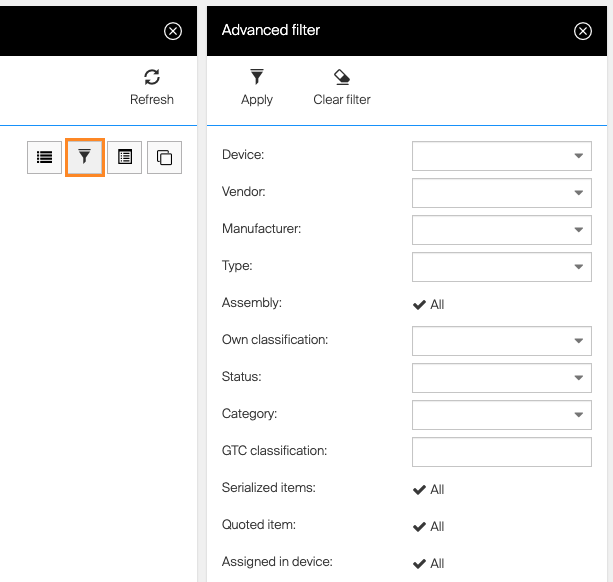
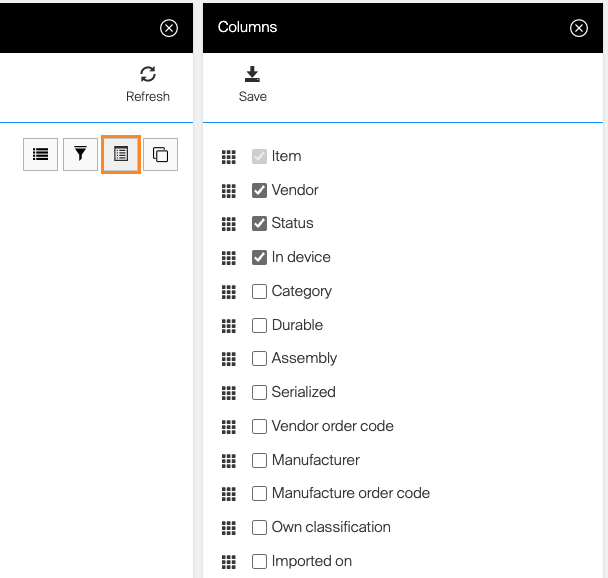
Select the columns to display and sort them in order by using the drag and drop function.
Sort the values in order by clicking the header, multi sorting is available by holding the shift button. Adjust the column width as needed. 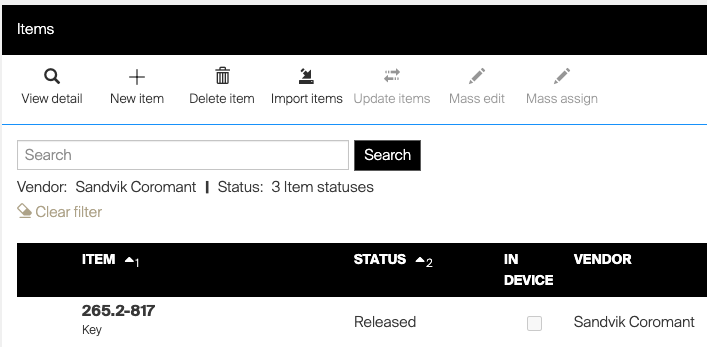
Save the view by clicking “Save as new view” and give the view a descriptive name
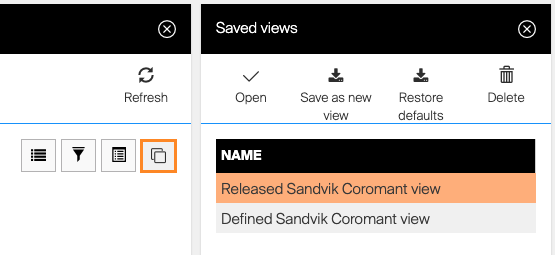
The settings will be saved and can easily be picked-up later. Additionally, if you navigate away from the Item view, the last settings will be remembered. So when you get back to the item view the previous settings will remain (regardless if the view is saved or not)
ShopFloor interface list views goes to card view
This change improves the user experience of list views in shop floor interface. The challenge have been that in some views and some screen resolution, text have been cut and not visible for the user. Or the item rows have became very high and a full screen may only have visualised 3-4 items rows. Both challenges have caused issues in selection of the right item. Now we move in to a card mode where columns are removed and each row is treated as a card. We can then fit more information on each row with longer text information. The views will also be much more dynamic and we can keep down the row height independent of screen resolution.
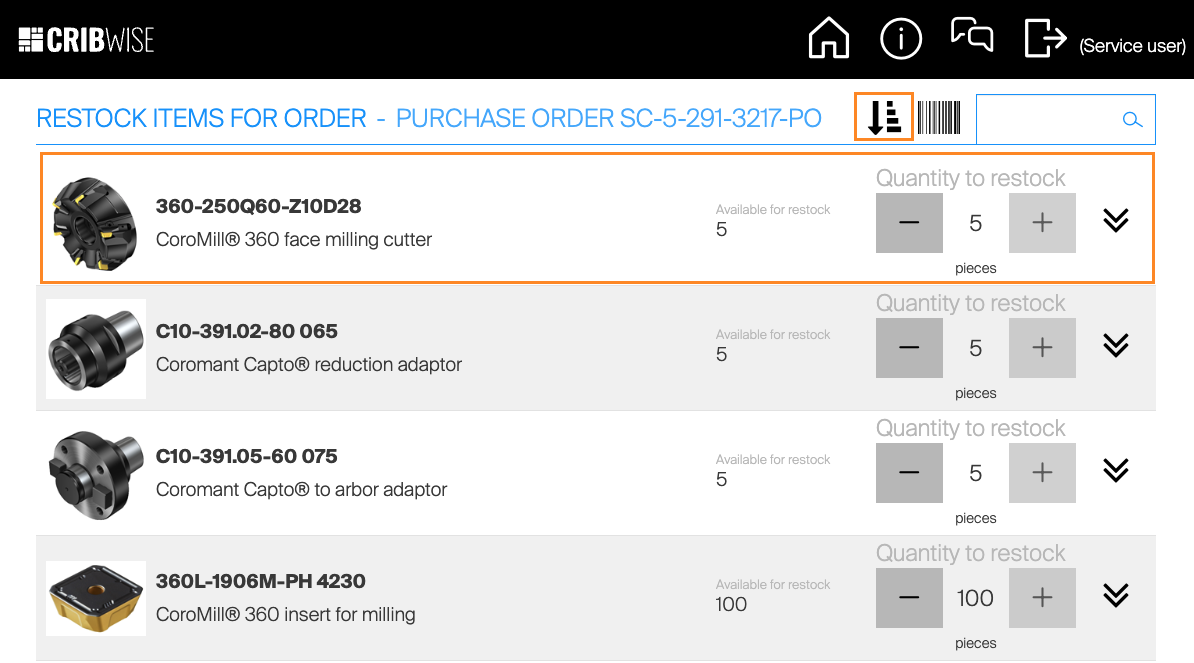
With this change of column to card, the method for sorting of the rows will change. Before the sorting where made by clicking the column header. Now this needs to be done by clicking sorting icon.
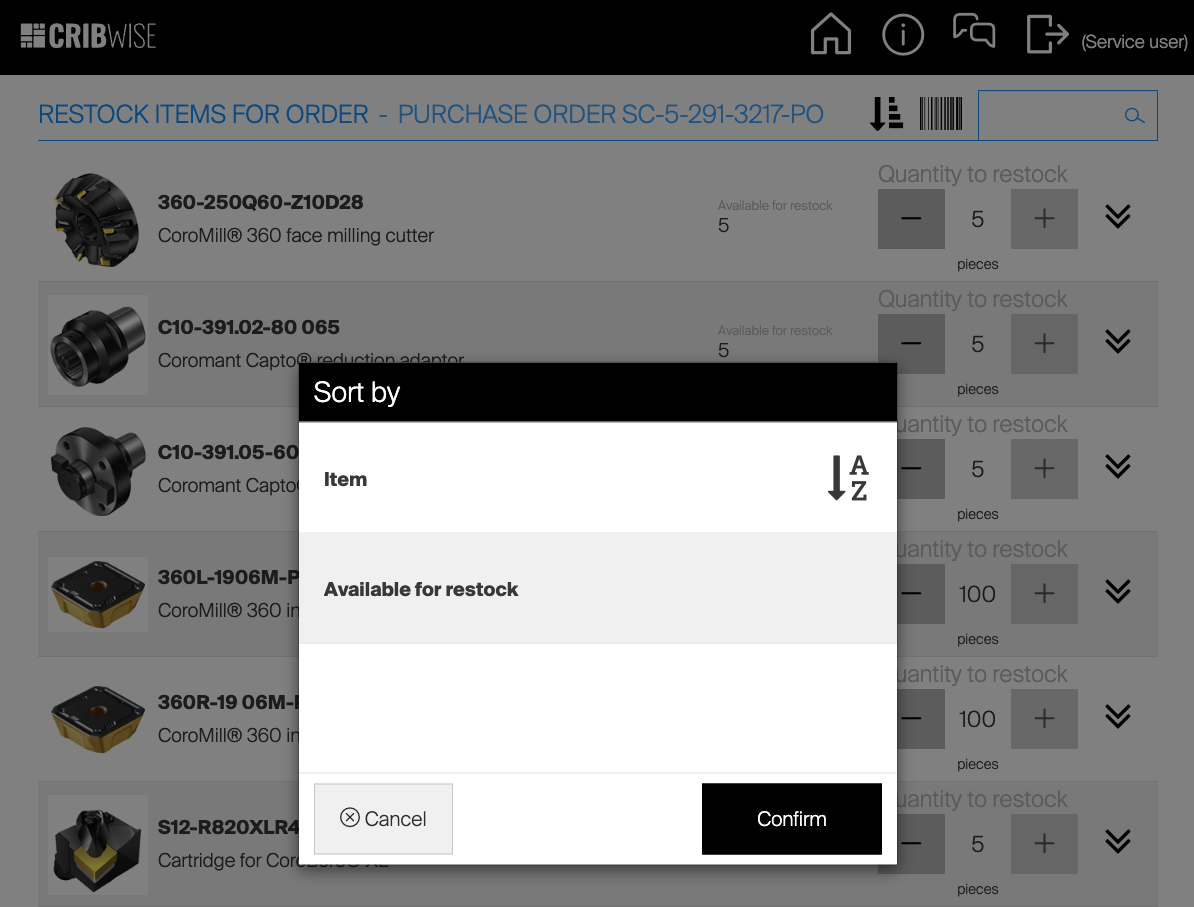
Click on the available sort by options to sort the list A-Z or 1-9 pending on value type to be sorted.
Own purchase order number ranges
CRIBWISE have had an own unique PO number range counting like 5-302-3534-PO. We now implement a way for customers to decide their own PO number range. The main driver for this change is that the character amount for our current method have reached minimum 15 characters, this amounts exceeds the limits of many ERP systems have for PO number length making integrations cumbersome. The activation of own number range can be set in system settings under purchase tab. The range can be set by number only. 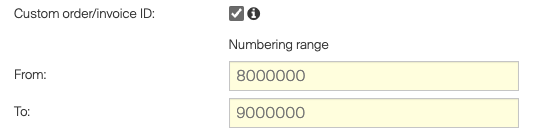
You can still define order pre-fix, from vendor level, scripts creating the order or manually.
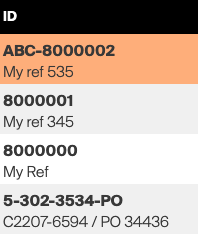
When activating own purchase order range make sure there is enough numbers in the range. If number range run out, no orders can be created! In later versions we will give alerts for this but this is not available in this first version.
New option of sorting at restock (Item instead of Location)
When restocking purchase orders in to locations our focus have been on optimising the location openings in order (first restock all items in 1st drawer then 2nd drawer). The challenge with this approach is if you have same item assigned to multiple locations in different part of the storage device. Operator will then need to restock parts of an item and then continue with another item and then go back to the first item. In most cases with large orders for many items suppliers deliver them in same box but separated inside the box by item number. With this new option of sorting you can choose to sort the restocking on Location (as currently) or Item and by that complete one item before move to next. The setting is made on device level! 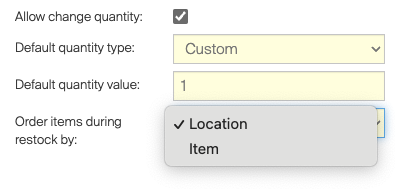
The new setting should be preferred in Open storage devices and Lifters.
New device status
From this release we change the meaning of some device statuses and add more statuses. The purpose for this change is to be able to get early warning on issues with synchronization of devices.
- Not Installed
This indicates that a physical device have been created but no installation is performed and connected to this device. - Synchronized
Device is installed and properly synchronized with Admin Portal - Not Synchronized
Device is installed but failed to synchronize according settings - Waiting for Lock, Waiting for Unlock and Locked
If you would like to get alerts when synch is not performed according to plan you can in System Settings / Diagnostics, subscribe to Sychronization error events. You can also search for this events in event log by sort of System events and view Synchronization error category.
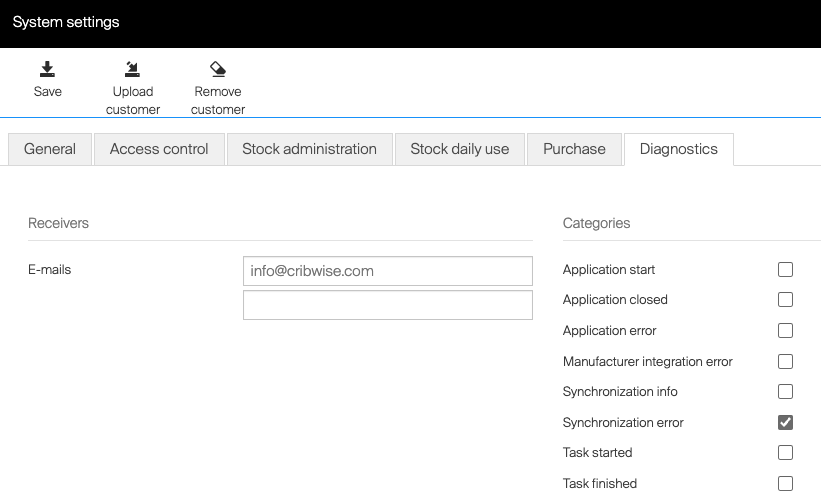
Note that this new device statuses and feature will only be visible when respective device is updated to 1.41 version!
Application moves to app services
CRIBWISE application will now move from Azure cloud service to application services. For a user this will have no impact but this will give us better capabilities to automatically scale up/down the services for performance, make the deployment of new versions seamless without downtime and also enhance the security further. What will change is that the inbound and outbound IP address will change! This could cause issues for any integration where our current IP addresses are whitelisted in customer network settings. Application gateway: 20.126.145.37 (Inbound to our services) Application gateway: 40.91.233.95 (Outbound calls from CRIBWISE will come from this address)
Examples of impact if CRIBWISE drops a report on a customer ftp server and customer is validating our current IP address, these drops could start fail if customer don’t update and whitelist our new IP address!
Smaller improvements
- Customer management Portal
Smaller enhancements in sign-up form, we change name of field “Organisation number” to “Partner reference” the meaning should be sales partners customer number. Adding VAT number. When API access is ordered and available the possibility to manage Subscription keys will be enabled.
- Additional API authentication method added
Create API keys in Admin portal / Administration / Integration, instead of use credentials (ID, secret, user and password) we now can use customer shortname and API Key for authentication of API calls. The API Key can be named and can be revoked manually or have expiry date.
- E-mail mandatory on support request from SFI
E-mail field mandatory when sending support request from SFI to avoid spamming and for support to have a contact.
- Cancel of pick is now restricted by permission
For operator to be able to cancel a in pick flow, user now needs permission set to perform cancel.
- Vendor address fields now available in order template
Release information
You will not find release notes and manuals in the self-service portal. All documents will be available in our Help Center athttps://cribwise.com/help-center https://cribwise.com/help-center/upcoming-releases-2021-and-2022/
Release details
Admin Portal and Shop Floor Interface functionality added/changed
| Name | Description | Type |
| API authentication via API keys | Authentication for API calls (including BI interfaces) could be managed by generated API keys. Each key could be set with limited validity and can be shared with third party projects without need to share customer specific information. | New |
| Severity filters in ready to use integration’s event log | Event logs for ready to use integrations now allows to filter only records with specific severity. | Improvement |
| Sorting of locations for items with special handling | Location list shown during restock and return of items with special handling is now sorted by location name. | Improvement |
| Cancel of SFI flow registered as event | When any flow on SFI is cancelled by operator, this action is recorded and shown in event log. | Improvement |
| Privilege to cancel pick flow | New SFI privilege added allowing to restrict operators to cancel pick flow before it is finished, eliminating situation when products are taken out but the flow is cancelled. | New |
| Lists customization | List of objects (like item list, orders list etc.) now remembers customizations made by user and will apply them any time when this list is opened again. These includes column width, column order, shown columns, advanced filters and sorting. User can also save current state of the list to create custom view and load this view later on. | New |
| End of support for Dormer Pramet catalog | Dormer Pramet catalog is no longer available to download items. | Change |
| Mandatory email address for support request | When sending support request from SFI, sender’s email is now mandatory to be provided by operator. | Improvement |
| Extension of tags available for order templates | Postal code from vendor address now can be added to order template. | Improvement |
| Custom order/invoice ID range | It is now possible to set custom number range to be used to generate ID for orders and invoices. When activated, each new order and invoice will have ID set as the next available number in this range instead of default ID. Order ID prefix still can be applied for custom IDs. |
New |
| Changed way of restricting access to Windows for SFI installations | SFI now uses a different technique to restrict access to Windows from running SFI. The new technique eliminates several problems found with the old technique and allows easier way to access the system for support personnel. | Improvement |
| New item field – GL account | General ledger account field added to item definition and reporting. | New |
| Device statuses reworked | Statuses of device has been changed to distinguish between devices pending installation and devices which were not synced in proper sync period. The diagnostics option could be activated to send notification when device is not synced in proper period. |
Improvement |
| Alternative option for restocking of products | Device could be set to restock products as product after product, instead of restock products location by location, allowing to finish restock of single product in a box before moving to another product. | New |
| SFI visual changes | Layout of information shown on SFI has been changed to apply more modern design, allowing to show all information without trimming on various screen sizes. | Improvement |
Admin Portal and Shop Floor Interface issues fixed
| Name | Description |
| Orders cannot be sent / preview cannot be generated | Order cannot be converted to PDF/Excel due to high number of translations for items. |
| Error shown when loading pick lists | When navigating to list of pick lists on SFI, error is always shown. |
| Invalid blade label for closed/cancelled orders | When item detail is opened for order in closed or cancelled state, blade title of the detail shows text “Purchase order item – Active”. |
| Activation/deactivation of scheduled script could be misleading | When activating/deactivating a scheduled script, the action runs validation of current state of all fields. When some mandatory field is not valid, state of the script is not changed in DB, but only on UI. |
| History of ordered item could be confusing when ordered quantity is changed | When quantity of ordered item on purchase order is changed before order is set to active, these changes are tracked in order item history (shown in detail of ordered item). But total ordered quantity is stored in the history only after order is set to active. |
| Serialized items causing delay in synchronization of cloud devices | High amount of serialized items causing delay in synchronization of cloud devices. |
| Missing support of ‘jfif’ images causes error when getting thumbnails | When image in the format JFIF (or better with extension) is used an image of the item (or CA) then it is incorrectly interpreted by the CRIBWISE core and the thumbnail cannot be loaded when required on other places. |
| Unable to load not assigned items for pick on TX750 | Exceptions in the logs from showing items not assigned to device, which is regularly failing with DB time out exception. |
| First position in a column on TX750 is not accessible properly | For location on TX750 with starting position 1 (bottom of a column) with location height of 2 positions (minimal height), bottom tambour is not opened fully, blocking access to the location. |
| CA selected during pick recorded incorrectly | Cost allocation value selected in second step has been stored also as value of first step for a pick. |
| Incorrect icon used for Select all option on SFI | Icon used for option to select all items as processed (functionality added in 1.40) is named “ssicon-select-all” and has been added as a new icon. But there is already an icon indicating selection of all, which is named “ssicon-select_all” (used f.e. in Restock – Restock all). |
| It takes hours to complete scheduled script with thousands of items | It takes hours to complete scheduled script execution for the script which is about to put thousands of items to the order. |
| Unit of measures are only in English | Units of measures in PDF and Excel templates are always shown in English, not in system language. |
| Possible concurrency conflicts not handled correctly during device force delete | In rare cases when device is modified during device force delete it may happen that the device is not correctly removed because such a case is wrongly handled in the force device delete task. |
| Device can be deleted when there is existing service/transfer list | It is possible to delete device when any service or transfer list targeting this device exist. |
| Transaction not shown in reporting | In some rare cases, transaction is missing date of synchronization after it is synced to AP. Due to this, transaction is then not shown in raw transactions reporting data source. |
| Error during synchronization when same user key has been added on both AP and SFI | There is a wrong conflict handling implemented for the user keys when the same type and key has been added between two synchronizations on both AP and SFI. |
| ‘Open rolo’ button visible after restock | On ASK200, button to open rolo is shown after restock is performed. |
| Continue not finished inventory can lead to invalid quantity discrepancy | When inventory is started and not finished and user will confirm to continue the inventory later on, the quantity expected in locations is from the time, when inventory has been started for the first time. |
| Location name can be set empty by Excel import | It is possible to set empty stock location name during import from Excel. |
| Item referenced by an assembly can be deleted | It is possible to delete item, which is set as a part of an assembly. |
| Cannot add item to order in specific circumstances | Tested with item with specific purchase settings, it is not possible to add specific quantity to purchase order. |
| DC100 location rescan working incorrectly when location is renamed on AP | Rename of the locations using excel import results in rescan of shelves on ASK200 is not finished properly. |