
Release overview
On Sunday, April 24th in the evening, we will deploy a new version of CRIBWISE. The Administration Portal (AP) and cloud devices will be down for a few minutes during the update. In this release we deliver several interesting features in Admin Portal and Customer Management improvements. More details can be found in our Help Center.
Highlights
Management of Vendor Currencies
This new feature gives the opportunity to manage purchasing from vendors in other currency then system currency. This feature has been highly requested where you can manage the currency rates in relation to the system currency. The feature targets mainly smaller markets with own currencies, where customer would like their own reporting to be made in local currency while purchasing are made in other currencies based on vendor locations.
Manage currency ratios in System settings.

Currency are set on Vendor level
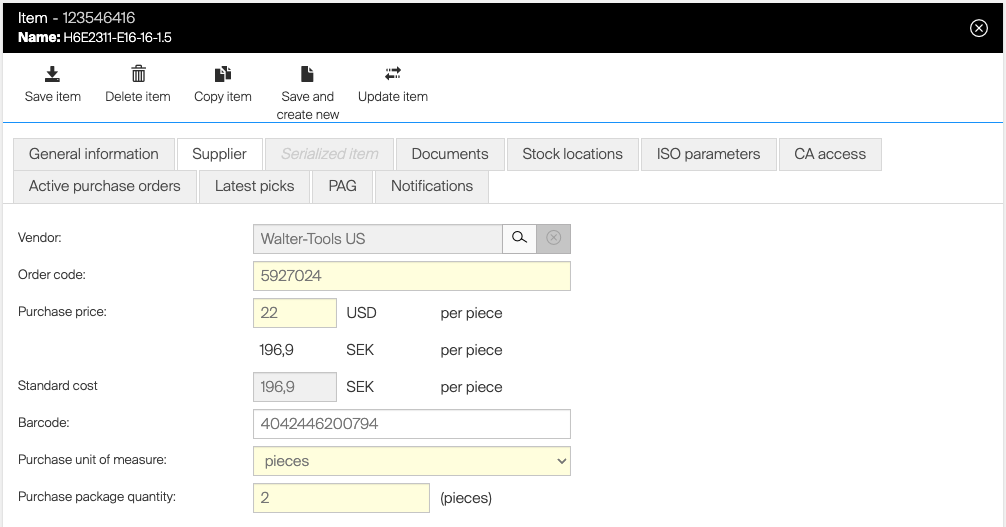
We can only manage one currency per vendor, if the same vendor has different currency settings on item level, then multiple vendors need to be managed in CRIBWISE.
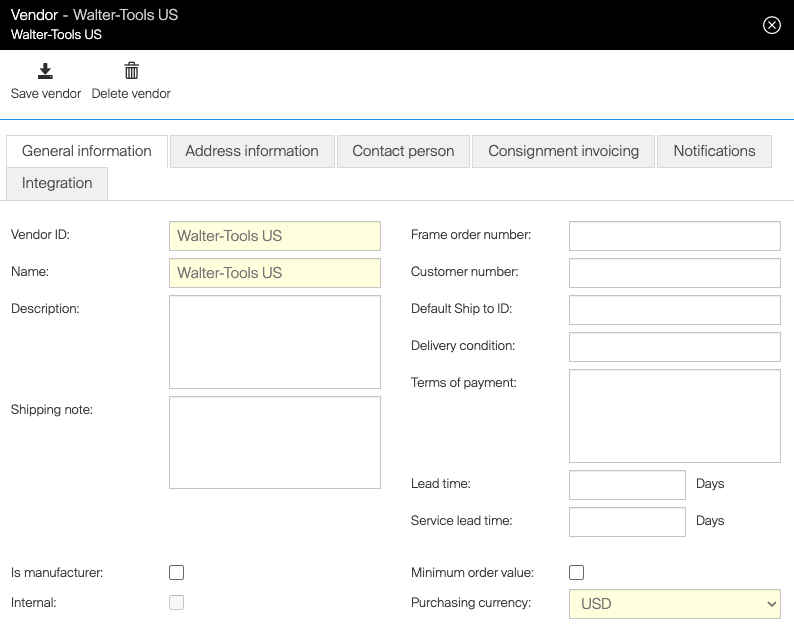
Prices are set in purchasing currency
Based on the currency ratio converted to the system settings currency for cost allocation and reporting.
Export view, Import/Export functions, data sources and API’s are extended with Currency.
Search alignment and enhancement in Shop Floor Interface and Admin Portal
We have aligned and improved the capabilities of searching in all lists in Admin Portal and Shop Floor Interface. The improvements make it possible to search for strings in multiple identifier fields in the same search with a space in between the search objects. In example below, the search picks “Key” from description and “04” from Item name.

In example below, you can also search in the same field starting with sections from the end.

Searchable fields on item is now Item ID, Item Name, Item Description, Manufacturer Item ID, Service code, barcode and any custom defined Item fields.
Selection of “all picked” or default “all picked”
When picking items in open stock locations, Lista LDC (multiple items in same drawer) and TX 750 (when neighbouring stocks for the same item is applied), it is now applied the previous setting that only worked for open stock to mark all as picked.
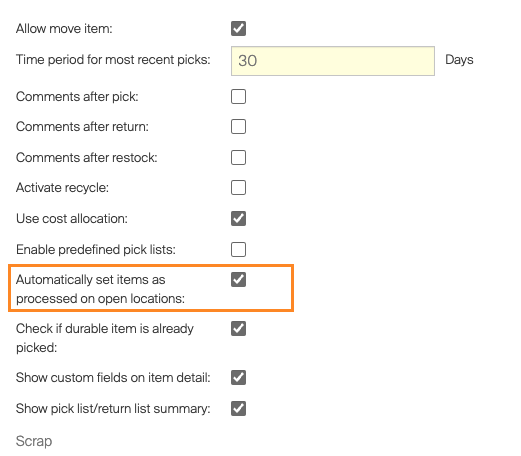
If the customer doesn’t want this setting then there is an option in Shop Floor Interface for above stated occasions where the customer can use “mark all as processed” Icon for fast selection of multiple items.
Management of Add-ons and invoice values per account
Starting with this release direct customer accounts and distributors can manage their end-customers add-ons. This includes recurring add-ons like support level and integrations or one-time add-ons like installation or migration services. Read more here CRIBWISE | Customer Management Change account
Product Access Group include list changes
We have now changed the meaning of include lists in Product Access Group. Before if a user group was assigned to multiple include lists the user was only presented the list of items that where on all lists. Starting with 1.40 release, you will now be able to set-up multiple include lists with items and assign to user groups and they will be presented all items on all include lists. This gives the possibility to build multiple lists for different purposes (Aluminium Milling, Steal Drilling) and assign to user groups relevant for those specific jobs.
Shop Floor Interface version compatibility
Currently there is a new way of handling synchronisation of devices, with less dependencies on actual version of the Shop Floor Interface in relation to Admin Portal version. In almost all previous releases the customers were forced to make an update of SFI when a new version of Admin Portal was released, else the synchronisation was stoped. This behaviour have caused frustration and support around deployment days when auto updates were not possible or failed. Starting with 1.40 release, the synchronisation will continue, but potential new features or changes will not be available on the Shop Floor Interface until updated to latest version. (There might also be breaking changes in the future that will force upgrade but we will do our best to avoid this) Note that the 1.40 release will need to be installed until this capabilities are available!
Smaller improvements
- Allow to search for Serial numbers in Return lists, to simplify the identification of a specific serial number in return processes we now offer the possibility to search for the specific serial number.
- We have implemented the option to activate Basic Auth in our sending ERP interfaces for Web service option.
Release information
You will not find release notes and manuals in the self-service portal. All documents will be available in our Help Center at https://cribwise.com/help-center
Release details
Admin Portal and Shop Floor Interface functionality added/changed
| Name | Description | Type |
| Vendor specific currency | Vendor can be set to purchase goods and service in specific currency, which is then part of reporting. | New |
| Product Access Group include lists combination | When user has assigned two or more PAG include lists, final set of items available for that user is now determined by combination of all of these lists. | Improvement |
| Overstocking from Admin Portal | It is possible now to overstock (increase ordered quantity in active orders) quoted items and items allowing the overstocking from Admin Portal. | New |
| SFI version compatibility | After update to 1.40, SFI will be able to operate with new version of AP without need to be updated to the same version (unless a major change is not part of the new version). | New |
| Searching by item serial number during return | It is now possible to search directly for serial number during return. | Improvement |
| Item searching improvements | On both AP and SFI, searching capability for items has been improved to support combination of several item parameters (like Id and description) and custom order or search parameters when they are separated by space. | Improvement |
| Processing of open locations during all flows | For processing of open locations (open storage devices, Lista LDC drawers, AutoCrib TX750 when several locations at once are opened for an item), new option to mark all locations as processed (i.e. picked, restocked) has been added for all SFI flows. Also new option to mark all these locations as processed automatically has been added to system settings. | Improvement |
Admin Portal and Shop Floor Interface issues fixed
| Name | Description |
| Error in picked items location export when item is searched | Picked items overview cannot be exported when there is active filter for items. |
| Missing CUD permissions for items for users with PAG/DAG override | If is no override on the item permissions but there is some override either on PAGs or Data Access Groups, item permissions are stripped down to read-only access even for cases where there should be full access. |
| Unable to synchronize satellite device after move to different stock because of existing transfer list | Cannot synchronize device after it has been moved from satellite stock to stock of another type. |
| Schedules script failed adding serialized item to order | Scheduled script failed during processing because it tries to add item with serial number which was already on the order. |
| Misleading behavior when TX750 is set with wrong COM port | When TX750 storage device is setup with wrong COM port, there is no clear message to SFI user about this problem. Instead of indication of communication is not possible to establish, SFI operator receives error showing “Front door is opened”. |
| Device login options contain invalid value | Device Login options show value “ExternalProvider”, which is not valid value for this list. Selection of this option leads to inability to login to SFI. |
| Cannot pick alternative item when item selected from Related items dialog | When item, which has alternative item set and is not available in a device, is selected from Related items dialog on SFI, system will properly show option to pick its alternative item, but when this option is selected, SFI will not proceed with a pick of this alternative item. |
| Picking stuck on Lista cabinet | The investigation showed that the issue was caused by unexpected behavior when talking to the Lista cabinet using COM port. During closing of the communication that call is “stuck” and never returns. |
| Setting ‘Allow move item’ not reflected properly on SFI | Daily use system setting ‘Allow move item’ impacts if item location assignment can/cannot be moved to another location. |
| Check for SFI update failed and blocks update | SFI did not received update notification from CD Manager and update did not start. |
| Option to recycle item on SFI is not shown properly | Option to recycle items is not shown properly when there are more cloud devices. |
| TX750/ASK200 – checkboxes not aligned on Items to pick blade | On machines with vertical screens and in Coromant branding, tick box showing status of dispense of items is not shown fully due to invalid alignment. |
| It is possible to add order template using excel import without excel file | Using excel import it is possible to define new order / invoice template in the system. Such a template is however defined in the linked excel file (which is not possible when created from UI). If such a template is then used for the order, sending such order (or generating) preview fails. |
| Glitch in visualization of a column in TX750 location management | In some specific case, column showing occupied positions in TX750 column selector has a thin white space (even though there are locations right above each other). |
| Exported graphic report (pie graphic) seems not a 100% circle | Pie chart report exported to PDF is not completely circular. |
| Tabular report not reloaded in detail | Problem with loading a report when another report is opened. |