
Release overview
On Sunday Feb 27th in the evening, we will deploy a new version of CRIBWISE. The administration portal and cloud devices will be down for a few minutes during the update. In this release we deliver several interesting features and Customer management improvements More details can be found in our Help Center.
Highlights
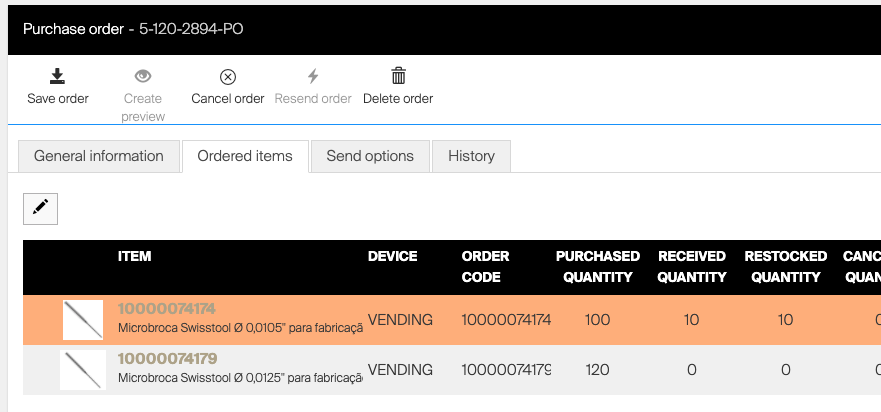
Go To Order and go to Item detail
We now implement a way to easier navigate from a purchase order, by clicking the item in order list we open a new blade next to order blade with item detail information.
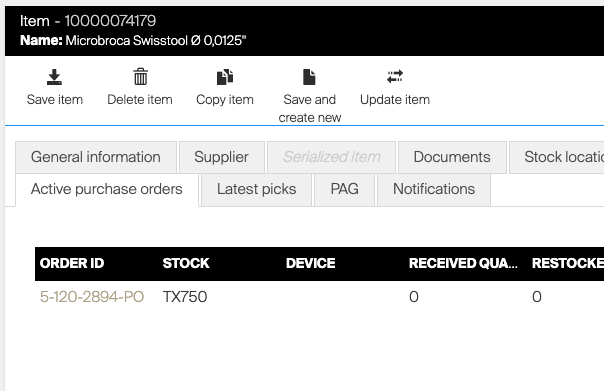
This change also goes from the other way around and you now can open active order from the Item detail tab, Active purchase orders.
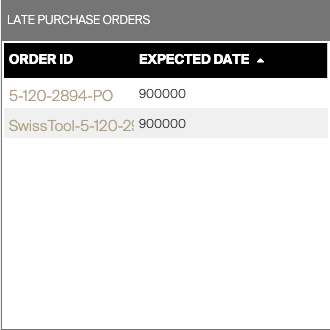
Also the dashboard widget late purchase orders are now clickable and opens the order detail.
Customer Management Portal update
Several changes in Customer Management for Distributor users (visible also for end-customer account administrators) that can manage their customer accounts, request trials, convert to active account, change qty of licenses, see recurring addons.
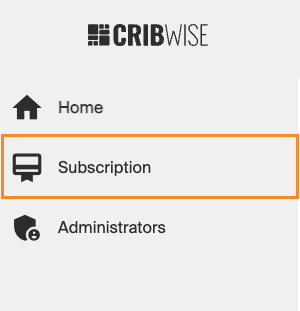
Some subscription related things like convert to active button have moved from Home menu to subscription.
With this change it will not be possible for a customer to create more devices in admin portal than quantity of license on subscription. I
t will not be possible to lower any quantity on subscription below actually created devices in admin portal.
Read more in our help center CRIBWISE | Customer Management
Filter and schedule reports
For report and scheduling report to be sent we have now implemented function to be able to send reports regularly with dynamically added date/time filters.
This gives the possibilities to create a consumption report to be sent day 1 every month containing related transactions since 1st last month. This can be done on daily and weekly intervals ad well.
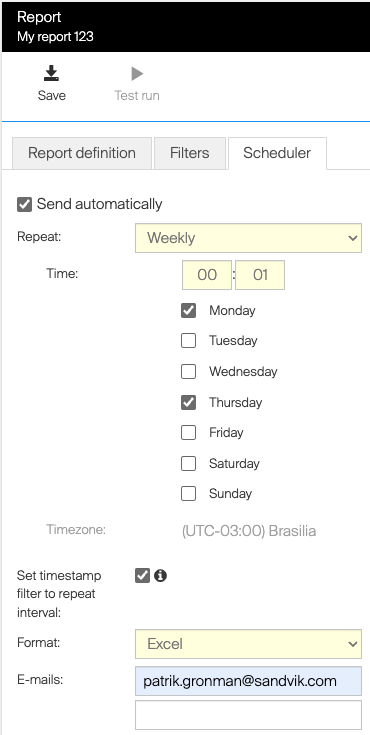
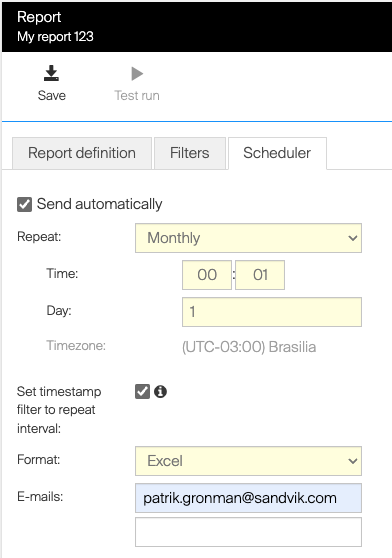
When weekly is selected it will pick the date filters from the last executed report.
The function is activated by tick “Set timestamp filter to repeat”.
Note that this overrides any time filter set in Filters tab.
CRIBWISE | Reporting – Tabular and chart reports
Note that all data in report module is stored on actual transaction date and if transactions are made that is not synchronized from SFI to AP can be missed.
Try to set the time when report are executed during time with no activity in work shop and make sure devices are synchronized.
Due to this limitation we do not recommend this function for integration purposes but here points to the CRIBWISE | BI interface where you also can query date of record creation in db.
Sandvik Coromant product catalogue
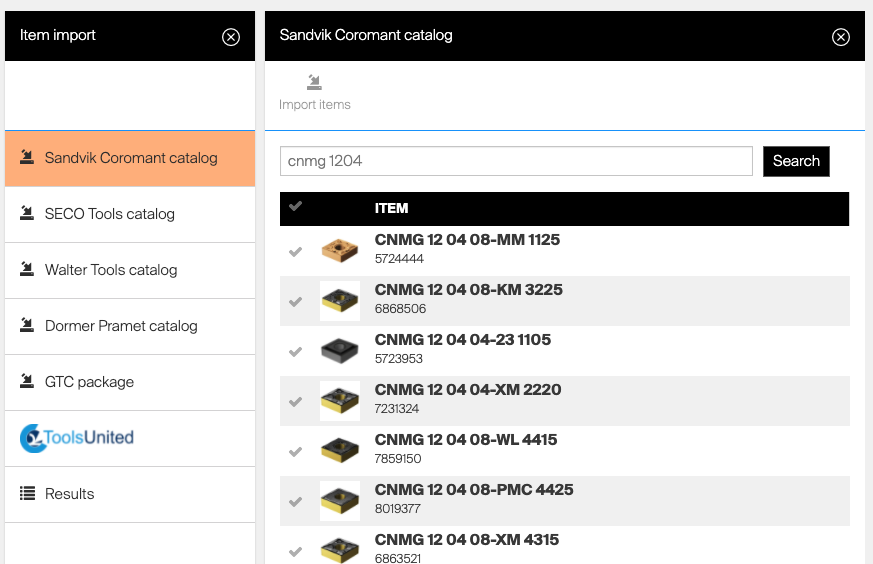
We have now been able to merge also Sandvik Coromant product catalogue into same experience as Walter Tools and SECO Tools where you can search for parts of name, description, barcode, Material ID.
Item overview performance enhancements
We have in this release made the Item overview functions much faster than what it have been for the past months especially if customer have large amount of items in the system.
Item CRUD permissions
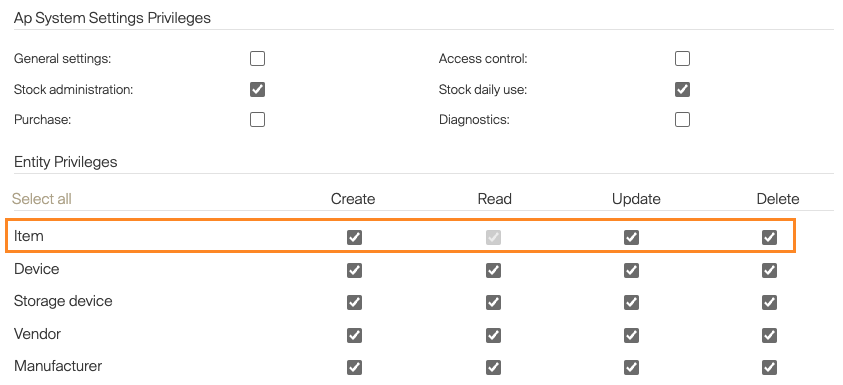
We have implemented the possibility to limit the rights in Admin portal for users to Create Update and Delete Items. (Everyone still has right to read/view items if not limited by other access rights)
Smaller improvements
- Transfer list updates, we now ignore purchase pack size when items are added in transfer list and instead align with the dispense pack size, this enables satellite stocks to have lower order point and max point then qty you have as minimum purchase quantity. Also Items with status outgoing now can be added to transfer lists!
- We have a field called Ship To ID that is currently on Vendor level this ID can be picked up by orders and sent to suppliers indicating a predefined ship to address in supplier ERP system. Now this field can also be added directly on orders manually or on script level.
Release information
From this release you will not find release notes and manuals in the self-service portal.
All documents will be available in our help center at https://cribwise.com/help-center
https://cribwise.com/help-center/upcoming-releases-2021-and-2022/
Release details
Admin Portal and Shop Floor Interface functionality added/changed
| Name | Description | Type |
| Moved Ship To field from Vendor to script | Checkbox Customer Ship to ID is updated to Default Ship to ID on Vendor, new checkbox Custom Ship to ID with field Ship to ID are added on order detail and scheduled script to allow user to have custom Ship to ID for specific orders. | New |
| Filtering and Scheduling of report enhancement | New option Set timestamp filter to repeat interval is added to reports based on transaction or assignment data source. If option is active, report is filtered and contains data since the last time the report was sent | New |
| Stock optimizer improvement | Result for items in stock optimization are updated to show OK status when at least one of its device assignment is evaluated. New option is added to filter result list to show only evaluated items. | New |
| Rework Sandvik Coromant catalog | Sandvik Coromant catalog is reworked to allow searching of items. The catalog now provides the same look and feel as other item catalogs. | Improvement |
| Go to Item details from Lists | First line of item identification is changed to link in orders (purchase and service), service list and consignment invoices. Once link is pressed, correspond item detail blade is shown directly. | New |
| Go to active Purchase Order from Item details and late orders widget | Order ID in tab Active purchase order in Item detail is changed to link. Once link is pressed correspond order detail blade is shown. | New |
| Order IDs in widget Late purchase orders are also clickable links. After link is pressed correspond order’s detail is shown. | ||
| AP CRUD permission for items | New permission to disallow creation, update and delete items in Admin Portal for groups/users | New |
| Item transfer improvements | Items in “Outgoing” state can now be added to transfer lists manually or by script. Script will now not consider purchase package size of an item when item as about to be added to a list. Dispense package size is now considered instead. | Improvement |
| Stock address extended with region code | Region code is now available in stock address. The code is available in XML order format and as a tag for order templates. | New |
| Information about AP not accessible from SFI is not shown anymore on login screen | When Admin Portal cannot be accessed by SFI, error is no longer shown in SFI login screen. This information is moved to Device information, which could be shown after login to SFI. | Improvement |
| Improved performance of item overviews | Performance of items overview, serialized items overview and picked items locations has been improved to decrease time needed to load the list. | Improvement |
| ASK200 initialization improvement | When ASK200 machine is in invalid state, SFI will automatically now try to reinitialize the machine before any flow is started. | Improvement |
| Management of ready-to-use integrations | Once customer is subscribed to a integration with external system, integration options are now possible to set from Admin Portal. It is possible also to test the integration setup and see integration job’s logs. | New |
| Increased priority of forced synchronization | When synchronization is forced from Admin Portal and there is any currently running synchronization of the device, this synchronization is stopped and the forced one is started immediately instead. | New |
| Basic authentication for web service target | It is now possible to use web service with basic authentication as a target for sending interfaces. | New |
Admin Portal and Shop Floor interface issues fixed
| Name | Description |
| Impossible to pick items because of timeout | Reported exception (timeout) when performing a pick on the TX750 device. |
| Change of system language and user language blocks AP | Change of system language combined with change of user language can block system. |
| Export on item overview does not contain UoM column | It is not possible export UoM measure column from Item preview . |
| Active and New Order was not cancelled when linked Device was removed | When device was force deleted, active device orders are cancelled, new and suggested orders were not cancelled. |
| Report filters can be active even they looks empty on UI | When filter on report based on actual data (assignments, orders, locations) is set to some value, f.e. a vendor, and this value (vendor) is deleted, filter is still active, but selected value is not visible in list of filters. |
| Items not shown properly in AP item list in specific case | When user clicks to create new item in item list before the list of items is fully loaded, item thumbnails and information is not shown. List must be reopened to show all rows properly. |
| List of items available for return not sorted by date of pick | When list of picks is collapsed to card mode (f.e. on Autocrib vertical screens), list is not sorted by date of pick and is not possible to sort. Items are shown randomly in the list. |
| Item own catagories not shown correctly in item advance filter | Item own categories shown in advanced filter for item list and item overview are not shown correctly – subcategories are shown under wrong parent category in some cases. |
| Incorrect label in Excel export for vendor’s template | Excel export column containing vendor’s order template used for orders of consignment items is labeled with text “Consignment invoice template name”. This name is wrong and confusing, as the template is for order with consignment flag, not consignment invoice. |
| Sync of item ACL could not work if user with overriden permissions is recreated | In specific case, sync of Item ACL can be stopped by incorrect handling of user’s permissions for items during synchronization. |
| Unexpected error in event log when AP cannot be reached from ‘All item locations’ dialog | In the case that AP cannot be reached from SFI’s ‘All item location’ dialog in some cases there is an exception logged into the event log of the customer and user is presented with ‘Unexpected error’ toaster. |
| AP notifications can be shown for wrong customers for superadmin accounts | If the same user is logged on two or more customers at once, notifications will be displayed on all of these customers. |
| Vending problems for Lista with extension cabinets | In specific circumstances, communication with one of storage device fails. Possible problem could be that COM port remains opened for another storage device. |
| Save and create new option on item leads copy of device assignments | When ‘Save and create new’ option on item detail is pressed and the new item is saved, this item will have device assignments copied from the item where this option was pressed. |
| Synchronization issues for customers with huge number of items (20k+) | Issues caused by huge number of items imported from the catalog (20k+). |
| Unexpected response from BI interface when login with invalid username | If username in invalid format is used for basic authentication to BI interface, response code is 500. Expected code is 401. |
| Out of stock rule ignores picked durable items | Out of stock rule adds item to order even when there is durable item picked in production. |
| Not possible create new location for Lista LDC on SFI | Option to create new location is not visible during assignment of item on SFI when cabinet contains Lista LDC module. Option visible only if device has any open storage device. |
| Reports filter “Last week” can act unexpectedly | When filter “Last week” is selected for a report, start day of a week is taken from locale of system, where AP is running. In the cloud it means that starting day of a week is Sunday. |
| Change user group for user – inactivates tabs AP and SFI privileges | When user group is changed of user, tabs AP and SFI privileges are disabled. User detail must be reloaded to show them properly according user’s role. |
| Missing validation on Stock save | Missing validation when saving invalid values for satellite stocks. |
| Delete vendor – validation missing for service vendor | When vendor is deleted, there is no validation if this vendor is used for any item as service vendor. When opening item having deleted vendor set as service vendor, error toaster is shown. |
| Synchronization errors not logged in AP event log | When synchronization problem occurs (in found case cannot sync items and item ACL due to duplicity of item ID in SFI database), there is no indication to user that sync is not working properly – device is shown as synced and there is no error shown in event log. |
| Chart report PDF export is not working | Chart PDF report export is not working, ending always with “failure” toaster. |
| Order could be sent twice by ERP sending interface | With the specific settings of ERP sending interface and scheduler, the same order could be sent twice by sending ERP interface to send orders. |
| ERP sending errors not handled properly – transaction could be missed | When sending of a file to target web service fails, it is possible that time of last run is still updated. In such case the next run will not cover the previous failed period and transactions in that period will be missed. |
| Hint for Order point rule on scheduled script is invalid | Hovering over “i” icon for Order point rule shows hint for Fill to max rule instead. |
| Inconsistencies for showing serialized items in picked items overview | When serialized instance is not in a location but is not picked, it is still shown as picked in picked items location overview. |
| ASK200 – user can logout before pick is registered | During dispense from ASK200, user can press logout button immediately after item is dispensed and rolo is opened. This interrupts the picking flow, resulting in pick not registered and quantity on location not lowered. |
| Logo missing on CRIBWISE branded SFI login screen | CRIBWISE logo is not shown on SFI login screen for CRIBWISE brand. |
| Invalid validation of fields for report scheduler tab | On report’s scheduler tab, when custom mail is active and subject is empty, it is not possible to save the report when scheduler is deactivated. |
| Synchronization timed out for high number of picks | Full sync of SFI not possible for customer due to database time out during sending picks for Admin Portal. |
| Using browser ‘back’ navigation in cloud device SFI causes unexpected errors | Using ‘back’ navigation in browser with SFI leads to unexpected behavior of the application. |
| Not possible return item when return for service is only option allowed | When user is allowed only to pick and return for service, user cannot access return as he is always taken to pick automatically. |
| Error in picked items location export when item is searched | Picked items overview cannot be exported when there is active filter for items. |