
System can provide actual stock situation containing quantities of items currently located in devices, picked quantity of durable items and information about serialized items using Web API interface.
Usage of these interfaces is restricted only to users with API privileges (read more about Manage user groups).
Following interfaces can be called after authentication:
- [AP_base_uri]/ERP/ItemsStatus/GenerateReport
- [AP_base_uri]/ERP/ItemsStatus/GenerateSerializedItemsReport
These interfaces are always active.
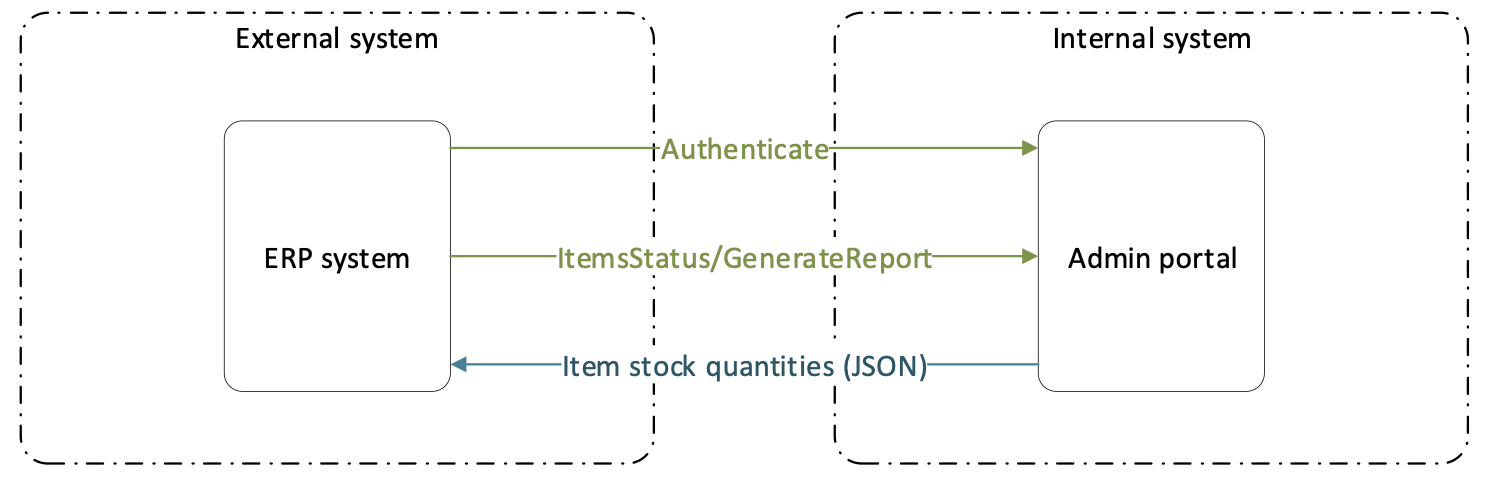
GenerateReport
URL
{url}/ERP/ItemsStatus/GenerateReport
Type
GET
Description
Method return in response information and quantities of all items currently located in all stocks. Item must be with status Released, Phase out or Outgoing and must be assigned to a device to be part of the report. If cost allocations of type Machine and Production Cell are used, report also contains information about picked durable items currently located in those cost allocations.
JSON response example
Information shown in example can differ based on defined stocks and cost allocations. Schema illustrates maximum allowed length for string types, which can be sent by the system. Numbers will be integer if not specified otherwise. Type information are marked orange in the schema. If item custom fields exist, they will be part of provided data identified by escaped custom field name (string with maximum length of 400 characters).
{ "ItemStatuses": [ { "Id": "string", 50 "Name": "string", 100 "Description": "string", 400 "Consumable": true, "InStock": true, "IsAssembly": true, "IsSerialized": true, "BellowCriticalLevel": true, "ItemStockStatus": "string", enum (“OK”, “Alert”, “Critical”). If item is located in multiple devices, state is shown for each device separated by | "VendorOrderCode": "string", 50 "VendorId": "string", 50 "VendorName": "string", 100 "ManufacturerOrderCode": "string", 50 "ManufacturerId": "string", 50 "ManufacturerName": "string", 100 "LeadTime": 0, "IsAtOrderPoint": false "StockStatuses": [ { "Id": "string", 50 "Name": "string", 100 "Quantity": 0 }, { "Id": "string", 50 "Name": "string", 100 "Quantity": 0 } ], "MachineStatuses": [], "ProductionCellStatuses": [ { "Name": "string", 100 "Quantity": 0 } ] } ] }
GenerateSerializedItemsReport
URL
{url}/ERP /ItemsStatus/GenerateSerializedItemsReport
Type
GET
Description
Method return in response information and state of all serialized items currently defined in the system. For all serialized items, list of existing instances (serial numbers) is shown with information about current location, status, service and purchase information.
JSON response example
Numbers will be integer if not specified otherwise. Type information are marked orange in the schema. If item custom fields exist, they will be part of provided data identified by escaped custom field name (string with maximum length of 400 characters).
{ "SerializedItemsStatuses": [ { "Id": "string", 50 "Name": "string", 100 "Description": "string", 400 "VendorId": "string", 50 "VendorName": "string", 100 "VendorOrderCode": "string", 50 "ManufacturerId": "string", 50 "ManufacturerName": "string", 100 "IsAssembly": true, "Instances": [ { "SerialNumber": "string", 50 "InstanceStatus": "string", Enum (New | Used | Refurbished | Scrap | ForService | InAssembly) "StockId": "string", 50 "StockName": "string", 100
"DeviceId": "string", 50 "DeviceName": "string", 100 "StorageDeviceName": "string", 100 "AvailabilityState": "string", Enum (InService | InProduction | InDevice | InAssembly) "StockLocationId": "string", 50 "StockLocationName": "string", 150 "LoanTimeEnds": "2017-04-03T12:36:28Z", "ServiceInformation": { "ServiceTriggerDate": "2017-04-03T12:36:28Z", "TimePickedRemaining": 0, "NumberOfPicksRemaining": 0, "LastService": "2017-04-03T12:36:28Z", "InActiveServiceOrder": true } } ] }
] }