
BI interface allows to connect external applications directly to reporting data on demand. Data is provided using OData Feed and basic authentication.
Only users with privileges BI users are allowed to authorize to connect to the data store.
How to setup this privilege to a user, follow Manage user groups.
Authentication
There are two ways how to authenticate to BI interface – basic authentication and authentication using bearer token. Authentication via token follows the same principle as described in ERP REST Interfaces – Authentication.
In case of token authentication, user must have also privilege to access ERP interface (API users role)
| Authentication type: | Basic | |
| User name: | customerShortName\userName | User must be assigned to BI users user group role |
| Password: | userPassword |
| Authentication type: | Token authentication | |
| See ERP REST Interfaces – Authentication for more information | ||
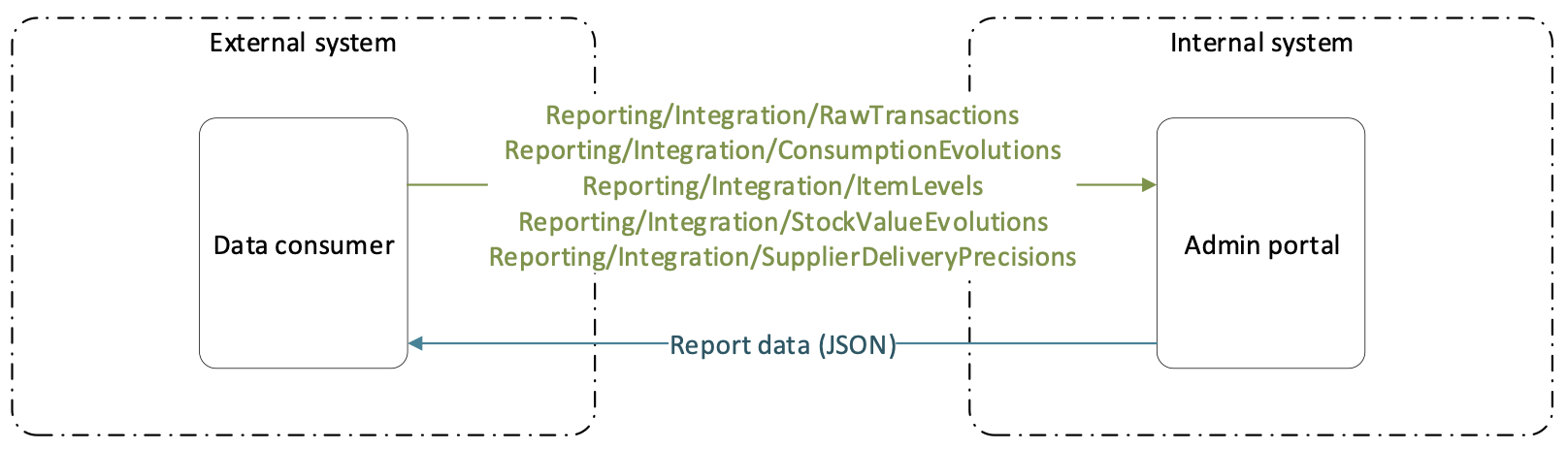
Several interfaces are prepared to provide data:
- [AP_base_uri]/Reporting/Integration/RawTransactions – interface provides complete list of transactions made in the system
- [AP_base_uri]/Reporting/Integration/ConsumptionEvolutions – interface provides consumption of items per stock in monthly basis in form of monthly snapshots
- [AP_base_uri]/Reporting/Integration/ItemLevels – interface provides actual quantities of items located in devices with their critical quantities. Only items assigned to a device are shown
- [AP_base_uri]/Reporting/Integration/StockValueEvolutions – interface provides stock values on monthly basis in form of snapshots made at the end of each month
- [AP_base_uri]/Reporting/Integration/SupplierDeliveryPrecisions – interface provides information about vendor delivery precision for ordered items. Data contains all ordered items per vendor, their expected date and quantity received at this date. If restocked quantity is equal to ordered quantity, item has been restocked in time. If restocked quantity is less than ordered quantity, item has not been received in time
Process of connecting to BI interface of cloud and on premise installations is not the same. Interface of cloud installation uses HTTPS protocol to secure communication. On the other hand, on premise installation uses unsecured HTTP protocol. Following chapters describe how to connect to the interface from both environments.
Connecting to BI interface for cloud installation
Following example shows how to connect external application to BI interface of cloud Admin Portal. Communication with cloud AP is using secured connection to ensure security of transferred data. Excel is shown as example.
- Create user in user group with privilege BI users
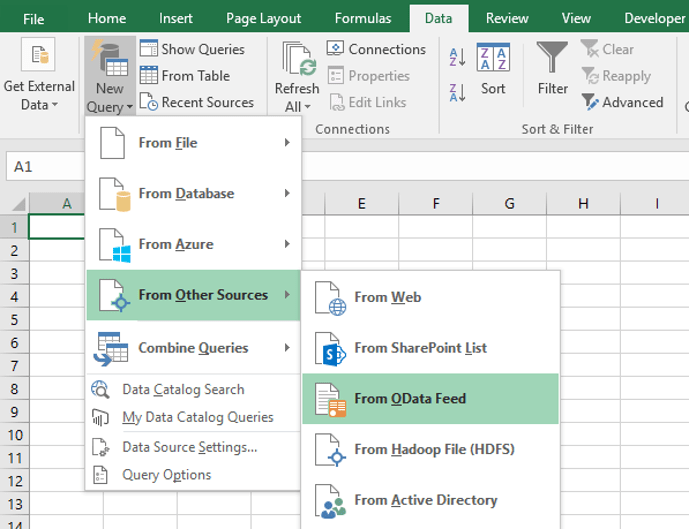
- In Excel, select New query and from Other sources select OData Feed
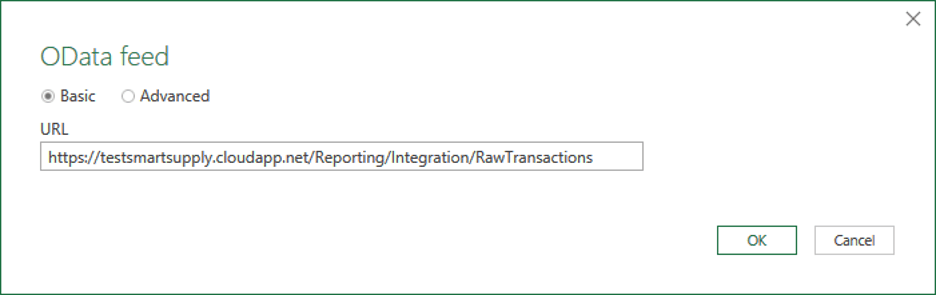
- Enter address of interface. Replace testsmartsupply.cloudapp.net part with address of Admin Portal. Communication with cloud Admin Portal is secured, https protocol must be part of the address
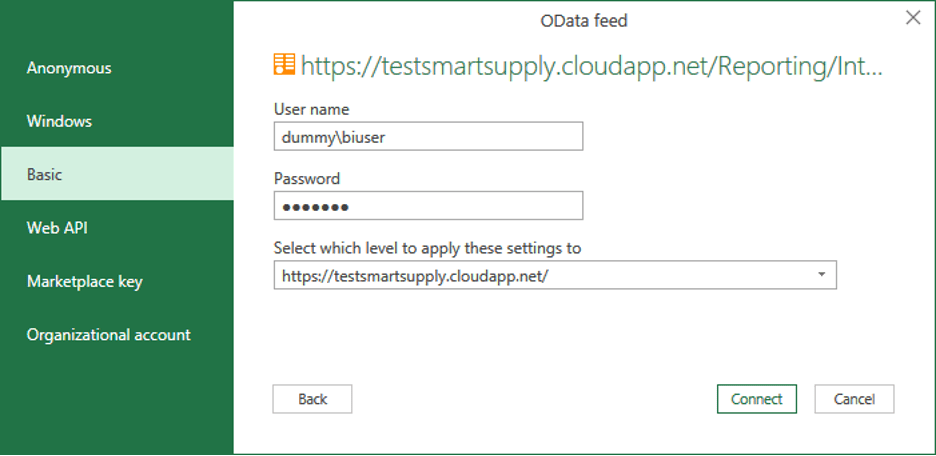
- Select Basic authentication and enter user information for user with privilege BI user. User name must be in format customerShortName\UserName. Select to Connect
- Load your data to Excel sheet or edit the query to perform custom transformations on data
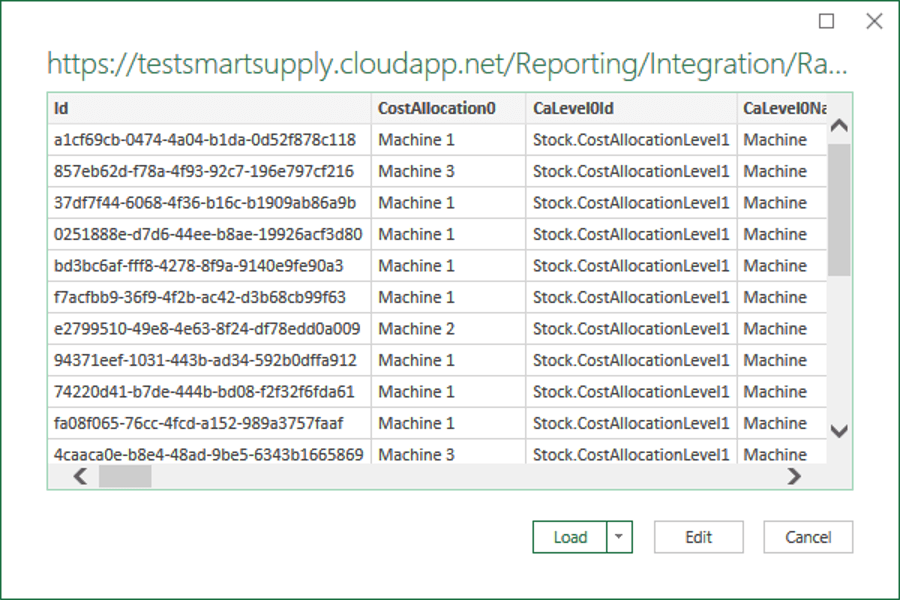
Connecting to BI interface for on premise installation
Connecting to on premise AP does not use secured connection. Security of communication must be ensured on local network level. Process is similar to connecting to cloud installation. Only difference is in source address format. Source address to on premise installation must have unsecured http protocol defined and address must be defined with port number 8080. Replace 192.168.1.20 part with address of on premise AP (IP address, computer name or DNS record):

Filtering data
Data from BI interfaces are provided via OData feed. It is possible to extend endpoint address with standard OData query to limit returned data using filters and to order the data. Filtering by could be common in case of polling of transactions data, when only new transactions are requested. In such case filtering by transaction’s CreatedOn information can be applied by extending call with parameter defining that only transactions created after specified date should be returned:
https://{url}/Reporting/Integration/RawTransactions?$filter=CreatedOn gt 2023-01-01T00:00:00.000Z
Currently it is not possible to apply filters for custom fields using name of custom field. When filter for value of a custom field should be applied, this custom field must be referenced as CustomField1, CustomField2 or CustomField3. For more information about OData query, see [external link].
Raw transactions
Cloud installation URL
https://{url}/Reporting/Integration/RawTransactions
On premise installation URL
http://{url}:8080/Reporting/Integration/RawTransactions
Data contain all historical transactions made in the system. Meaning of some fields can depend on TransactionTypeId. Following transactions are available in the data with following meaning of Price and Quantity fields. Quantity field always shows value in dispense unit of measure:
| Transaction typeId | Transaction description | Price | Quantity |
| Pick | Item taken from device by pick operation | Cost of pick | Picked quantity |
| Return | Item returned back to device | Refund for cost of pick if item is returned as not used | Returned quantity |
| PriceUpdate | Standard cost of item updated based on recent orders | New standard cost after recalculation of standard costs | N/A |
| Scrap | Picked item scrapped as return operation | N/A | Scrapped quantity |
| ScrapOrderQuantity | Item on service order/list scrapped during service operation | N/A | Scrapped quantity |
| CancelOrderQuantity | Item on purchase order cancelled before delivery | N/A | Cancelled quantity |
| GoodsReceived | Item on purchase order received from vendor | N/A | Received quantity |
| Iventory | Inventory performed on location | N/A | Current quantity on location |
| PickForService | Item picked for service agains service list or service order | N/A | Picked quantity |
| PickForTransfer | Item picked for transfer from central stock to satellite device | N/A | Picked quantity |
| Restock | Item restocked against order, service list, transfer list or without reference to order/list | N/A | Restocked quantity |
| Withdraw | Item removed from location wihtout pick operation | N/A | Quantity taken from location |
| Placement | Item placed to location without return operation | N/A | Quantity placed to location |
| Purchased | Item purchase or service ordered by activation of order | Purchase price | Purchased quantity |
Field TimeStamp shows date and time when transaction has been done (real time stamp of action). Field CreatedOn shows date and time when transaction has been created on AP in reporting data. This information can be used to periodically consume new transactions to ensure, that no transaction is missed due to delay in device synchronization. If item custom fields exist, they will be part of provided data identified by escaped custom field name (string with maximum length of 400 characters).
{
 "@odata.context": "string",
 "value": [
 {
 "Id": "string",
 "CostAllocation0": "string",
 "CaLevel0Id": "string",
 "CaLevel0Name": "string",
 "Ca0CostCarrier": "string",
 "CostAllocation1": "string",
 "CaLevel1Id": "string",
 "CaLevel1Name": "string",
 "Ca1CostCarrier": "string",
 "CostAllocation2": "string",
 "CaLevel2Id": "string",
 "CaLevel2Name": "string",
 "Ca2CostCarrier": "string",
 "CostAllocation3": "string",
 "CaLevel3Id": "string",
 "CaLevel3Name": "string",
 "Ca3CostCarrier": "string",
 "CostAllocation4": "string",
 "CaLevel4Id": "string",
 "CaLevel4Name": "string",
 "Ca4CostCarrier": "string",
 "CostAllocation5": "string",
 "CaLevel5Id": "string",
 "CaLevel5Name": "string",
 "Ca5CostCarrier": "string",
 "CostAllocation6": "string",
 "CaLevel6Id": "string",
 "CaLevel6Name": "string",
 "Ca6CostCarrier": "string",
 "CostAllocation7": "string",
 "CaLevel7Id": "string",
 "CaLevel7Name": "string",
 "Ca7CostCarrier": "string",
 "PhysicalCA": "string",
 "PhysicalCALevelId": "string",
 "PhysicalCALevelName": "string",
 "TimeStamp": "2019-03-11T13:22:04.588Z",
 "CreatedOn": "2019-03-11T13:22:04.588Z",
 "TransactionTypeId": "string", - enum (see table above schema)
 "TransactionType": "string", - value translated according system language
 "PartNumber": "string",
 "ProductName": "string",
 "ItemType": 0,
 "ItemTypeId": "string", - enum (“Consumable”, “Durable”)
 "ItemTypeText": "string", - value translated according system language
 "ItemOwnClassification": "string",
 "OrderCode": "string",
 "User": "string",
 "UserFullName": "string",
 "Quantity": 0,
 "QuantityBeforeTransaction": 0,
 "UnitOfIssue": "string",
 "GLAccount": "string",
 "Description": "string",
 "Category": "string",
 "CategoryId": "string",
 "CategoryPath": "string",
 "IsConsignment": true,
 "IsAssembly": true,
 "IsSerialized": false,
 "DeviceId": "string",
 "DeviceName": "string",
 "StockLocation": "string",
 "StockLocationName": "string",
 "StockLocationRule": "string", - value translated according system language
 "StockLocationRuleId": "string", - enum (“New”, “Used”, “Refurbished”, “ForService”)
 "StockId": "string",
 "StockName": "string",
 "SerialNumber": "string",
 "TransactionId": "string",
 "VendorId": "string",
 "VendorBusinessId": "string",
 "VendorName": "string",
 "ManufacturerId": "string",
 "ManufacturerBusinessId": "string",
 "ManufacturerName": "string",
 "OrderId": "string",
 "OrderReference": "string",
 "AddedToOrderBy": "string",
 "UserId": "string",
 "FirstName": "string",
 "LastName": "string",
 "UserGroup": "string",
 "Price": 0,
 "PurchasePrice": 0,
 "PurchaseGrossPrice": 0,
 "TypeOfReturnId": "string", - enum (“NotUsed”, “Used”, “ForService”, “Move”)
 "TypeOfReturn": "string", - value translated according system language
 "Comment": "string",
 "PurchaseCurrency": "string",
 "PurchaseCurrencyPosition": "string", - enum (“Before”, “After”)
 "Currency": "string",
 "CurrencyPosition": "string", - enum (“Before”, “After”)
 "AcquisitionTypeId": "string", - enum (“Purchase”, “Service”, “Transfer”)
 "AcquisitionType": "string", - value translated according system language
 "QuantityDiscrepancy": 0,
 "ValueDiscrepancy": 0,
 "PickListId": 0,
 "PickListName": 0,
 "UnitPrice": 0,
 "ConsumedQuantity": 0,
  "UnitOfMeasure": "string",
 "UnitOfMeasureId": "string",
 "PurchaseUnitOfMeasure": "string",
 "PurchaseUnitOfMeasureId": "string",
 "PurchasedQuantity": 0,
 "PurchasePricePerPiece": 0,
 "PurchaseGrossPricePerPiece": 0,
 "Year": "string",
 "YearMonth": "string",
 "Week": 0
 }
 ]
}
Consumption evolutions
Cloud installation URL
https://{url}/Reporting/Integration/ConsumptionEvolutions
On premise installation URL
http://{url}:8080/Reporting/Integration/ConsumptionEvolutions
Data show monthly snapshots per item types and stocks with total consumed quantity and value in the month. Snapshots are created for each month and corresponds to value valid at the end of this month. Day of month is irrelevant in SnapshotDate.
{
 "@odata.context": "string",
 "value": [
 {
 "Id": "string",
 "SnapshotDate": "2017-11-15T08:00:14.158Z",
 "ItemType": "string",
 "StockId": "string",
 "StockName": "string",
 "Quantity": 0,
 "Value": 0,
 "IsAssembly": true
 }
 ]
}
Item levels
Cloud installation URL
https://{url}/Reporting/Integration/ItemLevels
On premise installation URL
http://{url}:8080/Reporting/Integration/ItemLevels
Data show actual quantity of items per devices with critical quantity of the item in each device. Number of picks and returns are taken from historical transactions, showing count of pick and return operation made for an item in a device. If item custom fields exist, they will be part of provided data identified by escaped custom field name (string with maximum length of 400 characters).
{
 "@odata.context": "string",
 "value": [
 {
 "Id": "string",
 "ItemName": "string",
 "ItemId": "string",
 "ItemDescription": "string",
 "DeviceId": "string",
 "DeviceName": "string",
 "ItemCategory": "string",
 "StandardCost": 0,
 "PricePerPiece": 0,
 "GrossPricePerPiece": 0,
 "TotalCost": 0,
 "Quantity": 0,
 "NewQuantity": 0,
 "UsedQuantity": 0,
 "RefurbishedQuantity": 0,
 "PickedQuantity": 0,
 "ForServiceQuantity": 0,
 "CriticalQuantity": 0, "UnitOfMeasureId": "string",
 "UnitOfMeasure": "string",
 "IsOutOfStock": true,
 "ItemStockStatusId": "string", - enum (“OK”, “Alert”, “Critical”)
 "ItemStockStatus": "string", - value translated according system language
 "ItemTypeId": "string",
 "ItemType": "string",
 "IsAssembly": true, "IsSerialized": true,
 "IsQuoted": true,
 "HasServiceCalibration": true,
 "Min": 0,
 "Max": 0,
 "MissingToMax": 0,
 "OrderPoint": 0,
 "IsAtOrderPoint": true,
 "LeadTime": 0,
 "NumberOfPicks": 0,
 "NumberOfReturns": 0
 }
 ]
}
Stock value evolutions
Cloud installation URL
https://{url}/Reporting/Integration/StockValueEvolutions
On premise installation URL
http://{url}:8080/Reporting/Integration/StockValueEvolutions
Data show monthly snapshots of item quantities and item values per stock, item type and location rule (item condition). Snapshots are created for each month and corresponds to value valid at the end of this month. Day of month is irrelevant in SnapshotDate. Consumption, Turnover and AverageConsumption is calculated only for consumable items. Average consumption is calculated as percentage of picked consumable items from average stock value for one month:

Turnover shows number of stock turns per year based on turnover of one month:

{
 "@odata.context": "string",
 "value": [
 {
 "Id": "string",
 "SnapshotDate": "2019-03-11T13:22:04.609Z",
 "LocationAssignmentRuleId": "string", - enum (“NotUsed”, “Used”, “Refurbished”, “ForService”)
 "LocationAssignmentRule": "string", - value translated according system language
 "ItemType": "string",
 "StockId": "string",
 "StockName": "string",
 "Quantity": 0,
 "Value": 0,
 "OneMonthAgoValue": 0,
 "TwoMonthsAgoValue": 0,
 "Consumption": 0,
 "AverageConsumption": 0,
 "Turnover": 0,
 "TimeStampYearMonth": "string",
 "IsAssembly": true,
 "IsSerialized": true
 }
 ]
}
Supplier delivery precisions
Cloud installation URL
https://{url}/Reporting/Integration/SupplierDeliveryPrecisions
On premise installation URL
http://{url}:8080/Reporting/Integration/SupplierDeliveryPrecisions
Data show all ordered items by purchase orders. For all ordered items passed expected date, number of items received and cancelled until expected date are shown as QuantityInTime. DeliveryPrecision is calculated as (QuantityInTime/TotalQuantity)*100. If item’s expected date has not passed yet or is not specified, QuantityInTime and DeliveryPrecision fields are empty. ReceivedQuantity and CanceledQuantity fields shows actual status of ordered item regardless expected date.
{
 "@odata.context": "string",
 "value": [
 {
 "Id": "string",
 "OrderId": "string",
 "ItemId": "string",
 "ItemName": "string",
 "ItemDescription": "string",
 "OrderCode": "string",
 "OrderReference": "string",
 "VendorId": "string",
 "VendorName": "string",
 "OrderItemId": "string",
 "TotalQuantity": 0,
 "ReceivedQuantity": 0,
 "CanceledQuantity": 0,
 "QuantityInTime": 0,
 "DeliveryPrecision": 0,
 "ExpectedDate": "2019-03-11T13:22:04.633Z", "PurchaseUnitOfMeasure": "string",
 "PurchaseUnitOfMeasureId": "string"
 }
 ]
}
Picked items locations
Cloud installation URL
https://{url}/Reporting/Integration/PickedItemsLocations
On premise installation URL
http://{url}:8080/Reporting/Integration/PickedItemsLocations
Data contains information about all durable items that are currently picked in production. If physical location of item is known, it is shown for each picked item (based on physical Cost Allocation step and value selected during pick).
{
 "@odata.context": "string",
 "value": [
 {
 "Id": "string",
 "PhysicalLocation": "string",
 "PhysicalLocationType": "string",
 "Quantity": 0,
 "ItemId": "string",
 "ItemName": "string",
 "ItemDescription": "string",
 "ItemCategory": "string",
 "ItemTypeId": "string",
 "ItemType": "string",
 "IsAssembly": true,
 "IsSerialized": true,
 "LoanTimeEnds": "2020-10-08T09:28:54.189Z",
 "PickedBy": "string",
 "PickedByFullName": "string",
 "PickedOn": "2020-10-08T09:28:54.189Z"
 }
 ]
}